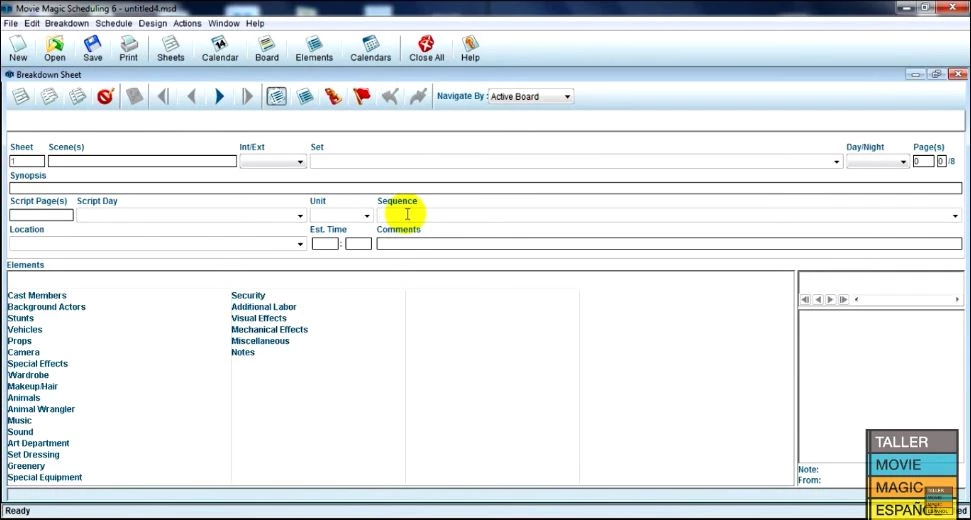
Movie Magic Scheduling operates as the core planning tool for film and television production, allowing Assistant Directors and Unit Production Managers to translate standard scripts into executable shooting schedules. Developed by Entertainment Partners, the desktop application breaks down screenplays element by element, turning text into manageable stripboards. By capturing exact details for cast, props, vehicles, wardrobe, visual effects, and locations, the software gives production teams a clear map of what needs to be shot, when it will happen, and who needs to be on set. It serves as the central hub where creative demands meet logistical realities, dictating daily workflows for hundreds of crew members across multiple departments.
Instead of relying on generic spreadsheets or basic project management tools, production departments use this software because it calculates industry-specific constraints automatically. It handles union rules, actor availability limitations, mandatory turnaround times, day breaks, and company moves within a dedicated interface built specifically for physical production. The application reads standard file formats like Final Draft documents and immediately categorizes speaking parts, background extras, and special equipment. This automated extraction saves hours of manual data entry and prevents crucial script elements from being forgotten during the demanding phases of pre-production.
While browser-only alternatives have gained traction in recent years, the desktop application remains deeply embedded in professional workflows because it handles massive data sets efficiently. It allows users to process complex changes locally while utilizing recent additions of cloud-sync and multi-user collaboration to bridge the gap between heavy local processing and necessary team communication. For serious production planning where a single day's delay costs tens of thousands of dollars, having a specialized tool to generate exact Day Out of Days reports and call sheets provides strict operational control. The resulting reports act as the literal blueprint for daily production, making the software a required infrastructure component for major studios and independent production companies alike.
Key Features
- Script Import and Extraction: The software imports Final Draft (.fdx) files directly, automatically parsing scene headings, action lines, and character names. It maps these elements into distinct categories so users do not have to copy and paste text manually. This process immediately establishes the foundation of the breakdown, ensuring every scene number and interior/exterior designation matches the written page exactly.
- Interactive Stripboard: The main interface displays a digital stripboard where users drag and drop colored strips representing individual scenes. Modifying the order of these strips instantly updates page counts, eighths of a page, and estimated shooting times for that specific day. Users can group strips by location or cast availability to minimize costly company moves and optimize the daily workflow.
- Day Out of Days (DOOD) Reporting: The application generates strict DOOD reports that track exactly when specific cast members, props, or vehicles are needed on set. This visual matrix uses industry-standard letter codes—such as SW for Start Work and WF for Work Finish—to tell production teams exactly when to hire day players, book hotel rooms, or rent expensive camera equipment.
- Red Flag Conflict Detection: Setting rules for actor availability or location constraints triggers red flags if the schedule violates those rules. If an Assistant Director schedules a scene requiring an actor on a day they are strictly unavailable, the system immediately highlights the clash in red, forcing the user to resolve the conflict before publishing the schedule.
- Calendar and Board Split View: A split-screen interface allows users to view the daily calendar alongside the stripboard. Moving a strip in the board view automatically shifts the corresponding calendar dates, preventing manual entry errors across different views. This dual perspective helps schedulers visualize the immediate impact of pushing a scene back by one day.
- Multi-User Collaboration: Team members can work on the same schedule simultaneously with active presence indicators showing exactly who is editing what. The software applies real-time updates and locks specific strips while one user edits them, preventing data from being overwritten by the second unit director or the production coordinator during high-pressure revisions.
- Customizable Export Templates: Users can design and save specific layout templates for their call sheets and stripboards, choosing exactly which columns and data points appear on the printed page. Schedules can be exported directly to PDF or converted into Excel formats (.xlsx) for the accounting department, ensuring the data fits cleanly into existing studio reporting pipelines.
How to Install Movie Magic Scheduling on Windows
- Navigate to the Entertainment Partners digital store and purchase a subscription to obtain your valid license and account credentials.
- Download the official Windows installation package directly from the "My Downloads" section of your user dashboard.
- Locate the downloaded executable file in your local downloads folder and double-click it to launch the setup wizard.
- Accept the end-user license agreement and review the destination folder, keeping the default application directory on your primary Windows drive to prevent permission errors.
- Click install and wait for the installer to extract the core application files, configure local registries, and build the necessary directory paths for saving local backups.
- Launch the application from the newly created desktop shortcut or the Windows Start menu.
- When prompted by the initial launch screen, enter your Entertainment Partners account credentials to verify your active subscription status with the remote server.
- Allow the software a few moments to synchronize any existing cloud schedules, custom templates, or user preferences tied to your account before opening a new blank schedule.
Movie Magic Scheduling Free vs. Paid
Movie Magic Scheduling operates strictly on a paid business model, managed entirely through the Entertainment Partners digital storefront. The developer does not offer a free tier, a basic free version, or an unrestricted trial for casual users. To download, install, and open the application on Windows, users must commit to purchasing a valid license. This strict payment gate ensures the software targets working professionals and active production teams rather than hobbyists looking for casual planning tools.
The pricing structure recently transitioned away from traditional perpetual licensing to a mandatory subscription model. Users can expect to pay around $39.99 per month for a standard professional single-seat license. For longer productions, an annual billing option exists at approximately $200 per year, which significantly reduces the monthly breakdown cost. Entertainment Partners also provides an academic edition for verified students and faculty members. This educational tier costs roughly $120 per year but requires strict proof of current enrollment during the checkout process.
Because the modern application requires an active account login to function, users cannot bypass the subscription check to access legacy offline modes indefinitely. The application routinely verifies the license status via an internet connection. When a subscription expires or a payment fails, the user loses the ability to open, edit, or export schedules until the account balance is settled. The software will not delete the local schedule files saved on the hard drive, but they remain locked and inaccessible. Independent filmmakers operating with zero budget must rely on alternative browser-based solutions or manual spreadsheets, as this application requires guaranteed funding.
Movie Magic Scheduling vs. StudioBinder vs. Gorilla Scheduling
StudioBinder operates entirely in the browser, focusing heavily on modern interface design and immediate team accessibility. It handles script breakdowns, scheduling, storyboarding, and call sheets within a unified online dashboard. Production teams choose StudioBinder when they prioritize easy sharing, remote collaboration, and a gentle learning curve for crew members who are not software experts. However, because it relies on a generalized cloud architecture, it lacks some of the extreme edge-case sorting options, precise printing controls, and deep union-rule customizability found in traditional desktop applications.
Gorilla Scheduling remains a desktop-first application that still offers a traditional perpetual license, making it highly attractive to independent filmmakers who strongly reject monthly subscription fees. It imports screenplays directly and builds stripboards effectively, offering a complete set of features for a one-time purchase. Despite the financial advantage, its interface feels notably dated, and its approach to cloud sharing requires manual file exports or third-party syncing tools. Users tolerate its steeper learning curve and clunky interface specifically to avoid recurring costs while still gaining detailed breakdown sheets and Day Out of Days reporting capabilities.
Movie Magic Scheduling proves to be the superior choice when dealing with large-scale union productions, complex multi-unit shoots, and traditional studio pipelines. It handles complex reporting, detailed element tracking, and conflict resolution with greater depth than StudioBinder. Furthermore, its recent addition of live multi-user collaboration fixes the old isolated-file problem that still plagues offline-only tools like Gorilla Scheduling. For working professionals interacting with major studios, bond companies, or established unit production managers, the specific file formats, industry-standard letter codes, and strict reporting layouts generated by this software remain the expected operational standard.
Common Issues and Fixes
- File locked error preventing schedule access. This happens when the application closes unexpectedly or the computer goes to sleep while the file is active, leaving a temporary lock file in the directory. To fix this, navigate to your computer's user profile folder, locate the specific scheduling data directory, and manually delete the hidden ".lock" file before relaunching the application.
- Legacy schedules will not open in the current application. Older schedules saved in the legacy proprietary format do not load correctly when double-clicked in the file explorer. To fix this, users must open the modern software first, select "Open on this PC" from the File menu, choose the old document, and allow the system to convert and save it into the updated file architecture.
- Live collaboration edits are not syncing across computers. This occurs when the local machine briefly loses network connectivity, pausing the active presence feature to prevent data corruption. To fix this, close the active schedule board safely, verify your Wi-Fi or ethernet connection, and reopen the file to force the desktop application to ping the main server and pull the latest changes from other users.
- Red flags fail to trigger for known actor scheduling conflicts. This issue stems from unlinked cast elements sitting isolated in the breakdown library. To fix this, open the Element Manager, ensure the specific actor name is properly linked to the exact character ID used on the stripboard, and manually recalculate the board to display the correct warnings.
- Printed Day Out of Days reports cut off columns. When printing to PDF, complex schedules with dozens of cast members often extend beyond the default page margins, hiding crucial data. To fix this, access the report layout settings, enable the automatic column scaling option, and switch the page orientation to landscape before generating the final export.
Version 10.10.7 — September 2025
- Introduced new date range controls for reports, allowing users to define specific "From" and "To" dates to generate documentation for precise production periods.
- Added the ability to view daily page counts and scene totals directly within the Calendar View and Calendar Reports for better schedule tracking.
- Improved report customization by ensuring date range filters apply across all eligible reports in a sub-board, resulting in more concise and relevant output.