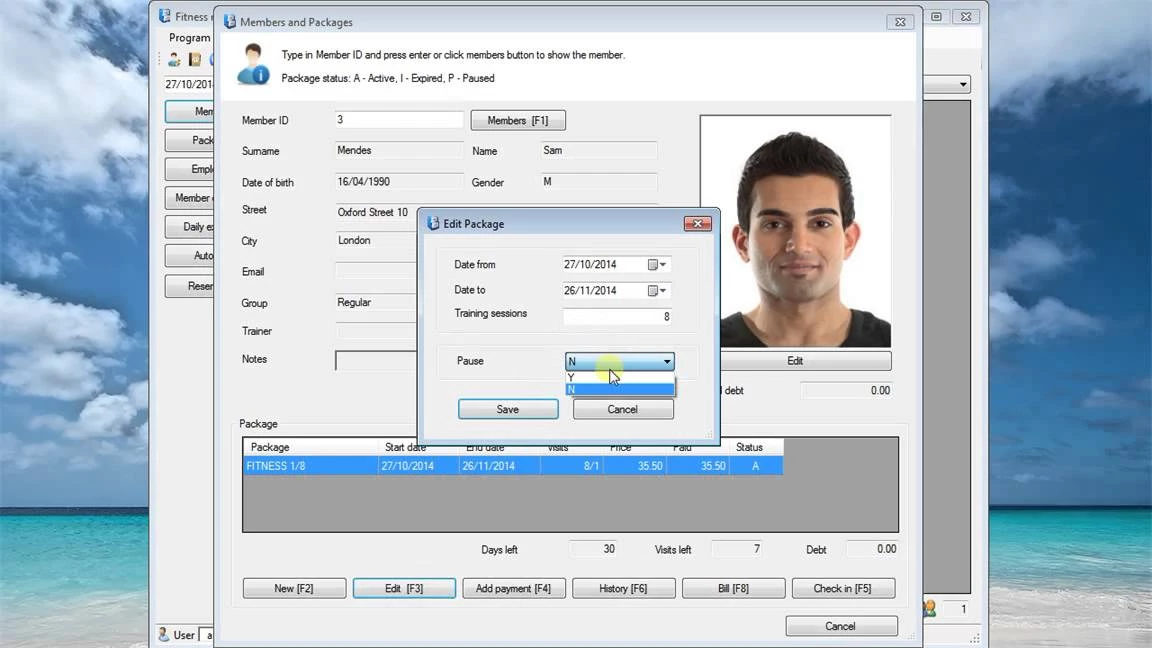
Fitness Manager operates as a dedicated desktop administrative application built for gym owners, martial arts dojos, yoga studios, and health club managers who want complete, localized control over their facility data. Unlike modern cloud-first platforms that force business owners into perpetual monthly subscription fees and host sensitive client records on remote servers, this tool stores all facility attendance, billing, and scheduling information locally on the host computer. It serves as a direct point-of-sale and check-in terminal, managing everything from active membership verification and drop-in visits to barcode scanning and employee shift tracking without requiring an active internet connection.
Focusing strictly on concrete operational tasks, reception desks use the software to instantly verify whether a member’s class package remains valid or if they carry an outstanding balance upon entry. Facility administrators rely on the internal modules to track retail inventory sales, such as nutritional supplements, sports drinks, and branded merchandise, while simultaneously scheduling personal training sessions across different facility rooms. By keeping the core database entirely local, clubs ensure continuous, uninterrupted front-desk operations even when local internet service providers experience unexpected outages, preventing frustrating bottlenecks during peak workout hours when members are rushing to enter the building.
Beyond standard attendance logging, the application adapts to practical daily club administration through custom package generation and access control. Owners can define specific membership tiers, construct family group discounts, monitor staff working hours for payroll generation, and export granular financial reports to evaluate monthly revenue securely. The user interface prioritizes rapid data entry over flashy web graphics, ensuring that front-desk staff can clear a line of waiting customers quickly, process cash or card payments, and update expiration dates without waiting for browser pages to load, dealing with browser caching errors, or relying on third-party cloud synchronization that might compromise member privacy.
Key Features
- Offline Member Database Management: The application relies on a local Firebird SQL database file to store all client profiles, attendance history, and payment records directly on the computer's hard drive. This architecture guarantees that reception staff can always check members into the facility and process walk-in payments, completely insulated from external internet outages or server downtime.
- Custom Membership and Class Packages: Facility managers can construct highly specific pricing tiers, such as punch cards for ten kickboxing classes or time-based unlimited access for a calendar year. The system automatically flags members attempting to scan in with an expired package or an unpaid account balance, triggering an alert on the reception monitor.
- Point of Sale and Inventory Tracking: A dedicated retail interface allows front-desk workers to process physical goods like water bottles, protein bars, and apparel. Staff can link these retail purchases directly to a specific member's existing tab for later billing or process them as anonymous walk-in sales, automatically deducting the items from the internal inventory tracker.
- Employee Shift and Schedule Management: The software includes built-in scheduling modules to assign personal trainers to specific group classes and manage room availability. It also functions as a staff time-clock, tracking employee check-in times and generating attendance summaries to calculate payroll for a designated billing period.
- Integrated Interface Language Editor: Administrators have the ability to manually rename interface buttons, navigation menus, and client-facing printouts directly within the software settings. This built-in text editor is highly practical for international clubs that need to adapt the standard English labels into regional dialects or specific industry terms.
- Automated SMTP Email Communications: An internal mailing tool connects directly to standard SMTP servers, giving owners a built-in method to communicate with their client list. Administrators can configure the module to automatically dispatch bulk renewal reminders, class cancellation notices, or holiday promotional offers based on specific database filters.
- Local Area Network Synchronization: For larger facilities requiring multiple workstations, the software supports local area network setups by designating the primary computer as the central server. Secondary reception or back-office computers can run a client module to access, query, and update the central member records simultaneously across the building.
How to Install Fitness Manager on Windows
- Download the primary Windows installer executable from the official vendor website to your designated reception or back-office computer.
- Launch the downloaded setup file and grant standard administrator permissions to initiate the local installation wizard.
- Review the software license agreement and select the destination directory on your local storage drive, noting that this folder will eventually house your critical local database files.
- Allow the installer to verify your operating system components; if your machine lacks the required Microsoft .NET Framework environment, the setup routine will prompt you to download and enable it through the Windows Control Panel.
- Complete the installation wizard and launch the executable for the first time, which will prompt the software to generate a unique hardware identification number based on your physical computer components.
- Create your initial administrative profile and begin configuring your facility's baseline settings, including the local currency symbol, applicable tax rates, and default membership categories.
- If constructing a multi-computer reception desk over a local network, install the separate client module on secondary machines and configure them to target the local IP address of your primary database computer.
Fitness Manager Free vs. Paid
The software operates on a strict perpetual license model, meaning facility managers pay a single one-time fee to own the application indefinitely. There are no mandatory monthly subscriptions, cloud hosting charges, or per-user recurring fees required to keep the system operational. For owners evaluating the workflow, the developer offers a fully functional 30-day trial period that permits administrators to input real member records, test barcode scanner hardware, and evaluate the financial reporting tools without artificial restrictions on database capacity.
Once the initial trial expires, a paid license becomes mandatory to unlock the interface and retain access to the configured facility database. The software is distributed across different licensing tiers, generally categorized as Basic, Plus, and Plus DAC. The standard tiers cover all primary database and scheduling functions, while the highest tier unlocks advanced hardware support for integrating physical turnstiles and digital access controllers at the front door. The base purchase covers the core application installation for one primary computer.
Facilities that require simultaneous access from multiple workstations—such as a front desk terminal and a separate manager's office—must purchase supplementary client licenses for each additional machine on the local network. Because the final registration key is mathematically tied to the specific hardware identification number of the host computer, migrating the permanent database to a brand-new machine after a hardware failure requires administrators to contact the developer directly to transfer the license authorization.
Fitness Manager vs. Mindbody vs. Gym Assistant
Mindbody is a cloud-first, enterprise-grade booking platform that heavily targets boutique fitness and yoga studios by offering consumer-facing mobile applications, online booking portals, and integrated digital marketing tools. It requires a significant ongoing monthly subscription and absolute dependence on an active internet connection to process front-desk arrivals and schedule changes. Facility managers should choose Mindbody if their business model relies entirely on online class reservations, automated lead generation, and heavy digital marketing outreach, whereas Fitness Manager is strictly for owners who want to eliminate monthly software overhead, keep all operational data stored on local hardware, and avoid third-party server dependencies.
Gym Assistant is another locally installed Windows desktop application designed specifically for independent health clubs seeking to avoid recurring cloud fees. It shares a very similar design philosophy with Fitness Manager, emphasizing local data storage, direct point-of-sale functionality, and perpetual licensing. Gym Assistant is often the preferred choice for North American facilities prioritizing extensive, native integration with specific 24-hour proximity card access controllers and physical gate hardware, while Fitness Manager excels for international club owners who require the built-in language editor to completely customize the interface text, buttons, and receipts for regional staff and localized operations.
Ultimately, Fitness Manager remains the superior fit for independent operators, martial arts schools, yoga centers, and single-location gyms that prioritize a budget-friendly, one-time payment structure combined with immediate, offline check-in speed. It provides the strongest workflow for facilities where the reception desk handles transactions directly, relying on fast local execution rather than web portals, and the owner refuses to risk losing access to the central member database during internet outages or unexpected payment disputes with a cloud hosting provider.
Common Issues and Fixes
- Missing .NET Framework error during installation. The application relies on the Windows .NET Framework architecture to execute properly. If the installer throws an error, open the Windows Control Panel, navigate to Programs and Features, and manually enable the .NET Framework features, or download the offline installer from Microsoft.
- Total database loss after a computer crash. Because the application intentionally avoids cloud synchronization, failing to back up the local files means losing all client records if the hard drive fails. Regularly copy the database file and the initialization configuration file from the installation folder to an external USB flash drive to guarantee recovery.
- Automated reminder emails fail to send. The internal mailing module requires accurate SMTP port configurations to communicate with external webmail providers. If using a standard commercial email service, you must input the correct server addresses and generate a dedicated app-specific password, as standard login credentials are blocked by default security rules.
- Secondary client computers cannot connect to the database. Client machines on a local area network must have unrestricted visibility to the host computer's local IP address. Ensure that the Windows Firewall on the main server machine contains an explicit exception for the database executable and that both computers operate on the exact same local subnet.
- Invalid hardware ID during license registration. The software calculates a unique identifier derived from the physical motherboard and processor of the machine it is installed on. You must generate this specific identification string from the exact front-desk computer that will run the database, rather than a temporary laptop, before requesting the final license code.
Version 10.8.0 — 2025
- Added new flexible data protection options, including a "Silent" mode for automatic backups upon exit and a "Prompted" mode for user-controlled saving.
- Implemented a daily backup rotation system that generates distinct backup files for every day to enhance data recovery.
- Improved the Product Sale module with simplified controls for adjusting item quantities and streamlined barcode scanner functionality.
- Added capability to store fingerprint templates directly in the main database for seamless synchronization with Door Access Control (DAC) systems.