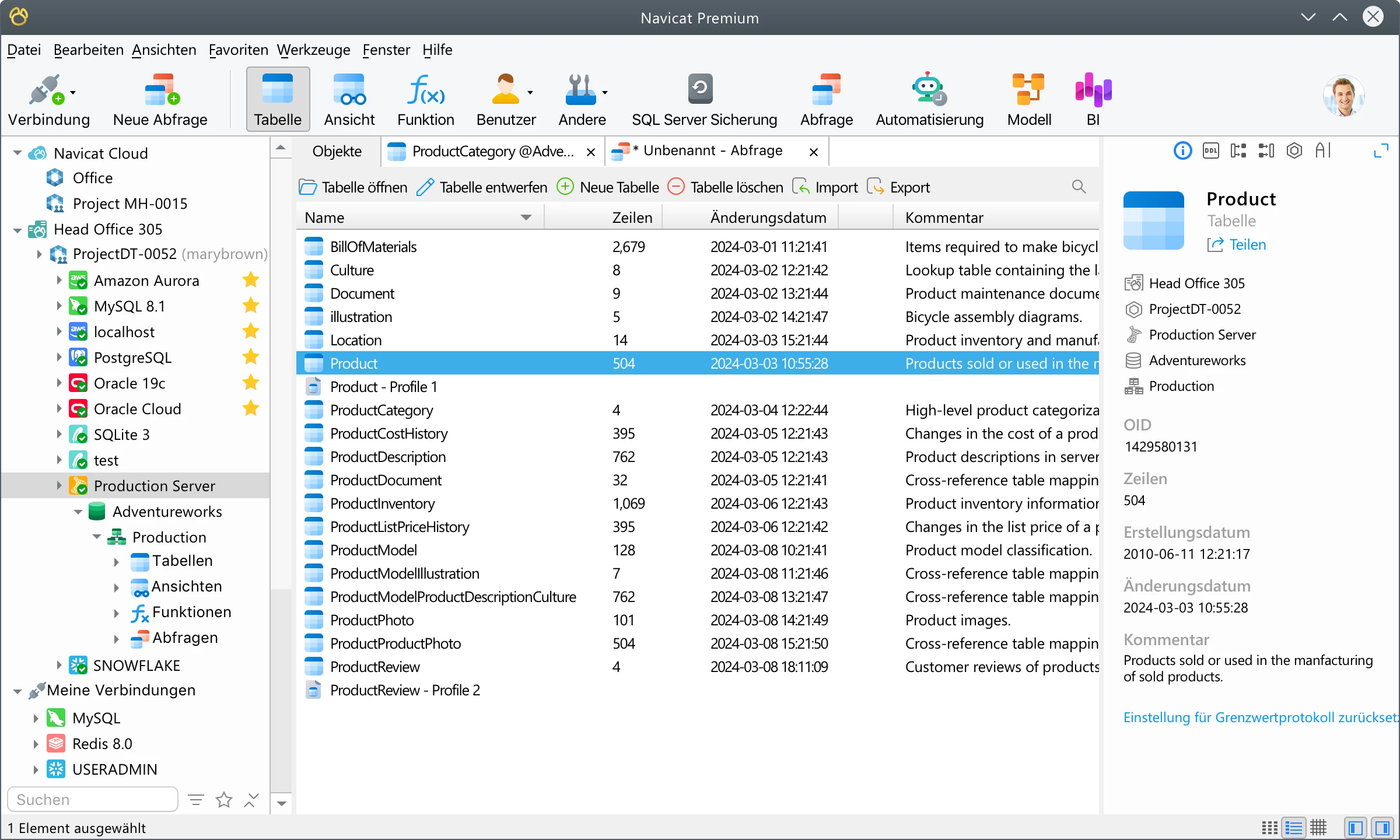
Navicat Premium is a unified database administration and development desktop client designed to interact with multiple database systems simultaneously from a single application interface. Built for database administrators, software developers, and data analysts, the software allows users to connect to relational databases like MySQL, PostgreSQL, SQL Server, MariaDB, and Oracle, alongside NoSQL systems such as MongoDB and Redis. Instead of forcing teams to juggle disparate, vendor-specific database clients for different segments of a project, this application provides a centralized workspace where entire infrastructures can be managed, queried, and maintained under one visual tree. This consolidation significantly reduces context switching and streamlines daily administration routines.
The decision to rely on a native desktop client rather than a browser-based or lightweight Electron alternative is driven by practical performance requirements and data security. Working with large datasets, migrating millions of rows, or running heavy synchronization tasks demands stable multitasking and hardware efficiency. A native Windows application handles local memory allocation better, preventing browser timeouts or interface freezing during long-running batch jobs and complex entity-relationship diagram rendering. Furthermore, localized credential storage, encrypted connection profiles, and direct SSH tunneling provide a secure, isolated environment for direct server administration without routing sensitive data traffic through a third-party web interface.
Users primarily adopt this tool to automate repetitive database tasks and eliminate syntax guesswork. Rather than writing manual SQL scripts to update user privileges, transfer tables between a development server and a production environment, or map out visual data models, professionals use the graphical interface to execute these jobs with a few simple clicks. It bridges the gap between raw command-line administration and high-level data analysis, offering utilities that handle everything from granular table design to exporting formatted query results for non-technical stakeholders. Whether deploying a new cloud database instance or debugging an existing on-premises server, the application adapts to the specific needs of the infrastructure.
Key Features
- Multi-Connection Workspace: Connect to MySQL, PostgreSQL, Oracle, MongoDB, Redis, and SQLite databases simultaneously within the exact same navigation tree. Users can drag and drop schema objects across different database connections to initiate instant data transfers without opening separate migration utilities.
- Visual Query Builder: Construct complex SQL statements and subqueries using a graphical interface without manually typing out the syntax. A Smart SQL editor is also available for manual scripting, featuring context-aware autocomplete, customizable code formatting, syntax highlighting, and real-time validation.
- Data Transfer and Synchronization: Migrate data across different database management systems using step-by-step mapping wizards that handle data type conversions automatically. The structural synchronization tool generates side-by-side schema comparisons and produces the exact deployment scripts needed to update target databases safely.
- Entity-Relationship Data Modeling: Reverse-engineer existing live databases to generate visual ER diagrams that display table relationships, indexes, and foreign keys. This feature allows database architects to design physical, logical, and conceptual models visually before pushing the finalized schema to a production server.
- Automated Backup and Scheduling: Configure batch jobs to automate routine maintenance tasks such as database backups, query execution, and large-scale data exports. Administrators can set up specific trigger events to send email notifications detailing the success, failure, or execution time of a scheduled task.
- Built-in Data Viewer and Editor: Inspect and modify raw table records using interactive grid, tree, or JSON document views. The result grid includes spreadsheet-style inline editing, rapid column filtering, and sorting controls to manipulate data directly without writing manual UPDATE or DELETE statements.
How to Install Navicat on Windows
- Download the official Windows executable installer package from the vendor's official website.
- Double-click the downloaded setup executable to launch the installation wizard and carefully review the end-user license agreement.
- Choose the destination folder for the application files, which defaults to the standard Program Files directory on your primary system drive, or define a custom folder path.
- Select the desired supplementary installation options, such as creating a desktop shortcut for quick launching or associating specific SQL file extensions directly with the application.
- Click Install to begin extracting and writing the application files to your local disk, and wait for the status bar to indicate completion.
- Click Finish to exit the setup wizard and launch the program immediately from the Start menu or the newly created desktop icon.
- Upon the first launch, a welcome dialog will appear asking you to either begin the 14-day evaluation period or open the registration window to enter your purchased license details.
Navicat Free vs. Paid
Navicat Premium is a commercial enterprise application and does not offer a permanently free community edition of its flagship multi-connection software for standard corporate operations. Organizations evaluating the product can utilize a fully functional 14-day trial to test server connections, data transfers, and visual modeling tools in their own environments before committing to a purchase. For individuals strictly engaged in non-commercial work, open-source projects, or academic studies, the developer provides specialized non-commercial licenses at a reduced cost, ensuring that students and hobbyists can still access professional-grade database tools.
Pricing for the commercial tier is structured to accommodate different purchasing preferences and IT budgets, offering both recurring subscription plans and permanent perpetual licenses. A standard perpetual license costs over a thousand dollars and grants lifetime offline access to the specific major release purchased, meaning the software will never expire. Conversely, the subscription plans—priced at approximately $79.99 monthly or roughly $799 annually—ensure continuous access to all future updates, bug fixes, and major feature additions as long as the subscription remains active.
To address the demand for basic database management, the developer recently introduced Navicat Premium Lite, a feature-limited tier that is available to download at no cost and supports essential multi-database connectivity. The Lite version officially permits commercial use but removes access to advanced enterprise tools such as visual data modeling, structural synchronization, and advanced data transfer wizards. This makes the free tier well-suited for developers or analysts who primarily need to execute queries, inspect schemas, and edit raw records without requiring the extensive administrative suite of the paid edition.
Navicat vs. DBeaver vs. DataGrip
DBeaver is a widely adopted, open-source-based alternative that offers a free Community Edition alongside its paid enterprise tiers. It connects to dozens of relational and NoSQL database types via standard JDBC drivers, making it an excellent choice for teams needing a versatile, budget-friendly client with broad database support. However, its Java-based user interface can sometimes feel less refined and noticeably slower to respond during heavy visual operations or large data exports when compared to a natively compiled Windows application.
DataGrip, developed by the IDE experts at JetBrains, is deeply integrated into the IntelliJ ecosystem and focuses heavily on SQL coding, intelligent query refactoring, and deep code analysis. It is ideal for software engineers who write complex backend scripts daily and already rely on JetBrains environments for their primary development work. Yet, it lacks some of the intuitive drag-and-drop administrative features, visual schema synchronization wizards, and ER modeling tools that make database administration accessible to non-programmers.
Navicat is the better fit for dedicated database administrators, data analysts, and architects who prioritize a fast, responsive native interface and rely heavily on visual utilities for schema synchronization, diagramming, and automated data migration. While it carries a noticeably higher price tag than most of its alternatives, its unified visual environment for managing mixed database architectures without requiring constant command-line intervention makes it a practical and efficient investment for enterprise database teams.
Common Issues and Fixes
- Client authentication protocol errors during MySQL connection. This disruption happens when the database server utilizes the newer caching_sha2_password security plugin, but the client connection settings are configured for legacy authentication methods. Fix this by updating your connection profile properties to support the new protocol, or execute an ALTER USER command on the database server to revert the specific account to native passwords.
- Data mismatch or truncated records during Excel spreadsheet import. This frequently occurs when the source spreadsheet contains hidden blank rows, duplicate primary keys, or cell values that exceed the destination table's maximum column limits. Fix it by thoroughly cleaning the spreadsheet before import, removing empty rows entirely, and verifying that the target database fields are configured with sufficient length to hold the imported data.
- Unusually slow data synchronization over remote networks. Running structural schema or large data syncs across a distant wide area network causes significant delays because all table data must be transferred to the local machine for comparison. Speed this process up by configuring an SSH tunnel for data compression, filtering the synchronization task to only include necessary tables, or running the operation from a virtual machine located physically closer to the target server.
- Missing default value errors during table creation or data insertion. If strict SQL modes are enabled on the target server, attempting to insert records without specifying all non-nullable fields will trigger an immediate error. Fix this by editing the database's sql_mode configuration setting to disable strict mode temporarily, or utilize the application's visual table designer to explicitly assign default fallback values to the affected columns.
Version 17.3.7 — December 2025
- Added capability to attach content from currently open tabs directly to the AI Assistant for better context.
- Added new option to change the response language for "Ask AI" queries.
- Improved Data Generation to support Unicode characters within the regular expression generator.
- Fixed an issue where exporting tables with long Chinese names to Excel caused a naming error.
- Fixed missing "List Columns" and "Range Columns" options in the MySQL table partition configuration.
- Fixed a display issue where incorrect OID and comments appeared in the main window.
- Fixed inconsistent execution order of triggers within the Table Designer.
- Fixed a bug where data types were ignored during ODBC imports in Automation tasks.
- Fixed an access violation error that occurred when opening certain tables.
- Fixed various minor bugs and made general performance improvements.