PrimoPDF operates as a virtual desktop printer, giving Windows users a straightforward way to convert any printable document into a standardized PDF file. Rather than functioning as a standalone graphical interface where you drag and drop files, it embeds directly into the operating system's print spooler. Whenever you press Ctrl+P or open the print dialogue in a word processor, spreadsheet application, or web browser, this tool appears right alongside physical hardware printers. Selecting it intercepts the print job and saves the layout as a digital document, preserving formatting, layout, and typography without requiring a physical paper output.
This approach is highly practical for office workers, students, and small business owners who frequently need to finalize documents for distribution. For example, a freelancer can draft an invoice in a basic spreadsheet tool and print it directly to a read-only document format, preventing the client from accidentally altering the numbers. Similarly, researchers can save static snapshots of web articles, complete with images and text, bypassing the messy formatting of typical browser-based saves. The local desktop nature of the software ensures that sensitive financial records, legal contracts, or proprietary business plans never leave your hard drive.
Compared to web-based converters that require uploading files to third-party servers, a local virtual printer provides immediate, offline processing with zero privacy risks. Web converters often struggle with complex local fonts or large file sizes, and they introduce unnecessary delays when you are processing dozens of pages. By handling the conversion natively on the machine where the document was authored, the resulting file perfectly mirrors the original layout. This makes it an essential utility for anyone who wants a secure, unmetered, and private method for document generation without paying for a bloated productivity suite.
Key Features
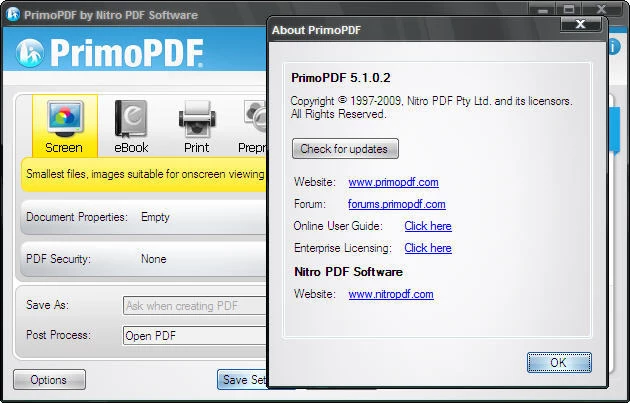
- Creation Profiles: The software includes five distinct output profiles—Screen, eBook, Print, Prepress, and Custom—that adapt the output to the intended use case. Selecting the Screen profile heavily compresses images and lowers resolution to generate the smallest possible file size for email attachments, while Prepress maintains maximum DPI and preserves high-resolution graphics for professional commercial printing.
- Universal Virtual Printer: Integration directly into the Windows printing subsystem means the tool works universally across almost every desktop application. Whether you are exporting a technical diagram from a CAD program, a text document from Notepad, or a graphical presentation, the program catches the standard spooling data and writes it to a digital file.
- Document Appending: Instead of forcing users to rely on external merging tools, the interface offers a direct append function. When saving a new print job, selecting an existing file prompts the software to add the newly generated pages to the end of that document, which is ideal for compiling monthly expense receipts into a single ongoing log.
- Secure Document Locking: Users can apply encryption during the saving process to protect sensitive information. The security settings allow you to require a password just to open the file, or you can set permissions to restrict specific actions, such as preventing viewers from copying text to their clipboard or printing the file to paper.
- Metadata Management: The document properties menu allows you to attach standardized metadata directly into the file architecture before saving. By filling out the Title, Author, Subject, and Keywords fields, the resulting files become much easier to locate using desktop indexing tools or enterprise document management networks.
- Post-Process Actions: To reduce friction in daily workflows, the application supports automated actions immediately following file generation. You can configure the settings to automatically open the newly created document in your default viewing application, or have it automatically attach the file to a blank draft in your default desktop email client.
How to Install PrimoPDF on Windows
- Download the installer archive from our website and extract the contents to a new, empty folder on your local drive.
- Open the extracted folder and double-click the included readme.txt file to review the dependency requirements and suggested installation paths.
- Right-click the primary setup executable and select the option to run the program as an administrator to ensure it has the necessary permissions to register a new virtual printer.
- Follow the initial wizard prompts, review the end-user license agreement, and confirm the default destination directory for the program files.
- Watch carefully during the setup phase for any bundled software offers; you must actively uncheck the boxes for optional browser toolbars or trial offers if you only intend to install the free converter.
- The installer will verify if your system has the required legacy Microsoft .NET Framework components installed; if prompted by the operating system, authorize the automatic download and activation of these background features.
- Wait for the progress bar to finish registering the print spooler services; the installer will not launch a standalone program window upon completion.
- To verify a successful installation, open the "Printers and Scanners" menu in your system settings and confirm that the new virtual printer is listed as an available device.
PrimoPDF Free vs. Paid
PrimoPDF operates as entirely free software for all users, with no distinction between personal, educational, or commercial licensing. The core application does not restrict the number of pages you can process, nor does it enforce arbitrary daily limits on how many documents you can generate. Furthermore, the developer does not overlay promotional watermarks or hidden text onto your output files, ensuring that the generated documents maintain a strictly professional appearance suitable for business environments.
The development and maintenance of this freeware are subsidized through an upsell business model driven by the parent company, Nitro PDF Software. During installation and occasionally within the post-print interface, users are presented with prompts highlighting the developer's premium commercial software. These prompts serve as the primary monetization strategy, directing users who need advanced functionality toward a paid ecosystem without crippling the free tool.
While the free virtual printer excels at generating and appending pages, it does not include tools for altering existing text, manipulating page orders, or applying digital signatures. Users who hit the limitations of the free tier and require optical character recognition or direct document editing will need to evaluate the paid Nitro software ecosystem. However, if your workflow is strictly limited to exporting layouts from other applications into a finalized digital format, the free tier provides complete and unrestricted utility without any hidden subscription fees or mandatory account registrations.
PrimoPDF vs. CutePDF Writer vs. doPDF
CutePDF Writer serves as one of the most direct alternatives in the virtual printer category. Its primary strength lies in its absolute minimalism; the program has virtually no graphical interface of its own and rarely bundles promotional software during setup. However, CutePDF relies on a separate Ghostscript installation to handle the actual file conversion, which adds an extra step to the initial setup process. It is generally the preferred choice for system administrators who want a completely silent, lightweight driver without any extra features, but it lacks the built-in encryption and metadata controls found in its rivals.
doPDF takes a different approach by utilizing its own proprietary rendering engine rather than depending on Ghostscript, meaning the installation process is faster and entirely self-contained. It handles font embedding with exceptional accuracy, ensuring that rare typography displays correctly on other machines. The trade-off is that doPDF historically generates slightly larger file sizes when processing documents with heavy graphics or complex vector art, and it completely lacks the ability to append new pages to an existing document.
PrimoPDF is the better fit when you require active control over the final output without stepping up to a paid editor. The inclusion of adaptive creation profiles allows you to instantly shrink the file size for email or maximize it for print, an option that requires manual configuration in other tools. Most importantly, the native append feature makes it far superior for workflows that involve merging different sources—like a spreadsheet chart and a word processor report—into a single cohesive file.
Common Issues and Fixes
- Installation fails with Error 1722. This specific error indicates a failure to communicate with the Windows Print Spooler during the setup process. To resolve this, open the Windows Services menu, locate the Print Spooler service, right-click it, select Restart, and then run the installer again as an administrator.
- Missing framework prompts during setup. The software relies on older Microsoft .NET Framework components to render its graphical interface. Navigate to the Windows Control Panel, select "Turn Windows features on or off", and check the box for the legacy .NET Framework to manually enable the necessary background files.
- Unwanted promotional software appears after setup. The installer includes optional bundles for the developer's premium editing suite or third-party add-ons. If you accidentally accepted these, you can safely remove the unwanted programs via the "Add or remove programs" menu without affecting the core virtual printer functionality.
- Text in the output file cannot be searched or highlighted. If you print an image file or a scanned page, the resulting document will be mathematically flat. Ensure you are printing directly from the original text-based source application, or use an external optical character recognition tool before printing to make the text selectable.
Version 5.1.0.2 — July 2010
- Added localization support for five new languages: French, German, Spanish, Dutch, and Italian.
- Improved PDF output quality and handling of non-TrueType and double-byte fonts.
- Enhanced compatibility with 64-bit operating systems for smoother performance.