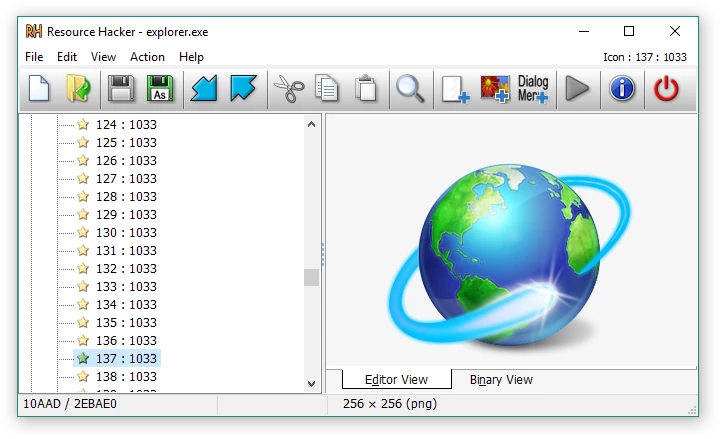
Resource Hacker is a specialized utility designed for viewing, modifying, renaming, adding, deleting, and extracting resources embedded within 32-bit and 64-bit Windows executable files. This desktop application targets developers, reverse engineers, and system administrators who need to inspect compiled binaries without access to the original source code. Instead of editing raw hex data, users interact with a structured tree view that organizes embedded assets into logical categories such as icons, bitmaps, cursors, string tables, dialogs, and manifest data. This allows for direct manipulation of the visual and structural elements of .exe, .dll, .cpl, .scr, and .mui files natively on a desktop environment.
Operating locally on the host machine, the software completely bypasses the need for internet connectivity, cloud processing, or external rendering servers. This local execution is strictly required for analyzing sensitive internal binaries, proprietary dynamic link libraries, or undocumented system control panel applets. Users rely on the local client because web-based alternatives cannot interface securely with local operating system files or compile resource scripts into binary format directly from a command-line prompt.
By exposing the internal anatomy of compiled software, the tool handles practical jobs like translating hardcoded user interfaces into different languages, swapping out low-resolution application icons for modern branding, or modifying window dimensions in legacy programs that display poorly on high-resolution monitors. The interface presents binary data in an accessible format, ensuring that interface components can be dragged, resized, and recompiled without altering the core logic or the executable code itself.
Key Features
- Feature Name: Executable Decompilation and Inspection: The application parses Windows binaries and automatically unpacks known resource structures into a hierarchical directory tree. This allows users to browse through distinct folders for version info, manifests, menus, and graphics without relying on a separate hex editor. Unknown binary formats fall back to a read-only text representation to ensure no hidden data goes entirely unnoticed.
- Feature Name: Visual Dialog and Menu Editing: Dialogs and menus feature native WYSIWYG editors, displaying the interface exactly as it would appear when running the target program. Users can click and drag buttons, text fields, and checkboxes to new coordinates, while the underlying script automatically updates the X and Y coordinate values. This physical rearrangement is critical for fixing overlapping text when translating an interface from English to a more verbose language.
- Feature Name: Asset Extraction and Exporting: Any embedded visual or audio file can be dumped directly to the local storage drive for external modification. Cursors, bitmaps, GIFs, AVIs, JPGs, and standard Windows icons can be extracted as raw binary files or converted into decompiled .rc scripts. This extraction workflow ensures that proprietary graphics locked inside an application can be retrieved, modified in a dedicated image editor, and cleanly re-imported.
- Feature Name: Command-Line Automation: Almost every graphical function is fully accessible via command-line switches, enabling batch processing without launching the visual interface. Administrators can write batch scripts using commands like -add, -extract, -delete, and -modify to target multiple files sequentially. The compiler supports directives such as #INCLUDE, #DEFINE, and #IFDEF, allowing complex scripting operations to replace hundreds of icons across an entire software suite simultaneously.
- Feature Name: Icon and Cursor Group Management: The software manages graphics in designated groups rather than as isolated standalone files, adhering to strict Windows executable standards. When a user replaces an icon, the application handles the associated ICONGROUP, ensuring that all different sizes and color depths are correctly mapped. This prevents the operating system from displaying corrupted or improperly scaled taskbar graphics after the modification is saved.
- Feature Name: String Table Modification: Developers often store error messages, tooltips, and interface labels in centralized string tables rather than hardcoding them into the executable logic. The built-in text editor allows users to rewrite these strings, supporting standard C-style escaped characters like n for new lines or t for tabs. Once edited, the user simply clicks the compile button to validate the syntax and permanently commit the text changes to the binary.
How to Install Resource Hacker on Windows
- Navigate to the official developer domain and locate the primary download section to retrieve the standard Windows installer package.
- Execute the downloaded setup file, which will immediately prompt you to review and accept the freeware license agreement before proceeding.
- Select the destination directory; the installer defaults to the standard program directory, but users modifying sensitive system files often prefer a dedicated root directory to avoid strict permission conflicts.
- Choose whether to create a desktop shortcut and a Quick Launch icon for faster access during intensive reverse-engineering sessions.
- Review the file association options, which allow you to automatically link .res and .rc file types to the application so that double-clicking a resource script opens it directly in the visual editor.
- Click the final install button to extract the core executable, the help documentation, and the command-line compiler components to the chosen folder.
- Launch the application from the Start menu to view the blank workspace tree, at which point you can drag and drop your first .exe or .dll file directly into the main window to begin inspection.
Resource Hacker Free vs. Paid
Resource Hacker operates entirely as a freeware application, maintaining a strict policy of zero financial cost for its users. The official developer provides the complete, unrestricted toolset without offering a tiered business model, meaning there are no hidden premium tiers or enterprise versions locked behind a paywall. The software does not include trial limits, feature restrictions, expiration dates, or artificial caps on the size of the executables you are permitted to analyze and modify.
Because there is no commercial monetization strategy, users do not have to navigate ad banners, nag screens, or mandatory registration forms during launch. The command-line automation tools and the internal compiler—features that are frequently restricted to premium licenses in competing reverse-engineering software—are fully available out of the box. Users are simply bound by the license agreement, which prohibits unauthorized redistribution of the software through third-party domains or media without prior written consent.
There are no optional paid plugins, subscription mandates, or recurring support fees associated with the product. All updates, bug fixes, and maintenance patches are released directly to the public for free. The application exists purely as a practical utility for desktop environments, built and maintained to facilitate executable analysis without enforcing a commercial transaction.
Resource Hacker vs. PE Explorer vs. Resource Tuner
PE Explorer functions as a much broader reverse-engineering suite, featuring a built-in disassembler, a dependency scanner, and native support for unpacking files compressed with UPX. You should choose PE Explorer when you need to analyze the actual code structure, troubleshoot missing library dependencies, or inspect malware where understanding the executable logic is just as critical as viewing the interface resources. However, it is a commercial product with a trial period, making it heavier and more expensive for simple text or graphic replacements.
Resource Tuner shares a closer core focus with Resource Hacker, offering a highly polished, visual-first approach to editing executable properties and substituting visual assets. It targets users who want a guided interface to quickly change icons, extract graphics, and modify application manifests without touching any script syntax, alongside a separate paid console edition for VBScript automation. The downside is that Resource Tuner is strict commercial software that requires purchasing a license after the evaluation phase expires.
Resource Hacker is the better fit when you strictly need a fast, lightweight, and completely free utility for direct resource manipulation and command-line compilation. It excels in environments where users want to write and compile .rc scripts manually or automate batch modifications through basic Windows batch files without paying for a premium console tool. For straightforward icon swapping, dialog resizing, and string translation without commercial overhead, it remains the most practical choice.
Common Issues and Fixes
- Problem description. Executable files appear completely empty or only show generic headers in the tree view. This occurs when the target application is packed or compressed using tools like UPX or ASPack, which obscure the internal resources. You must use a dedicated unpacking utility to decompress the binary before loading it into the resource editor.
- Problem description. The application throws a "Cannot create file" error when attempting to save modifications. This usually happens if the target file is currently running in the background, marked as read-only, or located in a protected system directory. Ensure the program is fully closed, remove the read-only attribute in the file properties, or save the modified file to your desktop before manually copying it back to the original folder.
- Problem description. Changes to a dialog box or string table fail to compile and display a syntax error line. The internal compiler strictly enforces standard script formatting, meaning a missing comma, unclosed double quote, or incorrect escape character will halt the process. Review the specific line indicated in the error popup and ensure strings are properly enclosed and C-style escape sequences are used correctly.
- Problem description. Modified icons display poorly or appear corrupted on the taskbar. This is caused by replacing an icon using a standalone .ico file that does not contain the correct matching resolutions and color depths for the target application. Always replace the entire ICONGROUP with a multi-size icon file rather than attempting to swap a single low-resolution image layer.
Version 5.2.8 — March 2025
- Improved handling of text encoding to ensure better accuracy with various character sets.
- Fixed a critical bug that caused compilation errors when processing DialogEx controls with an ID of -1.
- Implemented minor compatibility adjustments for modern Windows environments.