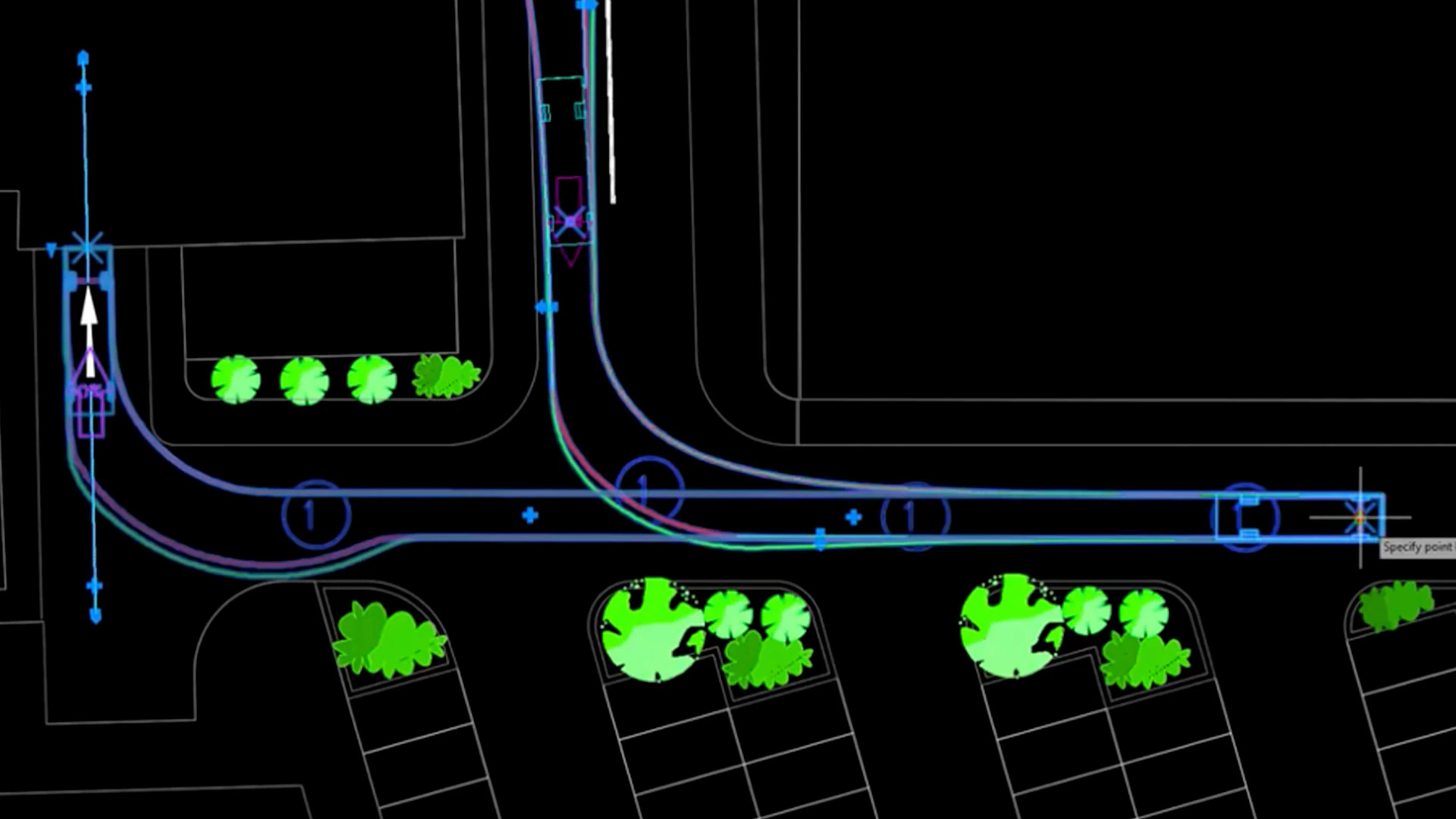
Autodesk Vehicle Tracking is a specialized transportation design and swept path analysis application built for civil engineers, urban planners, and architects. It operates directly inside host environments like AutoCAD and Civil 3D to evaluate how effectively steered vehicles, light rail, and aircraft maneuver through proposed site designs. By moving beyond manual turn templates, professionals use this interactive software to validate roadway geometry, intersections, and parking lot constraints before construction begins.
Because the software relies heavily on 3D spatial geometry and large-scale site coordinates, it is distributed entirely as a local desktop add-on rather than a browser-based tool. This local processing requirement ensures that complex swept path calculations update instantly when a user drags a curve or modifies a road alignment. Operating directly within the host CAD application means designers can check vertical ground clearances against existing 3D terrain models, preventing costly design oversights without leaving their primary drafting environment.
Replacing static templates with an interactive digital model changes how infrastructure firms approach site logistics. Instead of drawing simple arcs, engineering teams can simulate specific movements for articulated buses, multi-axle freight trailers, emergency vehicles, and commercial aircraft. By validating the precise turning radii, overhang paths, and undercarriage clearances of these heavy assets, drafting teams ensure compliance with municipal safety regulations while minimizing wasted paving space in complex industrial layouts.
Key Features
- Feature Name: Swept Path Analysis. Generates highly accurate vehicle movement tracks using AutoDrive Arc and Bearing modes. Users define the starting location and target points, and the software instantly calculates a realistic forward or reverse path based on established vehicle design standards, steering lock limits, and speed restrictions.
- Feature Name: Grip Editing Mode. Replaces manual drafting adjustments with interactive visual controls. Designers click and drag specific target points along a calculated path, forcing the software to immediately recalculate the vehicle trajectory, update the visual maneuver lines, and highlight any sections where the turn exceeds physical vehicle capabilities.
- Feature Name: Parking Lot Generator. Arranges bays, aisles, and islands automatically using the Parking Standard Explorer. The tool references regional and national layout codes to place geometric rules, quickly adapting row counts, accessible parking stall dimensions, and one-way or two-way aisle widths to fit an available site area.
- Feature Name: Roundabout Modeler. Creates intelligent roundabout geometry that connects to intersecting roads via dynamically linked blend points. When a user changes the central diameter or shifts an incoming road alignment, the software automatically updates the central island, aprons, and pedestrian crossings to match the newly formed intersection geometry.
- Feature Name: 3D Surface Clearance. Validates undercarriage scrape risks and overhead collision points by reading surface terrain data. The software projects the physical 3D vehicle model onto the host application's terrain mesh, highlighting spots where the grade is too steep for long wheelbases or where clearance fails to meet safety margins.
- Feature Name: Simulation Export. Translates calculated path alignments into animated visual sequences directly within the viewport. Users can record these moving vehicle simulations and save them as AVI video files to present structural clearances, line-of-sight checks, and maneuverability logic to project stakeholders or municipal review boards.
How to Install Autodesk Vehicle Tracking on Windows
- Verify that a compatible host CAD application is completely installed, updated, and activated on your local drive, as this plugin cannot operate independently.
- Navigate to your Autodesk Account via a web browser and access the All Products and Services dashboard using your administrative credentials.
- Expand the Architecture, Engineering & Construction Collection menu to reveal the individual application downloads and locate the specific add-on.
- Download the Windows installation package that explicitly matches the exact year edition of your host drafting program, avoiding cross-year mismatches that block the setup.
- Close all active drafting sessions and background vendor processes via the Task Manager before executing the downloaded installer file.
- Proceed through the setup wizard, accepting the default folder directory so the host application can locate the required integration libraries and interface files.
- Launch the host program and verify that the new menu tab appears on the primary ribbon interface when opening a standard drawing template.
- If the tab remains hidden, type the NETLOAD or MENULOAD command to manually reference the configuration file located in the user AppData directory to force the interface elements to load.
Autodesk Vehicle Tracking Free vs. Paid
Autodesk Vehicle Tracking is not sold as an independent, standalone application for new commercial buyers. Instead, it requires an active subscription to the Architecture, Engineering & Construction (AEC) Collection, which bundles it alongside core infrastructure tools. Because it is tied to the broader collection, the annual subscription cost reflects the entire suite of engineering applications rather than just the swept path module. The vendor utilizes a named-user licensing model, meaning access requires an ongoing paid subscription tied to a specific professional account.
For educational use, students, educators, and academic institutions can access the software at no cost through the official education portal. This free academic tier provides fully functional access to all vehicle libraries and analytical tools but applies strict licensing terms that legally prohibit any commercial project work or professional consulting usage.
Professional users who need to evaluate the tool before committing to the full collection can request a standard 30-day trial. The trial installation provides full access to the calculation engines, parking generators, and roundabout modelers without applying save restrictions or export watermarks during the active evaluation window. Once the trial expires, the software locks access to the specific ribbon tab until a valid commercial license is assigned.
Autodesk Vehicle Tracking vs. Transoft AutoTURN vs. Bentley OpenRoads
Transoft AutoTURN operates as the industry-standard standalone alternative for swept path analysis. It is highly valued for its extensive, frequently updated global vehicle libraries and its broad compatibility across multiple CAD platforms, including BricsCAD, ZWCAD, and MicroStation. Users generally choose AutoTURN when their firm operates outside a strictly Autodesk environment, requires independent network licensing, or relies on highly specialized proprietary vehicle profiles that are not included in standard infrastructure bundles.
Bentley OpenRoads handles swept path analysis and civil design natively within its own MicroStation ecosystem. Unlike a dedicated plugin that sits on top of a separate drafting tool, its transportation design features are built directly into the core modeling suite. Engineering firms typically select OpenRoads when their primary deliverables and network systems are already heavily invested in Bentley formats, avoiding the need to translate coordinate systems and 3D terrain files back and forth to DWG-based applications.
Autodesk Vehicle Tracking provides the strongest workflow for users who are fully embedded in Civil 3D. Because the tool is already included in the AEC Collection, firms utilizing Autodesk software do not have to purchase external add-ons or manage separate vendor contracts to perform safety audits. Its direct integration with native Civil 3D surfaces allows for immediate vertical clearance checks without exporting terrain data, making it the most efficient option for teams exclusively drafting in DWG formats.
Common Issues and Fixes
- Problem description. Missing ribbon tab after installation. This occurs when the host application fails to automatically load the correct menu configuration file. Open the command line, type MENULOAD, and manually navigate to the AppData Roaming folder to select the associated configuration file.
- Problem description. Installation blocked by host application warning. The installer checks the Windows registry for a matching application year. You must download and install the specific year edition of the software that perfectly matches the year of your active host installation.
- Problem description. Unexpectedly tight turning circles when reversing. Different software packages interpret standard vehicle pivot points differently. Open the System Settings dialog and manually adjust the steering lock rate or design vehicle specifications to match local transportation guidelines.
- Problem description. License authorization error code during startup. A conflict in the authentication background process triggers this failure. Close the application, uninstall the Single Sign-On component from the Windows control panel, clear the Web Services log folder, and install the latest authentication update from the vendor.
- Problem description. Corrupted path alignment lines during grip editing. When dragging a target point forces a path that exceeds the vehicle's physical steering limits, the application draws a solid red failure line. Undo the grip edit and adjust the target point to allow a wider turning radius that respects the mathematical lock limits.
Version 2026 — April 2025
- 2026 Platform Compatibility: Added full support for the 2026 versions of host applications, including AutoCAD 2026, Civil 3D 2026, and other supported vertical products, ensuring seamless integration with the latest design environments.
- Updated Vehicle Libraries: Expanded and updated the global vehicle database to include the latest manufacturer specifications and regional design standards, ensuring compliance with current transportation regulations.
- Stability and Performance Enhancements: Addressed various reported issues to improve overall software stability and simulation performance, specifically optimizing interactions within complex drawing files.