Kiwi for Gmail transforms the standard, tab-based Google Workspace interface into a dedicated desktop application for Windows. Rather than forcing users to manage their inbox, calendar, and active spreadsheets across a chaotic array of standard browser tabs, this software isolates the entire ecosystem into a standalone environment. It targets professionals, freelancers, and enterprise workers who rely heavily on Google services but suffer from constant tab clutter. By wrapping the familiar interface inside a native desktop shell, the application allows users to interact with their mail and documents using standard operating system window controls, taskbar pinning, and alt-tab switching. This means you can keep your primary inbox open permanently without it getting lost among research pages or video streams in your standard browser.
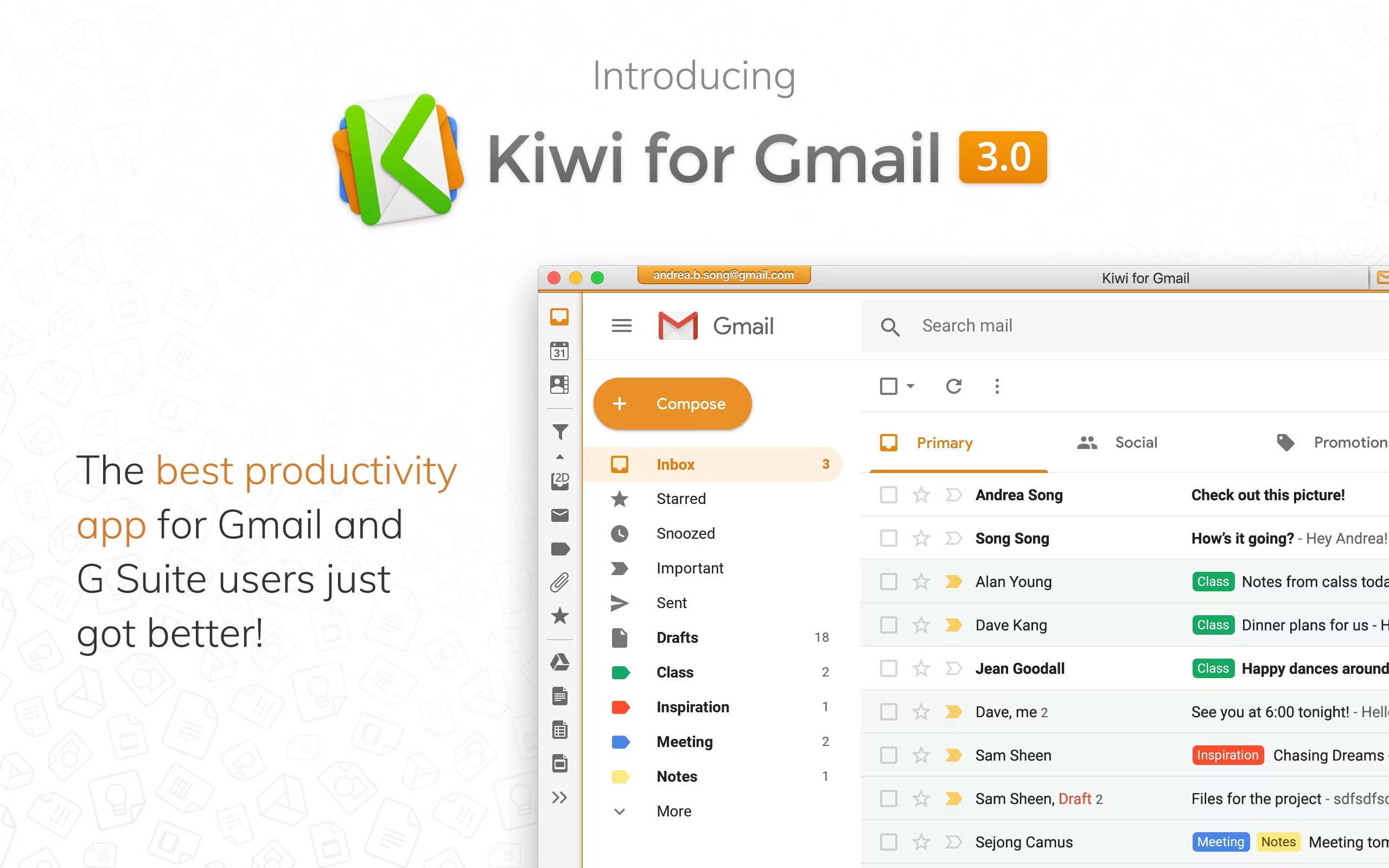
Managing multiple identities in a standard browser often leads to session conflicts, restricted private browsing windows, or accidental document creation under the wrong profile. This client prevents those overlap errors by strictly separating each active profile on an architectural level. Users can run their personal, corporate, and freelance profiles simultaneously within a single master window. Each profile operates in its own isolated container, complete with distinct color-coding along a left-aligned vertical sidebar. This architectural choice means you never have to sign out and sign back in to switch contexts. You simply click the red icon for your personal inbox or the blue icon for your corporate account, and the interface swaps instantly without reloading the entire page.
Beyond mail management, the application significantly alters how users handle word processing, spreadsheets, and presentation slides. Opening a file from Google Drive launches a distinct, floating application window instead of generating yet another tab in Chrome or Edge. This structural shift allows users to snap a data spreadsheet to one half of their monitor while drafting a detailed report on the other half. The program effectively turns a cloud-based suite into a classic office desktop experience, complete with an external menu bar, dedicated keyboard shortcuts, and direct integration with the native Windows notification system.
Key Features
- Multi-Account Architecture: The application supports up to nine active profiles simultaneously, depending on your subscription tier. Each profile exists in a completely isolated container, ensuring that links, drive files, and calendar invites open under the correct identity without session conflicts. Users assign specific colors and icons to each profile in the sidebar, making it immediately obvious which inbox is currently active on the screen.
- Focus Filtered Inbox: A dedicated toolbar sits above the primary message list, allowing users to instantly sort their incoming mail without writing complex search operators. You can click toggles to show only messages that are Unread, Starred, tagged as Important by Google algorithms, or contain Attachments. Combining these toggles immediately reduces a chaotic message list to a strict view of actionable items.
- Standalone Application Windows: Instead of loading Google Docs, Sheets, and Slides inside a web browser environment, the software launches them as independent desktop windows. This allows for standard operating system behaviors like native window snapping, minimizing individual documents directly to the Windows taskbar, and switching between active spreadsheets using alt-tab keyboard commands.
- Clean Compose Interface: Clicking the compose button generates a distinct, floating message window rather than a small overlay docked at the bottom of the interface. This floating window can be dragged to a secondary monitor, allowing you to read reference materials, review a presentation, or check a calendar schedule while actively drafting your outgoing message.
- Recent Document Recall: The software includes a native file menu bar positioned at the top of the interface. By navigating to the File dropdown and clicking Recently Closed Docs, users can instantly recover text files or spreadsheets they accidentally closed. This entirely bypasses the need to open a new tab and search through the main Google Drive directory to resume work.
- Native Desktop Notifications: Bypassing the unpredictable notification protocols of standard web browsers, the client hooks directly into the Windows notification center. This ensures you receive clear, persistent OS-level alerts for incoming messages and calendar events. It also includes a dedicated Zen Mode toggle that mutes all alerts across all configured profiles when you need strict focus.
How to Install Kiwi for Gmail on Windows
- Download the official Windows installer package from the vendor's primary website, saving the executable file to your local drive.
- Locate the downloaded executable file in your downloads folder and double-click it to initiate the automated setup wizard.
- Review the installation prompts; the software will automatically write the necessary application files to your default Windows application directory without requiring complex path configurations.
- Wait for the installation process to complete, which typically takes under a minute, then launch the application directly from your Start Menu or the newly created desktop shortcut.
- Upon the initial launch, a welcome screen will appear, prompting you to enter the credentials for your primary Google profile.
- Complete the standard authentication process, ensuring you approve any required two-factor authentication prompts generated by your mobile device or security key.
- Review the permissions dialog and grant the application the necessary OAuth permissions to read your inbox, calendar, and drive files, allowing the interface to populate correctly.
- Navigate to the internal account settings menu to add any secondary profiles, assigning a distinct visual color to each to finalize your multi-inbox workspace layout.
Kiwi for Gmail Free vs. Paid
The software operates entirely on a subscription model, though new users can evaluate the interface through a risk-free trial period. To maintain access after the trial expires, users must select one of the paid subscription tiers, which are billed either monthly or annually depending on the specific plan chosen. There is no permanent free tier available for long-term use.
The Standard plan serves as the entry-level tier and costs a few dollars per month. This tier restricts usage to a single profile, making it suitable for individuals who only need to manage one primary workspace but still want the benefits of a desktop wrapper. It includes the core interface improvements, such as the separated document windows, desktop notifications, and the specialized inbox filters.
For users managing multiple identities, the higher-tier plans allow for up to nine simultaneous profiles. These premium tiers unlock the ability to color-code multiple inboxes, utilize the specialized Zen Mode for blocking notifications across all accounts, and access dedicated integrations for external meeting software. Exact pricing for these upper tiers requires an annual commitment and scales based on the specific number of allowed profiles.
Additionally, a specialized Teams plan exists for enterprise environments. This tier is designed for organizations that need to deploy the application across multiple workstations under a centralized billing structure. It provides administrative controls for easier deployment and management of multiple user licenses across a company network.
Kiwi for Gmail vs. Mailbird vs. eM Client
Mailbird operates as a centralized communication hub that supports a wide variety of protocols, including IMAP, POP3, and Exchange. Users who need to monitor Outlook, Yahoo, and company-specific webmail accounts alongside their Google accounts will find Mailbird highly effective. It also provides heavy integration with third-party productivity tools, loading external apps directly inside its dashboard. However, because it normalizes the interface across different providers, you lose the exact visual layout and specific shortcut behaviors native to the Google ecosystem.
eM Client is a traditional, highly configurable local email program that downloads and indexes your messages directly to your local storage drive. It excels in environments that require offline search functionality, complex local routing rules, and advanced security measures like PGP encryption. It handles multiple provider types effortlessly and provides its own built-in calendar and task modules. The downside is that it functions strictly as a mail and calendar client, offering no specialized handling for cloud-based word processing or spreadsheet management.
Kiwi for Gmail takes an entirely different architectural approach. It does not use IMAP or POP3 to download messages locally; instead, it acts as a specialized desktop wrapper for the official web interface. You should choose this software if you are fully committed to the Google ecosystem and want to retain the exact search operators, label systems, and layout you already know. It is the better fit when your primary goal is to turn Docs, Sheets, and Slides into distinct windowed applications rather than just managing offline mail.
Common Issues and Fixes
- Repeated authentication prompts. If the application constantly asks you to log in after a system reboot, the internal session cookies may be corrupted or blocked by your operating system. Open the application settings, clear the internal cache completely, and verify that your organization's security policies do not enforce abnormally short session timeouts.
- High memory consumption. Because the software renders full web applications inside a desktop shell, running nine active profiles simultaneously demands heavy RAM availability. To reduce memory load and improve system responsiveness, close isolated document windows when you finish editing and remove any completely inactive profiles from your sidebar.
- Missing desktop notifications. If alerts fail to appear for incoming messages or calendar events, Windows might be blocking them at the system level. Open your Windows settings, navigate to the System menu, and ensure that Focus Assist is disabled. Additionally, verify that notifications are explicitly permitted within the application's internal preferences menu.
- Links opening in an external browser. When clicking a drive link inside a message, it might launch Chrome or Edge instead of an internal native window. To fix this behavior, open the application preferences and adjust the link handling settings, ensuring the program is instructed to intercept and open all supported file types internally.
- Blank interface on launch. Occasionally, network interruptions during startup can cause the main interface to load as a blank screen. You can resolve this by right-clicking the application icon in the system tray and selecting the option to reload the interface, which forces the program to reconnect to the remote servers.
Version Latest — 2025
- Added seamless integration for the Boomerang plugin, enabling robust email scheduling and tracking directly within the desktop application.
- Introduced a modernized user interface featuring Dark Mode and Custom Colors, allowing for easier visual distinction between multiple accounts.
- Improved overall application performance and energy efficiency, with optimized support for Apple Silicon (M1/M2) devices.
- Enhanced the toolbar for quicker access to Google Workspace apps like Docs, Sheets, and Slides without leaving the main window.
- Fixed various stability issues and interface glitches to ensure smoother navigation between tabs and windows.