Notion Calendar bridges the gap between your daily schedule and your project management workflow, transforming isolated appointments into actionable tasks connected directly to your primary workspace. For many professionals, managing time requires constantly switching between a dedicated task tracker and a standalone scheduling grid. This application removes that friction by bringing your databases, project timelines, and daily events into a single, unified Windows desktop client. Instead of treating your time and your to-do list as separate entities, the software allows you to view them side-by-side, dragging abstract deadlines directly onto a concrete timeline to create dedicated focus blocks.
Running as a standalone application on Windows 10 and Windows 11 provides significant advantages over relying on standard web-based alternatives. A dedicated desktop environment eliminates the need to hunt through dozens of open browser tabs just to check when your next meeting begins. The client offers system-wide keyboard shortcuts, taskbar integration, and background notifications that ensure you never miss a critical call. By pulling multiple external accounts into one interface, it serves as a centralized command center for your entire day, operating quickly and quietly without the overhead of enterprise email suites.
In practice, the software solves specific administrative headaches that slow down daily operations. Users can generate custom booking links to share their availability with clients, block out personal time across professional accounts automatically, and line up multiple global time zones for distributed team planning. By linking directly to project boards, clicking an event on the grid immediately opens the associated document, meeting notes, or project brief. This direct connection ensures that all relevant context is available the moment a meeting starts, preventing the frantic search for shared documents and allowing teams to focus entirely on the work at hand.
The interface is deliberately minimalist, avoiding the dense, cluttered aesthetic typical of legacy corporate organizers. By focusing entirely on a clean grid, clear typography, and subtle color coding, the software helps users read their day at a glance. This structural simplicity ensures that navigating between a dense morning of back-to-back meetings and an afternoon of open project work feels manageable. The clean layout also scales well across multiple monitor configurations, adapting to both expansive multi-display setups and compact laptop screens without losing readability.
Key Features
- Notion Database Integration: Connect existing workspace databases directly to the scheduling grid. Users can select a specific date property from their project boards and drag items onto specific time slots. This two-way synchronization means that moving an item on the calendar automatically updates the deadline within the associated project database.
- Availability Sharing: Generate custom booking links to negotiate meeting times with external clients. By pressing the 'S' shortcut, users can highlight open slots on their grid and copy a formatted text snippet or dynamic scheduling link. The recipient sees a clean booking page and can select a time without requiring access to the main workspace.
- Unified Multi-Account View: Display personal and professional calendars in a single interface while maintaining privacy boundaries. The application allows users to block out work schedules based on personal appointments. If a personal medical appointment is scheduled, the work calendar automatically displays a busy block without revealing the private event details to colleagues.
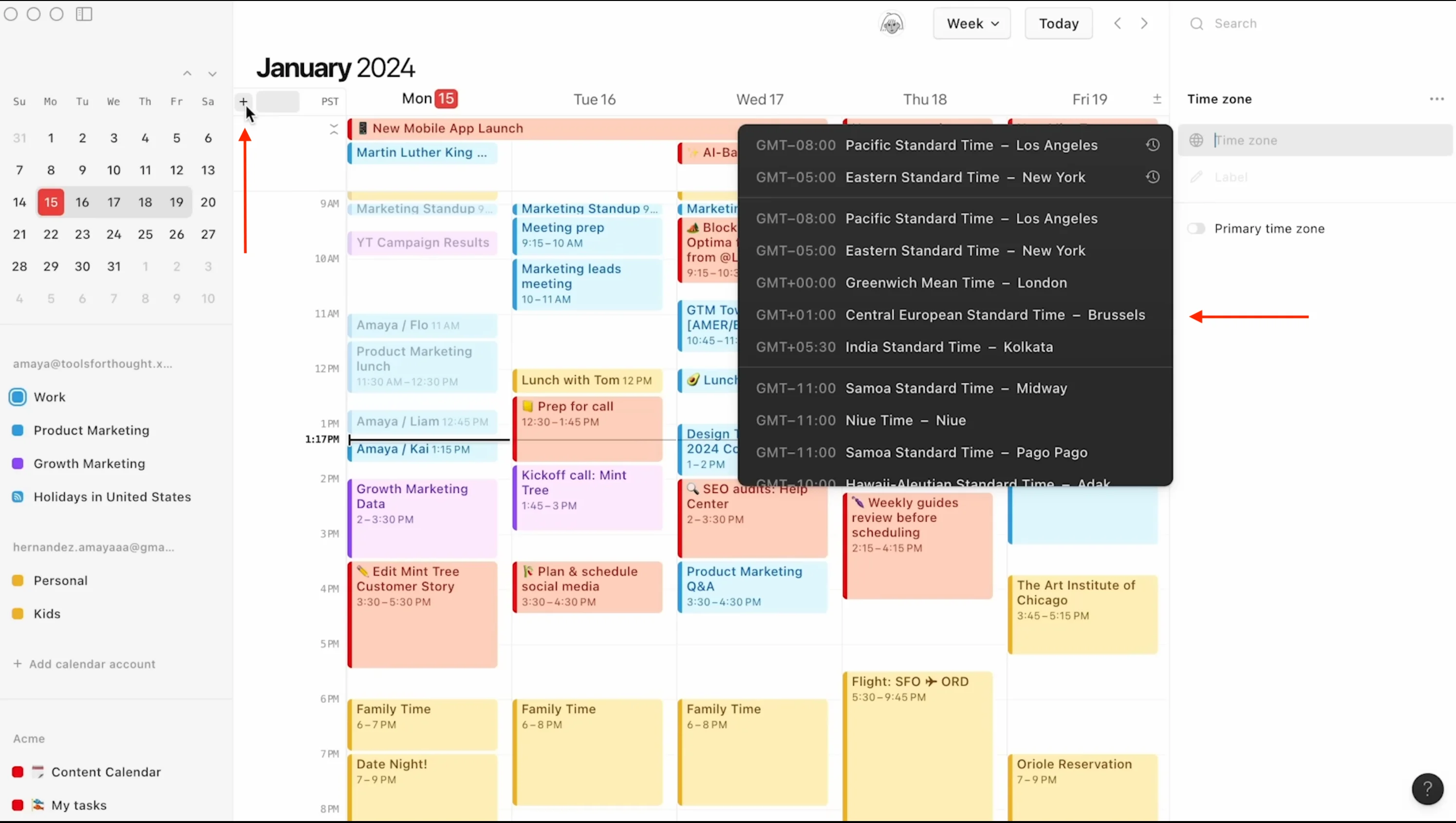
- Global Time Zone Management: Add and organize multiple time zones along the left-hand rail of the daily grid. Users can drag time zones to rearrange them or rename them to represent specific geographic office locations. This visual alignment helps distributed teams spot overlapping business hours and prevents scheduling conflicts across different continents.
- Command-Driven Interface: Navigate the schedule rapidly using a dedicated command menu accessed via keyboard shortcuts. Users can press a shortcut combination to open a prompt that functions much like a command-line interface, allowing them to jump to specific dates, toggle dark mode, adjust view settings, or create new events without touching the mouse.
- Direct Meeting Context: Attach specific workspace pages to calendar invites to keep documentation organized. When an event begins, attendees can click the attached link to open the exact project brief or meeting notes directly inside the application. This ensures everyone is reading the correct document before the video call starts.
- Keyboard Shortcuts for Meetings: Join upcoming video calls instantly without opening the event details. A dedicated keyboard combination allows users to launch directly into the conferencing link of the next scheduled meeting. This eliminates the frantic search for a specific video URL when transitioning between back-to-back calls.
How to Install Notion Calendar on Windows
- Download the official Windows installer package from the vendor's primary website.
- Launch the downloaded executable file to initiate the setup process on your local machine.
- Allow the installer to copy the necessary files to your local user directory; the software installs without requiring administrator privileges or advanced configuration steps.
- Open the application from your Start menu or desktop shortcut once the extraction and file placement finish.
- Click the initial login prompt, which redirects you to your default web browser to authenticate your existing workspace credentials.
- Review and accept the authorization requests to allow the application to read and write event data from your connected calendar providers.
- Return to the desktop client to complete the first-run experience, where you can configure default views and connect additional accounts.
- Customize the system visibility settings to ensure only the most relevant schedules are active on startup, preventing visual overload from shared team calendars.
Notion Calendar Free vs. Paid
Notion Calendar is completely free to install and use. The vendor does not charge a standalone subscription fee for the desktop client, nor does it lock core scheduling tools behind a premium paywall. Essential functions like availability sharing, multiple time zone displays, and custom keyboard shortcuts are fully accessible to all users at no cost. The business model treats the calendar client as an ecosystem extension rather than a separate revenue stream, encouraging users to manage their schedules alongside their workspace data.
Because the application connects directly to your primary workspace, its overall capacity is influenced by the tier of your connected account. Users on the free workspace plan can link their schedules to personal databases and tasks without hitting calendar-specific limits. There are no watermarks placed on the booking links sent to external clients, and the software does not restrict the number of external calendar accounts you can view simultaneously.
For organizations operating on Plus, Business, or Enterprise tiers, the calendar application simply inherits those advanced workspace capabilities. The software respects the administrative permissions, security protocols, and storage capacities dictated by the paid plans. If a team relies on a paid tier to manage massive databases with strict access controls, the desktop client visualizes that data accurately while preventing unauthorized users from altering scheduled project timelines.
While the application is free, it relies entirely on cloud connectivity to maintain synchronization. The vendor does not offer a standalone offline license or a perpetual purchase option, as the software is inherently tied to active internet connections and live databases. Users do not need to worry about trial periods or hidden export limits, but they must maintain an active workspace account to keep the application functioning.
Notion Calendar vs. Morgen vs. Google Calendar
Morgen is a premium, highly configurable scheduling tool designed for individuals who require deep connections to specialized third-party task managers. It supports a wider variety of calendar protocols, including native CalDAV, and integrates with external tools like Todoist or linear project trackers. However, accessing Morgen's advanced integrations, multi-account synchronization, and automated scheduling requires a paid monthly subscription, making it a heavier financial commitment for standard users.
Google Calendar remains the default standard for browser-first scheduling, offering immediate access from any computer without requiring local software installation. It handles basic event creation, recurring meetings, and video conferencing links perfectly. Yet, it operates primarily as a standalone web tool, lacking deep connections to complex project management databases and missing the speed and shortcut-heavy navigation provided by a dedicated Windows desktop client.
Notion Calendar serves as the better fit for professionals whose knowledge base, project boards, and collaborative documents already live within the Notion ecosystem. It bridges the gap by turning database items into visual time blocks, offering a faster desktop experience than a standard web calendar, and providing custom booking links without the premium subscription costs required by dedicated third-party schedulers like Morgen.
Common Issues and Fixes
- Database items do not appear in the schedule. The application cannot visualize workspace items unless a specific date field is configured on the source project board. Open the target database, ensure a "Date" property exists, and verify that it contains actual timeline data.
- External events fail to synchronize. Local data states can occasionally become stuck, preventing new meetings from appearing. Press Ctrl + Shift + R while the desktop client is active to force a hard refresh, which clears the local cache and pulls the latest data from the server.
- Integration connections drop unexpectedly. Authentication tokens for external scheduling providers can expire, causing data flow to halt. Navigate to the integrations menu in the settings panel, disconnect the affected account, and re-authenticate through the browser to restore the connection.
- Cannot change the date of a linked workspace event. If you are unable to drag an item to a new time slot, your account likely lacks sufficient permissions for the source database. You must request edit access from the workspace administrator, as view access prevents the calendar client from modifying deadlines.
- Desktop alerts for upcoming meetings do not trigger. The operating system may be suppressing application pop-ups. Check the Windows Focus Assist or Do Not Disturb settings to ensure rules are not actively blocking notifications from the application while you are working in full-screen mode.
Version 1.132.0 — 2025
- Added ability to edit Notion database page descriptions directly within calendar events for seamless bi-directional syncing.
- Integrated Notion AI to allow searching and retrieving context from your calendar schedule and events.
- Introduced a new Meeting Notes sidebar to instantly access AI-generated transcripts, summaries, and action items linked to your events.
- Improved performance for calendar syncing and reduced load times when switching between views.
- Fixed an issue where recurring event exceptions were not correctly reflecting updates from connected external calendars.