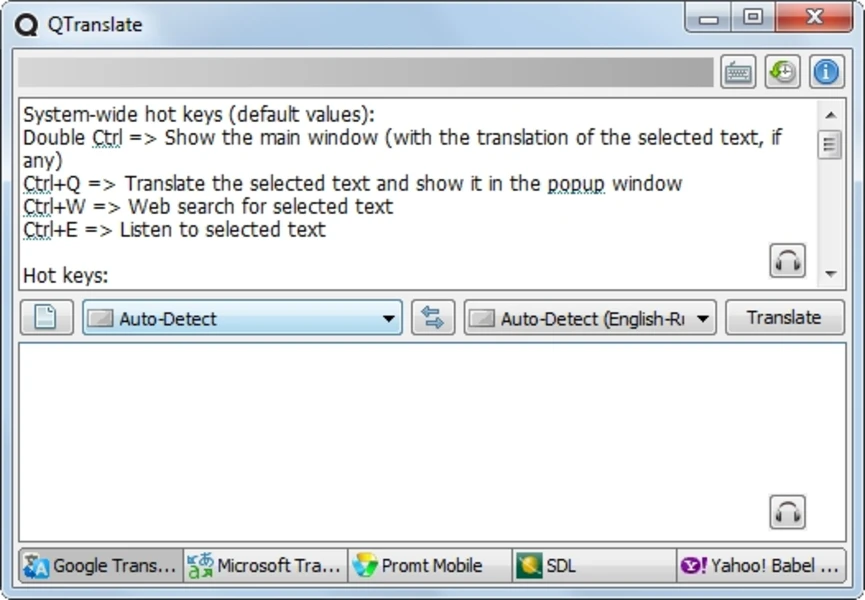
For computer users dealing with multilingual documents, international client emails, or foreign language chat clients, constantly shifting focus between an active application and a web-based translator disrupts concentration. QTranslate solves this friction by embedding text conversion directly into the Windows desktop environment. Operating as a lightweight background utility, the software monitors system clipboard activity and text selection. It allows users to highlight foreign words in almost any desktop program and immediately read the translated result without ever opening a web browser.
Instead of forcing users to rely on a single proprietary engine, this utility acts as an aggregator for the most widely used online translation APIs. It routes the selected text through external services and returns the localized output in a unified popup interface. Whether reading a technical manual in a PDF viewer, communicating with overseas colleagues in a desktop communication tool, or deciphering foreign code comments in a software development environment, users simply trigger a hotkey to view the converted text. The application handles everything from basic dictionary lookups to paragraph-length conversions and audio pronunciation.
The software runs quietly from the system tray, remaining completely invisible until triggered by a specific keyboard command or mouse action. Because it provides immediate on-demand text conversion, it removes the tedious mechanical steps of copying text, minimizing the current window, navigating to a website, pasting the text, and copying the result back. It provides a highly specific, practical utility for individuals who require rapid language conversion directly inside their existing desktop workflow.
Key Features
- System-Wide Hotkey Translation: Highlighting text in any program and pressing the default Ctrl+Q shortcut immediately opens a localized popup window displaying the translated result. The top half of the popup displays the original text, while the bottom half provides the translated output, removing the manual copy-and-paste steps typically required for web-based tools.
- Multi-Engine Aggregation: The popup interface includes a bottom toggle bar to switch between different translation providers, including Google, Bing, Promt, Yandex, and Baidu. If one engine struggles with a specific idiom or technical phrase, users can click a different provider logo to compare the results instantly without re-typing the query.
- Text Replacement Integration: For users writing in a foreign language, the software allows typing in a native language, selecting the text, and pressing Ctrl+Shift+T. This command replaces the original text with the translated output directly inside the active text editor, email client, or chat box.
- Text-to-Speech Pronunciation: Pressing Ctrl+E while text is selected routes the words through an audio synthesis engine, reading the text aloud. This helps language learners and professionals verify the correct pronunciation of unfamiliar foreign terms using the native audio APIs of the selected translation provider.
- Screen OCR Recognition: When dealing with unselectable text in images, protected PDFs, or video games, the built-in Optical Character Recognition tool allows users to draw a bounding box over the screen by pressing Ctrl+I. The software extracts the characters using the OCR.SPACE API and pushes them through the active translation engine.
- Offline Dictionary Support: The application connects to local XDXF dictionary files, providing detailed word definitions, grammar rules, and syntax context. Pressing Ctrl+Shift+Q triggers a local dictionary lookup instead of a machine translation, which proves highly useful for investigating single words deeply without relying on internet access.
- Translation History Tracking: The software automatically logs past translations in a local database. Users can open the history window by pressing Ctrl+H to retrieve a translation they executed hours earlier, preventing the need to re-query the web API for the same phrase.
How to Install QTranslate on Windows
- Download the executable installer or the portable zip archive from the official distribution source.
- If using the standard installer, run the setup executable and approve the Windows User Account Control prompt to allow the background process installation.
- Proceed through the setup wizard, accepting the license agreement and selecting the destination folder on the local storage drive.
- If using the portable version instead, extract the archive contents into a dedicated folder on a secondary drive or USB flash drive without running an installer.
- Launch the application executable. The software will not open a large desktop window; it will initialize quietly in the background.
- Locate the green application icon in the Windows system tray, which is usually hidden inside the expanding arrow menu near the system clock.
- Right-click the tray icon and select "Options" to configure the application, such as binding primary and secondary target languages to specific keyboard shortcuts.
- Test the background integration by opening Notepad, typing a test phrase, highlighting the text, and pressing Ctrl+Q to verify the translation popup appears on screen.
QTranslate Free vs. Paid
QTranslate operates entirely as free software without premium tiers, hidden subscriptions, or trial periods. The developer provides the utility as freeware, allowing both personal and commercial users to utilize the application without purchasing a license key or registering for an account. All capabilities, including optical character recognition, text-to-speech, and multi-engine API aggregation, are available immediately upon installation.
Because the tool acts as a desktop frontend that routes text queries to public web APIs like Google Translate and Bing Translator, the software itself does not incur heavy internal server hosting costs for language processing. Instead, it relies on the user's active internet connection to communicate with external services. There are no export limits, translation character caps, or application watermarks imposed by the desktop client itself.
While the desktop client is completely free, users must understand that it relies on external web services that monitor their own API usage. Heavy, continuous, automated querying might result in a temporary block from a specific provider. In these situations, the desktop tool does not prompt the user for payment; it simply requires the user to click a different provider tab in the interface to continue translating for free. For enterprise environments, the lack of a paid tier means businesses can deploy it widely, provided their internal security policies permit routing unencrypted text through public translation APIs.
QTranslate vs. DeepL Desktop vs. Babylon Pro
DeepL Desktop provides a highly accurate, AI-driven translation engine that excels at maintaining the natural tone of complex paragraphs and long-form documents. It allows users to drag and drop native file formats like .docx and .pptx directly into the application for full-document conversion. However, DeepL restricts its free tier with strict character limits and locks advanced document handling behind a paid Pro subscription. Users who need to process massive professional documents and require native file translation should choose DeepL, provided they are willing to pay for unrestricted access.
Babylon Pro is a heavy, legacy dictionary and translation suite built around offline enterprise usage and deep vocabulary reference. It includes massive downloadable dictionary packs, grammar tools, and currency converters, operating primarily through local databases rather than cloud APIs. Babylon requires purchasing a commercial license and features an interface that feels cluttered compared to modern background utilities. Babylon is appropriate for highly restricted enterprise environments operating on closed networks where offline dictionary lookups are strictly required by security policies.
QTranslate is the more practical fit for everyday desktop users who want a lightweight, fast, and entirely free aggregator. By pulling from multiple public engines simultaneously, it gives users the flexibility to cross-reference text conversions without paying for a subscription. While it lacks native document format handling, it remains the most efficient choice for instant popup translations during web browsing, reading, or casual desktop communication.
Common Issues and Fixes
- Hotkey conflicts with other software. If pressing Ctrl+Q or Ctrl+E triggers a different application's command, the translation popup will fail to appear on screen. Right-click the system tray icon, navigate to Options, open the Hotkeys tab, and reassign the translation triggers to unmapped key combinations.
- Mouse Mode interferes with design applications. Enabling the "Mouse Mode" feature places a clickable translation icon next to any selected text, which can intercept mouse clicks in creative software and cause tools like warp meshes to fail. Left-click the system tray icon to toggle Mouse Mode off while working in design or editing programs.
- Translation engines return connection errors. If the popup window displays a timeout or API error, the selected provider may have temporarily rate-limited your IP address for excessive queries. Click a different provider logo at the bottom of the popup window to route the text through an alternative web service.
- Antivirus software flags the application. Because the software monitors global keyboard inputs to detect hotkeys across the entire operating system, strict antivirus programs may flag it as a keylogger. Add an exclusion rule for the application executable in Windows Defender or your chosen security software.
- Offline dictionary lookups fail. If pressing the dictionary shortcut yields no results, the application lacks the necessary local database files. Users must manually download XDXF dictionary format files and place them into the designated dictionaries folder within the application directory.
Version 6.10.0 — February 2022
- Refined Google translation results to better match the quality provided on the official website.
- Restored functionality for multiple translation and dictionary services, including Papago, PROMT, Yandex, Youdao, Google Search, and Urban Dictionary.
- Switched to native Windows SSL support by removing the WolfSSL library dependency.
- Updated the internal Libcurl component to version 7.81.0.