Hydrographic surveying and dredging operations require precise, real-time coordination between vessel navigation, sensor data acquisition, and post-processing tools. HYPACK is a professional hydrographic software suite that provides marine surveyors and dredging operators with a unified environment to design tracklines, collect bathymetric data, and generate final delivery formats. By connecting directly to marine hardware, the software eliminates the need to juggle multiple third-party utilities during high-stakes survey missions. Whether handling single-beam transects across a local river or multibeam sweeps in an active harbor, operators use this platform to plan the mission, steer the vessel, and process the resulting depths all within a single application window.
Operating as a localized desktop application is necessary for this type of engineering work. Web-based or lightweight alternatives cannot effectively manage direct serial connections or TCP/IP packet streams from high-frequency multibeam echosounders, GPS systems, and inertial measurement units. The native desktop architecture ensures minimal latency while processing massive point clouds and side-scan sonar feeds, guaranteeing that field crews capture accurate depth measurements and target data without interruption. Survey vessels frequently operate in remote areas without reliable internet access, making a locally installed, dongle-authenticated application the only practical way to ensure continuous operation on the water.
Whether the task involves maintaining navigable shipping channels, monitoring environmental changes, or mapping out complex underwater topographies, professionals rely on this software to build accurate 3D models and calculate volume extraction. From the initial geodesy setup and background chart import to plotting smooth sheets and exporting CAD-ready files, the application handles the entire workflow natively. Surveyors can import background charts in formats such as DXF, DGN, TIF, MrSID, and ARCS, giving the vessel helmsman a clear visual reference while navigating along pre-calculated survey lines.
Key Features
- Feature Name: Channel Design and Survey Planning. The software includes tools for creating planned lines and cross-sectional profiles. Users can generate parallel and perpendicular patterns manually or use the Advanced Channel Design module to build complex 3D surfaces. These surfaces provide the foundation for precise dredging volume computations and ensure that dredging operators meet specific clearance depths.
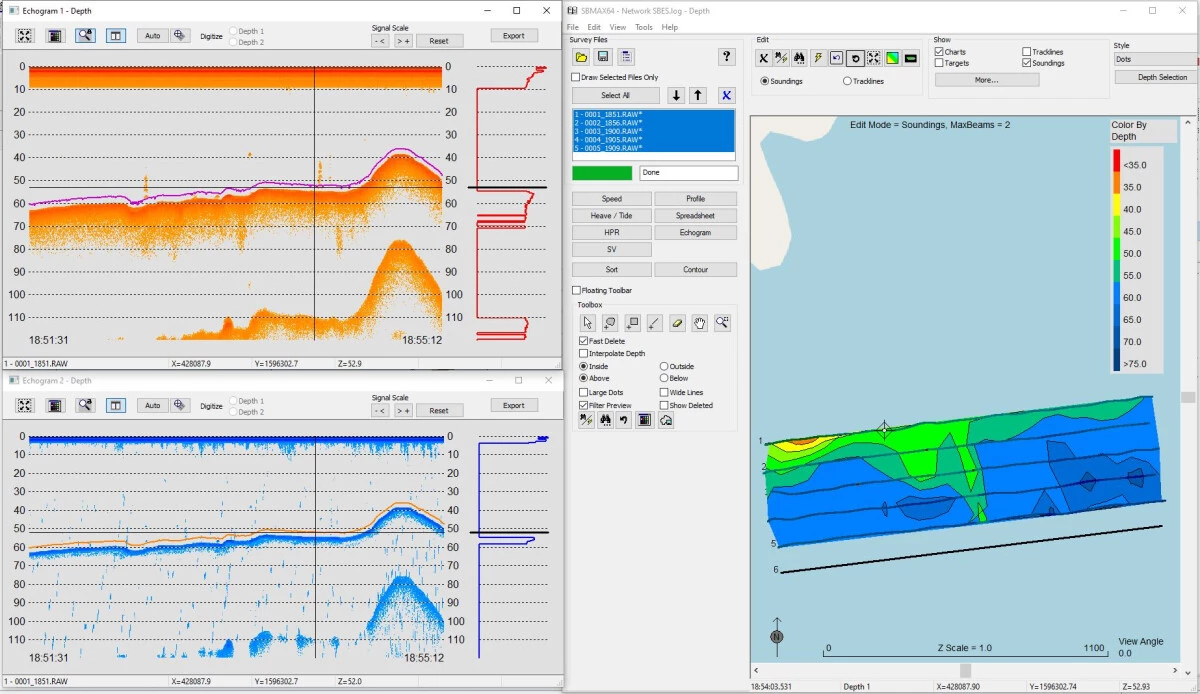
- Feature Name: Single Beam Editor. This graphical review interface allows surveyors to clean tracklines and edit depth profiles after a survey is completed. It displays acoustic profiles for network-capable soundings and provides tools for applying manual water level adjustments, RTK tide corrections, or real-time telemetry gauge data to ensure accurate final depth recordings.
- Feature Name: Electronic Navigational Chart (ENC) Editor. Operators can directly modify existing electronic charts in the standard S-57 format. The editor supports full attribution of S-57 features, allows the digitizing of TIF files, and enables surveyors to mark targets in the main survey interface so they can immediately update existing buoys, lights, or submerged hazards on the chart.
- Feature Name: Side Scan Sonar Mosaicking. The suite natively supports side-scan collection, targeting, and mosaicking. Users can measure target length, width, and height directly from the acoustic return, and export a GeoTIFF image alongside a rich-text Target Book. This Target Book can then be exported directly into Microsoft Word to generate clear hazard reports for clients.
- Feature Name: Extensive Hardware Support. The application handles input from over two hundred different marine devices out of the box. Surveyors can route data from RTK GPS, inertial measurement units, single-frequency and dual-frequency echosounders, magnetometers, and sound velocity sensors via serial COM ports or standard network connections.
- Feature Name: TIN Model and Volume Calculations. Post-processing tools generate precise triangulated irregular networks (TIN) from collected point data. Operators use this module to compute volume quantities for dredging payments, create interactive surface models, export gridded XYZ surfaces, and output final contours to DXF formats for engineering teams.
- Feature Name: Sub-Bottom Profiler Integration. The software supports both analog and digital sub-bottom profiling systems for inspecting geological layers beneath the seafloor. It records the acoustic returns and saves the subsurface data to the industry-standard SEG-Y format, allowing geologists to perform further seismic analysis if required.
How to Install HYPACK on Windows
- Download the core Windows installer package from the official Xylem customer portal or use the provided installation media if operating in an offline environment.
- Ensure your Windows user account has administrative privileges, as the setup requires installing low-level hardware drivers for external marine sensors and the security key.
- Launch the executable file and review the end-user license agreement before proceeding to the module selection screen.
- Choose your required components, such as the base software, the HYSWEEP multibeam module, or the DREDGEPACK interface, depending on your purchased license and intended operational scope.
- Wait for the main files to copy, then accept prompts to install required supplementary drivers, including the specific drivers needed for the USB hardlock security dongle.
- Plug your USB hardlock dongle into an available port, or activate your soft license key via the license manager utility, before launching the application.
- Upon the first run, launch the Hardware Configuration module to assign your specific GPS, motion sensors, and echosounder devices to their respective serial COM ports or TCP/IP network addresses.
- Configure your local geodetic parameters in the Geodesy tool so that incoming coordinates correctly align with your local mapping grid before beginning your first survey project.
HYPACK Free vs. Paid
This is a commercial, enterprise-grade software suite tailored for professional marine organizations, commercial dredging companies, and government agencies. There is no free tier or community edition available. Access requires purchasing or leasing a specific license package depending on the modules needed, such as the standard edition for single-beam operations or extended packages that include multibeam processing tools.
Organizations looking to purchase the software permanently can buy a perpetual license. This upfront investment ensures the software will operate indefinitely using a hardware USB key. Perpetual licenses are typically paired with an annual maintenance plan, which grants access to technical support, major software releases every January, and quarterly patches. If the hardware dongle is lost or physically broken, users under an active maintenance plan can purchase a replacement dongle at a reduced administrative cost, whereas those without active maintenance face much steeper replacement fees.
For shorter projects, temporary contractors, or organizations seeking more financial flexibility, Xylem offers term licenses and flexible leasing options. A term license provides full access to the software and updates for a strict one-year period, allowing companies to easily bill the software cost directly to specific client projects. Alternatively, short-term leases are available for periods as short as three days for soft licenses and seven days for hardware keys. A percentage of these short-term lease payments can often be applied toward the purchase of a permanent license if the organization decides to upgrade within a year of the initial lease.
HYPACK vs. QINSy vs. CARIS
QINSy is a specialized hydrographic suite developed by QPS, known for its strong focus on complex offshore construction, ROV operations, and intensive multibeam data acquisition. While QINSy excels in offshore environments requiring massive point cloud manipulation and precise sub-sea positioning, it often comes with a steeper learning curve for standard inshore surveys. Surveyors working on complex pipe-laying, intricate offshore rig placements, or multi-vessel offshore operations frequently rely on QINSy for its specialized real-time 3D grid handling. However, for a standard single-beam harbor survey, QINSy can feel overly complex.
CARIS, specifically the HIPS and SIPS modules, is widely considered the industry benchmark for high-end bathymetric data processing and official nautical charting. It is heavily utilized by national hydrographic offices to produce legally compliant navigational charts that meet strict international standards. However, CARIS primarily focuses on post-processing and charting rather than initial field acquisition. Organizations using CARIS usually have to pair it with another data collection software to handle the real-time pinging of the echosounder on the boat, moving the data into CARIS only after returning to the office.
HYPACK bridges the gap by offering a complete, end-to-end workflow from initial line planning and field collection to final product export. It is often the preferred choice for single-vessel surveying, inland waterway dredging, and port maintenance due to its straightforward interface and direct support for hundreds of hardware sensors. When operators need a single application that handles both the real-time navigation of the survey boat and the final volume calculation for a dredging contract, this suite provides the most practical and flexible workflow without requiring multiple disjointed software purchases.
Common Issues and Fixes
- Problem description. Application opens in Viewer Mode. This occurs when the software cannot detect the security dongle, restricting saving and hardware data collection. Verify that the USB hardlock is plugged directly into the motherboard, try a different USB port, or check the Windows Device Manager to ensure the hardlock drivers are installed and not blocked by the operating system.
- Problem description. All menu options are greyed out. If the interface loads but you cannot click any tools or configuration menus, a project has not been loaded. Open the Project Manager from the file menu and either create a new survey workspace or select an existing one to re-enable the toolbars.
- Problem description. "No Valid Soundings" error during processing. This happens if the device was incorrectly configured or set to "Do Not Record" during the live survey. Open your Read Parameters window and verify you have selected the exact sonar device used during acquisition, rather than a generic parser, to properly read the depth strings.
- Problem description. Raw file contains binary characters causing crashes. Sometimes a device, usually a GPS, is inadvertently configured to send binary messages mixed with plain text, which the software cannot read correctly. Open the RAW file in a text editor like Notepad++; if you see unusual non-text characters, run the built-in StripBinary tool to clean the file before importing.
- Problem description. Hardlock Error 2, 5, or 6. These specific numeric errors point to a driver communication failure with the USB key. Reseat the dongle, ensure the software was completely closed before inserting it, and install the latest supplemental drivers provided on the official support site.
Version 2025 Q2 — August 2025
- Expanded hardware compatibility to include Nortek Signature and Nucleus models, allowing users to select between averaged slanted beam values or direct vertical beam measurements for depth data.
- Promoted the Side Scan Targeting and Mosaicking (SSTM) tool from Beta to the primary application, featuring a redesigned Target window for improved target classification and comparison.
- Updated the Applanix POS M/V driver to streamline message handling, including the removal of legacy GSOF message support and the addition of new recording options.
- Enhanced Kongsberg KMALL and NMEA drivers to support more versatile data logging and provide automatic detection of installation parameters for smoother configuration.
- Added a new GeoAcoustics GeoBeam driver to the HYSWEEP module, facilitating better integration with Hydro-Tech equipment.
- Improved user interface clarity by standardizing slider colors for Altitude, Shadow Start, and Shadow End to red, matching official training terminology to reduce user confusion.