Avant Browser is a specialized desktop web browser designed to solve cross-compatibility issues by incorporating three distinct rendering engines into a single unified interface. Rather than forcing users to choose between the modern web standards of Google Chrome, the privacy-focused layout of Mozilla Firefox, or the legacy enterprise compatibility of Internet Explorer, this application integrates all three. It achieves this through a unique tri-core architecture that actively runs Blink, Gecko, and Trident engines under the hood. This structural design means a user can load a standard news website using the Chrome engine, switch a separate tab to the Firefox engine for a specialized web app, and open a third tab using the Internet Explorer engine to access an aging corporate intranet portal that requires ActiveX controls.
For web developers, quality assurance testers, and IT administrators, managing multiple standalone browsers is a frustrating reality of testing site layouts and verifying code compatibility. Avant Browser eliminates the need to launch separate heavy applications just to see how a CSS stylesheet or JavaScript function performs across different environments. By mapping specific domains to automatically load with a designated rendering engine, professionals can streamline their daily testing routines. Beyond development tasks, it serves corporate employees who rely on outdated internal databases that refuse to function on modern browsers, giving them a way to access legacy tools without sacrificing speed on the rest of the web.
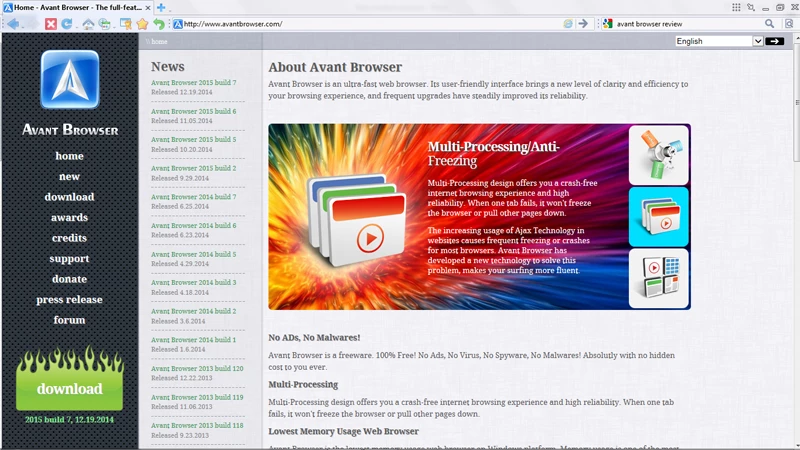
Running a multi-engine desktop client offers distinct memory management advantages compared to running three separate browser programs simultaneously. Avant Browser utilizes a strict multi-processing architecture that isolates every single tab into its own independent process. If a poorly coded intranet site causes the Trident engine to lock up, or a heavy script crashes a Gecko-rendered tab, the failure is contained entirely within that specific process. The rest of the browser window remains responsive, allowing the user to simply close the offending tab and continue working.
Key Features
- Feature Name: Tri-Core Rendering Engine: The application natively houses the Trident, Gecko, and Blink layout engines. Users can manually switch the active rendering mode for any open tab by clicking the engine icon directly adjacent to the address bar, or they can configure the settings menu to assign specific engines to automatically trigger when visiting predetermined URLs.
- Feature Name: Split View Interface: The browser includes a built-in multitasking layout that divides the main window to display multiple websites side by side. This viewing mode is highly practical for comparing source code across two different pages, watching a tutorial video on one half of the screen while reading documentation on the other, or monitoring separate analytical dashboards simultaneously without dragging and resizing multiple desktop windows.
- Feature Name: Detached Floating Tabs: Users can tear any active tab away from the main tab bar to create an independent, floating picture-in-picture window. This detached window can be set to "Stay on Top" of all other desktop applications, ensuring that a web-based messenger, a live video feed, or an important monitoring tool remains visible in the foreground while you type in a separate word processor or work in a different program.
- Feature Name: AutoFill and Startup Login: The browser manages site credentials locally and can bypass manual repetitive login screens. Beyond simply saving passwords, the software can be configured to automatically authenticate and log into a predefined list of frequently used websites the exact moment the browser application launches, saving users the trouble of clicking through individual login forms at the start of their workday.
- Feature Name: Integrated Video Sniffer: The software actively scans the HTML code of the pages you visit to detect embedded media files. When a compatible video file is recognized, a designated download icon appears on the interface, allowing you to intercept and save the media locally to your hard drive using the built-in multi-threaded download manager, bypassing the need to install third-party media extraction extensions.
- Feature Name: Anti-Freezing Multi-Processing: Every tab opened within the application runs as an isolated system process to protect the main browser interface from total failure. If an unoptimized script or a heavy media file causes a single tab to hang and stop responding, the rest of the application remains entirely functional, allowing you to force-close the frozen tab without losing your data or progress in your other open tabs.
How to Install Avant Browser on Windows
- Download the official Windows installer executable from the designated distribution source, saving the setup file to your local drive.
- Navigate to your default downloads folder and double-click the executable file to initiate the installation wizard. You may need to authorize the Windows User Account Control prompt to grant the installer administrative privileges.
- Read and accept the end-user license agreement presented on the first screen of the wizard to proceed with the installation.
- Choose the destination path for the application files. The wizard defaults to the standard Program Files directory on the primary system drive for modern Windows 10 and Windows 11 environments, but you can browse for a custom folder if you prefer to install it elsewhere.
- Review the component selection and shortcut options. You can choose whether to create an icon on your desktop and a shortcut in your Start menu for easier access.
- Examine the default browser association prompt carefully. If you prefer to keep your current primary browser as the default handler for HTML files and web links, ensure the option to make Avant your default browser is unchecked.
- Click the install button and wait while the setup wizard extracts the necessary core files, including the integrated rendering engines, onto your local disk.
- Click finish to close the setup wizard and launch the application. On the initial startup, you can access the settings menu to import your existing bookmarks and configure your automatic engine-switching rules.
Avant Browser Free vs. Paid
Avant Browser is distributed entirely as freeware. The developers provide the complete application with all of its multi-engine capabilities, interface customization options, and built-in tools at no cost to the end user. There are no paid tiers, subscription plans, or premium licenses required to unlock additional functionality. Features like the tri-core engine switching, split-view interface, and integrated video sniffer are available immediately upon installation.
The business model does not rely on restricting essential tools behind a paywall or forcing users into an enterprise upgrade path. You do not need to create an account, input payment information, or worry about recurring billing. The software is provided as a fully functional utility without trial limitations, export watermarks, or artificial caps on the number of tabs you can open or downloads you can initiate.
Because the application is completely free, it does not include dedicated corporate customer support contracts or guaranteed response times for troubleshooting. The software does not force users to install mandatory paid add-ons, but users should always ensure they acquire the installer from verified, reputable directories. Downloading the software from unverified third-party mirrors can occasionally result in interacting with customized wrappers that attempt to install unwanted search toolbars alongside the primary browser.
Avant Browser vs. Maxthon vs. Google Chrome
Maxthon is a prominent alternative in the multi-engine browser category, historically utilizing a dual-core architecture that switches between WebKit and Trident layout engines. Maxthon places a heavy emphasis on its proprietary cloud synchronization features, offering users a deeply connected ecosystem that syncs bookmarks, history, and active tabs across desktop and mobile devices. It also integrates modern features such as built-in cryptocurrency wallets. Users who require aggressive cross-device data synchronization and prefer a browser tightly integrated with cloud services often gravitate toward Maxthon's expansive ecosystem.
Google Chrome represents the standard, single-engine approach, relying entirely on the Blink rendering engine. It dominates the browser market by providing an enormous library of third-party extensions, tight integration with Google's suite of web services, and a rapid update cycle that dictates modern web standards. Chrome is the default choice for general consumers and users whose daily tasks exist entirely within modern, standardized web applications. However, Chrome offers no native support for legacy enterprise sites that require ActiveX controls or Internet Explorer rendering, forcing users to rely on clunky external extensions to access older intranets.
Avant Browser is the better fit for IT professionals, quality assurance testers, and corporate employees who specifically need local, immediate control over three distinct rendering engines without the added weight of cloud synchronization or cryptocurrency tools. By offering Trident, Gecko, and Blink in a straightforward, locally managed freeware package, Avant allows users to map specific legacy enterprise portals to Internet Explorer mode while keeping their standard browsing tasks in a modern Chrome or Firefox layout. It provides exactly what is necessary for cross-engine compatibility within a single window, avoiding the heavy ecosystem lock-in demanded by its competitors.
Common Issues and Fixes
- Problem description: The browser repeatedly sets itself as the default Windows handler.
If the application continuously overrides your preferred default browser settings every time you open it, navigate to the internal Options menu. Locate the system settings tab, disable the toggle that checks for default browser status on startup, and then use the Windows Default Apps menu to reassign your preferred primary browser. - Problem description: Websites fail to load correctly after manually switching engines.
If a webpage layout breaks completely when you force it into a specific rendering mode, the site likely relies on modern web standards that are entirely unsupported by the legacy engine you selected. Use the dropdown menu next to the address bar to switch the active tab back to the Blink engine, then refresh the page to load the modern scripts and assets correctly. - Problem description: The integrated video sniffer fails to detect embedded media files.
When the built-in sniffer does not display a download prompt for a video on a page, it is usually because the host website utilizes proprietary digital rights management or encrypted streaming protocols. The native tool only detects standard, unencrypted media formats; for protected content, you must rely on the site's official viewing method. - Problem description: System memory usage spikes unexpectedly during multitasking.
While the multi-processing architecture isolates individual tabs, keeping numerous heavily scripted web apps running simultaneously across different rendering engines will still consume significant system RAM. To alleviate the load, close unused background tabs, clear your cache through the privacy settings menu, and restart the browser to free up locked hardware resources.
Version 2020 Build 3 — March 2020
- Added capability to disable the Google Chrome Software Reporter Tool to reduce background resource usage.
- Improved stability and response time when switching between the tri-core rendering engines.
- Fixed minor bugs related to page rendering and memory management for a smoother browsing experience.