Oxygen XML Editor is an authoring and development environment designed for structured content, specifically focused on XML, DITA, JSON, and XSLT workflows. Technical writers, information architects, and software developers use this application to create complex documentation, manage large-scale DITA maps, and validate custom schemas. Instead of relying on basic text editors that only provide syntax highlighting, this desktop application provides a specialized visual editing mode alongside a direct code view. This ensures strict document compliance with industry standards, such as DocBook and TEI, before the content ever reaches a final publishing pipeline.
The local desktop environment plays a critical structural role for heavy documentation tasks. Managing thousands of interlinked topics, resolving cross-references, running complex XPath queries, and transforming XSLT into HTML or PDF requires local processing power and direct file system access that browser-based tools often struggle to provide. Users choose a local client to maintain direct control over local project directories and to run real-time Schematron validation without experiencing browser memory limits or network latency. The application parses large hierarchies instantly, providing immediate error flagging if an author breaks a required tag sequence.
Furthermore, the software incorporates modern workflow extensions directly into the local workspace, including the AI Positron assistant. This allows technical writers to draft missing topic descriptions, repair broken XML structures, and rewrite documentation against specific local style guides while staying inside the editing interface. By centralizing the writing, debugging, and publishing phases into one continuous interface, the application eliminates the friction of moving source files between separate validation scripts, external Git clients, and basic text editors.
Key Features
- Visual Author Mode: The Author editing mode provides a CSS-based, word-processor-like interface for XML frameworks like DITA, DocBook, and TEI. Writers manipulate structured content without reading raw tags, using interface actions to insert tables, figures, and topic references while the application silently maintains the strict underlying code hierarchy. Elements can be customized using local CSS files to change how tags render on screen.
- XSLT and XQuery Debugging: Developers write and test transformation stylesheets using dedicated XSLT and XQuery editors equipped with built-in debuggers. The interface includes step-by-step execution controls, variable tracking panels, and a dedicated XPath/XQuery Builder view that evaluates complex queries against the current document or entire project directories.
- Schema Validation and Design: The software checks document validity in real time against DTD, W3C XML Schema, RELAX NG, and Schematron rules. Users can open the visual Schema Design mode to drag and drop elements, view the schema hierarchy graphically, and track component references across large modular schemas to ensure data structures remain consistent.
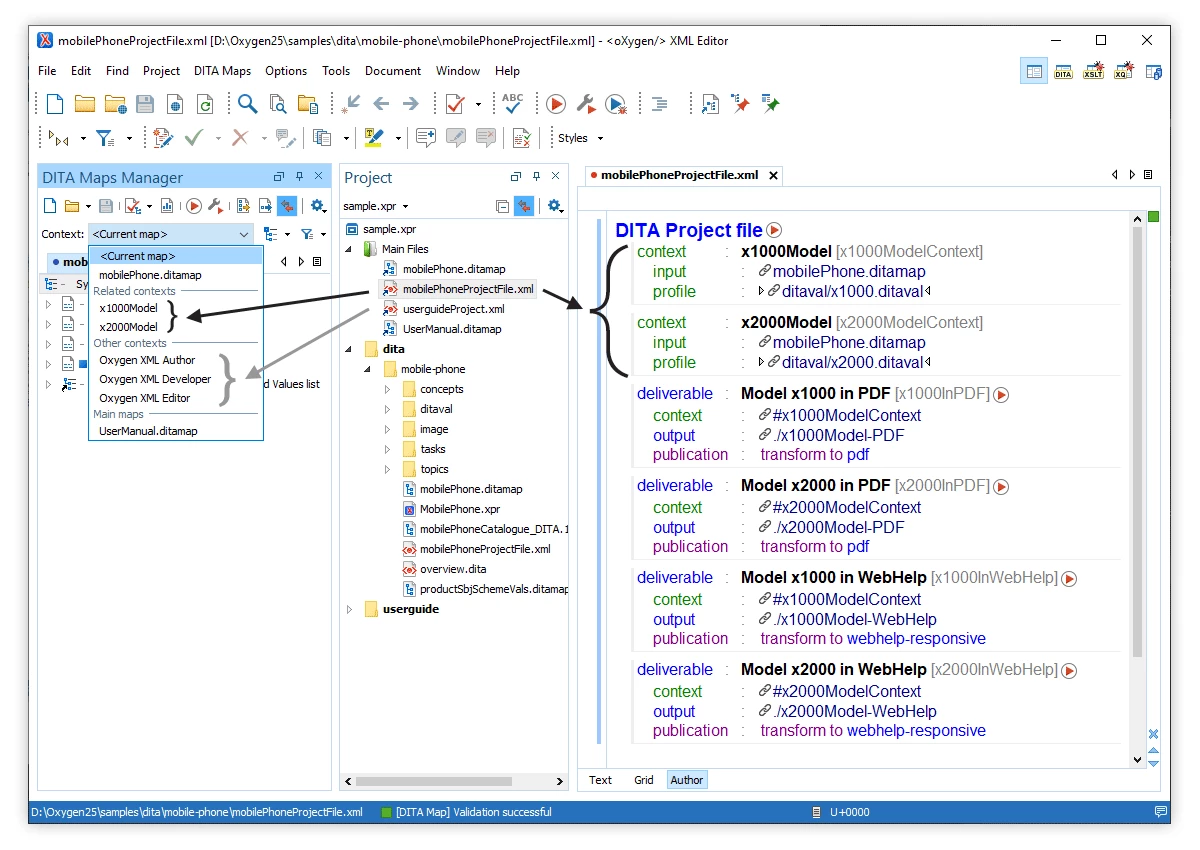
- DITA Maps Manager: A specialized panel organizes DITA projects by displaying topics as an expandable tree structure. Writers use this view to drag topics into new arrangements, assign profiling attributes for conditional text output, validate cross-references across the entire map, and generate final WebHelp or PDF deliverables using the built-in publishing engines.
- AI Positron Assistant Integration: The application connects to external language models like OpenAI GPT or Anthropic Claude via a dedicated side view. Writers highlight text to run quick actions, instruct the external model to draft short descriptions, translate terminology, or fix validation errors, with the results appearing in a diff editor for manual approval before insertion.
- JSON and JSON Schema Tools: Beyond XML, the editor supports JSON document creation, formatting, and validation against custom JSON Schemas. A Grid editing mode displays nested JSON arrays as navigable tables, while built-in conversion utilities translate JSON data into XML structures or evaluate it using XPath expressions directly from the main toolbar.
- Git Client and Version Control: A built-in Git client panel tracks local repository changes, showing modified files, staged commits, and branch history. Writers resolve merge conflicts directly within the specialized XML comparison tool, which highlights specific tag or text differences without forcing the user to leave the main documentation workspace.
How to Install Oxygen XML Editor on Windows
- Download the executable Windows installer package from the official vendor website, ensuring you select the 64-bit architecture to match your operating system.
- Double-click the downloaded setup file to launch the installation wizard and accept the standard end-user license agreement.
- Select the destination directory, which defaults to the standard Program Files folder on the Windows system drive, or specify a custom path if installing on a secondary disk.
- Choose which file associations to register, determining if the application will act as the default handler for formats like .xml, .xsl, .xsd, .json, and .dita.
- Review the option to use the bundled Java Runtime Environment, which ensures the application has the correct dependencies without altering system-wide Java variables.
- Decide whether to create desktop shortcuts and Start menu entries, then click Install to copy the application files to the local disk.
- Launch the application from the Start menu once the setup wizard finishes copying all files and building the local directory structure.
- Upon the first run, enter a valid license key into the registration dialog, or request a 30-day trial key using a valid email address to unlock the main interface and begin editing.
Oxygen XML Editor Free vs. Paid
The application operates strictly under a commercial licensing model and does not offer a free tier for continuous use. New users can register on the vendor website with a valid email address to request a 30-day trial key. This trial unlocks the entire desktop feature set for evaluation purposes. During the 30-day window, there are no artificial saving restrictions, export limits, or watermarks applied to generated PDFs or WebHelp outputs, allowing teams to test real production workflows.
Once the trial expires, users must purchase a license to continue saving files and processing transformations. The pricing structure is segmented by user type and deployment scale. A Personal license, intended strictly for individual freelancers or hobbyists who are funding the purchase themselves, costs approximately €240 per year. For corporate environments and commercial work, Business licenses start at roughly €942 for a single named user. Organizations can also purchase floating network licenses at higher tiers for teams that need to share software access across multiple shift workers or international locations.
Syncro Soft provides a heavily discounted Academic license starting around €6 per month for students, teachers, and educational institutions. Standard commercial licenses generally include a one-year Support and Maintenance Pack (SMP), which provides access to major updates and direct technical support from the developers. Connecting to the AI Positron Assistant requires additional AI credits or a separate enterprise add-on that links the software to an organization's own API keys for external services like OpenAI or Anthropic.
Oxygen XML Editor vs. Altova XMLSpy vs. MadCap Flare
Altova XMLSpy focuses heavily on the data integration and backend development side of XML, offering highly specialized graphical tools for modeling databases, editing SOAP requests, and generating backend code from schemas. Developers handling complex XBRL reporting, financial data integration, or deep web services architecture often choose XMLSpy because its interface functions strictly as a data engineering workbench. However, it lacks the specialized, word-processor-style visual authoring mode that technical writers need for drafting long-form manuals or managing vast networks of DITA topics.
MadCap Flare is built from the ground up as a complete technical writing ecosystem with strong project management capabilities, direct legacy content migration tools, and highly customized multi-channel publishing to web and print. Teams managing huge corporate documentation portals with CSS-based styling, complex condition variables, and extensive translation workflows often prefer Flare for its strict project control. Its primary downside is that it hides much of the raw XML structure behind its proprietary interface, making it less suitable for users who need to write custom XSLT stylesheets, validate raw schemas, or maintain portability outside of the vendor's ecosystem.
Oxygen XML Editor strikes a practical balance by serving both the strict code requirements of schema developers and the visual drafting needs of technical authors. Users choose it over XMLSpy when they need a comfortable visual environment for writing DITA, DocBook, or TEI content without breaking underlying tags. They choose it over MadCap Flare when they require direct, unfiltered access to edit the underlying XML source code, run XPath queries against local directories, or construct custom XSLT publishing pipelines without being locked into a proprietary project manager.
Common Issues and Fixes
- The application throws an OutOfMemoryError when running a complex XSLT transformation or validating a massive DITA map. The software runs on Java and has a default memory allocation limit that may be too low for large projects. Users must open the installation directory, locate the
oxygen.vmoptionsconfiguration file, and increase the-Xmxvalue (such as changing-Xmx1024mto-Xmx4096m) to allow the application to consume more system RAM. - The AI Positron Assistant fails to return results or shows a connection error in the side view. This usually happens if the local network blocks the required external API endpoints or if the user's trial credits have expired. Check corporate firewall settings to ensure the application can reach the external AI provider, or verify in the add-on preferences that a valid enterprise API key is configured and active.
- PDF output generated from a DITA map fails to apply custom CSS styling correctly. The built-in PDF Chemistry transformation engine relies on specific media query rules and @page definitions to format print output. Open the transformation scenario settings, ensure the custom CSS file is explicitly referenced in the arguments, and verify that the CSS rules are written for the "print" media type rather than standard screen display.
- The visual Author mode displays raw XML tags instead of the expected word-processor layout for custom document types. The editor does not have a predefined CSS framework for unrecognized or custom XML structures. Users must open the Document Type Association preferences, create a new framework rule matching the custom root element, and assign a local CSS file to dictate how the tags should render visually in Author mode.
- Validation fails with DITA Open Toolkit errors when generating HTML5 WebHelp. This often occurs if the map contains broken cross-references, missing image files, or empty topic references that the publishing engine cannot resolve. Check the DITA Maps Manager for red error indicators, open the validation report panel to locate the exact missing file paths, and correct the broken references before running the transformation scenario again.
Version 26.0 — January 2024
- Advanced AI Integration: Incorporated Oxygen AI Positron 8.0, introducing "agentic" capabilities that allow the AI to perform complex, multi-step tasks using project-aware context and a new "Saved Memories" feature for persistent preferences.
- Real-Time AI Autocompletion: Added a new AI-driven content completion engine that offers intelligent, context-sensitive suggestions for XML, XSLT, XSD, Schematron, and JSON Schema development directly within the editor.
- Enhanced DITA Management: Redesigned the DITA Maps Manager to improve usability and added a more powerful topic search functionality, streamlining the organization and retrieval of DITA resources.
- Unified AI Add-on: Consolidated the standard and Enterprise AI assistants into a single unified add-on, enabling broader access to features like the Model Context Protocol (MCP) for connecting external tools.
- Expanded Development Support: Extended AI action support (such as "Explain Code" and "Generate Code") to cover additional languages, including HTML, XHTML, XProc, and XSpec.
- JSON Editing Upgrades: Introduced AI-powered file creation for JSON and JSON Schema, coupled with automatic validation mechanisms to repair structure issues in AI-generated content.
- Improved Stability: Fixed specific issues causing exceptions during PDF generation with footnotes in rotated tables and resolved validation errors in projects using custom DITAVAL files.