Writing a novel requires tracking an immense amount of information, from character arcs and historical timelines to specific location details and thematic subplots. Standard word processors are designed for general document creation, leaving authors to invent their own organizational systems using scattered text files, physical notebooks, and complex folder structures. The Novel Factory approaches drafting entirely differently, acting as a dedicated workspace built specifically for the mechanics of fiction writing. Instead of dropping users onto a blank page with a blinking cursor, it provides a strictly structured environment that actively guides the author through the entire narrative process.
The core appeal of this software lies in its ability to break the monumental task of writing a book into manageable, logical stages. It replaces scattered notes with dedicated sections for plot management, character profiles, and scene blocking. Authors map out their pacing using visual corkboards, fill in specific details about a protagonist's motivations, and then open the primary manuscript editor to write the actual draft. Because the structural planning tools run parallel to the typing interface, writers never have to close their active chapter to check a secondary character's eye color or confirm a timeline detail. Every piece of reference material remains accessible within a few clicks, preventing the distraction that often derails a writing session.
While web-based writing platforms are common, a dedicated desktop installation remains crucial for authors who need to eliminate digital distractions and work completely offline. By installing the software locally on a Windows 10 or Windows 11 machine, writers isolate their creative workspace from browser tabs and internet connectivity issues. This local setup ensures that manuscript files are cached on the computer's hard drive for immediate access, syncing to the cloud only when a connection is restored. For anyone attempting to finish a long-form draft, this isolation, combined with strict organizational templates, provides the necessary focus to actually reach the end of the manuscript.
Key Features
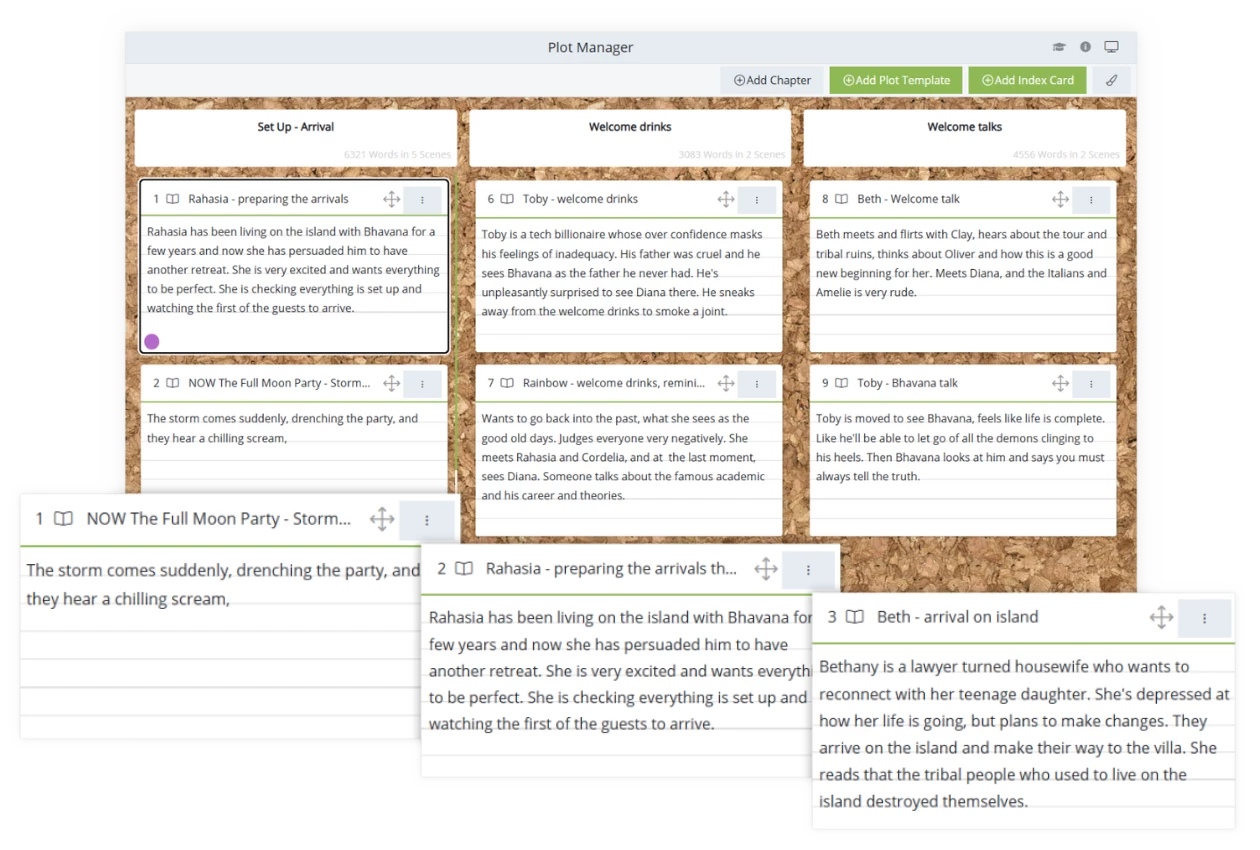
- Feature Name: Dynamic Plot Manager. The plot management tool shifts the focus from a daunting blank page to manageable narrative building blocks. Users interact with a visual corkboard interface to drag and drop scene cards into established story structures. This modular approach ensures that key pacing beats are hit at the right moments, preventing the middle of the narrative from losing momentum.
- Feature Name: Built-in Writing Roadmap. Rather than leaving authors to figure out their own process, this built-in guide offers a structured path from the initial concept to the final polished draft. It acts as an interactive coach, prompting writers to define their premise, outline their arcs, and block their scenes in a logical order. This roadmap reduces overwhelming friction by breaking the marathon of fiction creation into actionable tasks.
- Feature Name: Detailed Character Profiles. Keeping track of an ensemble cast requires more than scattered text files, which is why this tool provides dedicated profile fields. Writers document physical traits, underlying motivations, psychological archetypes, and historical backgrounds using specific application prompts. Centralizing these details makes it simple to reference a protagonist's background while drafting dialogue or mapping out personal growth arcs.
- Feature Name: Flexible Subplot Manager. Complex narratives weave multiple storylines together, and the dedicated tracking system ensures secondary arcs remain organized. Authors color-code individual threads, assign them to specific cast members or themes, and track their progression alongside the primary plot timeline. This specialized tracking prevents minor storylines from being forgotten or resolved awkwardly, resulting in a tighter manuscript.
- Feature Name: Distraction-Free Manuscript View. When the structural planning is complete, the dedicated manuscript view provides a clean environment for typing the actual book. The interface allows writers to view their active text alongside their structural notes and scene outlines without constantly switching active windows. This parallel layout keeps critical reference material visible while maintaining an uncluttered space for raw creative output.
- Feature Name: Real-Time Writing Statistics. Maintaining momentum requires measurable progress, which is achieved through the integrated statistics dashboard. The software tracks daily word counts, breaks down scene lengths, and monitors overall progress against user-defined output targets. By providing visual feedback on daily habits, it helps authors stick to their drafting schedule and identify periods of low productivity.
How to Install The Novel Factory on Windows
- Open a modern, Chromium-based web browser on your Windows 10 or Windows 11 PC and navigate to the official login portal for the software. Because the current application operates as a Progressive Web App, the initial setup must begin through a standard browser interface rather than a traditional executable installer.
- Enter your account credentials to access your web-based dashboard, ensuring that your subscription is active and your workspace loads completely. This initial connection authenticates your local machine and prepares the necessary application files for local caching.
- Locate the installation icon situated on the far right side of your browser's address bar, or open the primary browser menu and select the prompt labeled "Install Novel Factory" from the dropdown list. This action triggers the browser to package the web environment into a standalone local instance.
- Confirm the installation prompt when it appears on the screen to allow the browser to unpack the necessary files and integrate the application into your operating system. During this step, the system will automatically generate a dedicated shortcut on your Windows desktop and taskbar for easy access.
- Close the browser tab entirely and launch the newly created desktop application directly from your Windows environment. You will notice that the software now opens in its own isolated window, stripped of standard browser controls like address bars or navigation buttons.
- Verify the local offline capabilities by temporarily disconnecting your computer from the internet and ensuring that your manuscript and planning sections remain accessible. The software is designed to cache your work locally and synchronize it with the cloud once your connection is restored.
- Log out of any remaining browser sessions and conduct all future writing sessions exclusively through the installed desktop client. Restricting your active session to a single local application prevents data synchronization conflicts and ensures that your offline progress is saved correctly.
The Novel Factory Free vs. Paid
The Novel Factory operates on a tiered subscription model, providing distinct levels of access based on the complexity of an author's needs. The Basic plan is priced at $7.50 per month and is tailored specifically for writers focusing on a single project at a time. This entry-level tier grants full access to the core planning tools, the manuscript editor, and a limited amount of cloud storage, but it strictly restricts the account to one active novel database. For beginners drafting their very first manuscript, this tier provides all the necessary guidance without unnecessary financial overhead.
Authors juggling multiple ideas or extensive fictional universes will need to look at the Standard plan, which costs $20 per month. Upgrading to this tier removes the single-novel restriction, allowing users to create and manage an unlimited number of concurrent projects within the interface. The Standard plan also increases the available cloud storage capacity significantly, accommodating larger manuscript files, extensive location imagery, and more complex character mood boards. Both of these subscription plans offer discounts for users who commit to an annual billing cycle rather than a month-to-month payment schedule.
To reduce the risk of buyer's remorse, the developers offer a 30-day free trial that requires no immediate payment information. During this initial trial period, prospective users have unrestricted access to the entire suite of organizational tools and structural templates. If a writer decides the strictly structured approach does not fit their personal creative workflow, they can easily export their manuscript and planning data into standard document formats before the trial expires, ensuring that no creative work remains trapped behind a closed paywall.
The Novel Factory vs. Scrivener vs. yWriter
Scrivener excels at raw flexibility and customized document management, making it the preferred choice for authors who demand absolute control over their digital binders. It allows writers to construct deeply customized folder hierarchies, store massive amounts of external research documents, and compile text into dozens of different formatting styles. However, this extreme customizability comes with a notoriously steep learning curve that can stall early productivity. New authors often find themselves distracted by the sheer volume of formatting options and interface tweaks, spending more time learning how to use the menus than actually drafting their manuscript. For writers who lack a defined process, Scrivener offers a blank slate rather than a guiding hand.
yWriter offers a completely free, database-driven approach to novel writing by breaking stories down into manageable scenes and chapters. Developed specifically by a programmer and author, it forces writers to assign specific characters, items, and locations to individual scenes, which is excellent for tracking continuity across a long and complex draft. While its fundamental logic is structurally sound, yWriter suffers from a heavily table-based, utilitarian interface that feels quite dated compared to modern alternatives. It lacks visual polish, interactive corkboards, and the dedicated instructional guidance that commercial writing software provides, making the creative process feel somewhat like data entry.
The Novel Factory is the better fit for authors who actively want structured guidance and a clean, visually appealing workspace alongside their main word processor. By enforcing a step-by-step roadmap and providing specialized templates for character and subplot development, it prevents writers from getting lost in their own notes. While it lacks the extreme custom folder structures of Scrivener and the free price tag of yWriter, it eliminates the overwhelming friction of staring at an unstructured page. It keeps the focus strictly on finishing the draft by breaking the monumental task of writing a book into logical, guided milestones.
Common Issues and Fixes
- Problem description. Users experience offline changes failing to sync across different computers. This occurs when users remain logged into the application on multiple devices simultaneously, causing database conflicts when the software attempts to merge local caches. To resolve this, always ensure your desktop client reconnects to the internet before closing the program. Make it a strict habit to manually log out of one computer before initiating a drafting session on another.
- Problem description. The application displays blank interface screens or rendering errors on older operating systems. Because the underlying application architecture relies on web rendering technology, outdated system components prevent the interface from loading. The most effective fix is to update your default Windows browser, such as Edge or Chrome, to the newest available update, as the standalone desktop app utilizes these core engines.
- Problem description. Legacy project data is missing from the newly installed workspace. The current platform architecture does not automatically import or overwrite databases created in older, separate desktop iterations of the software. To recover your previous work, navigate to the user menu located in the top right corner, click the specific import button for legacy projects, and follow the prompts to copy your historical data into the modernized environment.
- Problem description. The interface prevents the creation of a second novel or blocks access to advanced subplots. Users frequently encounter locked menus when attempting to start a sequel, which is tied to the intentional restrictions of the Basic subscription tier. To resolve this limitation and unlock unlimited project creation, navigate to the account management portal and upgrade the subscription to the Standard plan.
Version 1.37.1 — July 2021
- New Progressive Web App (PWA) Architecture: Rebuilt the platform to function seamlessly across all devices with full offline capabilities, allowing work to be saved locally and synced when connection is restored.
- Overhauled Plot Manager: Introduced a dynamic drag-and-drop index card system for rearranging scenes and chapters, including color-coding and subplot associations.
- Enhanced Character Builder: Added comprehensive character development templates with detailed prompts, archetype suggestions, and questionnaires to deepen character backstories.
- "Turn Back Time" Version History: Implemented a snapshot feature that automatically saves manuscript versions, allowing users to compare drafts and revert to previous iterations of scenes.
- Integrated Plot Templates: Included a library of industry-standard story structures (e.g., Hero's Journey, Save the Cat) that can be directly applied to the Plot Manager.
- Advanced Statistics Dashboard: Added new tools to track daily word counts, writing habits, and project completion estimates to boost productivity.
- Customizable Interface: Enabled workspace personalization options, including dark mode support and adjustable panels for a distraction-free writing environment.