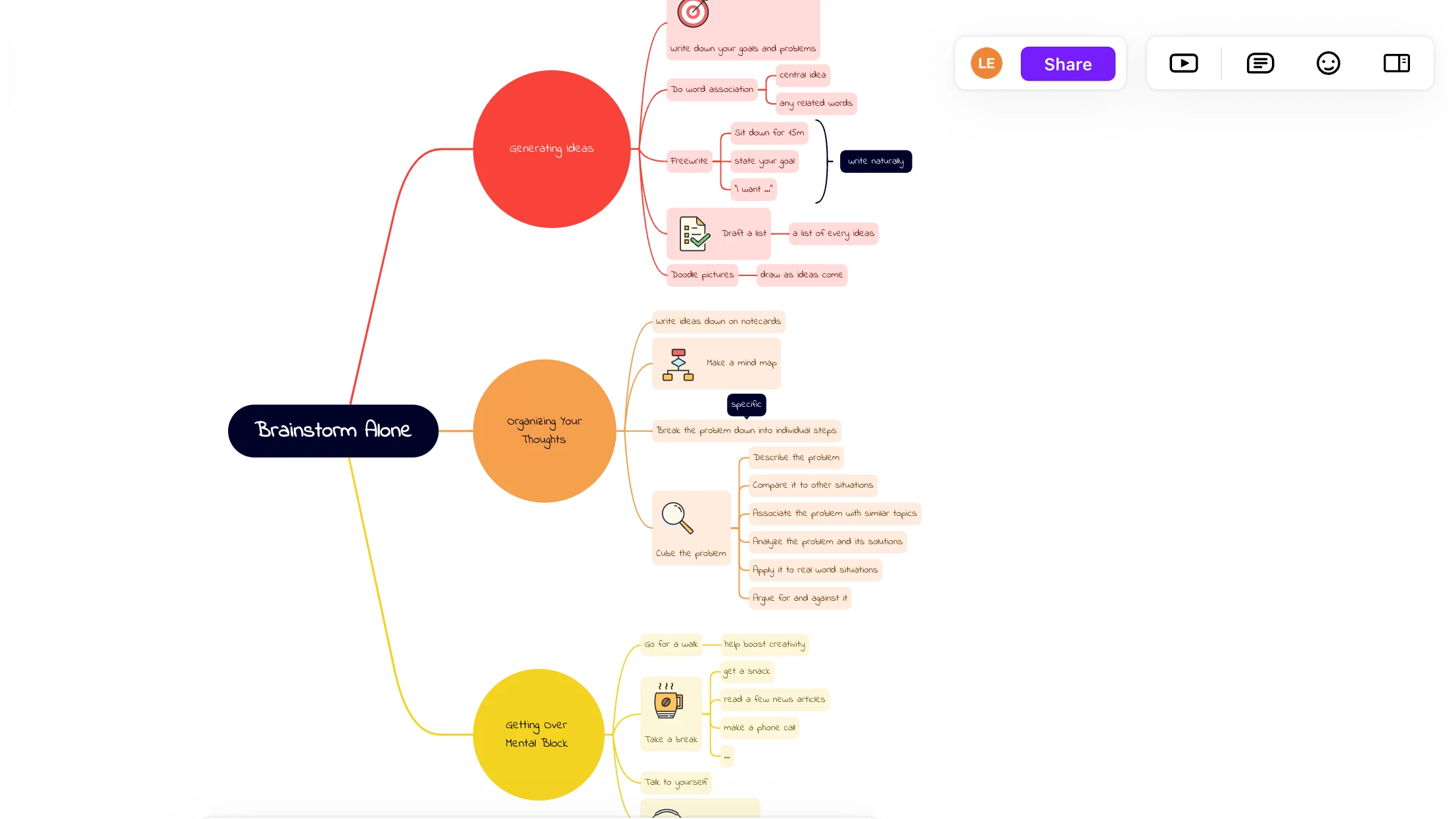
Organizing chaotic thoughts into a structured plan requires more than a blank text document. Brainstorming often starts as a scattered collection of ideas, notes, and tasks that quickly outgrow a standard linear list. XMind serves as a dedicated desktop environment designed specifically to capture, organize, and format these thoughts visually. By forcing ideas into hierarchical branches, nodes, and relational maps, the application helps users see the connections between disparate pieces of information. Instead of scrolling through pages of disorganized text, users interact with a two-dimensional canvas where they can drag, drop, and group concepts until a logical framework emerges. The layout mechanics operate on a rigid parent-child hierarchy, which forces users to categorize information logically rather than randomly placing text boxes on a screen. Every map starts with a single central topic, and from there, users build outward.
The decision to rely on a desktop-centric application instead of a lightweight browser tool fundamentally alters the editing experience. A dedicated local installation takes advantage of the host machine's hardware, allowing users to build massive, deeply nested charts without the interface lag common to web-based alternatives. Because all rendering happens locally, the interface responds instantly to keyboard inputs. Pressing the Tab key generates a child node, while pressing Enter creates a sibling node. This dual-key workflow allows users to dump a stream of consciousness onto the screen as fast as they can type, without ever needing to touch the mouse. Users can navigate the entire map using the arrow keys, collapsing large branches with the spacebar to hide irrelevant information and keep the screen clean. This local execution also means the application operates entirely offline, keeping private project outlines, strategic plans, and personal notes stored securely on the local disk rather than requiring an active internet connection or mandatory cloud storage.
Beyond simple visual mapping, the application acts as a bridge between initial ideation and actual execution. A raw map might contain random thoughts, but the toolset allows users to refine those nodes by adding priority markers, task assignments, and hyperlinks to local files. This transforms a static diagram into a working dashboard for a project. Writers use it to structure chapters before drafting, developers map out database relationships before coding, and managers outline project phases before moving to formal tracking software. By providing an interface that scales from a simple central bubble to a complex, multi-sheet workbook, the software accommodates a wide range of analytical tasks.
Key Features
- Multiple Structural Layouts: The canvas is not limited to standard radial mind maps. Users can right-click any central topic and switch the layout to a Logic Chart, Brace Map, Organizational Chart, Tree Chart, Timeline, or Matrix. The application also supports mixing different structures within the same document, allowing a main project node to branch off into a timeline on one side and a fishbone diagram for root-cause analysis on the other.
- ZEN Mode: Distractions often derail focus during complex planning sessions. Activating ZEN Mode hides all toolbars, formatting panels, and extraneous interface elements, expanding the canvas to fill the entire screen. A subtle built-in timer tracks the duration of the session, helping users adhere to focused work intervals without needing a separate clock or time-tracking utility.
- Pitch Mode: Presenting a mind map usually requires exporting the file to an external presentation program and manually formatting slides. Pitch Mode automates this process by reading the hierarchy of the map and generating an animated slideshow directly within the application. It applies transitions, breaks down child nodes into bullet points, and allows the presenter to step through the logical flow of the map without leaving the original document. During the presentation, the speaker can use the arrow keys to advance the animation, revealing child topics one by one.
- Outliner View: Visual mapping does not appeal to every stage of a project. The built-in outliner allows users to toggle the interface from a graphical map to a traditional, linear bulleted list. Edits made in the outliner view instantly reflect in the visual map, and vice versa. This dual-view approach accommodates users who prefer typing their initial thoughts into a list before visualizing the relationships.
- Mathematical Equation Support: For academic and technical users, standard text nodes are insufficient for complex documentation. The application supports LaTeX syntax, allowing users to type mathematical formulas and chemical equations directly into a node. The software renders the LaTeX code into clean, formatted mathematical notation in real time, eliminating the need to paste static images of equations from external editors.
- Advanced Export Formats: Moving data out of the application is a critical workflow requirement. Users can export their charts as standard PNG images or PDFs, but the software also supports OPML and TextBundle for moving hierarchical data to other text editors. Additionally, SVG export allows for lossless vector scaling, which is necessary when printing massive diagrams on large-format plotter printers without pixelation.
- AI Copilot Integration: Utilizing an internal credit system, users can prompt an artificial intelligence assistant to help generate map structures. By pasting a long block of text, a web link, or a document file, the Copilot attempts to extract the main concepts and automatically draws a structured map. Users can also select an existing node and prompt the assistant to generate child topics, summarizing or expanding upon the selected concept.
How to Install XMind on Windows
- Obtain the official Windows installer package, which is provided as a standard executable file.
- Double-click the downloaded executable file to launch the setup process. Windows User Account Control will prompt you to allow the installer to make changes to the device.
- The installer extracts the core application files directly to the system. Unlike older enterprise software, the installation path defaults to the local AppData or Program Files directory without requiring complex configuration screens or custom path selections during the initial run.
- Once the extraction completes, the setup routine creates a desktop shortcut and automatically launches the application for the first time.
- Upon launch, a welcome screen appears, prompting you to log in with an official account. Logging in is necessary to sync files to the developer's cloud service or to verify a paid subscription tier.
- If you choose not to log in, you can bypass the prompt and drop immediately into the free evaluation tier, which allows you to create a new local document and begin mapping right away.
- To ensure quick access for future planning sessions, right-click the application icon on the Windows taskbar and select the pin option.
- For users who prefer a clean desktop, you can delete the downloaded setup package from your system once the installation is complete, as the application handles its own internal updates moving forward.
XMind Free vs. Paid
The application operates on a freemium model, offering a permanent free tier alongside paid subscription options. The free tier does not expire, making it suitable for users who only occasionally need to map out a small project. However, it imposes strict limitations on output and scale. Free users can create a maximum of ten maps and have access to basic visual themes. The most significant constraint involves exporting: any PNG or PDF exported from the free version will display a large, unremovable watermark. Furthermore, advanced export formats like Word, Excel, SVG, and Markdown are completely disabled.
To remove these restrictions, users must upgrade to the Pro tier, which costs approximately $59.99 billed annually or around $4.92 billed monthly. An active Pro subscription removes all watermarks from exported files and unlocks the full suite of export formats. Pro users also gain the ability to create up to fifty maps with basic collaboration features, insert LaTeX equations, add file attachments directly to nodes, and utilize unlimited slides within Pitch Mode. This tier is designed for independent professionals who rely on the software for regular project management and require clean, professional document exports.
For heavy corporate users, a Premium tier is available for approximately $8.25 per month. This tier removes the map limit entirely, allowing for unlimited collaborative files and unlimited sheets per document. It also adds advanced project management tools, such as the ability to generate Gantt charts from mind maps, assign tasks to specific team members, and export tasks directly to a calendar or Excel. Additionally, the Premium tier provides a higher monthly allotment of AI credits for the Copilot feature, supporting workflows that heavily rely on automated text summarization and automated node generation.
XMind vs. MindManager vs. MindMeister
MindManager is a heavy-duty corporate alternative designed primarily for enterprise environments and complex data integration. While XMind focuses on fast, fluid visual mapping, MindManager acts more like a visual database, integrating deeply with Microsoft SharePoint, Outlook, and Excel. Users can link nodes to live external spreadsheets, build interactive business dashboards, and calculate project budgets directly within the map. However, this deep integration comes with a steep learning curve and a high enterprise price tag, making it overly complicated for individuals who just need to outline a presentation or brainstorm an essay.
MindMeister operates entirely in the web browser, focusing heavily on real-time multiplayer collaboration rather than local processing. Multiple remote users can log into a MindMeister map simultaneously, typing and adding nodes in a shared workspace without installing any software. This cloud-first approach excels for distributed teams holding live brainstorming meetings over video calls. The tradeoff is that MindMeister requires a constant, stable internet connection, and the browser interface can suffer from severe interface lag when a map grows to contain hundreds or thousands of nodes.
XMind offers a middle ground, providing the responsiveness of a dedicated local installation without the extreme cost and complexity of an enterprise database tool. Users who frequently travel, work on massive diagrams, or prioritize keyboard-driven speed will prefer this application over a browser-based alternative. It avoids the subscription fatigue associated with heavy corporate platforms while still delivering local file control, instant offline access, and zero rendering lag on large hierarchical charts.
Common Issues and Fixes
- Corrupted or unopenable document files. Unexpected system shutdowns or crashes can occasionally corrupt a local file, preventing the canvas from rendering when opened. To fix this, navigate to the File menu and select File Cache. This built-in recovery tool stores recent automatic backups of your work. If the interface will not load at all, you can manually retrieve the raw backup files by opening the Windows File Explorer and navigating to %HOMEPATH%AppDataRoamingXMindElectron v3vana.
- Exported images and PDFs contain a large logo. Users evaluating the software without an active subscription will find a permanent watermark stamped across their exported files. This is not a rendering bug; it is the deliberate limitation of the free tier. To generate clean files without the logo, you must log into an account with an active Pro or Premium subscription.
- Missing advanced export formats in the menu. When attempting to export a map to Word, Excel, Markdown, or SVG, the options may be grayed out or entirely absent from the File menu. These specific file formats are locked behind the paid tiers. Upgrading the account and restarting the application will restore these options to the export dialog.
- Interface lag on extremely large multi-sheet documents. While the local rendering engine is highly capable, maps containing thousands of nodes across dozens of sheets can occasionally cause the application to stutter during zoom or pan operations. To restore responsiveness, collapse branches that are not currently in use, reduce the number of embedded high-resolution images, or disable hardware acceleration in the application settings to force software rendering.
- Cloud sync conflicts creating duplicate files. When saving documents directly into a third-party sync folder like OneDrive or Google Drive, the background synchronization can sometimes lock the file while the application is trying to auto-save, resulting in duplicate or conflicted copies. To avoid this, save your active work to a standard local folder, and only copy the finished file to the sync directory, or use the developer's native sharing service.
Version 26.01.07153 — December 2025
- Improved the positioning of labels on topics within the Grid structure for better visibility and layout.
- Enhanced the stability and user experience of automatic reconnection when online mind maps are disconnected.
- Fixed a compatibility issue where topic content width conflicted with the display of task information.
- Fixed a bug where rich text formatting styles were lost when copying and pasting content.
- Fixed an issue that prevented certain relationship line shapes from being selected or used correctly.
- Resolved various known issues to ensure smoother performance and stability.