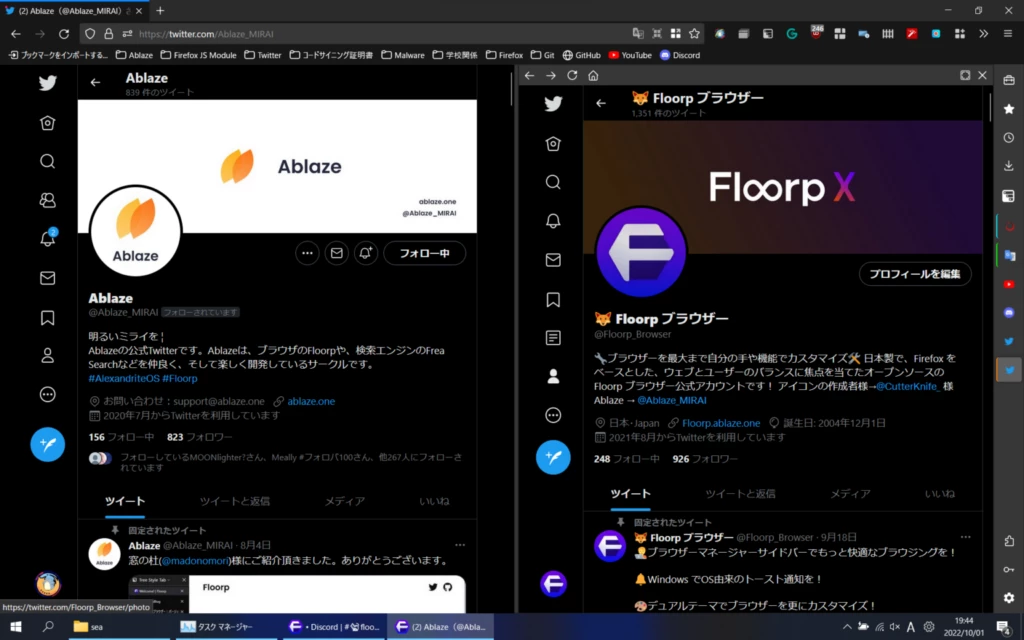
Ablaze Floorp Browser is a highly customizable, open-source web browser built upon the Mozilla Firefox rendering engine. Designed originally by a Japanese developer community, the project focuses on giving users total control over their desktop browsing interface. Instead of forcing you into a single rigid layout designed for casual reading, the application allows you to shift tabs, toolbars, and panels around to fit specific research, development, or professional workflows. It serves as a strict alternative to standard browser designs, catering specifically to people who manage dozens of open tabs daily and need built-in organization tools directly in the native client.
For many desktop users, sticking with mainstream default browsers means relying on an array of third-party add-ons to achieve basic interface changes like vertical tab layouts or persistent side panels. Ablaze Floorp Browser solves this exact problem by building these structural features directly into the core application. By keeping the interface natively flexible, the browser actively avoids the performance overhead and stability risks of running multiple heavy UI extensions. It fits perfectly into complex working environments where you might need to keep a technical reference document open in a sidebar while managing separate client logins in distinct container tabs on the main screen.
Choosing a heavy-duty desktop application like this over simpler, stripped-down alternatives matters primarily for deep multitasking and strict layout control. While lightweight browsers work fine for single-task reading, they often struggle with screen space efficiency when a user is juggling multiple web applications simultaneously on a widescreen monitor. By running on the Gecko rendering engine, this browser also provides a critical independent alternative to the dominant Chromium-based monopoly. This ensures high compatibility with standard web technologies while applying strict tracking protection to block background scripts without compromising the layout logic that power users demand.
Key Features
- Flexible UI Customization: Users can freely adjust the browser's layout, moving the tab bar to the vertical edge of the screen, shifting toolbars to the bottom, or hiding the title bar entirely to maximize screen real estate. Advanced users can apply custom CSS rules to alter the aesthetic and structural elements of the interface, bypassing standard menu limitations to achieve a completely personalized look.
- Workspaces and Containers: The browser natively integrates tab grouping with isolated login containers, complete with color-coded labels. This allows you to log into multiple separate accounts for the same website within a single window, making it highly effective for managing both work and personal accounts simultaneously while ensuring cookies do not bleed across profiles.
- Dual Sidebars and Web Panels: You can dock web applications, chat clients, or reference pages into persistent sidebars that remain visible as you navigate different sites in the main view. You can adjust the panel width, set auto-hide parameters, and even force the panel to load the mobile version of a site, which is highly practical for messaging apps.
- Integrated Mouse Gestures: Navigation commands such as moving back, going forward, refreshing the page, or closing specific tabs can be executed by holding right-click and dragging the mouse in specific patterns. These gestures are built directly into the client, eliminating the need to install and configure separate navigation extensions that might conflict with page scripts.
- Customizable Keyboard Shortcuts: The application allows you to map specific browser actions to custom key combinations. If the default keyboard bindings conflict with other desktop software or you prefer a different layout for your specific workflow, you can reassign them through the main settings menu and streamline your daily navigation.
- Enhanced Tracking Protection: Running on the Firefox engine, the browser inherits native privacy tools that block third-party tracking cookies, cryptominers, and known fingerprinting scripts. Users can toggle between strict, standard, and custom modes, easily managing exceptions for specific trusted domains that require tracking scripts to function correctly.
How to Install Ablaze Floorp Browser on Windows
- Navigate to the official project website to download the standard executable Windows installer package.
- Alternatively, open the Windows Command Prompt or PowerShell and use the Windows Package Manager by typing the command winget install Ablaze.Floorp to download the package automatically.
- If using the executable, run the downloaded setup file to initiate the local installation process.
- Accept the Windows User Account Control prompt, noting that the official executable is signed by the project developer to verify its authenticity.
- Select your preferred installation directory or leave the default path targeting your local Windows program files folder.
- Click through the setup wizard to complete the installation, choosing whether to create a desktop shortcut and pin the application to your taskbar.
- Allow the application to launch automatically, and follow the Windows 10 or Windows 11 settings prompt if you wish to set it as your default system browser.
- On the first run, utilize the initial configuration screen to select your preferred layout style—such as top tabs or vertical tabs—and use the import tool to bring over your existing bookmarks, history, and passwords from your previous browser.
Ablaze Floorp Browser Free vs. Paid
Ablaze Floorp Browser operates entirely as free, open-source software under the Mozilla Public License. There are no paid tiers, no enterprise editions, and no locked premium features. Every interface modification, workspace tool, container setting, and privacy control is fully available to all users immediately upon installation. Because the project is maintained by a community of developers rather than a traditional software corporation, the product does not rely on tier-based restrictions.
The project does not limit functionality with trial periods, export restrictions, or feature watermarks. You do not need to create an account, register an email address, or sign up for a mandatory subscription to access the browser's advanced capabilities. The business model relies strictly on voluntary community support and transparent development rather than software sales or the monetization of background user telemetry.
Users and organizations who want to support the ongoing development and server costs can contribute financially through GitHub Sponsors. The project offers various sponsorship levels, including a specific monthly tier that allows corporate sponsors to place an advertisement on the project's sponsor page. However, participating in any financial sponsorship program is entirely optional and has absolutely no impact on the browser's local feature set, update access, or daily rendering performance.
Ablaze Floorp Browser vs. LibreWolf vs. Vivaldi
LibreWolf is another browser built upon the Firefox rendering engine, but its entire development focus is heavily weighted toward hyper-hardened privacy. It aggressively strips out all forms of telemetry and enforces strict anti-fingerprinting rules by default. While this approach makes LibreWolf an excellent choice for users demanding maximum out-of-the-box privacy, its rigid security settings frequently break complex web applications. LibreWolf also lacks the built-in interface customization tools and workspace managers that power users typically need for deep multitasking.
Vivaldi offers a massive array of interface modifications, built-in workspaces, and side panels, making it one of the most flexible desktop browsers on the market. However, Vivaldi is built upon the Chromium engine, meaning it inherently contributes to the broader Google Blink ecosystem. It also contains proprietary closed-source interface code, which can be a significant deterrent for users dedicated to running fully open-source software environments on their machines.
Ablaze Floorp Browser is the stronger choice when you want the extreme interface customizability, web panels, and tab management features similar to Vivaldi, but you explicitly want them built on the independent Firefox rendering engine. It provides the necessary workspace organization and vertical tab layouts required for heavy daily multitasking, while remaining fully open-source and entirely separate from the Chromium framework.
Common Issues and Fixes
- Websites claim the browser is outdated. Because the application is historically built on the Extended Support Release branch of its underlying engine, some websites rigidly check version numbers and incorrectly block access. You can fix this by installing a User-Agent switcher extension to spoof a mainline browser version, allowing the site to load normally.
- Video playback lags or drops frames over time. Users frequently encounter stuttering on heavy media sites like YouTube after watching several videos. This is usually caused by aggressive anti-fingerprinting extensions or background content blockers. Check your extension list, set your ad-blocker to advanced mode, and clear the site cache to restore normal playback performance.
- Desktop notifications fail to appear. On some Windows configurations, native alerts from websites do not trigger correctly in the system tray. To fix this, type about:config in the address bar, search for the alerts.useSystemBackend preference, and set the value to true to force the application to use native OS notification handling.
- Sidebars and web panels glitch when hovering. Occasionally, the auto-hide sidebar behavior becomes unresponsive or gets stuck visually on the screen. Restarting the browser generally clears the interface state, but disabling hardware acceleration in the performance settings can permanently resolve these layout rendering glitches on specific graphics cards.
- High memory usage after long sessions. Keeping dozens of tabs active in various workspaces can eventually consume significant system RAM. Use the built-in task manager to identify unusually heavy background tabs, and consider utilizing native tab sleep settings to automatically unload inactive pages from local memory without losing your workspace organization.
Version 12.10.1 — January 2026
- Workspace Archiving (Stable): Introduced a stable version of the workspace archive and restore feature. Users can now archive inactive or infrequently used workspaces to their profile folder, preserving only the relevant tab data, and restore them when needed.
- Enhanced PWA Appearance: Improved the design and window handling for Progressive Web Apps (PWAs). PWA windows will now more accurately reflect the visual instructions and appearance settings specified by the website.
- Mouse Gesture Engine Update: Updated the mouse gesture system to utilize the $1 Unistroke Recognizer algorithm, providing more accurate and responsive gesture detection.
- Fixed PWA Installation with SVG Favicons: Resolved a long-standing issue where the "Install this site as an app" function failed on websites using SVG files as favicons.
- Workspace Bug Fixes: Fixed a bug where enabling the Workspaces feature caused tabs to be added unintentionally.
- Full-Screen Toolbar Fix: Corrected an issue where the browser toolbar did not behave correctly while in full-screen mode.