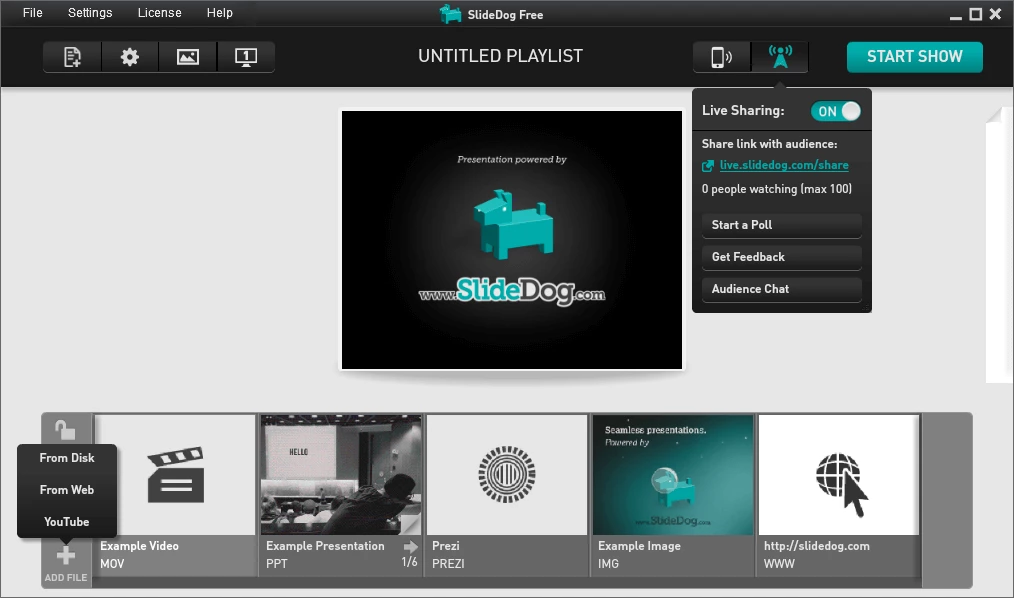
SlideDog Pro functions as a master playlist container for live presentations, allowing speakers, event technicians, and educators to cue up multiple distinct file formats into a single continuous run-of-show. Instead of forcing you to manually switch windows or drag windows across a secondary projector display, the software operates directly on the desktop to sequence different file types—including PowerPoint slide decks, PDF documents, local video files, and Prezi packages. Because it does not convert or compress the original files, the application relies on the native rendering engines installed on your local Windows machine, ensuring that custom fonts, animations, and embedded audio play exactly as designed.
For event organizers and corporate presenters, relying entirely on a web-based slide tool introduces risks regarding internet latency and browser tab mismanagement. Operating as a dedicated desktop client, this application pre-loads media directly into the system memory before the presenter walks on stage. It completely hides the desktop background, taskbar, and mouse cursor from the audience projector, making the transition between a static PDF document and an MP4 video file invisible to the crowd. This approach solves the classic live-event problem of attendees seeing the presenter fumble through folders or struggle with the Windows taskbar.
Beyond merely sequencing files, the software acts as a two-way communication channel during live events. Presenters can generate a web link that attendees access from their smartphones or tablets to follow along with the active slides. This functionality extends into live polling and anonymous feedback collection, turning a traditional one-way lecture into an interactive session. By keeping the main presentation safely managed on a local machine while opening up web-based interactions for the audience, the software balances local reliability with modern engagement.
Key Features
- Native File Format Playback: Rather than converting documents into a proprietary format, the software triggers the native applications already present on your machine. When the playlist reaches a .pptx file, the application quietly utilizes Microsoft Office in the background to render the slides, preserving all original transitions and timing rules. For PDF files, it interfaces directly with Adobe Acrobat or Adobe Reader, ensuring that vector graphics and text scale correctly on large projectors.
- Presenter View and Dual Screen Support: The application automatically detects multiple connected displays and routes the clean presentation output strictly to the secondary monitor or live projector. Meanwhile, the primary laptop screen displays a dedicated command dashboard containing a timeline of the full playlist, thumbnails of upcoming slides, a timer, and personal presenter notes.
- Audience Live Sharing and Polling: Speakers can broadcast their current slide directly to attendee mobile browsers via a generated web link, eliminating the need for attendees to squint at a distant projector. Presenters can push out multiple-choice polls or text-based questionnaires, receiving anonymous feedback directly to their primary monitor in real time.
- Mobile Remote Control Capabilities: Event operators do not need to remain tethered to the podium laptop. By logging into the web remote on a smartphone, presenters can advance slides, jump between distinct files in the master playlist, and trigger video playback from across the room. The remote interface relies on a secure PIN code system to prevent unauthorized access.
- Unattended Looping and Auto-Advance: For trade show booths and digital signage setups, the software includes a continuous looping mode. Users can configure a master playlist consisting of promotional videos, static image slides, and PDF brochures, then set specific duration timers for each individual item. The software cycles through the entire run-of-show automatically.
- Web Content Integration: The playlist supports live web pages and direct video embeds. By entering a URL directly into the "Add Item" menu, the software loads the target page using a built-in rendering engine. This allows speakers to navigate live analytics dashboards or show public websites directly on the projector without exiting the presentation environment.
How to Install SlideDog Pro on Windows
- Navigate to the official vendor website and select the Windows offline installer package, which contains the complete application data necessary for a standard local setup.
- Double-click the executable file to launch the setup wizard. If the Windows SmartScreen filter displays a warning regarding an unrecognized internet download, click "More info" and select "Run anyway" to proceed.
- Accept the End User License Agreement when prompted. The setup wizard will then ask whether you want to install the software for all users on the machine or just the current user account, which dictates whether the files are placed into the Program Files (x86) directory or the local AppData folder.
- During the unpacking process, the installer automatically checks your operating system for necessary framework dependencies. If your machine lacks the Microsoft Visual C++ 2015 Redistributable (x86) or the .NET 4.6 Framework, the setup utility will attempt to download and install them immediately.
- Allow the framework installations to complete without interrupting your internet connection, as the main application requires these Microsoft components to interface correctly with your local media players.
- Once the core files are securely placed in their designated folder, choose whether to create a desktop shortcut and click the finish button.
- Upon first launch, the software will scan your system registry to detect available file viewers, checking specifically for valid installations of Microsoft Office, Adobe Reader, and VLC media player.
SlideDog Pro Free vs. Paid
The developer provides a functional free tier designed for basic presentation needs, though it comes with distinct visual and operational restrictions. When using the free edition, a persistent watermark is overlaid in the bottom-right corner of the projector output, signaling to the audience that the software is unlicensed. Furthermore, free users are locked out of advanced tools such as the dual-monitor presenter view, custom background images, and the continuous looping mode. This tier serves as an evaluation tool or for casual users who only need a single-screen playlist for simple meetings.
For professional environments, the Pro tier unlocks the complete feature set and removes all watermarks from the public display. The vendor offers multiple billing structures, including a monthly subscription priced at $19, an annual plan that costs $99 for the first year, and a one-time perpetual license available for $299. The annual plan typically includes a renewal discount for subsequent years, dropping the recurring cost to $79. The lifetime perpetual license guarantees the user free updates for the next two major software iterations. All Pro plans include access to premium support.
Every paid license includes two simultaneous machine activations. This dual-activation policy specifically accommodates live event professionals who need to run the software on both a primary presentation laptop and an active backup machine without purchasing two separate subscriptions. Users can manually deactivate the license key on an older computer and apply it to new hardware through the application settings menu.
SlideDog Pro vs. Microsoft PowerPoint vs. ProPresenter
Microsoft PowerPoint remains the global standard for slide creation and standard single-deck delivery. It excels at text formatting, shape manipulation, and internal slide animations, making it the default choice for authoring content. However, when a speaker needs to transition from a PowerPoint deck into a separate PDF document or a heavy local video file, PowerPoint forces the user to exit the slideshow, revealing the desktop. Microsoft PowerPoint is best used as a creation tool, whereas SlideDog Pro is designed specifically as a delivery container that manages those generated PowerPoint files alongside other distinct formats without ever showing the desktop background.
ProPresenter is a highly complex live production suite built primarily for large houses of worship, concert venues, and broadcast studios. It relies heavily on layered text, live camera inputs, alpha channel keying, and multi-screen routing, requiring a dedicated hardware setup and significant training for the event operator. ProPresenter is the correct choice for venues that need to overlay dynamic song lyrics onto live camera feeds. In contrast, it is often overly complicated and expensive for a standard business conference, academic lecture, or trade show where the primary goal is simply sequencing basic document files.
SlideDog Pro occupies the middle ground, serving as the optimal choice for users who need a clean, continuous run-of-show without learning a broadcast-level production suite. It takes the media you already have—standard slides, PDFs, and videos—and organizes them into a drag-and-drop playlist that handles the transitions automatically. If you simply want to prevent the audience from seeing your mouse cursor while you switch from a slide deck to a video file, SlideDog Pro provides the most direct workflow.
Common Issues and Fixes
- PowerPoint files failing to load into the playlist. The software relies on a local installation of Microsoft Office to render slide decks accurately. Ensure that you have an activated, desktop edition of Microsoft Office installed on the machine, as cloud-only web apps or generic document viewers will not allow the application to process the formatting correctly.
- PDF documents displaying with visual errors or missing text. Because the application uses native viewers, PDF rendering issues usually stem from a missing or outdated Adobe installation. Install a fully updated installation of Adobe Acrobat or Adobe Reader, open the application directly to accept any initial end-user agreements, and set it as the default PDF handler in Windows.
- Video files stuttering or dropping frames during playback. The software pre-loads media into system memory to ensure quick transitions, which can cause lag if the computer lacks sufficient RAM or if the video files are uncompressed. Compress large video files using standard H.264 encoding and ensure the host laptop has at least 8 GB of RAM.
- Audience unable to access the live sharing link or mobile remote. The live sharing, polling tools, and remote control functionalities require the host computer to maintain an active, stable internet connection. Verify that the presentation laptop is connected to a reliable network and that restrictive corporate firewalls are not blocking the application.
- Missing framework errors during initial setup. If the installation fails with a missing dependency warning, the installer was likely unable to reach the Microsoft servers. Download and install the Microsoft Visual C++ 2015 Redistributable (x86) and the .NET 4.6 Framework manually from the official Microsoft website, then re-run the setup wizard.
Version 2.3.1 — October 2022
- Enhanced compatibility with the latest Adobe Acrobat user interface.
- Improved system stability by updating the core Chromium engine and Harman AIR SDK.
- Fixed an issue where the preview window would unexpectedly steal focus.