Koodo Reader operates as an open-source, unified digital library manager and reading application built for users who require complete control over their local document collections. Instead of forcing users to simply open an epub file in an isolated, basic window, this software provides a dedicated environment for organizing, studying, and consuming literature on a desktop monitor. It bridges the gap between highly complex library managers and bare-bones document viewers, offering a modern interface that prioritizes visual customization, strict local file management, and reading comfort.
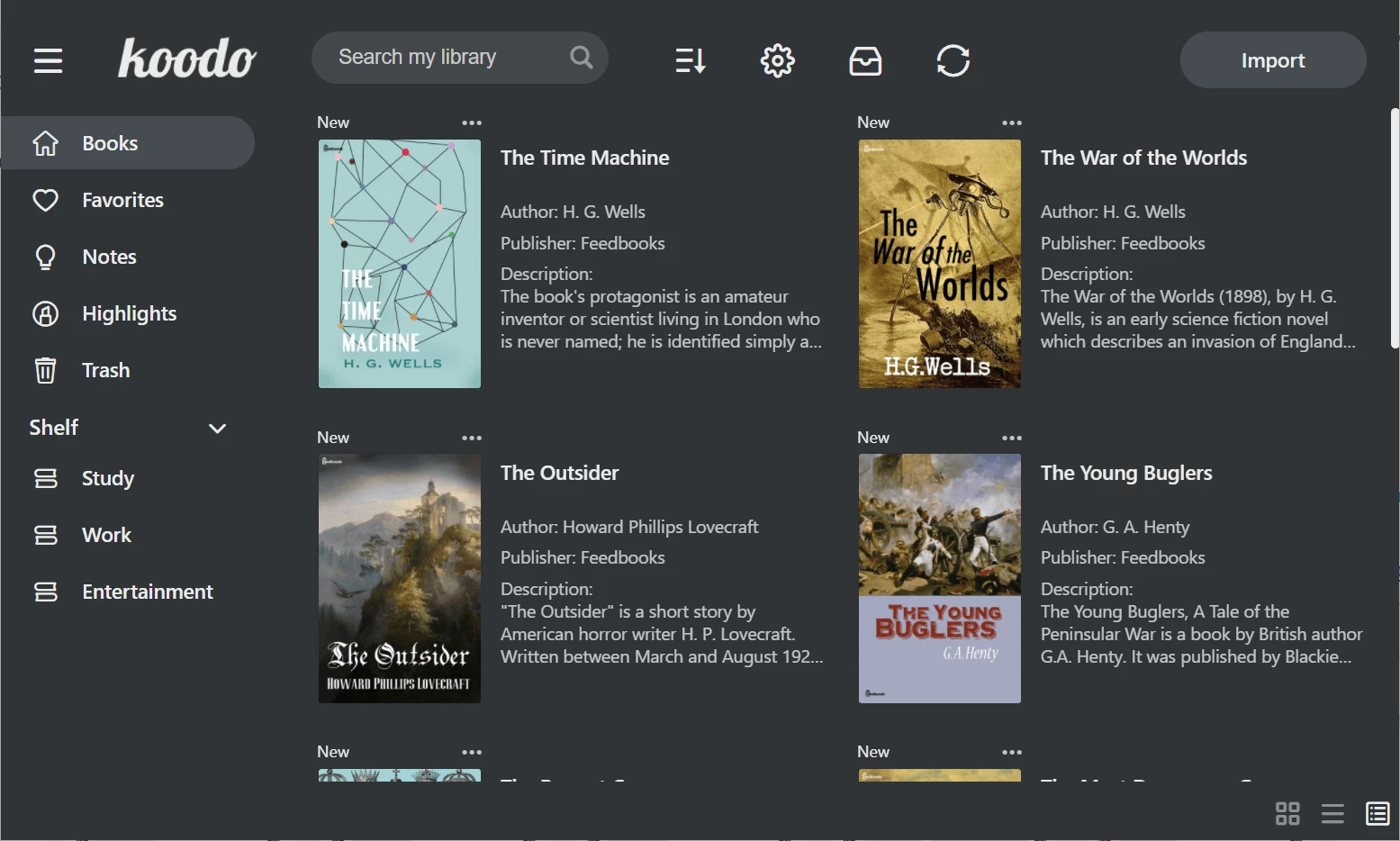
For students, researchers, and avid fiction readers, managing a diverse collection of formats—from comic archives to raw text documents—often requires installing multiple different viewers. The application consolidates these workflows by parsing almost every major text format natively. Users can drop an entire folder of DRM-free books into the interface and instantly generate a searchable, unified shelf complete with cover art, author metadata, and exact file size details. This organizational structure prevents local drives from turning into a chaotic mess of unread documents.
Reading long texts on a desktop machine running Windows 10 or Windows 11 is typically less ergonomic than using an e-ink device, which makes the software’s layout controls critical for usability. By keeping the application strictly desktop-focused rather than forcing users into a browser-based cloud environment, individuals retain total ownership over their local data. The software processes local rendering, text-to-speech generation, and dictionary lookups using the host hardware, ensuring that large graphic-heavy files load predictably without waiting for server-side processing delays.
Key Features
- Extensive Native Format Support: The software eliminates the need for third-party format converters by handling a massive array of file types directly out of the box. Users can open standard EPUB and PDF documents, DRM-free MOBI and AZW3 files, as well as comic book archives like CBZ and CBR without extracting the internal images first. It also accurately parses plain text, Markdown, and FictionBook formats, rendering them cleanly with standard typography instead of raw code.
- Customizable Reading Layouts: The interface adapts to different monitor sizes and user preferences through highly specific layout options located in the main reading menu. Users can switch between a traditional single-column view, a dual-column layout that mimics a physical book, or a continuous scroll mode that works perfectly for long web articles saved as HTML. Margin width, paragraph spacing, line height, and exact font families can be forced globally across the entire library.
- Advanced Study and Annotation Tools: Designed for active reading sessions, the software includes built-in highlight, underline, and strike-through tools that can be customized with specific colors for categorization. Users can attach floating text notes to specific sentences, which are then aggregated in a dedicated annotation sidebar for quick export or future review. The application also integrates instant dictionary lookups and text-to-speech dictation for users trying to digest dense academic material.
- Independent Cloud Synchronization: Rather than hosting data on proprietary vendor servers, the software allows users to bring their own cloud storage accounts for syncing reading progress. By linking an existing account from providers like OneDrive, Dropbox, WebDAV, or standard FTP within the settings panel, the application synchronizes bookmarks, highlights, and exact page positions. This ensures that users can close a document on their main workstation and pick up precisely where they left off on a secondary laptop connected to the same storage folder.
- Night Mode and Visual Theming: Reading on bright LCD monitors can cause severe eye strain, so the application provides deep visual customization to mitigate screen glare. The dedicated Night Mode inverts bright backgrounds to pure black or dark gray, while reducing the contrast of the text to prevent visual halo effects in dark rooms. Users can also select from multiple base theme colors, adjust the interface brightness independently of the operating system controls, and apply custom background tints like sepia for daytime reading.
- Organized Library Management: Managing thousands of documents requires strict organizational tools, so the software provides a highly structured digital bookshelf interface. Users can view their collection as a grid of high-resolution cover thumbnails or as a dense data list displaying the author name, format type, and exact file size. The library can be sorted by reading progress percentage, filtered by custom tags, or organized into specific user-created shelves for different academic subjects or fiction genres.
How to Install Koodo Reader on Windows
- Download the official Windows installer executable from the developer's main distribution page or official repository, ensuring you select the correct version for your system architecture.
- Double-click the downloaded setup file to initialize the installer wizard on your desktop.
- If the Windows Defender SmartScreen warning appears, click "More info" followed by the "Run anyway" button to allow the installer to proceed with the execution.
- Choose whether to install the application for the current user profile only or for all user accounts on the local machine, which requires administrator privileges.
- Select a destination folder path for the application files on your local drive, or leave the default program directory intact to ensure standard updating behavior.
- Check the boxes to create a desktop shortcut and a Start Menu entry for quick access, then click the install button to begin writing the files to the disk.
- Wait for the extraction process to finish, which normally takes less than a minute, and click the Finish button to close the wizard.
- Upon the first launch, you will see an empty library interface where you can immediately click the "Import" button to browse your local storage and add your document folders.
Koodo Reader Free vs. Paid
Koodo Reader operates under a strict free and open-source model, meaning the desktop application costs nothing to download, install, and use for standard reading. There are no hidden trial timers restricting your usage, no artificial limits on how many local books you can import into your library, and no paywalled menus for standard organization tasks. The core interface, including all layout customization options, format support, and basic annotation tools, comes completely unlocked right out of the box.
The developer covers basic maintenance through community donations, but the application also integrates optional artificial intelligence tools for text summarization and translation. Because these specific functions require active server processing and external API calls, the developer offers optional paid quotas for users who rely heavily on them.
Users can purchase specific character quotas or opt into a yearly subscription to access these integrated translation features without having to configure and pay for their own external API keys. If you only need to read local files, organize your text collection, and synchronize data using your own personal cloud storage account like Dropbox or WebDAV, the core application remains completely free and fully functional.
Koodo Reader vs. Calibre vs. SumatraPDF
Calibre serves as a highly complex database manager built for users who need to catalog massive text archives, modify metadata in bulk, and convert files between dozens of different formats. If you are preparing files to send to a dedicated e-ink device, manually modifying CSS styles, or running extensive third-party plugins, Calibre provides the necessary controls. However, its native reading window feels clunky and visually dated. Koodo Reader offers a much cleaner, aesthetically pleasing reading environment on your desktop, leaving the heavy database conversion tasks to other utilities.
SumatraPDF takes the opposite approach, functioning as a bare-bones, ultra-lightweight document viewer designed entirely for speed. It opens massive PDF documents and basic text files instantly, making it highly effective for older hardware or users who just want to quickly reference a technical manual. The trade-off is a complete lack of library organization, no cloud synchronization, and virtually no annotation tools. Koodo Reader is the better fit when you want to study a text, save your exact reading progress, customize typography, or take detailed notes within a structured local library.
Ultimately, Koodo Reader occupies the practical middle ground between these two extremes. It provides enough structural management to keep a digital collection organized without the overwhelming complexity of Calibre. At the same time, it delivers a highly customizable, feature-rich reading experience that basic viewing utilities like SumatraPDF intentionally omit to save system resources.
Common Issues and Fixes
- Blank white screen on application launch. This is a known display error related to how the application's framework handles local hardware cache data on certain graphics setups. To fix this, close the software completely via the Windows Task Manager, navigate to your user AppData directory, delete the application's local cache folder, and restart the program.
- Missing book cover thumbnails after importing. The application sometimes fails to extract embedded cover images from specific file types during a bulk folder import. You can resolve this by right-clicking the affected book in your library, selecting the metadata edit option, and manually browsing for a local JPEG or PNG image to replace the blank thumbnail.
- Cloud synchronization fails to update reading progress. This happens when the connected cloud service, such as WebDAV or standard FTP, loses its connection token or experiences a firewall block. Open the settings menu, navigate to the Sync tab, re-enter your remote storage credentials, and click the manual sync button to push the local database state back to the server.
- Custom fonts not applying to specific imported files. Some publishers hardcode their exact font choices into the document's internal stylesheet, blocking external programs from overriding them. To fix this, look for the layout settings menu within the reading view and enable the toggle to ignore publisher styles, which strips the embedded formatting and forces your selected typeface to display.
Version 2.2.5 — December 2025
- Enhanced the AI translation engine to improve accuracy and expanded support to 92 different languages.
- Implemented encrypted cloud storage for data source credentials when using Koodo Sync, allowing for immediate synchronization on new devices without reauthorization.
- Introduced a new option to export software debug logs, accessible under Settings > General.
- Optimized the application installer size by removing unnecessary language packs.
- Improved application performance and memory usage on mobile devices, specifically reducing lag in large libraries.
- Fixed a bug where the book list sorting order would not update correctly after exiting reading mode.
- Resolved an issue causing text truncation in certain PDF files when using scroll mode.
- Corrected a problem where footnote navigation failed to function in specific books.
- Addressed a glitch that prevented the menu button from being hidden.
- Fixed an issue where the current chapter was not automatically located or highlighted in multi-level chapter structures.