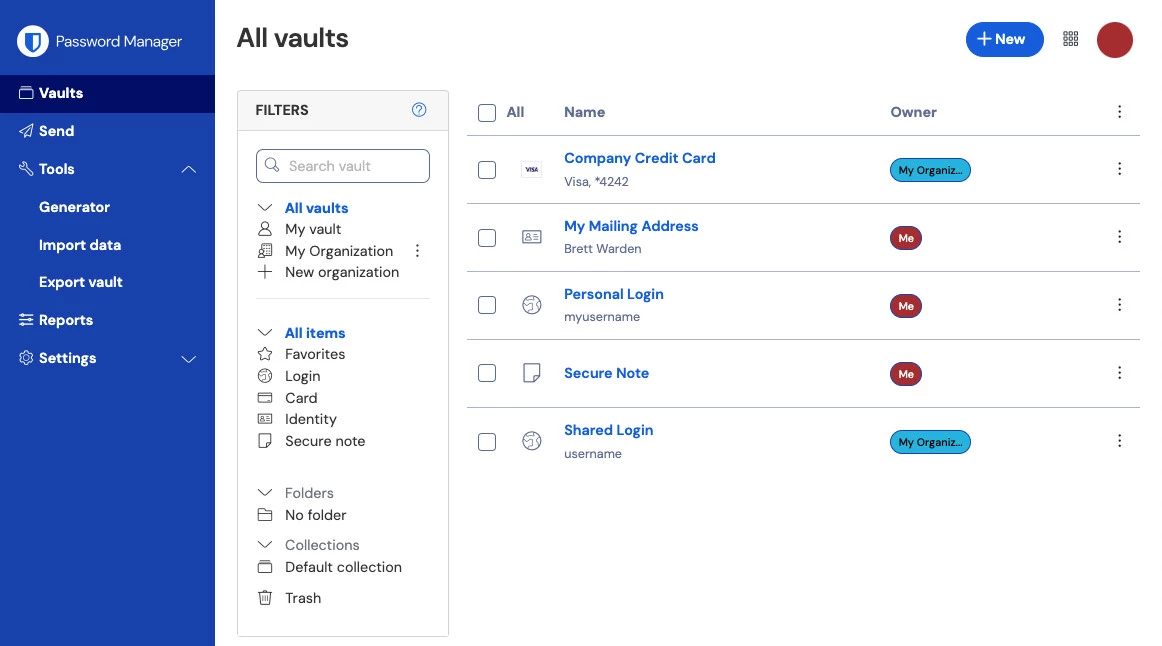
Bitwarden operates as a transparent, open-source password manager that secures digital identities through strict zero-knowledge encryption. This application organizes unlimited logins, private notes, and credit card details into a protected vault, ensuring critical information remains accessible only to the owner. While many users interact with their vaults primarily through browser extensions, installing the dedicated desktop application on a Windows machine provides a distinct environment for vault administration. The standalone client functions independently from web browser processes, isolating sensitive vault operations from tracking scripts or browser crashes.
The primary function of the desktop application is to provide immediate access to encrypted records without requiring an active browser session. Users rely on the local software to manage complex folder hierarchies, review password exposure reports, and edit highly sensitive file attachments in a controlled window. For individuals managing hundreds of accounts or IT administrators handling shared corporate vaults, the standalone interface prevents tab clutter and keeps credentials accessible via global keyboard shortcuts. It serves as the central hub for local vault management, offering direct export capabilities for offline backups and bulk editing tools that are difficult to execute in a narrow browser popup. Accessing the desktop client ensures that background processes remain isolated, reducing the surface area for potential exploits aimed at browser vulnerabilities.
Running the native desktop client provides hardware-level authentication advantages that browser extensions lack. By communicating directly with the operating system APIs, the application utilizes Windows Hello integration to replace manual master password entry with local biometrics. Users can unlock their vaults using a recognized fingerprint, a facial scan, or a local machine PIN. This hardware tie-in reduces the risk of keyloggers capturing the master password during frequent vault unlocking routines. Furthermore, the application caches an encrypted copy of the vault locally on the host machine, ensuring that users retain read-only access to their stored credentials even when traveling or operating without an active internet connection. The synchronization engine runs silently in the background, updating the local encrypted blob whenever the client detects a stable network link.
Key Features
- Zero-Knowledge Encryption Architecture: The application secures all vault data locally using AES-CBC 256-bit encryption before any information transmits to the cloud servers. The encryption key derives directly from the master password using PBKDF2 SHA-256 or Argon2id hashing algorithms, meaning the host servers never receive or store the unencrypted master key. If a server breach occurs, attackers cannot decrypt the stored blobs because the required key only exists within the user's local hardware memory during an active, authenticated session.
- Windows Hello Biometric Integration: The desktop client connects directly to native operating system biometrics, allowing users to bypass manual password entry. Users can authenticate using a registered fingerprint, facial recognition scan, or local hardware PIN. This integration significantly reduces the risk of keyloggers capturing the master password, as the long decryption phrase is replaced by a secure hardware token exchange handled entirely by the operating system.
- Integrated Authenticator (TOTP): The built-in authenticator generates time-based one-time passwords directly inside the individual vault record. When a user accesses a website requiring two-factor authentication, the application automatically copies the TOTP code to the system clipboard upon filling the main password. This eliminates the need to rely on secondary mobile applications, consolidating the entire login process into a single secure interface.
- Vault Organization and Attachments: The software supports complex nested folders, favorites lists, customized identity profiles, and standalone secure notes. Premium users can attach up to one gigabyte of encrypted files to individual items, making it an ideal storage location for passport scans, tax documents, or software recovery keys. These attachments inherit the exact same zero-knowledge encryption applied to standard text credentials.
- Secure Password Generator: A highly configurable generator creates complex string combinations based on user-defined parameters for length, casing, numbers, and special characters. It also includes an option to generate multi-word passphrases consisting of random dictionary words separated by hyphens or spaces, which are easier for humans to memorize while remaining mathematically resistant to brute-force guessing attacks.
- Emergency Access Management: The application allows owners to designate trusted contacts who can request access to the vault in the event of an emergency. This system imposes a mandatory waiting period, ranging from a few hours to several days, during which the owner can decline the request. If the timer expires without owner intervention, the trusted contact gains read-only or full takeover access, preventing permanent data loss.
- Bitwarden Send: This built-in utility encrypts text snippets or files for sharing with external individuals who do not possess their own vault accounts. Senders can apply strict expiration dates, configure maximum access counts, and assign password protection to the generated link. This feature replaces the insecure practice of sending temporary passwords or sensitive client credentials through plain-text emails or unencrypted chat applications.
How to Install Bitwarden on Windows
- Navigate to the official vendor download page to obtain the standard executable installer package for your specific processor architecture.
- Launch the downloaded setup executable and approve the standard User Account Control prompt to authorize the required system modifications.
- Review the installation scope prompt, choosing whether to install the application strictly for the current user profile or globally for all accounts registered on the machine.
- Allow the installation wizard to extract the required application files to the default directory path or assign a custom storage location on your local drive.
- Click the finish button to close the installation wizard and automatically launch the executable for the initial configuration run.
- On the initial launch screen, confirm your designated server environment by clicking the region dropdown at the bottom and selecting either the primary US infrastructure or the EU server cluster.
- Enter your account email address and master password to securely retrieve, download, and locally decrypt your vault database from the cloud servers.
- Navigate to the File menu, select Settings, open the Security tab, and check the box labeled Unlock with Windows Hello to enable local biometric authentication for future sessions.
Bitwarden Free vs. Paid
The free tier provides entirely unrestricted password management without limiting the number of saved logins or capping the number of connected devices. Free users receive full access to the core zero-knowledge vault, passkey storage, secure text notes, and the built-in password generator. This tier also permits sharing a single two-person organization folder for basic household credential sharing. The vendor sustains this tier without implementing advertising or selling user analytics, relying entirely on business subscriptions and paid upgrades to fund the open-source infrastructure.
Users requiring advanced authentication and storage capabilities must upgrade to the individual Premium tier, which costs $19.80 billed annually. This paid subscription activates the integrated TOTP authenticator, allowing the application to generate and autofill two-factor codes alongside standard passwords. It also unlocks hardware security key support for FIDO2 devices, provides an allowance of encrypted file storage for sensitive documents, and enables the emergency access protocol for trusted contacts.
The Families tier costs $47.88 billed annually and expands the premium feature set to accommodate up to six independent users. Each member receives their own private premium vault while gaining access to unlimited secure folder sharing within the family organization. This structure allows households to maintain strict privacy for personal banking or email accounts while creating centralized, shared folders for streaming services, utility bills, and shared network access codes.
Bitwarden vs. 1Password vs. KeePass
1Password operates as a closed-source, subscription-only credential manager known for its highly refined interface and proprietary synchronization engine. It includes distinct extras such as Wi-Fi sharing via QR codes, passport expiration alerts, and native integrations with developer tools. However, it completely lacks a free tier and forces users to store their encrypted vaults exclusively on corporate servers, making it less appealing for users who strictly require open-source code transparency or self-hosting capabilities.
KeePass takes a fundamentally different approach by functioning as a strictly offline, local-only database utility characterized by an interface styled heavily like Windows XP. It requires no account creation and saves the encrypted database file directly to the local hard drive, relying on users to configure third-party methods like external network drives to sync the file across different machines. While highly secure and customizable via community plugins, it lacks out-of-the-box browser integration and automated cross-device synchronization.
Bitwarden serves as the practical middle ground, combining the verifiable open-source transparency of KeePass with the automated cloud synchronization of 1Password. Users choose this application when they want an immediate, zero-friction sync experience across their Windows hardware without being locked into a high-priced proprietary ecosystem. It remains the logical choice for individuals who demand verifiable encryption mechanics but refuse to compromise on daily usability and cross-device availability.
Common Issues and Fixes
- Desktop application window remains invisible after launching from the taskbar. Click the taskbar icon to ensure the invisible window has focus, then press Alt plus the Spacebar to open the native context menu. Select Maximize to force the window onto the display, close it normally using the interface button, and reopen the program to restore standard window sizing.
- Windows Hello biometric unlock fails to trigger upon application restart. Open the application, go to the File menu, select Settings, and navigate to the Security tab. Locate and uncheck the option labeled Require master password or PIN on app restart, which intentionally suppresses biometric prompts when the application boots.
- Login attempts fail with an incorrect username or password error despite accurate credentials. Verify the server region dropdown located at the bottom of the login screen. Accounts created on the European server infrastructure will fail to authenticate if the desktop client defaults to the US server environment.
- Vault synchronization fails continuously with a generic error message. Background session tokens occasionally expire or corrupt, blocking the sync process. Log out of the desktop application entirely via the File menu, verify your internet connection, and log back in to generate a fresh session token.
- Biometric unlock options are grayed out or entirely missing from the security settings. This occurs when the Microsoft Visual C++ Redistributable packages are outdated or missing from the host machine. Download and install the latest x64 Redistributable package directly from Microsoft, then restart the computer to enable the native hardware APIs.
Version 2025.12.0 — December 2025
- Vault Health Alerts (Premium): Added a new feature for Premium plans that proactively alerts users within the browser extension if a password is weak, reused, or has been exposed in a breach.
- Direct Browser Import: Introduced a Direct Import capability for Chrome and Brave browsers, significantly speeding up the process of migrating data into Bitwarden.
- Unified Autofill Workflow: Improved the browser extension experience by merging the "Fill & Save" option into the standard Autofill function; users can now save the current site's URI to a login item directly if no match is found.
- Enhanced SSO Security: Updated the Admin Console to ensure that users revoked from an organization are immediately blocked from accessing their SSO-linked accounts.
- Performance & Fixes: Optimized login performance for the Web Vault and fixed an issue causing the mobile app to crash when unlocking during a sync error.