1Password has outgrown the traditional definition of a credential storage utility, functioning as a complete digital guardian for your online identity. As modern workflows require handling an ever-growing list of logins, payment methods, and authentication tokens, managing these secrets manually becomes a significant security risk. This desktop application solves the problem of identity sprawl by locking your most sensitive data inside a tightly encrypted vault. Whether you are a solo freelancer managing client accounts or a family trying to secure household Wi-Fi passwords and bank details, the software ensures that only you hold the decryption keys.
Choosing the dedicated Windows desktop client over a browser-only extension unlocks system-level integrations that significantly improve daily work. The native application hooks directly into Windows Hello, allowing you to bypass typing a complex master password in favor of biometric fingerprint or facial recognition. Furthermore, the desktop client acts as an authentication bridge for all your web browsers simultaneously, meaning you do not have to authenticate Chrome, Firefox, and Edge individually. It runs quietly in the background, ensuring that your vaults remain synced, backed up, and instantly available the moment a login field requires attention.
For developers and IT professionals, the application introduces specialized workflows that go far beyond standard autofill. The built-in SSH agent and command-line interface integration allow users to authenticate server infrastructure without keeping plaintext keys on their local disk. By handling the heavy lifting of encryption and organization locally, the desktop app prevents phishing attempts and credential stuffing while maintaining a highly organized, searchable database of your entire digital footprint. The software utilizes PBKDF2 key derivation and standard heavy encryption, meaning that even if the provider's servers were compromised, the data remains mathematically impossible to read without your unique localized key combination.
Key Features
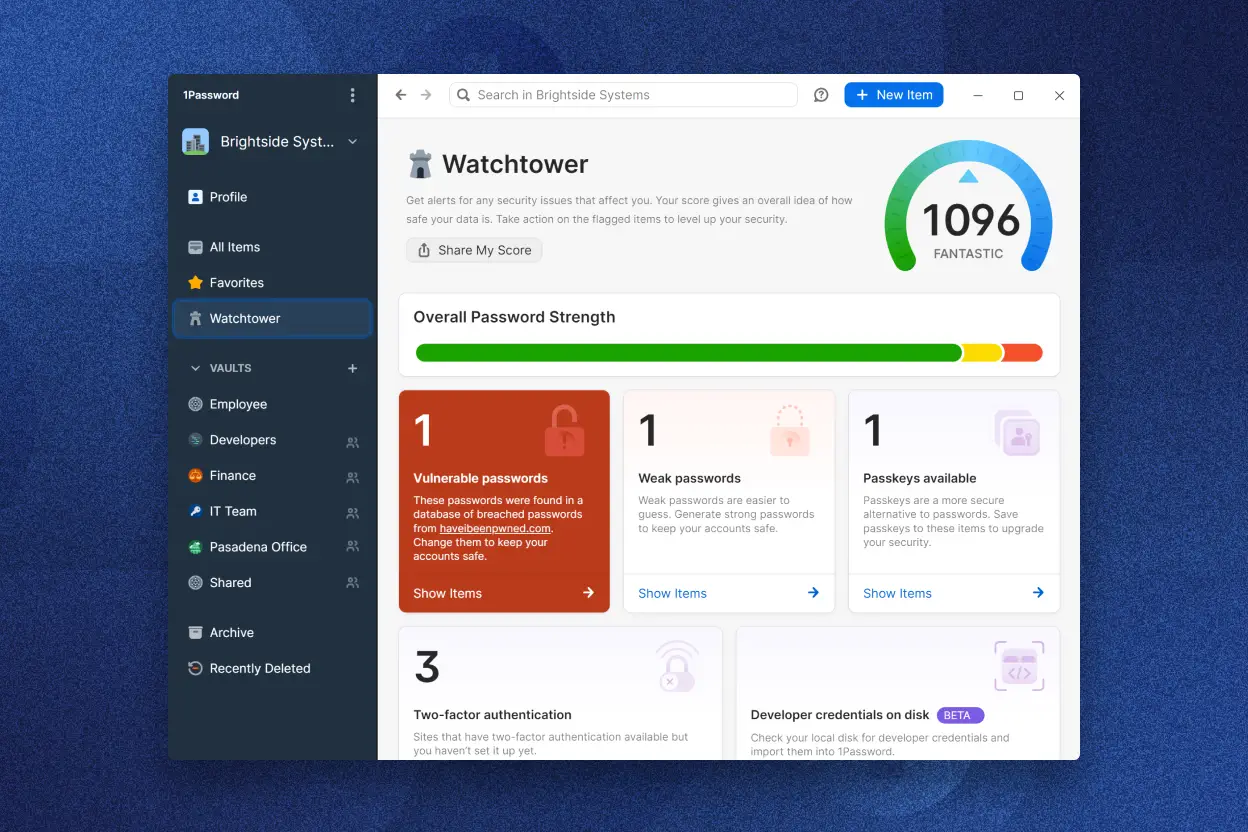
- Watchtower Security Auditing: The built-in dashboard scans your entire vault against known data breach databases and alerts you to compromised, weak, or reused passwords. It provides a concrete security score based on your credential hygiene. It also monitors the expiration dates of credit cards and warns developers if their stored SSH keys use outdated formatting, prompting immediate updates before a critical account is compromised.
- System-Wide Passkey Provider: The application functions as a third-party passkey provider on Windows, allowing you to generate, save, and synchronize passkeys across your hardware. This eliminates the need to rely strictly on the default operating system passkey storage, keeping your passwordless logins securely inside your main vault. When a website requests a passkey, a native overlay appears, letting you authenticate the request instantly with a biometric scan.
- Developer Command-Line Tools: By integrating directly with the terminal interface, the software allows developers to inject secrets, API tokens, and credentials directly into scripts and environment variables. The built-in SSH agent authorizes terminal requests using biometric prompts instead of requiring users to manage plaintext keys on their local drive. This means you can push to remote repositories securely without ever exposing the underlying private key to the local file system.
- Travel Mode Protection: When crossing international borders, you can flag specific vaults as safe for travel while removing sensitive vaults entirely from your local hardware. Once you reach your destination and disable the mode via the web interface, your private vaults synchronize back to your local machine, ensuring that a physical device inspection cannot compromise your most critical data.
- Shared Family and Team Vaults: Vaults can be segmented into personal, shared, and guest categories, making it easy to distribute streaming passwords or financial documents to family members. Administrators retain strict access control, dictating who can view, edit, or manage specific login items, while ensuring that personal vaults remain completely isolated from shared organizational data.
- Biometric Windows Hello Bridge: The desktop client communicates natively with your computer's Trusted Platform Module to support face and fingerprint unlocking. Once the main client is unlocked biometrically, it securely passes that authentication state to your browser extensions, preventing redundant password prompts across different web browsers running simultaneously.
How to Install 1Password on Windows
- Download the official Windows MSIX installer package from the provider's server, ensuring you select the standard 64-bit package.
- Launch the setup package; the MSIX format will automatically deploy the application files to the correct system directories without requiring manual destination path configuration or administrator overrides.
- Open the newly installed application and click the sign-in button to connect your existing account, which requires an active internet connection to communicate with the synchronization servers.
- Enter your registered email address, your account password, and your Secret Key, which is a localized 34-character code required during the initial hardware setup phase to authenticate the new device.
- Navigate to the application settings, click on the Security tab, and enable the Windows Hello integration to let the app use your device's fingerprint reader or camera instead of retyping your password.
- Open your preferred web browser and install the companion extension to enable automatic form filling on websites, allowing the desktop app to handle the underlying cryptography.
- Right-click the browser extension icon, open its settings menu, and verify that the app integration toggle is active so the desktop client can intercept and handle your unlock prompts.
1Password Free vs. Paid
Unlike some competitors in the password management space, this software does not offer a free tier for ongoing use. The developer operates on a strict subscription model, though new users can evaluate the full feature set via a 14-day free trial. During this trial period, you have unrestricted access to all desktop features, browser extensions, and synchronization services without limits on the number of saved passwords or connected devices. You do not have to deal with watermarks or export restrictions; if you decide not to pay, you can easily export your vault data to a standard CSV file.
The Individual plan is the primary entry point, costing approximately $47.88 per year when billed annually. This tier provides a single user with unlimited password storage, 1 GB of encrypted document storage, Watchtower security alerts, and full two-factor authentication support. Because there are no limits on hardware installations, a single subscription covers your desktop, laptop, and mobile devices simultaneously without arbitrary synchronization paywalls.
For households, the Families plan costs around $71.88 per year and extends coverage to five users. This tier introduces shared vaults, making it easy to manage collective credentials like utility bills or streaming services while giving each member their own private storage. Account recovery features are also included in the family tier, allowing a designated organizer to restore access if a family member forgets their master password. Business and enterprise tiers are available at higher per-user monthly rates, adding advanced administrative controls, custom security policies, and directory integration for corporate teams.
1Password vs. Bitwarden vs. Dashlane
Bitwarden appeals heavily to budget-conscious users and open-source advocates. Its most significant advantage is a broad free-forever tier that supports unlimited passwords across unlimited devices, a feature that makes it an immediate default for people unwilling to pay a subscription. Bitwarden also allows self-hosting for users who want total physical control over their encrypted data on their own servers. However, its interface is notably more utilitarian, and it lacks the advanced developer toolkits, built-in SSH agent, and direct biometric bridging that polished commercial alternatives provide. Furthermore, autofill triggers in Bitwarden often require manual clicks within the browser extension rather than appearing automatically inside the login fields.
Dashlane targets users who want a broader cybersecurity bundle rather than just a credential vault. Alongside standard password management, Dashlane frequently includes built-in virtual private network access and active dark web monitoring alerts. While its autofill capabilities are accurate, Dashlane is generally more expensive than its peers. Its desktop experience has largely shifted toward a web-first extension model, which feels less integrated into the local operating system than a native standalone application running quietly in the system tray.
You should choose 1Password if you value deep system-level integration, developer-friendly features, and a refined interface. While it lacks the free tier of Bitwarden and the bundled network tools of Dashlane, its Travel Mode, SSH key management, and reliable Windows Hello bridging make it the superior choice for power users and professionals who interact with dozens of complex credentials daily. It justifies its mandatory subscription through strict attention to detail and advanced vault segmentation that simplifies both family sharing and complex corporate workflows.
Common Issues and Fixes
- Browser extension fails to unlock via Windows Hello. If the browser add-on asks for your master password instead of triggering a biometric prompt, the connection to the desktop app has dropped. Open the main desktop application, navigate to Settings, select the Browser tab, and ensure the box for connecting with the browser is checked.
- Keyboard modifiers get stuck after a biometric prompt. A known issue with recent operating system updates can cause the Shift or Alt keys to act as if they are permanently pressed after dismissing a Windows Hello prompt. To fix this, tap the Shift key once to clear the stuck modifier state, or fully close and reopen the desktop application before authenticating.
- Endless authentication loop in Firefox. When authenticating a Firefox extension request, Windows Hello may continually succeed but immediately return an error loop. Bypass this by opening the standalone desktop application first, unlocking your vault there, and then returning to Firefox, which will recognize the active session.
- Missing SSH key approval prompts in the terminal. If your command-line interface hangs without asking for authorization to use a stored SSH key, the background agent might be disabled. Check the developer settings in the desktop application to confirm the SSH agent is active, and verify that your SSH configuration file points to the correct named pipe for the software.
Version 8.11.23 — December 2025
- Added full support for passkeys, allowing you to create, manage, and sign in to accounts securely directly from the browser extension.
- Improved general application stability and performance for a smoother user experience.
- Fixed an issue where the application could become unresponsive for approximately 30 seconds after enabling passkey support.