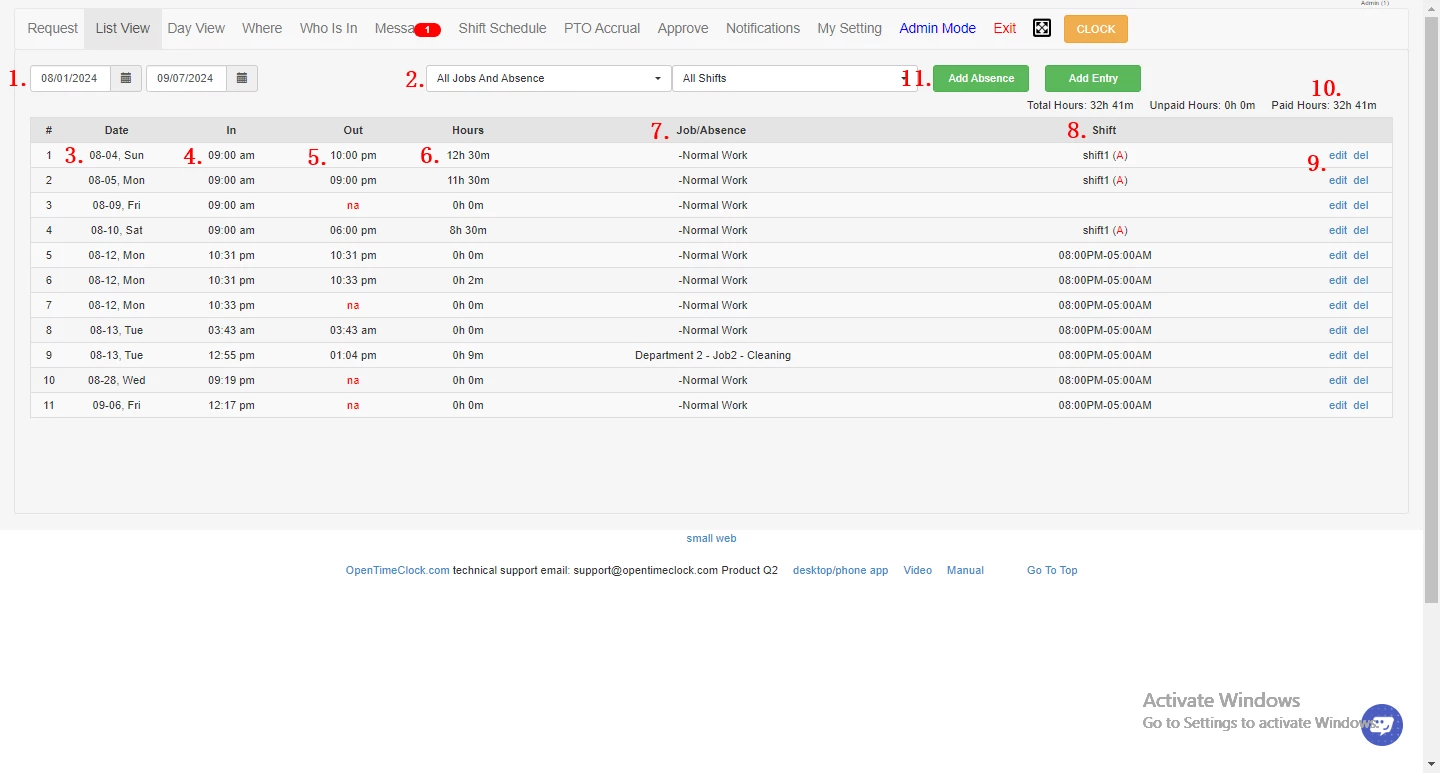
OpenTimeClock operates as a dedicated employee attendance terminal, converting a standard Windows computer into a central physical time-tracking station. While organizations often rely on expensive hardware clocks to manage shift workers, this desktop application uses existing office hardware to log staff arrivals, departures, paid time off, and project-specific hours. It serves retail environments, manufacturing floors, clinics, and offices that require a fixed checkpoint for hourly staff. Instead of asking employees to manage individual timesheets on personal smartphones—methods known for human error and delayed reporting—businesses deploy this application on a shared computer in a breakroom or lobby. This requires staff to interact with a centralized kiosk before starting their tasks, establishing a verifiable timeline of daily operations.
Running the native Windows application provides concrete operational benefits over relying strictly on a web browser. A dedicated client interacts directly with local hardware, utilizing USB barcode scanners, RFID badge readers, and webcams without encountering browser permission prompts during every shift change. Furthermore, the desktop installation handles temporary network outages gracefully. If an office loses internet connectivity due to router issues, the terminal continues accepting employee punches locally, storing the encrypted timestamps directly on the hard drive. Once the connection is restored, the application quietly pushes the cached data to the administrative dashboard, preventing payroll gaps. This localized stability is a primary reason IT administrators choose the desktop deployment for front-desk and warehouse environments where constant connectivity is uncertain.
Beyond basic timekeeping, the software enforces accountability through visual and geographic constraints, targeting common payroll disputes. Management can require photo verification upon login, utilizing the connected webcam to capture a snapshot of the person standing at the keyboard. This prevents buddy punching, an issue where one employee logs hours for an absent colleague, artificially inflating labor costs. By combining physical hardware restrictions, such as IP address lockouts, with visual confirmation, the application ensures that the payroll data accurately reflects the actual staff present. The resulting data stream provides exact records, making it easier to resolve disputes over late arrivals or unauthorized overtime. For business owners, having an unalterable log of shift activity translates to accurate labor forecasting and reduced administrative overhead.
Key Features
- Facial Recognition and Photo Verification: The application interfaces directly with the computer's webcam to capture an image of the individual logging in. Administrators can configure the system to simply store a photo timestamp alongside the punch record for manual review by human resources, or they can utilize the automated facial recognition algorithms to verify the identity instantly. This creates a hard barrier against unauthorized shift entries and ensures the right person is at the terminal.
- Offline Attendance Logging: When the host machine loses internet access, the software automatically switches into an offline mode without interrupting the user experience. It stores all clock-in and clock-out events locally on the Windows drive. Upon detecting a restored network connection, it uploads the queued attendance records to the cloud database in the background, ensuring no shift data is lost during routing outages and employees are not delayed from starting work.
- Hardware Scanner Integration: For environments with existing employee ID badges, the software accepts rapid input from standard USB peripherals. Employees can scan physical barcodes, QR codes, or RFID tags at the terminal. Because the application treats these peripheral scanners as standard keyboard inputs, workers can log their presence in a fraction of a second without needing to remember or manually type complex numeric PINs.
- Network and IP Restrictions: To ensure that employees are actually on the premises when they start their shifts, the system can restrict attendance access based on the current network environment. Managers can lock the client so that attendance logs are only accepted if the Windows machine is communicating through the approved corporate IP address or internal Wi-Fi network, preventing staff from logging in from home or the parking lot.
- Group Clock-In Mode: Shift supervisors and foremen can bypass individual logins by utilizing a specialized administrative view. They can select multiple team members from a visual list and log them all in simultaneously with a single click. This function severely expedites shift changes in warehouses, restaurants, or construction trailers where dozens of employees arrive at the exact same time and waiting in line at a terminal would waste billable hours.
- Custom Payroll Export Formatting: The backend dashboard translates the raw punch data into over 80 distinct reporting layouts tailored for bookkeeping. Managers can generate highly detailed timesheets separating regular hours, overtime, sick leave, and vacation accruals. These formats are designed to be imported directly into external payroll processing systems, significantly reducing the manual data entry required at the end of a pay cycle.
How to Install OpenTimeClock on Windows
- Download the Windows installer package from the official vendor website to the target machine where the kiosk will be set up.
- Navigate to your downloads folder and launch the executable file to initiate the standard setup wizard.
- Review the software license terms and choose a destination folder on your local drive for the application files, or accept the default installation path provided.
- Follow the prompts to create a desktop shortcut. Placing a shortcut directly on the desktop is highly recommended if the computer will serve as a permanent breakroom kiosk for staff.
- Finish the setup process, exit the installer, and launch the application for the initial hardware configuration.
- Grant Windows privacy permissions if prompted by the operating system. This step is necessary to ensure the application has authorized access to the connected webcam for facial recognition and photo timestamps.
- Enter the specific company identification number along with your manager credentials on the primary login screen to securely link the local desktop terminal to your administrative cloud account.
- (Optional) Configure your Windows operating system to launch the application automatically upon startup. Setting the app to open on boot guarantees the time clock is always active and ready for staff even after an unexpected system reboot or overnight update.
OpenTimeClock Free vs. Paid
The pricing structure operates on a flat-rate model rather than charging per individual user, making it highly scalable and predictable for businesses managing large hourly workforces. The Free Plan is completely free to use and explicitly supports an unlimited number of employees, managers, and physical locations. Under this zero-cost tier, organizations have full access to the core tracking tools, including biometric facial recognition, barcode and RFID scanning, offline terminal mode, and basic shift scheduling. The only functional limitation of the free tier is historical reporting access. New accounts receive a 30-day trial for downloading detailed timesheet reports in PDF or Excel formats. Once that introductory period expires, exporting those specific document files requires an upgrade, though the raw time data remains fully visible and stored within the web interface.
The Paid Plan costs $39 per company per month, or $399 when billed annually, which provides a notable discount for long-term commitments. Paying this flat fee unlocks all restrictions on report exports, allowing managers to pull historical data required for complex payroll audits. It also grants developers access to the system API for building custom integrations with proprietary internal software. Because the fee applies to the entire company rather than scaling with headcount, a retail chain with hundreds of cashiers or a factory with seasonal workers pays the exact same monthly rate as a small office with five staff members, keeping overhead costs completely flat regardless of rapid hiring phases.
Alternative licensing options exist to accommodate specific organizations and business models. Schools, government agencies, hospitals, and registered charities can apply for the NPO Plan, which grants all the premium Paid Plan features at absolutely no cost. Additionally, the vendor offers a unique Sponsor Link Plan for commercial businesses. By placing a verified text link back to the developer's website in the footer of their own homepage, businesses can receive the reporting and API features entirely for free, providing a budget-friendly option for web-savvy startups.
OpenTimeClock vs. Clockify vs. TimeClock Plus
Clockify is built primarily for freelancers, digital agencies, and remote knowledge workers who need to track billable hours down to the minute. It relies on a task-based timer approach where users manually start and stop clocks as they switch between different client projects on their own personal computers. While highly effective for monitoring desk-based productivity and generating client invoices, it lacks the physical kiosk controls, biometric webcam verification, and RFID scanner integrations required for managing a traditional shift-based workforce on a factory floor or retail environment.
TimeClock Plus (TCP) targets massive enterprises, large-scale hospitals, and heavy industrial operations that demand strict labor compliance tracking alongside complex scheduling rules. It offers highly granular auto-assignment, overtime forecasting, multi-location shift swapping, and deep enterprise HR integrations. This advanced capability comes with a significantly higher price tag, customized hardware costs, and a steep learning curve that often requires a dedicated implementation team to deploy correctly.
OpenTimeClock proves to be the more practical choice for small to mid-sized businesses that want to set up a shared physical attendance terminal without paying enterprise-level implementation fees. If a store owner simply wants to place a Windows PC near the front door where employees scan a barcode or smile at a webcam to clock in, OpenTimeClock provides the exact toolset required without forcing users to navigate complex enterprise menus. Its flat-rate pricing and uncomplicated interface make it highly accessible for managers who need reliable, secure shift records but wish to avoid the burden of navigating a complex suite or paying restrictive per-user monthly licenses.
Common Issues and Fixes
- Problem description: The desktop application fails to upload local offline punches to the cloud database. Check your Windows firewall or local antivirus software settings to ensure they are not blocking outbound network traffic for the specific application executable. Once outbound network permissions are properly restored, the software will automatically sync the cached attendance logs to the administrative server.
- Problem description: Employees receive an "IP Restricted" error and cannot log their daily shift. The administrative dashboard currently has network restrictions enabled, but the terminal computer is connected to an unapproved Wi-Fi network or an active VPN client. Disconnect the VPN, or have a manager log into the backend to update the authorized IP address list in the security settings.
- Problem description: The webcam does not activate for photo verification during the login process. Navigate to the Windows Privacy and Security settings and verify that desktop applications are explicitly permitted to access camera hardware. Additionally, ensure no other background programs, such as video conferencing tools, are currently holding exclusive control of the camera feed.
- Problem description: Scanned barcode or RFID badge data does not register in the password field. USB scanners function as standard keyboard emulators that inject text where the cursor is active. The user must click inside the PIN or ID text box to ensure it has active focus before scanning the physical badge; otherwise, the operating system will not pass the scanned text string to the application interface.
- Problem description: The application screen appears frozen or white when launching from the desktop shortcut. This can occur if the local cache becomes corrupted or if the client cannot resolve the initial server handshake over a poor network connection. Close the application via the Windows Task Manager, ensure your internet connection is stable, and relaunch the program to force a fresh connection to the server.
Version 3.2.7 — July 2024
- Revamped User Interface: Introduced a major design update with a modernized look and feel to enhance navigation and overall user experience.
- Enhanced Stability: Implemented under-the-hood optimizations to improve application performance and reliability during high-traffic usage.
- General Bug Fixes: Resolved various minor issues and glitches reported in previous versions to ensure smoother operation.