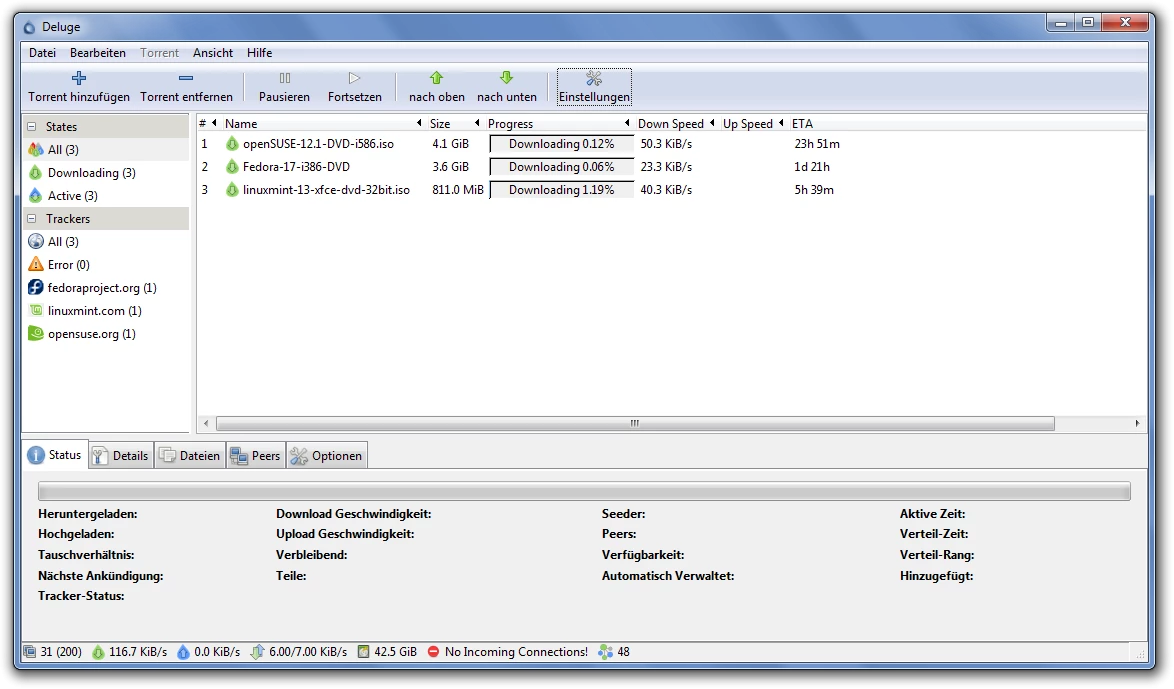
Deluge is a dedicated BitTorrent client built around a modular architecture that separates its core file-sharing engine from its graphical user interface. By utilizing the libtorrent library at its foundation, the application handles heavy peer-to-peer data transfers, multi-file torrent distributions, and complex bandwidth allocation tasks. Unlike web browser downloaders that struggle with connection interruptions or massive file sizes, this desktop utility is engineered to parse torrent files, locate available peers, and assemble incoming data chunks while actively checking file integrity. It serves users who need exact control over network protocols, port mapping, and seed ratios without relying on advertising-heavy commercial software.
For real-world workflows, individuals rely on this client to distribute large datasets, retrieve open-source disk images, and manage extensive media libraries locally. Its defining architectural trait is the daemon-client model. Users can run the graphical interface as a standard standalone desktop application, or they can operate the core transfer process as a background service. This split design allows the interface to connect to remote daemons running on dedicated hardware elsewhere, providing a centralized control panel for transfers happening on separate machines. The utility excels in aggressive early-stage seeding environments, connecting rapidly to swarms to maximize distribution speed when a file is initially shared.
Because the main interface is kept intentionally sparse, the tool appeals directly to technicians, homelab operators, and intermediate network users who prefer to add functionality strictly on an as-needed basis. Instead of bundling unnecessary bloat, the developers use a Python-based plugin system to introduce secondary capabilities like custom folder routing, automatic extraction, or advanced scheduling. This minimalist approach ensures the application consumes minimal memory and processor cycles, leaving local hardware resources available for other tasks while background transfers complete. The application integrates tightly with the desktop environment, supporting drag-and-drop operations for torrent files and intercepting protocol links directly from web browsers.
Key Features
- Thin-Client Daemon Architecture: The application separates the actual transfer engine from the graphical interface. Users can launch the core engine as a headless background process, allowing file transfers to continue running silently even if the main graphical window is closed. This also permits the desktop interface to act as a remote control, connecting to distant daemons over the network using a specific connection manager menu.
- Modular Plugin System: By default, the interface remains minimal, relying on a dedicated Preferences menu to load optional Python-based plugins. Users can activate tools such as the Label plugin to sort incoming transfers by category, or the AutoAdd extension to watch specific local directories for newly saved torrent files. This modularity prevents interface bloat and ensures the client only loads the code required for your specific workflow.
- Protocol Encryption and Peer Exchange: To prevent internet service providers from identifying and throttling BitTorrent traffic, the client supports forced Message Stream Encryption and Protocol Encryption. It also actively utilizes Mainline Distributed Hash Tables and Peer Exchange to locate file hosts without relying on a central tracker. This enables decentralized file sharing and ensures consistent download availability even if the original tracking server goes offline.
- Granular Bandwidth Scheduling: Network administration tools are built into the core functionality, allowing operators to set specific limits on active transfer speeds. Through the scheduling interface, users can map out exact times of the day when upload and download capacities should be capped or left unrestricted. This prevents the application from saturating the local network connection during active work hours while maximizing throughput overnight.
- Advanced Network Port Mapping: The client automates the process of opening network pathways through local routers by supporting UPnP and NAT-PMP protocols. Rather than forcing users to manually configure port forwarding in their router firmware, the application negotiates these connections directly. This ensures inbound connections are successfully routed to the client, which is critical for maintaining healthy seeding ratios and establishing peer connectivity.
- Magnet Link Integration: Instead of requiring users to manually save small tracker files to their local disk, the software intercepts Magnet URIs directly from the web browser. Once a magnet link is clicked, the application fetches the necessary metadata from the swarm, allowing the transfer to begin without an intermediate storage step. The interface then presents a confirmation dialog displaying the file hierarchy before committing storage space.
How to Install Deluge on Windows
- Download the official Windows installer executable package from the verified project website to your local storage drive.
- Double-click the downloaded executable file to launch the setup wizard, granting permission if the Windows User Account Control prompt appears.
- Review the GNU General Public License terms, then click Next to proceed to the component selection screen.
- Select your desired installation components; you can choose the standard desktop interface, the web user interface, and the background daemon depending on how you plan to manage transfers.
- Check the boxes to associate torrent files and Magnet URIs with the application so that your browser automatically hands off future downloads to the client.
- Confirm the default installation directory path, typically located in the Program Files folder on your primary drive, and click Install to extract the necessary application files.
- Click Finish to close the wizard and launch the program for the first time.
- If Windows Defender or your active firewall displays a security alert regarding network access, click Allow Access to ensure the application can connect to inbound peers and external trackers.
Deluge Free vs. Paid
The software operates under a strict open-source distribution model, utilizing the GNU General Public License. It is completely free to obtain, install, and modify. There are no paid tiers, no premium subscriptions, and no hidden trial limitations restricting how many files you can transfer or how much data you can process. Every feature, including remote management and protocol encryption, is available immediately upon installation without requiring an account or a license key.
Because it relies on community contributions rather than commercial sales, the interface contains zero advertisements and does not bundle third-party promotional software. Users will never encounter pop-up windows asking them to upgrade to a higher edition for faster speeds or built-in media playback. The development is sustained through voluntary work rather than aggressive monetization.
This model stands in sharp contrast to many mainstream BitTorrent clients that lock basic functionalities—such as automatic virus scanning or ad-free interfaces—behind annual subscription fees. With this client, the complete absence of a financial barrier guarantees that network operators, homelab enthusiasts, and casual users all have access to the exact same untethered toolset.
Deluge vs. qBittorrent vs. uTorrent
qBittorrent operates as a monolithic desktop application built on the Qt framework, providing a familiar visual layout for users accustomed to traditional file-sharing utilities. It includes a built-in search engine and an RSS reader by default, making it easier for casual users to locate and automatically grab files without installing extra modules. For managing thousands of long-term seeds simultaneously, qBittorrent handles the massive database load with fewer interface slowdowns, making it a preferred choice for heavy archivists who need hundreds of active connections maintained over several months.
uTorrent is a heavily commercialized application that dominated the early file-sharing era but now relies on a monetization model involving interface advertisements and bundled promotional offers. While it remains visually compact, its free tier actively pushes users toward purchasing a premium version to remove banners and unlock conveniences like automated file conversion or built-in media playback. It operates entirely as closed-source software, meaning independent developers cannot audit its code or verify its internal data handling practices, which deters privacy-focused users.
Deluge is the better fit when users require clear separation between the user interface and the background transfer engine. If you intend to run a headless server on a secondary machine and control it from your main Windows desktop, this client-daemon architecture provides a superior workflow that neither competitor offers natively. It is also preferred in scenarios where aggressive early-stage swarm connection is required, as its network handling algorithms often connect to peers faster during the initial distribution of a newly tracked file.
Common Issues and Fixes
- Problem description: Torrent stuck at 99 percent or failing to complete. This usually occurs when a sudden influx of inbound peer connections triggers a SYN flood defense mechanism in your local router or software firewall. To resolve this, open the Preferences menu, navigate to the Bandwidth section, and reduce the total maximum allowed connections to prevent network hardware from blocking the application traffic.
- Problem description: All active downloads marked with an Error state. This happens if you manually move your downloaded files to a new drive or folder using the Windows file explorer while the client is closed. To fix it, pause the affected items, right-click and select Move Storage to point the application to the new directory path, then right-click again and select Force Re-check.
- Problem description: The graphical interface fails to connect to the daemon. If running in thin-client mode, the desktop window will appear blank or refuse to display active transfers if the authentication credentials fail. Open the Connection Manager, ensure the local host IP address is correct, and verify that your username and password strictly match the entries in the daemon authentication configuration file.
- Problem description: Side-by-side configuration error on startup. On older Windows operating systems, attempting to launch the executable may result in an immediate crash due to missing C++ runtime libraries. You can fix this by downloading and installing the Microsoft Visual C++ Redistributable Package directly from the official Microsoft download center, which supplies the necessary framework files.
- Problem description: Magnets fail to launch the application from the browser. If clicking a magnet link in your web browser does not automatically open the transfer window, the system file associations have been broken or overwritten by another application. You can restore this behavior by re-running the application installer and ensuring the box to associate magnet URIs is checked during the setup wizard.
Version 2.1.1 — July 2025
- Added support for creating BitTorrent v2 torrents within the core application.
- Introduced a new option to toggle between Dark and Light themes in both the GTK and Web user interfaces.
- Implemented support for specifying network interface names in addition to IP addresses in the Web UI.
- Enhanced the Blocklist plugin with new whitelist functionality and automatic IP filter cleaning before updates.
- Fixed multiple security vulnerabilities, including insecure HTTP version checks and potential path traversal issues (GHSL-2024-189, GHSL-2024-191).
- Resolved a crash that occurred when resizing the window while using the Piecesbar or Stats plugins.
- Corrected an issue where the "rm" and "move" commands would hang indefinitely in the Console UI.
- Fixed bugs related to changing torrent ownership and the quick search feature not functioning correctly.
- Dropped support for Python 3.6; Python 3.7 or newer is now required.