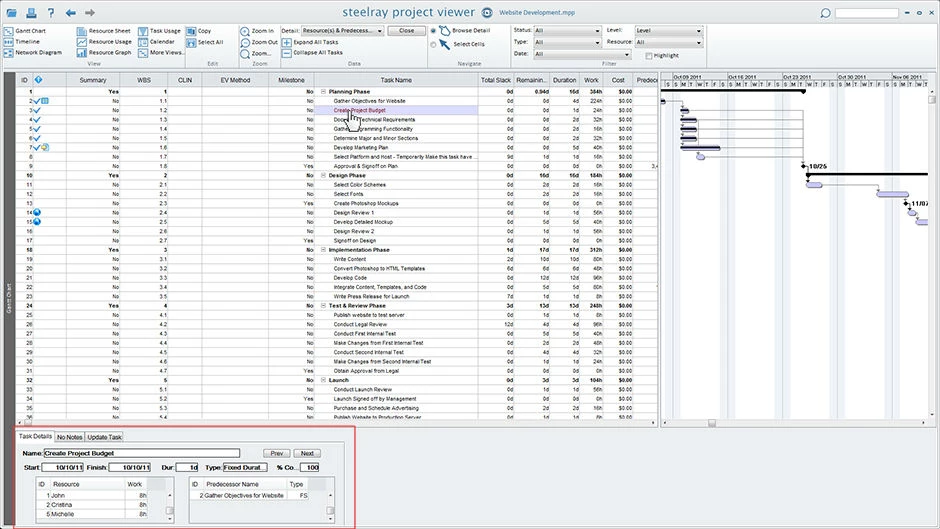
Project management in industries such as construction, heavy engineering, and aerospace generates highly complex schedule data, usually stored in proprietary formats like those used by Microsoft Project or Oracle Primavera P6. For project managers, having complete editing software is a practical necessity. However, for the extended network of team members, contractors, and executive stakeholders, purchasing an editing license simply to view a Gantt chart is an unnecessary drain on the IT budget. Steelray Project Viewer is a specialized desktop utility designed exactly for this scenario. It acts as a dedicated reading and printing environment, allowing users to open, navigate, and analyze complex schedule files without the overhead of the original authoring software.
By focusing strictly on the viewing experience, this utility bypasses the steep learning curve associated with heavy management suites. Users who receive a schedule file via email or a local server can open it instantly and see exactly what the project manager intended. The application renders the original timelines, resource allocations, network diagrams, and task usage sheets with exact fidelity. Because it does not allow editing, it also serves as a secure way to distribute schedules without the risk of an unauthorized user accidentally shifting a critical path deadline or deleting a resource dependency.
Choosing a dedicated desktop application over a lightweight web browser tool is a deliberate workflow decision. In enterprise environments, schedule files can contain thousands of line items, complex nested dependencies, and extensive resource pools. Web-based viewers often struggle to render these massive datasets smoothly and frequently require users to upload sensitive, proprietary corporate data to a third-party server. By processing the schedule locally on a Windows desktop, Steelray Project Viewer ensures instant loading times for heavy files while keeping all proprietary data strictly within the company firewall. This local rendering approach guarantees both performance and data security for organizations handling sensitive contracts.
Key Features
- Native Microsoft Project Support: The application reads the exact proprietary structure of .mpp files without relying on intermediary XML exports or messy file conversions. It natively supports legacy iterations of the format all the way up to files generated by the newest iterations of Microsoft Project. This ensures that when a stakeholder opens a file, the baseline dates, custom fields, and task notes appear exactly as the original author formatted them.
- Primavera P6 Compatibility: Beyond standard Microsoft formats, the Ultimate Edition of the utility can natively open and process Oracle Primavera P6 .xer files. This dual compatibility is highly practical for heavy construction or defense contractors who often receive schedules from different prime contractors using completely different enterprise software suites. It eliminates the need to install multiple distinct viewing utilities on a single workstation.
- Integrated Fast Search Engine: Navigating a schedule with ten thousand line items is incredibly tedious using standard scroll bars. The application incorporates a specialized, built-in search engine that allows users to instantly type a task ID, a specific contractor's name, or a deadline date to jump directly to that exact point in the Gantt chart. This rapid navigation prevents stakeholders from wasting time hunting through collapsed summary tasks.
- Professional Print Controls: Printing massive, multi-year timelines onto standard paper sizes is a notoriously difficult task in standard project software. This utility provides an advanced print preview interface with dedicated scaling options, allowing users to force a sprawling Gantt chart to fit onto a single page or explicitly define header and footer data. Users can control orientation and date ranges before sending the document to a physical plotter or exporting it to a PDF printer.
- Detailed Resource and Task Views: The interface replicates the standard analytical views project professionals expect, including Task Usage, Resource Usage, and Network Diagrams. By clicking on a specific date column or a designated team member in the sidebar, users can immediately see what tasks are starting, which are finishing, and where an individual might be overallocated. This visibility is highly useful for department heads planning weekly labor distribution.
- Offline Local Processing: All file parsing and visual rendering occurs directly on the local Windows machine's processor. The software does not require an active internet connection to read files, nor does it force users to upload their schedules to a vendor's cloud server. This strictly offline capability is an absolute requirement for users working in defense contracting, secure government facilities, or remote job sites with zero network connectivity.
How to Install Steelray Project Viewer on Windows
- Download the official Windows installer executable directly from the vendor's primary website to ensure you receive the unmodified application.
- Open your default downloads directory, locate the saved executable file, and double-click it to initiate the setup wizard.
- Read the presented end-user license agreement carefully, and click the designated checkbox to accept the terms required to continue the installation.
- Select the destination directory on your local drive, keeping the default application folder path unless your corporate IT policy mandates a specific software drive.
- Click the install button to begin unpacking the core application files, rendering engines, and interface components onto your local storage disk.
- Wait for the progress bar to complete, which typically takes only a few moments due to the highly optimized nature of the viewer.
- Click finish to exit the setup window and launch the executable for the first time.
- Upon the initial startup, enter your purchased license key into the prompt, or select the evaluation option to begin the trial period and access the main viewing interface.
Steelray Project Viewer Free vs. Paid
Steelray Project Viewer is a premium, commercial software product designed specifically to reduce the overall licensing costs of project management within large organizations. It is not a free application, nor is it an open-source project. However, the developer does provide a limited-time free trial, allowing project managers and IT administrators to download the utility, open their heaviest schedule files, and verify that the formatting and performance meet their specific workflow requirements before committing to a purchase.
The paid licensing model operates primarily on an annual subscription basis, which is priced significantly lower than a full editing suite. The standard edition, which focuses exclusively on opening Microsoft Project schedules, typically costs around $20 per user per year. For organizations that operate in mixed environments and also require the ability to open Oracle Primavera P6 files, the Ultimate Edition is available for roughly $35 per user per year. This straightforward per-user pricing allows companies to accurately forecast their software budgets without worrying about complex usage tiers.
By deploying this utility instead of purchasing full MS Project licenses for every stakeholder, enterprises can achieve significant financial efficiency. The application enforces no hidden export restrictions, artificial save limits, or watermarks once the software is fully activated with a valid subscription key. Organizations that need to roll out the software to hundreds of employees can also utilize the single license key deployment method, allowing automated corporate IT tools to install the application silently across an entire network without requiring individual users to manage their own activation steps.
Steelray Project Viewer vs. Seavus Project Viewer vs. Project Viewer 365
Seavus Project Viewer is a heavy-duty enterprise application that is explicitly designed to mimic the exact visual interface and ribbon layout of Microsoft Project. It offers perpetual, one-time purchase options starting at roughly $62 for a single Windows user, alongside annual subscription options. Seavus is an excellent choice for organizations that want the absolute closest visual clone to the original Microsoft software, complete with deep graphical reporting tools and integration with enterprise servers. However, its dense feature set and higher upfront cost can be excessive for casual stakeholders who simply need to check a date or print a chart.
Project Viewer 365 takes a highly distributed, cloud-centric approach to schedule viewing. It provides applications across web browsers, mobile devices, and desktop systems, featuring direct integrations with cloud storage providers like Google Drive, OneDrive, and SharePoint. It is the optimal tool for remote teams that rely on immediate cloud synchronization and collaborative environments. The trade-off is that Project Viewer 365 relies heavily on ongoing subscription costs, which can escalate well over $100 per year for its advanced business tiers, and its web-first nature may not satisfy strict offline security requirements.
Steelray Project Viewer remains the superior fit for users handling massive, data-heavy schedules in industries where local performance and offline security are paramount. Its ultra-fast local rendering engine prevents the lag often associated with opening ten-thousand-line items in browser-based alternatives. Combined with its specialized printing controls and highly affordable annual price point, it provides the most direct, efficient desktop experience for simply navigating, searching, and plotting large local files without unnecessary cloud bloat.
Common Issues and Fixes
- Problem description. Missing font formatting in large corporate schedules. Sometimes, when opening a file created with custom typography, the viewer defaults to standard system fonts, altering the visual layout. Fix this by ensuring the specific corporate font used by the original author is locally installed on your Windows machine before launching the project file.
- Problem description. License key fails to authenticate during initial setup. Users may encounter an activation error if a corporate firewall blocks the outgoing authentication ping to the vendor's server. Resolve this by temporarily connecting to an unrestricted external network to validate the key, or by asking your IT department to whitelist the software's outbound traffic.
- Problem description. Blank pages generated when printing massive timelines. Exceptionally long Gantt charts can occasionally cause scaling errors during the print preview, resulting in wasted paper. Fix this by manually adjusting the print scaling options in the setup menu to "Fit to One Page" or by defining a highly specific date range before sending the job to the plotter.
- Problem description. Security software flags the installer as unrecognized. Because strict enterprise endpoint security systems occasionally block unverified executables, the installation process might halt unexpectedly. Fix this by submitting the downloaded installer to your IT department for a false-positive review, or by running the executable as an administrator if you have the necessary system privileges.
Version 6.27 — 2025
- Erix.AI Integration: Added new AI-powered assistance (Erix.AI) to help users generate and manage project plans more efficiently.
- Subscription Management: Introduced the ability to manage purchased subscription plans directly within the application settings.
- Timeline View Enhancements: Improved the visual layout and functionality of the Timeline View for clearer project tracking.
- Resource Calculation Updates: Optimized the logic for calculating resource work to ensure greater accuracy in project scheduling.
- User Interface Refinements: Applied multiple UI/UX fixes to streamline navigation and improve overall visual stability.
- Performance Improvements: Addressed various bugs and enhanced system stability for smoother operation.