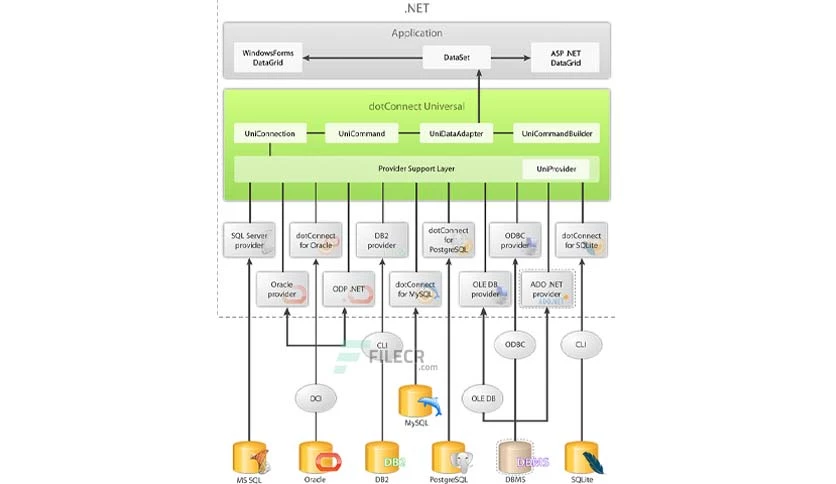
Building and maintaining enterprise software often requires interacting with multiple database environments. Instead of forcing software engineering teams to manage disparate vendor-specific data drivers, Devart dotConnect Universal Professional provides a unified ADO.NET data provider. This specialized framework allows Windows developers to write a single codebase that natively connects to Oracle, MySQL, PostgreSQL, DB2, SQLite, and SQL Server. By abstracting the data access layer into a unified architecture, engineers can interact with various database dialects without needing to rewrite SQL queries or manage conflicting vendor libraries.
For commercial software vendors developing off-the-shelf applications, supporting multiple database backends is a strict necessity. Different clients run different infrastructure. If an application relies strictly on native libraries, it cannot easily deploy into a client environment running PostgreSQL without major modifications, forcing the engineering team to maintain multiple forks of the software. The standard approach—writing conditional database logic or building custom abstractions—creates significant technical debt and testing overhead. This data provider solves that problem directly inside the development environment by functioning as a translation layer. It intercepts standard ADO.NET commands, translates them on the fly, and routes them to the correct database engine while keeping the C# or VB.NET application code strictly uniform.
Unlike lightweight wrappers or basic Object-Relational Mappers, this desktop and server integration tool is engineered for strict control over the disconnected dataset architecture. It provides fully managed code libraries that deploy alongside the application, meaning the target machine does not need bulky database client software installed for the bundled providers. Developers can bind data to Windows Forms, Windows Presentation Foundation (WPF), or ASP.NET web applications using visual designers in Visual Studio. This ensures that whether the software is reading a few configuration rows from a local SQLite file or executing a batch update on a remote Oracle cluster, the data access implementation remains exactly the same.
Key Features
- Feature Name: Unified SQL Translation (UniSQL) This core engine allows developers to write generic SQL statements containing conditional blocks, macros, and unified functions. At runtime, the provider automatically translates these statements into the native SQL dialect of the active database connection. This removes the need to manually parse strings or maintain separate repositories of queries for Oracle, MySQL, and SQL Server environments.
- Feature Name: Bundled Direct Providers The setup package directly includes native-level connectivity components for Oracle, MySQL, PostgreSQL, and SQLite. When compiling an application, these providers are embedded into the deployment package as fully managed assemblies. Administrators deploying the final application do not need to install the Oracle Call Interface (OCI) or MySQL client libraries on the target Windows machines.
- Feature Name: Visual Studio DataSet Wizard The software integrates directly into the Visual Studio IDE, offering a dedicated DataSet Wizard available from the Server Explorer. This visual design-time tool allows developers to point and click to map database tables, define relationships, and generate Typed DataSets. It generates the necessary boilerplate XML and C# class structures, drastically reducing manual coding time for data binding.
- Feature Name: Real-Time Database Event Tracing Complex data layers obscure performance bottlenecks, making it difficult to optimize queries. This application supports direct integration with dbMonitor, a standalone diagnostic interface that tracks per-component execution. Developers can view live logs of SQL statement execution times, transaction commits, rollbacks, and parameter binding directly, allowing them to isolate slow database operations.
- Feature Name: Advanced ASP.NET Provider Model Integration For developers building web applications, the framework completely implements the standard ASP.NET 2.0 provider interfaces. Users can map Role, Session State, Membership, Profile, and Site Map providers directly to any supported database backend using configuration files. This allows an application to switch its user authentication and session storage from a local SQL Server to a remote PostgreSQL cluster by simply changing the connection string.
- Feature Name: Microsoft Enterprise Library Support Large legacy systems frequently rely on the Microsoft Data Access Application Block for standardized database interactions. This software plugs directly into that existing framework, allowing developers to extend the Enterprise Library capabilities to non-Microsoft databases. It ensures that older applications can be modernized and connected to new data sources without replacing the existing architecture.
How to Install dotConnect Universal Professional on Windows
- Download the offline Windows installer executable for the Universal Professional edition directly from the Devart registered user portal or the standard trial download page.
- Launch the setup file and review the end-user license agreement to ensure compliance with the target deployment environment rules.
- Select the target installation directory; by default, the setup routes the core assembly files to the standard Program Files directory under the Devart folder structure, though custom drive paths are fully supported for specialized workstation setups.
- Choose the specific Visual Studio integration options presented in the installer checklist, ensuring that you match the checkboxes to the exact editions of Visual Studio currently installed on your workstation.
- Opt to install the standalone dbMonitor application if you require real-time SQL execution tracing during your local development and testing phases.
- Allow the installer to complete the file extraction and automatically register the ADO.NET provider assemblies into the Windows Global Assembly Cache (GAC), which is required for IDE detection.
- Open your project in Visual Studio, navigate to the Solution Explorer, and check that the Devart data components are correctly populated inside the IDE Toolbox and Server Explorer.
- Before compiling for production, open the Customer Portal online to verify your hardware ID and confirm that your development machine has actively consumed a valid license seat.
dotConnect Universal Professional Free vs. Paid
Devart manages its ADO.NET data providers through a tiered licensing structure based on team size and deployment scope. New users can download a fully functional 30-day trial to test the cross-database capabilities inside their own projects. Once the trial period ends, the software automatically transitions into a free Express edition. The Express edition permits continued commercial use but severely restricts functionality; it only supports native data types, removes the bundled direct providers, and disables all visual design-time extensions within the IDE.
To access the complete feature set, development teams must purchase a perpetual commercial license. The entry-level Single Developer license allows one specific programmer to install the software on their workstation, build applications, and compile the necessary assemblies. For organizations requiring broader deployment, Devart offers a Server license, which permits installation on a single server accessed by a single legal entity, making it appropriate for automated build servers or centralized application server environments.
For extensive enterprise rollouts, the Site license allows an unlimited number of developers within a single company to use the tools. Finally, an OEM license is required for organizations that intend to package the Devart components into their own commercial software and distribute it to external third parties. All paid licenses are strictly perpetual, meaning the license purchased will work indefinitely.
Every new perpetual license includes a one-year subscription for technical support and product upgrades. During this 12-month window, developers receive access to new major releases, bug fixes, and updated Visual Studio integrations. Once the initial year expires, teams can choose to renew the subscription at a discounted rate to maintain access to newer database engine compatibilities, or they can decline the renewal and continue using their existing, activated software edition without interruption.
dotConnect Universal Professional vs. Microsoft SqlClient vs. Oracle Data Provider for .NET (ODP.NET)
Microsoft SqlClient is the default, native ADO.NET provider developed strictly for Microsoft SQL Server environments. It is the undisputed standard for engineering teams building applications that will only ever communicate with a SQL Server backend. Because it is built directly into the .NET ecosystem, it offers immediate support for the latest SQL Server features, optimized binary data streams, and zero-abstraction performance mapping the Tabular Data Stream protocol. However, its major limitation is its total lack of cross-database compatibility. If an application relying on Microsoft SqlClient needs to support a customer running MySQL or Oracle, the development team must write an entirely separate data access layer from scratch.
Oracle Data Provider for .NET (ODP.NET) is the official tool for integrating .NET applications with Oracle databases. It exposes proprietary, vendor-specific functionality that generic drivers cannot touch, such as Oracle Advanced Queuing, transparent application failover, and specialized performance tuning for bulk data operations. Developers building internal enterprise applications bound permanently to an Oracle cluster generally prefer ODP.NET for these explicit advantages. Similar to SqlClient, ODP.NET creates total vendor lock-in. Any logic built using Oracle-specific classes will fail if the application is migrated to an open-source database like PostgreSQL.
Devart dotConnect Universal Professional serves as the crucial bridge for applications that must remain agnostic to the underlying database. While Microsoft SqlClient and ODP.NET offer maximum native performance for their specific ecosystems, they force developers to maintain separate codebases for different clients. By implementing Devart's unified provider, development teams sacrifice a minor fraction of native-driver performance in exchange for massive architectural flexibility. The software allows developers to write standard UniSQL, bind data once, and let the translation engine handle the vendor-specific routing. It is the logical choice for multi-tenant SaaS applications, commercial off-the-shelf software, and teams migrating legacy systems away from single-vendor lock-in.
Common Issues and Fixes
- Problem description. The data provider components appear greyed out and unselectable in the Visual Studio IDE when working on an ASP.NET project. This occurs because the IDE is currently set to the standard Designer view, which does not support non-visual data components. Right-click the .aspx file in the Solution Explorer and switch the interface to Component Designer view to restore full interactability with the Devart toolset, allowing you to drag and drop connection components onto the surface.
- Problem description. Parameterized database queries fail to map custom data types correctly during execution, leading to silent truncation or SQL errors. When configuring data parameters in the code, developers often mistakenly assign values to the standard DbType property. Instead, assign the data mapping to the UniDbType property, which the engine uses to precisely match the target database's specific architecture limits.
- Problem description. The application throws a licensing error during deployment or when compiling on an automated build server. The software relies on a hardware ID generated from the BIOS, CPU, and hard drive parameters to validate the developer's license seat. Log into the Devart Customer Portal, check your active activations, and deactivate any unused machines to free up a license slot for the build server.
- Problem description. Production web servers experience heavy disk I/O load and degraded database connection performance. This happens when the per-component tracing feature is accidentally left active in a live deployment environment. Ensure that the UniMonitor class and the standalone dbMonitor integration are strictly disabled in your production configuration files, as aggressive SQL event logging consumes significant system resources.
Version 3.80.2279 — December 2020
- Added full compatibility with the .NET 10 framework.
- Added support for Visual Studio 2020.
- Implemented built-in interactive OAuth authorization for secure connections.
- Added support for the PgSqlNumeric data type.
- Improved performance of data processing with new batch update capabilities.
- Implemented modern SSH encryption algorithms for enhanced security.