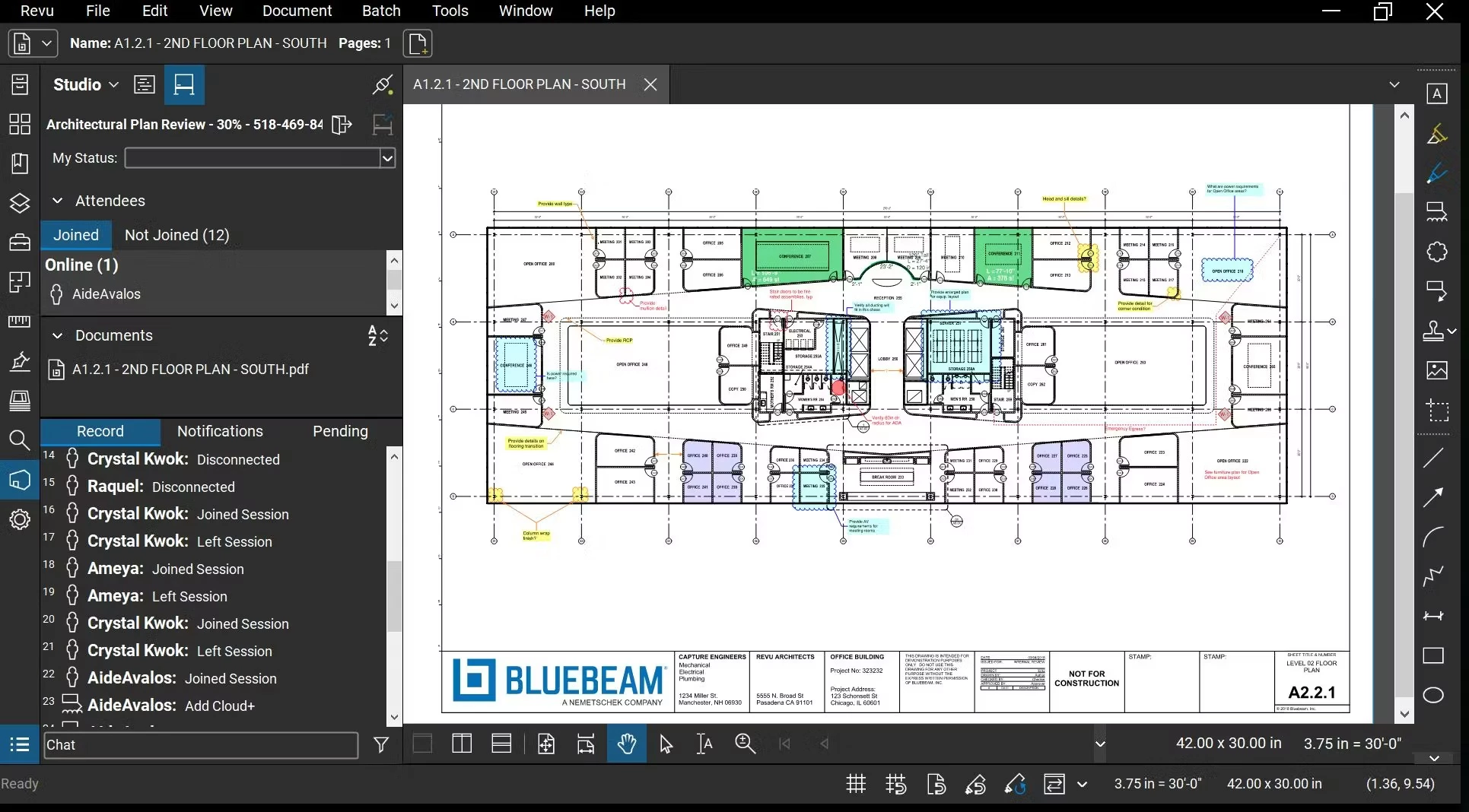
Bluebeam Revu is a specialized PDF markup, measurement, and collaboration application designed specifically for the architecture, engineering, and construction (AEC) sectors. While standard document editors focus on text manipulation and administrative paperwork, this application targets complex, large-format design drawings, site logistics plans, and heavy submittal packages. Project managers, estimators, and engineers rely on it to pull exact material quantities from digital blueprints, track punch lists, and coordinate structural design changes across entirely decentralized teams. It replaces generic viewers by introducing industry-standard tools for calibration, takeoff, and revision control directly into the interface.
Unlike browser-based drawing viewers that often struggle to render heavily vectorized architectural plans or massive multi-page plan sets, the desktop client handles these documents locally utilizing dedicated system hardware. The application parses layers generated by CAD software, maintaining the integrity of original drafting data while adding an interactive collaboration layer on top. The interface is modular, allowing users to customize their workspace panels depending on whether they are doing a quick visual review or spending hours calculating flooring areas and linear pipe runs.
By keeping the core processing load on the local Windows desktop environment and handling the collaboration layer through cloud-based synchronization, the software gives users the responsiveness required for intensive daily document control. Subcontractors on the job site, BIM coordinators in the office, and lead architects can all look at the exact same revision of a blueprint. This hybrid approach prevents the common version control nightmare where team members accidentally build from outdated plans, ensuring that every request for information (RFI) or structural markup is tied accurately to the active project phase.
Key Features
- Studio Sessions: A real-time collaboration environment built directly into the software ecosystem. Multiple project stakeholders can log into a hosted session on the same PDF, adding markups, adjusting measurements, and tracking comments simultaneously without locking the file for other participants. The session tracks every action with an author name and timestamp.
- The Tool Chest: A dedicated panel that stores, organizes, and standardizes custom annotations. Users can save frequently used plumbing symbols, specialized text formatting, or custom-scaled measurement tools into profiles for rapid reuse across different drawing sets. These customized tool sets can be exported and shared across an entire company to ensure drawing standards remain uniform.
- Interactive Markups List: A built-in tracking panel that operates like a database or spreadsheet at the bottom of the workspace. It logs every annotation placed on a drawing, allowing users to filter items by subject, author, or date, assign specific review statuses, and export the entire table to Excel or CSV formats for external project tracking.
- Document Compare and Overlay Pages: Utilities specifically designed to detect and highlight differences between sequential drawing revisions. Overlay Pages assigns distinct colors to each revision and stacks them transparently, so removed walls or added structural lines visually stand out immediately, eliminating the need to spot changes manually.
- Advanced Measurement Tools: Specialized takeoff functions that calculate length, perimeter, area, volume, and angle directly from the calibrated PDF file. The Dynamic Fill feature allows users to essentially pour digital paint into complex, irregular room shapes on the drawing to instantly calculate the bounded area and perimeter without clicking every corner.
- Quantity Link: An advanced integration available in the highest subscription tier that links measurement totals from the PDF directly to a designated Microsoft Excel spreadsheet. As the estimator adds new area or length measurements to the digital drawing, the connected Excel cells automatically update in real time to reflect the new material quantities.
- Batch Link Hyperlink Automation: A navigational tool that automatically creates navigational hyperlinks across large document sets. By scanning the title blocks of a multi-page PDF, the software can automatically link section cuts and elevation callouts to their corresponding pages, saving hours of manual linking for large submittal packages.
How to Install Bluebeam Revu on Windows
- Navigate to the official vendor download center and retrieve the current Windows installer executable for the desktop application.
- Launch the downloaded package to start the InstallShield Wizard and select your preferred interface language from the initial dropdown menu.
- Read and accept the End User License Agreement, then proceed to select your installation options and destination folder, which defaults to the standard Program Files directory.
- Choose whether to install the software as an upgrade over an existing older generation or as a side-by-side evaluation installation, if the setup detects a previous iteration on the machine.
- Click Install to begin unpacking the application files; during this phase, the setup routine may prompt you to install or update the Microsoft .NET Framework if your operating system lacks the required version.
- Allow the installer to complete the process, which might trigger a mandatory system restart if core Windows background services or Visual C++ Redistributables were updated during the deployment.
- Open the application from the start menu and sign in using your Bluebeam ID (BBID) to authenticate your subscription tier and unlock the tools.
- If you do not sign in, or if you do not possess an active account, acknowledge the prompt stating that the software will operate strictly in a Read-only mode restricted to viewing and printing.
Bluebeam Revu Free vs. Paid
The application operates entirely as a commercial product sold under a user-based annual subscription model. There is no permanent free tier available for professional editing. However, the vendor provides a fully functional 30-day trial for new accounts to evaluate the feature set. If an active subscription lapses, or if a user simply installs the software without signing in, the desktop application reverts automatically to a Read-only mode. In this restricted state, users can still open heavy documents, navigate 3D PDFs, view existing markups, and print files, but all measurement, editing, and saving capabilities are completely locked.
The paid subscriptions are divided into three distinct tiers: Basics, Core, and Complete. The Basics tier, priced at $260 per user annually, covers standard PDF creation, basic text markups, simple length and area measurements, and the ability to join existing Studio Sessions. This entry-level tier is strictly meant for administrative staff, document controllers, or individuals doing light visual reviews who do not need to calculate complex material takeoffs.
The Core tier costs $330 per user annually and unlocks the heavy-duty tools required by most construction professionals and engineers. It adds perimeter, angle, and volume measurements, specialty architectural markups, document overlay features, CAD plugins, and the ability to initiate and manage new Studio Sessions. For users who need total automation, the Complete tier, priced at $440 per user annually, adds dynamic fill measurements, batch slip sheet automation, batch hyperlink creation, and the Quantity Link feature for live Excel integration. All three subscription plans also include access to Bluebeam Cloud, allowing users to view and markup documents via web browsers and mobile devices.
Bluebeam Revu vs. Adobe Acrobat Pro vs. Foxit PDF Editor
Adobe Acrobat Pro serves as the primary standard for general business and administrative PDF management. It focuses heavily on text editing, digital signatures, optical character recognition, and interactive form creation for typical office environments. While Adobe handles word processing files and marketing layouts exceptionally well, it lacks specialized architectural scaling, automated drawing overlays, and dedicated quantity takeoff tools. Attempting to manage a 500-page set of construction blueprints in Adobe Acrobat often results in a frustrating experience because the software is not optimized for CAD-generated vector graphics or precise area measurements.
Foxit PDF Editor operates as a capable and cost-effective alternative to Adobe for enterprise document control. It delivers strong security policies, redaction capabilities, and batch processing at a competitive price point, making it a favorite for IT deployments in large corporations. While it handles standard business documents efficiently and offers basic measurement tools, it does not include a dedicated equivalent to the Tool Chest, nor does it provide the specialized real-time drawing collaboration environment found in Studio Sessions. Foxit is excellent for administrative PDF handling but falls short on the job site.
Bluebeam Revu remains the clear choice for project managers, estimators, and structural engineers handling large-format blueprints and heavy submittal packages. While Adobe Acrobat and Foxit are better suited for corporate legal, accounting, and HR departments, Bluebeam provides the specialized measurement logic, localized markup tracking, and construction-focused workflows necessary for the AEC industry. Users choose Bluebeam precisely because it is built to read building plans rather than text documents, turning a static digital drawing into a measurable and trackable project database.
Common Issues and Fixes
- Slow rendering or interface lag when zooming on large documents. By default, the application might rely on software rendering, which struggles with complex architectural vectors. Navigate to the Preferences menu, select the 2D Rendering tab, and change the Rendering Engine setting from Software to Hardware. This forces the application to utilize the dedicated graphics card, significantly speeding up panning and zooming.
- The built-in PDF printer stops working or disappears from the print menu. The internal port monitor responsible for the virtual printer can occasionally disconnect after Windows updates. Open the Bluebeam Administrator application, navigate to the Printer tab, click the Reinstall Printer button, and then press the Restart button located in the Port Monitor section to reset the service.
- The Save As dialog does not appear when printing to PDF. This behavior typically occurs due to a strict Windows print queue character limitation. Check your destination path and ensure the folder location and file name combined do not exceed 140 characters. Shortening the file name or saving it directly to the desktop often resolves the queue error.
- Document changes cannot be saved because the file is locked by another user. This error triggers when the document is still active in a Studio Session, left open on another machine, or locked by background syncing services. Verify that you have properly checked the document out of Studio, finished the session, and closed any competing PDF viewers on your network.
- The software defaults to opening in Read-only mode despite a paid account. This happens when the application cannot authenticate the user's active license or the login token expires. Ensure your internet connection is active, click your account name in the top right corner of the interface, sign out completely, and sign back in with your Bluebeam ID (BBID) to restore full editing access.
Version 21.8 — December 2025
- Round Corners for Markups: Added the ability to round individual or all corners on Polygon and Polyline markups, allowing for smoother and more precise shapes.
- Task Link Integration: Introduced a new integration with GoCanvas that enables office teams to dispatch tasks to field users and view real-time status updates directly within Revu.
- Enhanced Studio Search: Improved the search functionality in Studio Projects to include markup results for each file, providing direct links to the exact location of the markup.
- Text Editing Shortcut: key improvements to text editing now support the
Ctrl+Backspaceshortcut, allowing users to quickly delete entire words. - Fix for Area Measurements: Resolved a visibility issue where placing Area Measurements with a highlighted fill would incorrectly appear opaque and block the view of the underlying document.
- ARM64 Outlook Fix: Fixed a bug where opening PDF attachments from Outlook on ARM64 devices resulted in a blank screen.
- AutoCAD Printing Correction: Addressed an issue where pages printed from AutoCAD using the Bluebeam PDF Printer were unintentionally rotated by 90 degrees.
- Stapler Wizard Stability: Fixed an issue in the Stapler wizard where the output folder setting would revert to the system default instead of the user-selected folder.