Intuit QuickBooks operates as a heavy-duty financial management and accounting application designed for businesses that require strict local data control and high-capacity processing. While many modern businesses default to lightweight browser tools, wholesale distributors, specialized contractors, and large manufacturing teams often hit a technical ceiling with cloud-only alternatives. This desktop application solves complex inventory routing, deep job costing, and bulk transaction processing tasks that demand dedicated local system resources rather than internet-dependent server rendering. Local processing guarantees that large financial databases do not suffer from browser timeouts during critical data entry periods.
Instead of relying on generic expense tracking, users choose this software to build deeply customized financial workflows that align with their specific industry standards. It handles enormous internal lists—scaling to hundreds of thousands of customers, vendors, and inventory items—without suffering the interface lag common in web browsers. Financial professionals rely on its offline capabilities to run immediate batch processing for invoices, adjustments, and payroll runs, ensuring that large data imports process instantly on local hardware. The environment caters specifically to accountants, bookkeepers, and chief financial officers who need granular user permissions and rigid audit trails.
Furthermore, the application provides a familiar interface that heavily emphasizes traditional double-entry bookkeeping, chart of accounts management, and strict compliance reporting. Users can quickly pull up historical vendor records, track pending purchase orders, and reconcile lengthy bank statements using dedicated keyboard shortcuts. This multi-monitor friendliness allows a data entry clerk to view a complex bill of materials on one screen while comparing it against an active vendor invoice on another, a workflow that web apps often complicate with rigid single-page layouts.
Key Features
- Advanced Inventory Management: The software goes beyond basic stock counts by offering multi-level location tracking for specific rows, shelves, and bins within a physical warehouse. Users can implement strict FIFO costing, track sensitive items by lot or serial number for recall readiness, and generate immediate stock status reports to avoid costly backorders. It also supports direct barcode scanning, which reduces manual entry errors when receiving large freight shipments.
- Deep Job Costing and Estimates: Project-based businesses, such as construction firms, use the job costing tools to track specific labor hours, overhead allocations, and material expenses against initial customer estimates. The interface allows project managers to run comparative reports that expose exact profit margins for individual contracts in real-time. This ensures that cost overruns are caught before a project finishes, allowing for mid-project billing adjustments.
- Integrated Payroll Processing: Instead of exporting timesheet data to an external web portal, the application processes employee compensation directly within the local company file. It calculates precise federal and state tax deductions, generates necessary tax forms like W-2s, and facilitates direct bank deposits with an active Intuit payroll subscription. This local integration means payroll expenses automatically post to the correct ledger accounts without manual journal entries.
- Batch Invoicing and Data Entry: Financial officers save hours of repetitive work by using the Add/Edit Multiple List Entries function to adjust pricing rules or enter bulk expenses simultaneously. This batch processing capability bypasses the single-entry screens that slow down daily administrative work. Users can also select multiple unbilled time and expense entries to generate dozens of client invoices with a single click, streamlining the end-of-month billing cycle.
- Custom User Roles and Permissions: Administrators can build highly specific access levels to restrict what different employees see and do within the company data file. A data entry clerk can be granted access to enter accounts payable transactions without ever seeing sensitive payroll figures, entire bank balances, or executive financial summaries. This strict compartmentalization protects against internal fraud and ensures data privacy across large departments.
- Detailed Financial Reporting: The software includes over 150 industry-specific report templates, ranging from detailed balance sheets to inventory assembly tracking. Users can customize specific data columns, apply exact date filters, and memorize these configurations for quick generation during monthly close periods. The reports can be exported directly to Excel with the formatting intact, allowing external financial analysts to manipulate the data immediately.
- Sales Order Fulfillment Dashboard: The application centralizes the entire pick, pack, and ship process into a single visual dashboard for warehouse managers. This tool consolidates pending sales orders, checks available inventory in real-time, and generates printable pick lists for floor workers. It directly integrates with major shipping carriers to generate tracking numbers and print shipping labels without requiring third-party logistics software.
How to Install Intuit QuickBooks on Windows
- Navigate to the official Intuit customer portal using your account credentials, locate your specific purchased edition, and download the Windows installer package to your local hard drive.
- Double-click the downloaded setup file to initialize the extraction process, and click through the initial prompt to accept the official Intuit software license agreement.
- Type in the official Product Number and License Number provided in your purchase confirmation email or physical packaging when prompted by the setup wizard to validate your purchase.
- Select Express install if you intend to use the software on a single standalone computer and plan to store your primary company data file directly on that local machine.
- Choose the Custom and Network Options path if you need to install the software on a dedicated multi-user server, which will allow multiple workstations to access the same financial file simultaneously.
- If installing on a server, follow the prompt to install the dedicated database server manager, which sets up the necessary Windows firewall exceptions and network sharing permissions for the host directory.
- Click the final Install button to write the application files to your system, configure local database services, and establish the required registry keys for correct operation.
- Launch the application from your desktop shortcut, allow it to connect to the internet for the mandatory first-run license activation, and choose to either create a new company file or restore a previous local backup.
Intuit QuickBooks Free vs. Paid
There is no free tier, permanent perpetual license, or one-time purchase option available for this software. Intuit strictly enforces an annual subscription model for all new and renewing desktop users, having phased out all legacy one-time purchase models. Access to the software requires an active, paid license, and the application will lock you out of entering new company data if the yearly subscription lapses, effectively turning the software into a read-only viewer until the balance is paid.
The entry-level plans limit the number of simultaneous users and restrict access to the most advanced warehouse and inventory tools. Small teams generally opt for these lower-tier subscriptions, which provide standard accounting, general reporting, and basic job costing capabilities. These baseline tiers restrict concurrent access to a maximum of three or five network users, depending on the exact plan chosen, making them suitable for small retail shops or independent consulting firms that do not need heavy database server environments.
The enterprise-level tier requires a significantly higher annual investment, scaling into thousands of dollars per year based on the exact user count and feature requirements. This top tier unlocks the maximum internal data capacity, the advanced warehouse tracking modules, and the highest level of granular security permissions. Companies can scale this tier to support up to forty simultaneous users working in the file at the same time.
Optional services and integrations add further recurring fees to the baseline subscription cost. Businesses that wish to run payroll internally must pay for an enhanced payroll add-on, which charges a base annual fee plus a monthly per-employee surcharge. Additionally, companies that want the benefits of remote access without maintaining their own physical servers must pay monthly per-user fees to an authorized cloud hosting provider, which hosts the desktop application in a virtualized Windows environment.
Intuit QuickBooks vs. Sage 50 vs. Xero
Sage 50 serves as a strong traditional competitor that also prioritizes local desktop processing, strict audit trails, and heavy financial control. Users typically choose Sage 50 when they need specialized serialized inventory tracking, multi-entity consolidation, or deep project costing without jumping to Intuit's most expensive enterprise pricing tier. However, the Intuit application provides a slightly more familiar interface that most external tax accountants are already trained to navigate, making it significantly easier to hand off tax preparation files at the end of the fiscal year without format conversions.
Xero takes a completely different approach by operating entirely in the cloud, offering direct automated bank feeds, machine-learning categorization, and a modern interface. Service-based businesses, creative agencies, and agile startups almost always prefer Xero because it eliminates the need to maintain local server hardware and connects easily with hundreds of web-based applications. It fails, however, when businesses hit high transaction volume limits or require complex multi-warehouse inventory assemblies, which are areas where heavy desktop software thrives without experiencing browser lag.
Ultimately, the Intuit desktop application remains the better choice for established companies that have hit the technical limits of web-based accounting tools. When a business needs to process tens of thousands of inventory items, calculate complicated job costs completely offline, and control user access down to the individual report level, this local software outpaces lighter cloud competitors. Its ability to handle enormous raw data inputs on local processors without internet dependencies makes it a necessary tool for heavy operational environments.
Common Issues and Fixes
- Multi-user connection failure (Error H202). This happens when a workstation cannot communicate with the main computer hosting the company file, usually due to a blocked port. To fix this, install and run the official database server manager utility directly on the host machine to properly scan the target folder and automatically configure the local Windows firewall rules for network traffic.
- Unable to open or restore a file (Error 6000 83). This error triggers when the folder holding the financial data lacks the correct Windows permissions or the network path is broken. The most reliable fix is to copy the backup file locally to the Windows desktop, restore it there to verify file integrity, and then verify the shared host folder grants full read and write access to all active network users.
- Application crashes immediately on startup. The program may freeze or fail to open if background processes become hung or local installation files are severely damaged. Users should download the official Intuit Tool Hub, navigate to the program problems tab, and run the quick fix utility to forcefully close conflicting background services and automatically repair the main executable file.
- Missing or damaged entitlement data (Error 3371). This prevents the software from launching because the local license registration file has become corrupted by a hard drive glitch or Windows update. To resolve this, navigate to the hidden Windows ProgramData directory, delete the damaged entitlement configuration file, and reopen the application to trigger a fresh, secure license activation prompt.
- PDF generation and printing failures. The software occasionally fails to save invoices as PDFs or print checks due to a corrupted print component. To resolve this, use the Tool Hub to run the Print and PDF Repair Tool, which resets the temporary print spooler files and reinstalls the required Microsoft XPS Document Writer driver that the application uses for formatting.
Version Latest — 2025
- Automated Recurring Payments: Introduced a new scheduling feature for recurring payments, allowing businesses to automatically charge customers on a set schedule to improve cash flow and reduce manual invoicing efforts.
- Google Drive Integration: Added direct integration capabilities for Google Drive, enabling users to upload receipts and import Chart of Accounts data seamlessly from their cloud storage.
- AI-Powered Invoicing & Insights: Implemented Intuit Assist AI tools to help generate professional invoices instantly and provide smart suggestions for transaction categorization to minimize data entry errors.
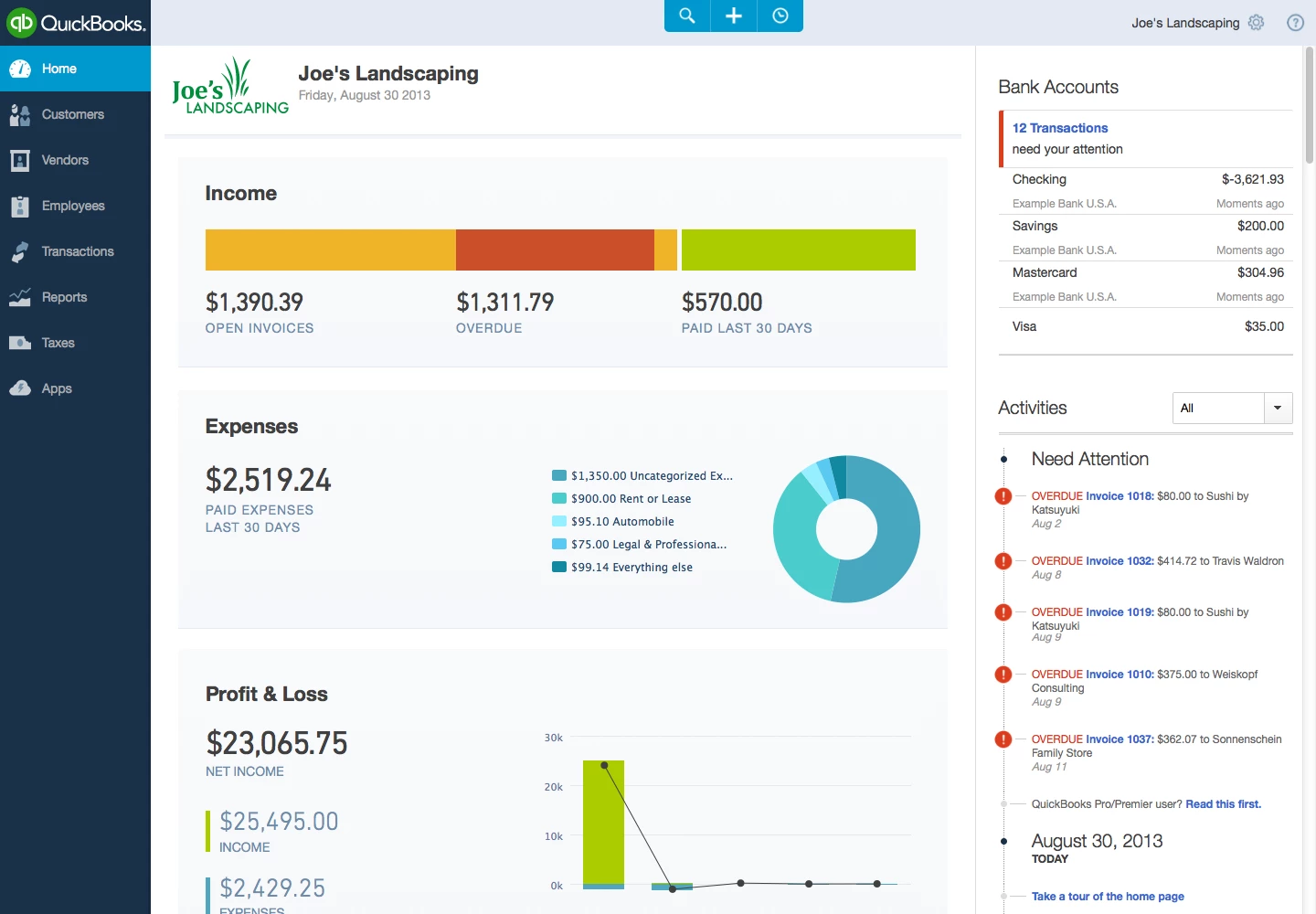
- Enhanced Sales Dashboard: Revamped the Sales Overview area with a new Quick Actions widget and customizable interface, giving users faster access to frequently used sales tools and real-time income visuals.
- QuickBooks Solopreneur Collaboration: Expanded accountant access to allow collaboration on QuickBooks Solopreneur files, enabling seamless review of transactions, reconciliations, and reports.