What began as an alternative to clunky voice-over-IP programs has turned into the primary communication hub for millions of users worldwide. Discord operates as a persistent virtual space where users build custom servers consisting of text chat, drop-in voice rooms, and video streaming channels. Unlike traditional messenger apps that require initiating a direct call to speak, this software relies on an always-open channel design. Users click a voice channel to instantly connect their microphone, making it feel closer to walking into a shared physical room. By moving away from restrictive friend-list calling and focusing on community-based server structures, the platform accommodates individual friend groups as easily as it handles massive public hubs with thousands of active members.
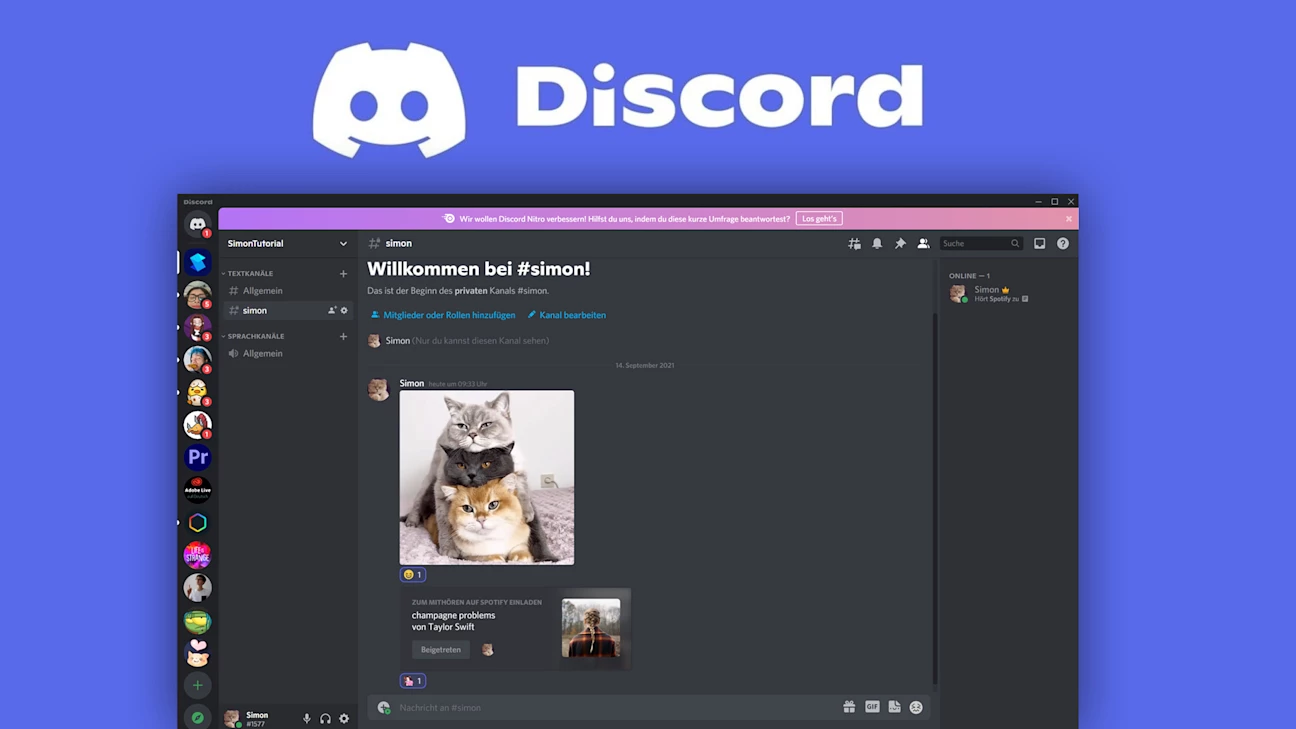
The practical applications stretch far beyond the original gaming demographic. Study groups, software development teams, open-source projects, and digital creators use the application to coordinate daily tasks, share project files, and hold live video meetings. Moderators can configure precise role-based permissions, allowing them to hide specific channels from new users, assign administrative rights, and restrict who can broadcast video. The interface layout is divided logically: a left sidebar holds all joined servers, the adjacent column lists the specific categories and channels of the active server, the central pane displays the active text or voice feed, and the right sidebar shows currently online members. For heavy users managing multiple communities, this clean vertical alignment keeps separate projects entirely isolated but instantly accessible. The ability to centralize instant messaging, forum-style discussion threads, and live audio communication into one interface eliminates the need to juggle separate forum boards, video conferencing links, and private messaging clients.
While a browser-based client exists, installing the dedicated Windows desktop application unlocks essential system-level capabilities that web browsers restrict. The desktop environment enables global push-to-talk hotkeys, allowing users to toggle their microphone even while interacting with full-screen 3D applications or heavy productivity suites without minimizing their work. Furthermore, the local installation provides access to hardware-accelerated screen capturing for high-framerate application streaming, custom system tray notifications, and a visual overlay feature. This overlay displays a small text indicator of who is currently speaking directly over active full-screen applications, preventing the need to tab out of a program to see who is talking. For anyone relying on consistent audio quality and immediate multitasking controls, the desktop client acts as a necessary bridge between the operating system's hardware interfaces and the network's communication servers.
Key Features
- Persistent Server Architecture: Instead of temporary group chats, users create permanent servers organized into distinct categories and channels. Administrators can define granular permissions, locking private staff rooms, creating read-only announcement boards, or establishing public lounges where any member can drop in and chat.
- Drop-In Voice Channels: Voice communication does not require dialing or waiting for someone to answer. Clicking a voice channel immediately connects the user's microphone and headset, allowing them to broadcast to anyone else currently sitting in that specific room. The interface displays profile avatars of connected users, providing a clear visual overview of active conversations.
- Application-Specific Screen Sharing: The "Go Live" broadcasting tool lets individuals stream their current monitor view or a specific application window to other members in the voice channel. Because it allows targeting a single window, presenters can share a specific project file, design document, or running program without accidentally broadcasting private notifications or unrelated background desktop activity.
- Integrated Noise Suppression: Background noise heavily degrades group calls, so the software incorporates a toggleable Krisp audio filtering subsystem. When activated in the voice settings, this filter automatically isolates human speech and heavily reduces mechanical keyboard clicks, background static, fan noise, and environmental echoes before the audio packet leaves the computer.
- Threaded Text Conversations: To prevent busy text channels from becoming chaotic, users can reply to specific messages and branch the discussion into an isolated thread. These threads keep side-conversations contained within a temporary pop-out menu, ensuring the main channel remains readable while still preserving the detailed back-and-forth discussion for those interested in the specific topic.
- Bot Integration and Automation: Server administrators can invite automated programs to handle repetitive moderation tasks, assign roles based on user reactions, or bridge external APIs directly into the text chat. By configuring webhooks, a standard channel can be transformed into an automated notification dashboard that pulls updates from external platforms like code repositories or RSS feeds.
- Extensive Hardware Input Control: The settings menu offers precise control over input and output devices, allowing users to select distinct hardware endpoints for voice chat versus standard system audio. Users can adjust individual volume sliders for every single person in a call, ensuring loud microphones do not overpower quiet speakers in the same channel.
How to Install Discord on Windows
- Download the official Windows setup executable to your local storage drive, keeping it in your default Downloads folder for easy access.
- Execute the downloaded file to begin the deployment. Unlike traditional software wizards that present multiple pages of configuration options, this setup engine immediately launches a silent background process that downloads the necessary framework updates.
- Wait for the automated deployment sequence to finish. The engine automatically extracts the application components into your hidden local AppData directory, meaning you cannot manually select a custom installation path on your primary hard drive.
- Review the initial login interface once the client automatically launches at the end of the unpacking process. You will see text fields for an existing email address and password, alongside a dynamically generated QR code on the right side of the screen.
- Sign in to your account. You can either type your login credentials directly into the fields, or open the mobile application on your smartphone, navigate to the user settings menu, and scan the desktop QR code to instantly authenticate the session.
- Configure your hardware by navigating to the User Settings gear icon located near your profile name in the bottom left corner. From there, select "Voice & Video" to specify your exact microphone input and headset output devices before joining a call.
- Adjust the default boot behavior by accessing the "Windows Settings" tab in the preferences menu. By default, the client configures the operating system registry to launch the program automatically upon system startup, which you can disable using the provided toggle switch.
Discord Free vs. Paid
The core platform is entirely free to use, without hidden restrictions on server creation, channel limits, or message history. Unlike traditional corporate communication tools that delete older messages on free tiers, this software retains permanent chat logs for all users. Anyone can join thousands of public communities, create personal hubs, and host lengthy voice calls without entering any payment information.
For users wanting profile enhancements and larger file capabilities, the Nitro Basic tier costs $2.99 per month. This subscription increases the maximum file upload size from the standard 25MB limit to 50MB, which helps when sharing larger video clips or high-resolution project assets directly in the chat. It also unlocks the ability to use custom server emojis globally across any other channel, adds a distinct badge to the user's profile, and enables custom video backgrounds during webcam calls.
The standard Nitro subscription costs $9.99 per month and is targeted at heavy users and community managers. This tier drastically increases the file upload limit to 500MB, allows high-definition video broadcasting up to 4K resolution at 60 frames per second, and enables longer text messages. Additionally, standard Nitro subscribers receive two free Server Boosts to apply to their favorite communities.
Server Boosts represent a community-driven monetization model where members can pool resources to unlock collective perks for an entire server. As a server accumulates more boosts, it reaches higher tiers, unlocking additional emoji slots, custom vanity invite links, higher audio bitrates for the voice channels, and improved upload limits for everyone participating in that specific server, regardless of their individual subscription status.
Discord vs. TeamSpeak vs. Slack
TeamSpeak is a traditional, self-hosted voice communication tool designed strictly for low-latency audio transmission. It provides far more granular control over audio codecs and server resource allocation, making it highly efficient for users on strictly limited network bandwidth. It requires users to rent or host their own server hardware and connect via IP addresses, which appeals to technical users who want absolute ownership over their data infrastructure. However, TeamSpeak lacks a modern text interface, has negligible media embedding, and does not support video streaming or native screen sharing.
Slack is a strictly professional corporate workspace application built around asynchronous communication and rigid organizational structures. It forces users into isolated workspaces where identity is tied directly to an enterprise email address, ensuring strict administrative control over corporate data. It excels at complex thread management, enterprise software integrations, and strict compliance tracking. Slack charges a per-user licensing fee, meaning costs scale linearly with every new employee added to the workspace, whereas Discord allows thousands of members to join a single server at no direct cost to the host.
Users should choose TeamSpeak when operating in strictly constrained bandwidth environments where self-hosted audio is the primary priority, and they should choose Slack when managing formal business operations that require enterprise data compliance. Discord provides a superior middle ground for online communities, independent creator teams, and casual groups. It offers the low-latency audio channels typical of TeamSpeak combined with the rich text environments of Slack, all hosted on free infrastructure that handles immense user counts without mandatory licensing fees.
Common Issues and Fixes
- Stuck on an RTC Connecting loop. This network error occurs when your computer fails to establish a direct connection to the active voice node. To resolve this, ask a server administrator to temporarily change the voice channel's server region, or disable any active VPN software that might be blocking the required UDP ports.
- Microphone audio constantly cutting out. The built-in noise suppression and voice activation threshold can sometimes be too aggressive, cutting off quiet speech or dropping words entirely. Navigate to Voice & Video settings, lower the "Input Sensitivity" slider manually, or completely disable the "Krisp Noise Suppression" toggle to allow raw audio to pass through unedited.
- Screen share broadcasts video but lacks audio. When streaming a specific program, the audio hook might fail to attach if the software lacks administrator privileges or does not recognize the application. Run the desktop client as an administrator, and explicitly add the specific program you are trying to broadcast into the "Registered Games" list within the user settings.
- The application gets stuck in an Update Failed boot loop. Corrupted temporary files can prevent the client from downloading necessary startup patches from the central server. To fix this, close the application completely via the system tray, press the Windows Key + R to open the Run dialog, and delete both the `%appdata%discord` and `%localappdata%discord` directories before running the installer again.
- The visual overlay fails to appear during hardware-accelerated tasks. The overlay relies on specific display modes to render over active screens, which can be blocked by restrictive display settings. Ensure the overlay is toggled on in the application settings, verify that your specific software is not running in an exclusive full-screen mode, and check if any security software is isolating the injection process.
Version 1.0.9219 — December 2025
- Added online status indicators directly to the Quick Switcher, allowing users to view a contact's availability without opening a direct message.
- Improved performance of the application startup on Windows by delaying non-mandatory automatic updates to get you into chat faster.
- Fixed issue with the desktop client occasionally displaying a blank window while the application was updating in the background.