MailWasher Pro functions as a dedicated, server-level email inspection tool that sits between your mail provider and your primary desktop email client. Instead of relying on built-in junk filters in programs like Microsoft Outlook, this utility connects directly to your mail server via POP3 or IMAP. It downloads only the header information and a localized text snippet of each incoming message. This allows you to review the sender, subject, and raw text of the email without actually downloading the full payload or executing any attached files. You mark unwanted messages for deletion, and the software permanently erases them from the server. Once the inbox is clean, you open your standard email client to retrieve only the safe, verified correspondence.
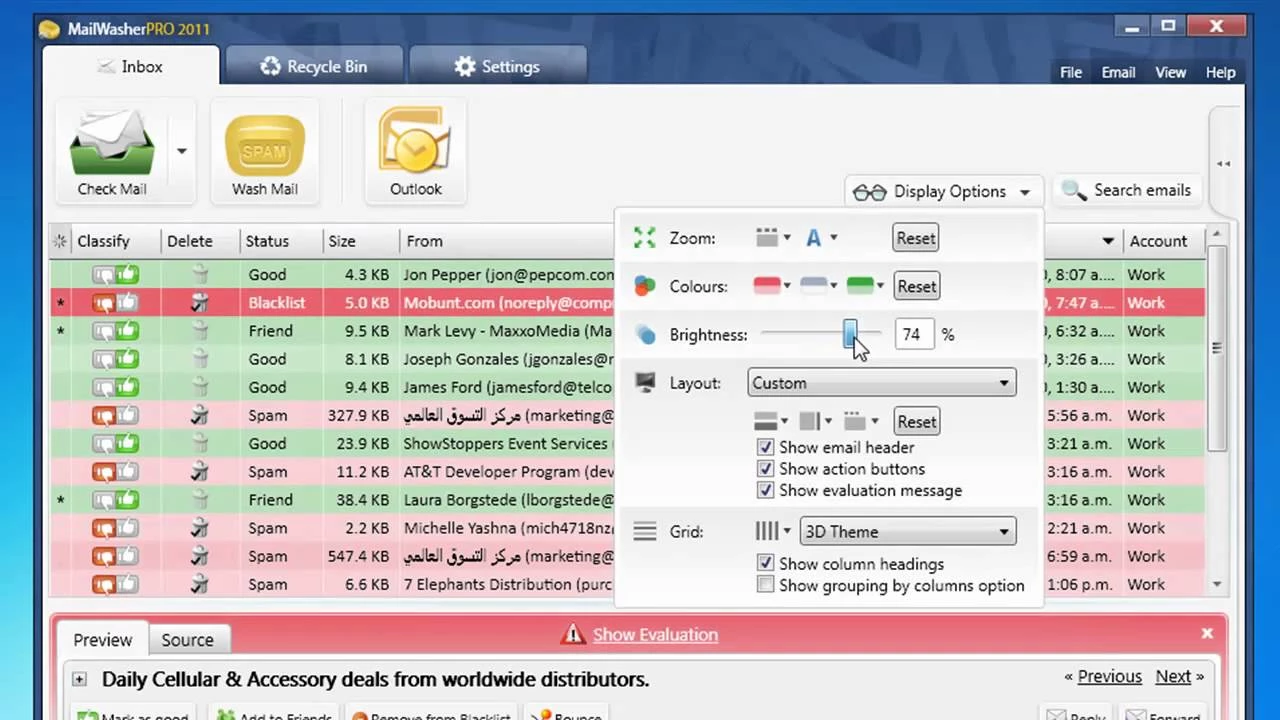
For users managing multiple high-traffic addresses, the application solves the specific problem of malicious payloads and aggressive marketing campaigns flooding the local hard drive. Standard email clients often download the entire message background, exposing the system to tracking pixels that confirm the address is active, or worse, zero-day exploits embedded in HTML frames. By isolating the review process in a separate desktop interface, the utility prevents these scripts from running. It provides a visual grid of incoming mail, color-coded by threat level, allowing users to process hundreds of messages in minutes using keyboard shortcuts and automated filtering rules.
Choosing a dedicated desktop application for mail filtering provides distinct operational advantages over cloud-only or browser-based webmail interfaces. The software aggregates an unlimited number of accounts—including Exchange, Gmail, Yahoo, and custom domain webmail—into a single unified dashboard on your local monitor. All the analytical processing, including Bayesian learning and custom rule execution, happens locally on your machine rather than relying on a third-party server to parse your private correspondence. This localized approach ensures you retain direct control over your blacklist, whitelist, and deleted items, complete with an offline, searchable recycle bin that acts as a fail-safe against accidental deletions.
Key Features
- Server-Level Message Inspection: The application connects to your provider using standard IMAP or POP3 protocols to retrieve only the message headers and a small portion of the body text. This prevents large, malicious attachments from reaching your local storage, allowing you to delete threats directly from the mail server before your main email client synchronizes.
- Safe Preview Environment: Incoming messages are rendered strictly in plain text or stripped HTML without loading external images or scripts. This sandbox approach guarantees that tracking pixels cannot fire, preventing marketing senders and spammers from verifying that your address is active and monitored.
- FirstAlert! Community Filtering: The software checks incoming message signatures against a centralized, user-driven database of known spam campaigns. When multiple users flag a specific payload as junk, the network updates immediately, allowing your local installation to automatically recognize and queue identical messages for deletion.
- Customizable Friends List and Blacklist: The filtering engine relies on strict, user-defined rules to manage trusted and untrusted senders. You can organize known contacts into specific categories to ensure their mail always bypasses the spam checks, while blacklisted domains and addresses trigger an automatic delete action upon connection.
- Simulated Bounce Generation: You can select specific messages and command the software to generate a fake non-delivery report back to the original sender. This tricks automated mailing list software into registering your address as invalid or disconnected, gradually reducing the volume of junk mail you receive over time.
- Searchable Local Recycle Bin: Unlike standard server deletion which is permanent, the application retains the downloaded text portion of deleted messages in a local database file. If a legitimate message is accidentally marked as spam and removed from the server, you can search this local archive and restore the text to your inbox.
- Bayesian Learning Engine: The localized spam filter adapts to the specific vocabulary and structure of your daily mail flow. By manually classifying borderline messages with the thumb-up or thumb-down interface icons, you train the underlying algorithm to automatically recognize the nuances of your specific industry terminology versus standard junk mail.
How to Install MailWasher Pro on Windows
- Navigate to the official vendor website to obtain the primary Windows installer executable, ensuring you avoid third-party mirror sites that might bundle unauthorized toolbars.
- Launch the downloaded executable and approve the standard Windows User Account Control prompt to initiate the setup wizard.
- Review the end-user license agreement, then select the destination path for the application files, which defaults to the standard program directory depending on your system configuration.
- Choose your shortcut preferences, including whether to place an icon on the desktop and pin the application to the Start menu for quick access during your daily mail routine.
- Click the install button to unpack the core application files, the local database structure, and the default XML configuration files into your user profile directory.
- Once the extraction completes, leave the option checked to start the application immediately and close the installer wizard.
- Upon the first launch, the software will open the Account Import Wizard, which scans your system for existing email clients like Microsoft Outlook or Mozilla Thunderbird to automatically copy your incoming and outgoing server settings.
- If auto-import is unsuccessful or you use a web-based provider, manually enter your email address, select the provider from the drop-down list, and input your application-specific password to establish the initial server connection.
MailWasher Pro Free vs. Paid
The software operates on a hybrid licensing model, offering both a permanently restricted free tier and a fully featured commercial version. The free tier, officially labeled as MailWasher Free, is restricted to managing a single email address. It lacks the searchable local recycle bin, restricts the preview pane functionality, and does not include synchronization capabilities for the mobile companion application. This makes the free version strictly suitable for casual users who only need to monitor one personal inbox.
Upgrading to the Pro tier unlocks the ability to manage an unlimited number of POP3 and IMAP accounts simultaneously within the left-hand sidebar interface. It activates the FirstAlert! real-time community database, enables the full plain-text preview pane, and provides access to official technical support. The commercial license requires an initial payment of $49.95, which covers application usage and updates for a 12-month period across up to three separate computers.
After the initial period, the subscription renews at a reduced rate of $24.95 annually to maintain access to the FirstAlert! database and software updates. For users who prefer to avoid recurring charges, the vendor offers a perpetual lifetime license for $149.95. This one-time payment grants the user access to all future updates and versions of the application indefinitely, while still allowing installation on up to three personal machines. An Enterprise Server edition also exists for network administrators, starting at $199.95 annually for up to ten users, shifting the filtering from the local desktop to the corporate mail server.
MailWasher Pro vs. SpamTitan vs. Xeams
SpamTitan operates as a cloud-based gateway filter specifically built for corporate environments, schools, and managed service providers. It intercepts traffic at the DNS level before it ever reaches the Microsoft Exchange or Office 365 server, utilizing deep sandboxing and zero-day threat analysis. Because it requires domain-level configuration and charges a recurring monthly fee per user, it is designed strictly for network administrators managing hundreds of mailboxes rather than individual desktop users.
Xeams is a complete, self-hosted mail server application that supports full SMTP, POP3, and IMAP protocols alongside its built-in filtering engine. It requires the user to deploy and maintain their own infrastructure, configure network port forwarding, and manage complex routing rules to achieve optimal performance. While it offers deep architectural control over how messages are processed and stored, the administrative overhead makes it impractical for someone who simply wants to clean their existing consumer or business webmail accounts.
MailWasher Pro is the better fit for individuals, freelancers, and small business owners who need immediate control over their incoming mail without modifying domain records or hosting their own infrastructure. It requires zero server administration, installs directly on the local desktop, and interfaces securely with standard consumer webmail providers. This localized, client-side approach allows the user to visually inspect and delete threats on the provider server while keeping their primary email client completely isolated from malicious payloads.
Common Issues and Fixes
- Deleted messages keep downloading to the primary email client. This synchronization conflict occurs when your main email program automatically checks the server for new mail before the filtering utility has time to clean the inbox. Fix this by opening your main email client, navigating to the send and receive settings, and disabling the automated background polling schedule so you only download mail manually after inspecting it.
- Restored items from the recycle bin are missing file attachments. By default, the application only downloads the first 999 lines of text for each message to accelerate the checking process and minimize bandwidth consumption. To resolve this limitation and capture attachments, open the application settings, navigate to the General tab, select Spam Throttle, and move the slider to increase the maximum number of downloaded lines.
- The application does not launch automatically when Windows boots. Third-party security software or major operating system updates can occasionally overwrite the background startup trigger. Correct this by clicking into Settings, selecting the General menu, choosing Application, and verifying that the specific checkbox for launching upon startup is actively enabled, or manually place a shortcut in the user profile startup folder.
- Legitimate correspondence is consistently marked with a high spam score. The localized Bayesian learning filter can become confused if it receives contradictory training data, such as marking a newsletter as spam one day and safe the next. Fix this by opening the Spam Tools tab, clearing the existing learning database cache, and rigorously using the thumb-up icon on known-good senders to establish a strict, accurate baseline for the algorithm.
- Older license strings fail to activate the current software installation. Users upgrading from older legacy installations often find that their original 500-digit license string is rejected by the modern interface. This requires purchasing a current license to obtain the updated 12-digit format, as the old key generation system has been entirely replaced.
Version 7.15.45 — December 2025
- implemented various minor bug fixes to enhance software reliability
- improved general application stability and performance
- resolved miscellaneous small issues identified in previous builds