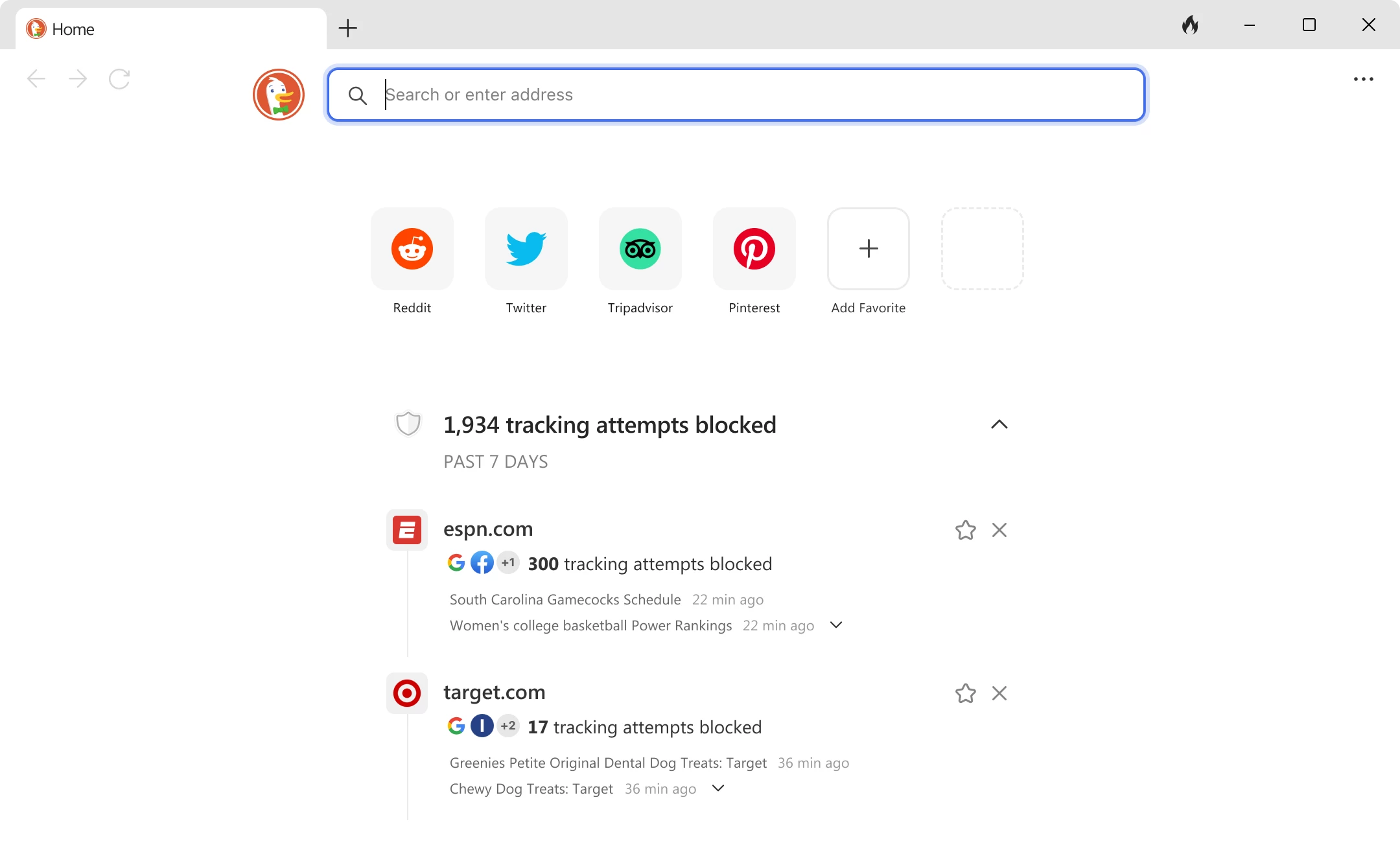
The DuckDuckGo Browser for Windows transforms a recognizable private search engine into a dedicated desktop application engineered to prevent digital tracking. Unlike generic web clients that rely on extensive plugin ecosystems to block intrusive scripts, this application runs as a standalone navigator built on the Windows WebView2 rendering API. By utilizing the system's underlying Blink rendering engine rather than acting as a heavy fork of Chromium, the software limits background resource consumption while natively stripping away the invisible tracking code embedded in modern web pages. It is built specifically for users who want immediate tracking protection without configuring complex add-ons or managing intricate security menus.
For individuals handling sensitive research, personal finance, or routine web reading, the desktop application solves the problem of persistent data collection. Standard navigators often rely on third-party extensions to block cookie consent banners or stop hidden pixels from logging browsing behavior. The DuckDuckGo Browser integrates these defenses directly into its core, ensuring encrypted connections whenever possible and automatically rejecting invasive cookie policies on supported sites. This removes the friction of constantly dismissing privacy prompts, allowing users to focus entirely on reading and navigating. Because it utilizes the WebView2 runtime, the application shares underlying memory resources with the operating system rather than spinning up entirely separate rendering processes from scratch. This architectural decision keeps memory consumption lower than traditional alternatives, ensuring that hardware running Windows 10 or Windows 11 can handle multiple open tabs without experiencing severe system lag. The focus remains tightly on reading and researching, eliminating the bloated menus, promotional sidebars, and experimental flags that clutter mainstream navigators.
Choosing this dedicated desktop application over a browser-only extension means the core application code actively prevents data collection instead of merely patching a leaky host program. A standard extension often cannot stop a host browser from transmitting telemetry or fingerprinting data back to its developer. By controlling the entire interface, from the tab manager to the URL bar, DuckDuckGo ensures that routine actions like searching, opening new tabs, and managing bookmarks remain insulated from background data harvesting. The interface remains clean, presenting only the necessary controls for navigation alongside dedicated tools for erasing session history on demand. This structured approach to local security provides a more predictable environment for daily web reading.
Key Features
- Tracker Blocking: The browser automatically stops third-party trackers from loading when you open a web page, effectively removing the targeted advertisements that rely on those scripts. This built-in shield also collapses the empty whitespace left behind by blocked page elements, ensuring articles and storefronts remain visually readable without large empty gaps interrupting the text layout.
- Cookie Pop-up Management: When landing on a new website, the application intercepts the standard cookie consent banners that interrupt navigation. It automatically selects the most private option available to reject non-essential tracking, or hides the banner entirely if the site refuses to offer a straightforward rejection button, saving you from repetitive clicking on every new domain.
- The Fire Button: A prominent button located in the main toolbar allows users to instantly wipe their current session. Clicking this icon closes all active tabs and immediately deletes the local browsing history, cached files, tracking identifiers, and temporary session data from the local storage drive, leaving no trace of the recent workflow on the machine.
- Duck Player for YouTube: Embedded videos and standard YouTube links open in a dedicated, distraction-free viewing interface designed to block targeted video advertisements. This alternate player strips out tracking cookies and prevents the host platform from adding the viewed video to your personalized algorithmic profile, keeping your viewing habits isolated from your main account.
- Smarter Encryption: The application forces web connections to use HTTPS protocols instead of unencrypted HTTP whenever a secure version of the site exists in its routing index. It maintains a frequently updated index of sites that support secure connections, automatically upgrading the request before any data leaves your machine. This prevents accidental exposure of search queries or login credentials on public Wi-Fi networks.
- Email Protection Integration: Users can generate unique, randomized proxy email addresses directly from the browser when signing up for new online services. These proxy addresses strip hidden tracking pixels from incoming promotional messages before forwarding the sanitized emails to your actual personal inbox, protecting your primary address from data breaches and marketing lists.
- Built-in Password Management: Because the application restricts external extensions, it provides a native vault for storing login credentials securely on the local disk. The manager can import existing passwords from other standard browsers and will auto-fill username and password fields on recognized login screens while keeping the underlying database encrypted.
How to Install DuckDuckGo Browser on Windows
- Download the official Windows app installer package directly from the vendor's primary download page to ensure you receive the unmodified application.
- Launch the downloaded package to initiate the automated setup sequence, which installs the core files utilizing the Windows WebView2 runtime framework.
- Wait for the setup window to finalize the local extraction; the browser will open automatically once the local file transfer completes without requiring a system reboot.
- Review the initial welcome screen upon the first launch, which presents a direct option to import existing bookmarks and saved passwords from Google Chrome, Microsoft Edge, or Mozilla Firefox.
- Choose whether to set DuckDuckGo as the default system handler for opening web links and HTML files, which will redirect all external link clicks from chat applications into the secure browser.
- Follow the brief interactive tutorial that explains the layout of the top toolbar, specifically highlighting the location of the shield icon for site permissions and the prominent button for clearing session history.
- Navigate to the top-right menu and select the general settings panel to adjust the default appearance, where you can toggle between light and dark themes or configure the application to follow your current Windows 10 or Windows 11 system theme colors.
DuckDuckGo Browser Free vs. Paid
The core DuckDuckGo Browser for Windows operates as a completely free application. Users can download, install, and utilize the entire suite of privacy tools, including the tracker blocker, the secure video player, the password manager, and the email proxy protection service, without paying any upfront fees or registering for an account. The developer sustains this free tier primarily through context-based advertisements displayed strictly on its own search engine. These search ads are based entirely on the immediate keywords you type into the search bar rather than a historical profile of your long-term user behavior across the internet.
For users requiring deeper network and identity defenses, the company offers a paid subscription tier named Privacy Pro, available for $9.99 per month or $99.99 per year. This premium upgrade integrates directly into the desktop application interface without requiring a separate program installation. The primary addition is an anonymous Virtual Private Network that secures outgoing network traffic across up to five devices simultaneously. This built-in utility uses the open-source WireGuard protocol to maintain fast connection speeds while masking your local IP address from websites and local network administrators.
Beyond the integrated network routing, the Privacy Pro subscription includes tools for mitigating real-world data exposure. The Personal Information Removal service automatically scans dozens of data broker websites, submitting opt-out requests to delete your public records, phone numbers, and home address from their searchable databases. Additionally, the subscription includes Identity Theft Restoration, which provides dedicated advisor support to help recover financial losses and correct credit reports if your personal information is ever compromised. If you only need to block web trackers and clear your local session history, the base free tier provides all the necessary functionality for daily web navigation.
DuckDuckGo Browser vs. Brave vs. Mozilla Firefox
Brave focuses heavily on users who want a feature-heavy, Chromium-based environment that supports all standard web store extensions natively. It includes an aggressive built-in ad blocker and tracking protection mechanism, but it also bundles a cryptocurrency wallet, native rewards programs, and integrated video calling tools directly into the interface. Users who rely on a highly specific set of niche extensions for their daily workflow, or who actively want to participate in a blockchain-based attention token economy while browsing, will find Brave better suited to their technical requirements.
Mozilla Firefox serves as a highly customizable, open-source alternative running on its own independent Gecko rendering engine instead of relying on Blink. It offers strict tracking protection and deep configuration options through its hidden preference menus, allowing advanced users to modify nearly every aspect of the rendering and interface behavior. Firefox supports thousands of third-party extensions, making it ideal for web developers who need specialized page inspection tools or privacy advocates who strictly avoid any software reliant on Chromium or Edge-based rendering architectures.
The DuckDuckGo Browser is the better fit for users who want an extremely streamlined, zero-configuration defense against web tracking. Because it intentionally omits support for external third-party extensions, it avoids the security risks, background telemetry, and performance bloat associated with mismanaged browser add-ons. By offering built-in password management, integrated video privacy, and immediate history clearing in a deliberately simplified interface, it provides a highly focused tool for reading, researching, and shopping without leaving a digital trail on the host machine.
Common Issues and Fixes
- Application package parsing error during installation. This occurs when the standard installer fails to interact correctly with the local Windows app installer framework. To fix this, download the direct MSIXbundle file from the official DuckDuckGo help pages and launch it directly from your downloads folder to bypass the standard web installer module.
- Cannot install third-party browser extensions. The application intentionally does not support external add-on stores to maintain strict data security and prevent malicious scripts from monitoring your tabs. Instead of looking for a web store, utilize the native built-in ad blocker, cookie manager, and secure password vault to handle standard extension tasks.
- Sync and backup requests a Windows password. When setting up local data synchronization to move bookmarks between devices, the software uses the operating system's native encryption to secure your recovery token locally. Enter your local Windows PIN or user account password, rather than your Microsoft account password, to authorize the encryption prompt.
- Website breaks or fails to load correctly. Aggressive tracker blocking can sometimes interfere with poorly coded site elements, shopping carts, or mandatory login scripts. Click the shield icon located in the top URL bar and toggle the "Protection for this site" switch to temporarily disable the strict blocking rules for that specific domain while keeping defenses active elsewhere.
- Duck Player fails to load YouTube videos. If the secure video player encounters a playback error, it is often due to a sudden change in the host platform's delivery architecture. Refresh the page to force a new connection, or temporarily open the video directly on the main site using the standard interface until the built-in player rules update automatically in the background.
Version 0.14.10.0 — January 2026
- Added new feature allowing users to securely sync credit cards and identities across multiple devices.
- Added the ability to block specific websites directly from search results to better customize your browsing experience.
- Improved performance of the Image Search layout, specifically optimizing the rendering of narrow images and menu icons.
- Improved accuracy of "Places" and "Directions" instant answers to better interpret location-based queries.
- Fixed issue with minor stability glitches to ensure a smoother and more responsive user interface.