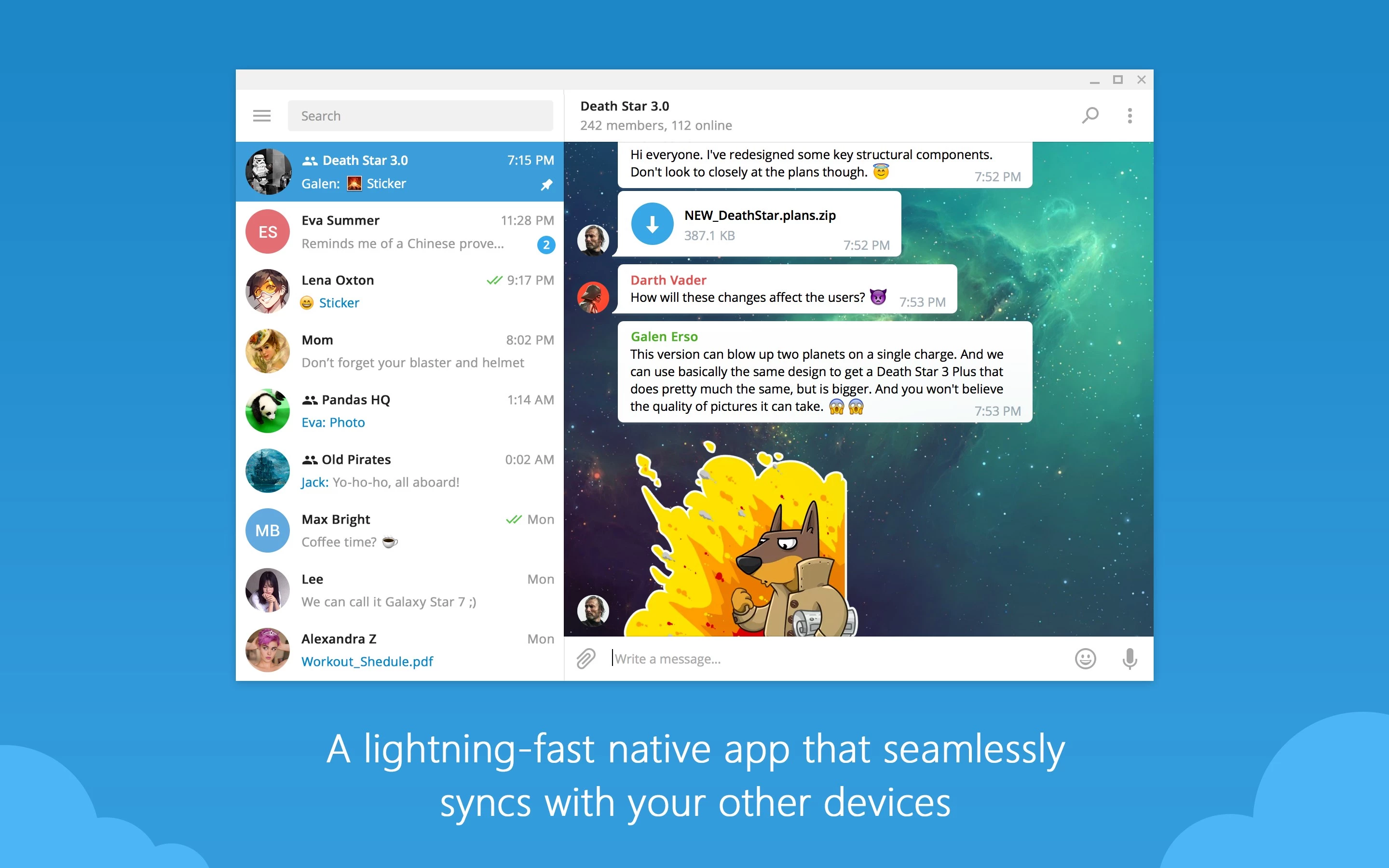
Telegram Desktop is a cloud-based instant messaging client built specifically for Windows operating systems, designed to operate entirely independently of a mobile device. Unlike traditional linked-device messengers that require a smartphone to remain online and nearby to route messages, this application connects directly to the server infrastructure using its own custom data protocol. This architecture means users can turn off their phones entirely, yet still send texts, download massive media files, and manage large community groups directly from their computer keyboard. The software targets professionals, community managers, and casual users who need an efficient way to handle high-volume text communication without draining their mobile battery or consuming local hard drive space.
The concrete job this software solves is eliminating the friction of transferring large files, organizing chaotic communication threads, and juggling multiple identities. In a typical workday, users often need to send uncompressed video files, high-resolution photographs, or heavy project archives to colleagues and clients. Doing this via email involves strict attachment limits, and using a dedicated external storage link adds unnecessary steps to the workflow. Telegram Desktop handles direct file uploads up to 2 Gigabytes per file on the free tier, allowing users to simply drag and drop assets directly into a chat window. Furthermore, it addresses the chaos of cluttered inboxes by providing native folder organization, enabling users to separate work threads from personal conversations using dedicated interface tabs that sit neatly on the left side of the screen.
Using the dedicated desktop application instead of a browser-only alternative provides distinct advantages in responsiveness, local integration, and account management. The native Windows client supports global keyboard shortcuts, allowing users to minimize the application instantly, jump between specific chat folders, or search through message histories without taking their hands off the keyboard. It also integrates directly with the native Windows notification center, provides hardware-accelerated media playback for videos, and includes detailed local storage management tools. For users who manage both personal and business profiles, the desktop application allows adding multiple separate phone numbers into a single interface. Users can click their profile icon to switch between accounts instantly, receiving background notifications for all of them simultaneously without needing to log in and out. By caching data intelligently and allowing users to dictate exactly how much disk space the application is permitted to use, it maintains a highly responsive footprint while keeping historical messages instantly accessible from the cloud network.
Key Features
- Independent Cloud Synchronization: The application fetches message history, contacts, and media directly from the server rather than mirroring a phone screen over a local network. This allows the desktop client to launch instantly, load older messages, and maintain an active connection even if the primary mobile device runs out of battery or loses cellular service.
- Large File Transfers and Media Handling: Users can bypass typical email attachment limits by sending individual files up to 2 Gigabytes in size directly through the chat interface. By selecting the paperclip icon and choosing the File option instead of Photo, the software transmits images and videos in their original format without applying aggressive compression algorithms.
- Chat Folders and Interface Organization: To manage high volumes of incoming messages, the interface allows the creation of custom tabs via the Settings menu under the Folders section. Users can group specific contacts, channels, or automated bots into designated tabs such as Work or News, keeping the primary chat list strictly organized and reducing visual clutter.
- Advanced Keyboard Navigation: The client supports extensive shortcut keys to speed up daily interactions without requiring mouse input. Pressing Ctrl and the numbers 1 through 9 instantly switches between custom chat folders, while Ctrl+F isolates the search function to the currently active conversation for quick data retrieval and Ctrl+O opens the file attachment dialog.
- Local Storage Management: Because all media is stored on remote servers, the software includes granular controls over how much data is kept locally on the Windows machine. Through the Advanced settings menu, users can set strict cache size limits and specify exactly how long the client should retain downloaded media before automatically clearing it from the hard drive.
- Group and Channel Administration: Community managers can administer massive public or private groups supporting up to 200,000 members directly from the desktop. The interface includes specific moderation tools to toggle slow mode, pin important announcements to the top of the chat window, and manage user permissions or automated bot integrations.
- Multi-Account Support: The client allows users to log into multiple phone numbers simultaneously within the same desktop window. By clicking the profile menu, individuals can add another account and switch contexts instantly, keeping professional communications completely isolated from personal chats while receiving native notifications for both profiles.
How to Install Telegram Desktop on Windows
- Download the official Windows installer package from the provider to ensure you receive the unmodified application.
- Double-click the downloaded executable file to launch the installation wizard.
- Select your preferred installation directory, which defaults to the local AppData folder to facilitate automatic background updates without requiring continuous administrator prompts.
- Choose whether to create a desktop shortcut and a Start menu entry for quick access, then click Next to review your choices.
- Click Install to unpack the application files, which typically completes in just a few seconds due to the lightweight nature of the client architecture.
- Click Finish to exit the setup wizard and launch the application for the first time.
- On the initial welcome screen, click Start Messaging and log in by either scanning the displayed QR code with your mobile device or entering your registered phone number to receive a secure SMS verification code.
- Wait a brief moment as your chat history, custom folders, and contacts populate directly from the cloud network, making the client ready for immediate use.
Telegram Desktop Free vs. Paid
The software operates on a freemium model, meaning the core messaging application, cloud storage, and desktop synchronization features are available entirely for free. Free tier users can send files up to 2 Gigabytes, join up to 500 groups or channels, create up to 10 custom chat folders, and pin up to 5 specific conversations to the top of their list. For the vast majority of personal and professional communication tasks, the free version provides more than enough capacity without restricting the core functionality or enforcing hard message limits. The free tier does display unobtrusive sponsored messages in large public channels, but private one-on-one chats and standard group conversations remain strictly ad-free.
For users who push the limits of the platform, a Premium subscription tier is available, typically costing around four to five dollars per month depending on whether it is billed monthly or annually. This subscription can be purchased directly through the desktop settings menu or via the official verified payment bot to apply an annual discount. The paid tier is specifically targeted at heavy media consumers, video editors, and community administrators who use the client as a primary file distribution network rather than just a basic texting tool.
Subscribing to Premium instantly doubles most of the application's limits. Paid users can upload massive files up to 4 Gigabytes each, join up to 1000 channels, create up to 20 chat folders, and pin up to 10 chats simultaneously. This increased upload limit is particularly useful for professionals who want to share uncompressed video exports or extensive design archives without relying on external file-hosting websites.
Beyond increased limits, the Premium subscription unlocks several exclusive workflow features directly within the desktop interface. It removes all sponsored messages from large public channels and provides real-time voice-to-text transcription for incoming audio messages. This transcription feature is highly practical for desktop users working in quiet office environments who receive voice notes but cannot play them out loud. Additionally, the paid tier removes server-side download speed caps, allowing large archives or video files to transfer as fast as the user's local internet connection permits.
Telegram Desktop vs. WhatsApp Desktop vs. Signal Desktop
WhatsApp Desktop serves as the default communication tool for a massive global user base and features automatic end-to-end encryption for all personal chats. However, its desktop client relies on a linked-device architecture that, while improved recently, can still suffer from synchronization delays if the primary mobile device has been offline for an extended period. Furthermore, WhatsApp imposes strict file size limits and aggressively compresses media, making it unsuitable for transferring high-resolution video projects or heavy uncompressed archives. Users should choose WhatsApp when they need to reach contacts who refuse to install alternative messaging applications, but it falls short for heavy file distribution and community management.
Signal Desktop is built strictly around user privacy, utilizing the open-source Signal Protocol to ensure that neither the service provider nor any third party can read message content or access metadata. The desktop client pairs securely with a mobile device to maintain end-to-end encryption across all linked hardware. Because it prioritizes security over cloud convenience, Signal does not store chat histories on a central server, meaning a newly linked desktop client will not display older messages sent before the device was paired. This makes Signal the optimal choice for highly confidential communications, but it lacks the massive group capacities, cloud-synced history, and folder organization required for general productivity tasks.
Telegram Desktop is the better fit for power users who require speed, massive file handling, and independent client operation. While its standard cloud chats rely on client-server encryption rather than default end-to-end encryption, this architectural choice is precisely what allows the desktop application to load instantly, sync vast amounts of data without delay, and provide unlimited remote storage for media. When a user needs to organize dozens of active work threads into folders, moderate a channel with thousands of participants, or share a 2-Gigabyte video file from their computer without compressing the quality, Telegram provides a far more efficient and practical workflow than its competitors.
Common Issues and Fixes
- Stuck on a perpetual Connecting status. This usually indicates a localized network block, restrictive firewall, or an outdated DNS cache preventing the client from reaching the server. To fix this, open the Windows Command Prompt as an administrator and run ipconfig /flushdns, then check the application's Advanced Settings to ensure no dead proxies are enabled under the Connection Type menu.
- Windows notifications fail to appear for new messages. If the client is running but alerts do not pop up in the corner of the screen, Windows might be restricting background execution or suppressing banners. Open the application Settings, navigate to Notifications and Sounds, and verify that Desktop notifications is toggled on, then check the native Windows Focus Assist settings to ensure it is not blocking alarms.
- Excessive local disk space consumption. Because the client downloads media to display it quickly, active users might notice the application folder growing large over time. Navigate to Settings, click Advanced, and select Manage local storage; here you can reduce the total cache size limit, set media to clear automatically after a few days, or manually clear the cache immediately to free up hard drive space.
- Voice messages play out of the wrong audio device. When using multiple monitors or external sound cards, audio might route incorrectly during playback. Go to the application Settings, select Advanced, and look under the Call Settings section to manually define the default playback and recording hardware rather than relying on the default Windows audio routing.
- High system resource usage during media playback. Older Windows computers might struggle with animated stickers or heavy video files playing directly in the chat window. To fix this, navigate to the Advanced settings menu and toggle off Hardware accelerated video decoding, or disable the automatic playback of videos and GIFs to reduce the strain on the processor.
Version 6.4.2 — January 2026
- Resolved an issue causing the application to close unexpectedly when adjusting audio playback speed.
- Fixed a potential crash that occurred when deleting topics in forums or bot chats.
- Corrected the "sent" status display for outgoing messages in forum channels.
- Updated the underlying Qt framework to improve stability across all supported platforms.