Actual Multiple Monitors modifies how the Windows operating system handles multiple displays by injecting missing interface elements directly into secondary screens. While a native Windows setup extends the desktop space, it often forces users to navigate back to the primary display to access the system tray, clock, or main Start menu. This desktop utility solves that layout friction by rendering fully independent taskbars, window controls, and background environments on every connected monitor. By treating each display as a standalone workstation, the software removes the mechanical drag of moving the mouse back and forth across a massive pixel area. This localized control becomes critical when working with ultra-wide screens or multi-tiered monitor arms where the physical distance between the primary Start menu and the active working area is substantial.
The software targets system administrators, software developers, streamers, and gamers who juggle dozens of active windows across three or four screens. For a developer writing code on a central display, looking up documentation on a left monitor, and monitoring server logs on a right monitor, having immediate access to taskbar grouping and system tray icons on the exact screen they are looking at saves hours of mouse travel. Gamers benefit specifically from the utility’s ability to override native focus rules. Normally, clicking a browser on a secondary monitor forces a game on the primary monitor to minimize. This utility intercepts that command, allowing users to change a music track or read a chat feed while the game continues running at full resolution. Streamers also rely on this focus management to monitor chat and broadcasting tools without interrupting the visual output of their main capture window.
A local desktop application is strictly necessary for this level of interface modification. Browser extensions and lightweight layout scripts cannot alter the Windows Shell or inject buttons into the title bars of other local applications. Actual Multiple Monitors operates at the system level, hooking into the display driver and window manager to intercept minimizing commands, enforce rigid window grid boundaries, and duplicate the native taskbar logic. This low-level processing ensures that hotkeys, mouse lock boundaries, and background scrolling commands respond instantly without relying on external cloud rendering or network connectivity. Because it writes directly to the interface layout memory, it guarantees that window snapping and taskbar injection remain responsive even when the central processor is under heavy load from video rendering or compiling tasks.
Key Features
- Feature Name: Extended Multi-Monitor Taskbar. This function replicates the primary Windows taskbar onto all peripheral displays, including the Start button, system tray, clock, and Aero Peek preview thumbnails. Users can configure these secondary taskbars to show only the applications running on that specific monitor, keeping the interface uncluttered and preventing the primary screen from holding a massive list of pinned programs. It completely removes the need to drag the cursor across multiple screens just to check the time or open a background application.
- Feature Name: Ignore Deactivation for Fullscreen Apps. This overrides the default operating system behavior that minimizes a fullscreen application when a user clicks onto a different monitor. By assigning this rule to a specific game or video player executable, users can interact with chat clients or web browsers on their second display while the primary application remains visible and active. This ensures live broadcasts or continuous monitoring dashboards are never hidden by an accidental background click.
- Feature Name: Desktop Divider Grid System. This layout tool splits large or ultrawide monitors into smaller, non-intersecting tiles that act as virtual displays. When users drag a window into one of these defined zones, the application automatically snaps and resizes to fill the tile perfectly, preventing overlapping edges and making it easier to arrange complex dashboards without manual resizing. The rigid grid boundaries stay active even if the display resolution changes.
- Feature Name: Custom Title Bar Injection. The utility modifies the default Windows application frames by adding custom command buttons next to the native minimize, maximize, and close controls. These new buttons allow users to send an active window to the next monitor, mirror the window across displays, or force the window to stay on top of other applications with a single click. These buttons adapt to the native visual style of the operating system so they look like default interface elements.
- Feature Name: Independent Background Management. Users can bypass the native display personalization limits by assigning completely separate wallpapers and screensavers to each connected monitor. The engine supports pulling local image directories or specific web sources, applying individual stretching rules, or spanning a single ultra-high-resolution image proportionally across displays with different physical aspect ratios. It manages random slideshow intervals independently for each screen.
- Feature Name: Hardware Mouse Lock and Constraint. To prevent accidental cursor drift during intensive tasks, this tool allows users to lock the mouse pointer inside a specific application window or limit it to a single monitor. The constraint is toggled via custom keyboard shortcuts, ensuring gamers do not accidentally click outside their game client and lose control focus during fast mouse movements. The lock instantly releases when the hotkey is pressed again.
How to Install Actual Multiple Monitors on Windows
- Download the executable installer package from the official Actual Tools website, ensuring you save it to a local directory rather than a temporary network drive.
- Launch the setup executable and approve the standard Windows User Account Control prompt to grant the installer the administrative privileges required to modify the system shell.
- Read the end-user license agreement and select your desired local installation path, which defaults to the standard Program Files directory on the main operating system drive.
- Select the startup behavior options, deciding whether the application should create a desktop shortcut and whether it should launch automatically in the background whenever the computer boots up.
- Proceed with the installation phase, allowing the setup engine to copy the core executable files, interface libraries, and display driver hooks into the local storage.
- Complete the setup and start the application for the first time, which will immediately place the configuration icon in your primary system tray and open the central control panel.
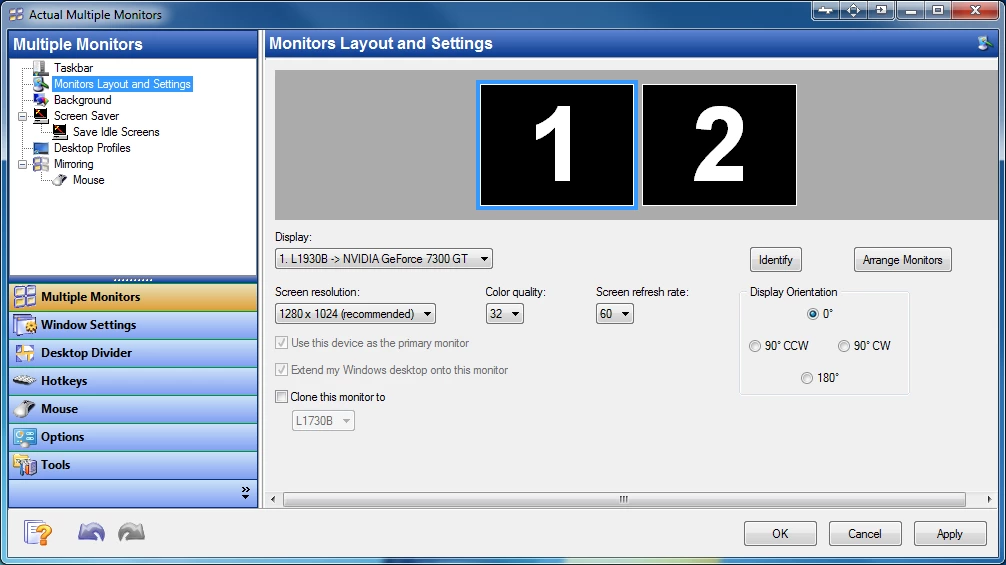
- Use the left-hand navigation menu in the control panel to define your physical monitor arrangement, set up your secondary taskbars, and assign your initial hotkeys before closing the window to let the utility run silently in the background.
Actual Multiple Monitors Free vs. Paid
Actual Multiple Monitors operates strictly under a commercial software model and does not offer a permanently free tier. Users interested in testing the window management rules and taskbar modifications can download a fully unlocked 30-day evaluation version. During this trial period, the software imposes no watermarks, artificial limits, or feature restrictions, allowing prospective buyers to test the configuration tools across their exact physical display hardware.
Once the trial period expires, users must purchase a standard perpetual license to continue using the software. The base license typically costs around $24.95 to $34.95 depending on promotional discounts, and it covers a single user installation. This is a one-time payment for the current software build, rather than a mandatory recurring subscription, and it includes one full year of minor and major update releases directly from the developer.
For users needing more than just display management, Actual Tools offers a discounted upgrade path to their broader system utility suite. By paying a higher bundle fee, buyers can unlock virtual desktop managers, file explorer tab modifications, and automated folder navigation tools alongside the multi-monitor engine. Enterprise users and system administrators outfitting large offices can also request volume licensing discounts directly through the vendor's order center.
Actual Multiple Monitors vs. DisplayFusion vs. UltraMon
DisplayFusion is one of the most visible competitors in the display management space, favored for its deep integration with online wallpaper galleries and its highly modern interface. When users prioritize visual customization, remote control via mobile applications, and complex scripting logic for monitor profiles, DisplayFusion is usually the primary choice. However, DisplayFusion scatters its settings across multiple context menus and tray icons, whereas Actual Multiple Monitors keeps all configuration rules consolidated in a single, strictly organized control panel.
UltraMon provides a classic, highly conservative approach to handling secondary screens, making it ideal for older hardware or strictly administrative environments. Users choose UltraMon when they just need a simple smart taskbar and basic application mirroring without heavy background processing or complex interface hooks. While UltraMon demands very few system resources, it falls behind Actual Multiple Monitors in modern application handling, lacking the ability to duplicate the native Start menu fully or inject advanced title bar buttons into contemporary software frames.
Actual Multiple Monitors sits in the middle as the most technically rigid and practical window manager, prioritizing exact workflow control over decorative themes. It is the better fit for users who need to solve specific focus issues, such as keeping fullscreen games running while interacting with a chat window, or enforcing strict mouse boundaries on a drawing tablet. Its superior handling of non-focus background scrolling and its reliable "Ignore Deactivation" tools make it the stronger utility for heavy multitaskers and streamers.
Common Issues and Fixes
- Problem description. Users report blank phantom windows or duplicate application entries appearing on the secondary taskbars. This visual glitch is caused by a conflict in the internal window tracking engine. You can fix this by opening the central configuration module, navigating to the Taskbar section under Multiple Monitors, and disabling the "Multi-monitor task switcher" option.
- Problem description. Fullscreen applications minimize to the taskbar automatically when clicking on a different display. The operating system natively drops focus from the primary window when a secondary screen registers a click. To fix this, locate your application in the utility's Window Settings list and enable the "Ignore Deactivation" rule specifically for that executable.
- Problem description. The mouse cursor drifts out of the active game window during fast movements. Standard display boundaries do not stop rapid cursor tracking across multi-monitor borders. You can solve this by assigning a dedicated keyboard shortcut in the Mouse control settings to toggle the "Lock Mouse" constraint, which mathematically traps the cursor inside the active application frame.
- Problem description. Background scrolling applies to the wrong application window. The utility sometimes misreads cursor coordinates if multiple overlapping text editors are open. To correct this behavior, go to the Mouse settings tab, find the Drag and Scroll section, and adjust the toggle that makes the entire window area responsive to non-focus scrolling.
- Problem description. Multi-monitor background randomization stops updating images. The wallpaper engine can stall if the local folder path is moved or if the display profile resets. Fix this by opening the Background settings, verifying the target folder directory still exists, and manually reapplying the multi-monitor desktop profile to restart the slideshow timer.
Version 8.15.3 — May 2025
- Added the ability to completely disable system-wide mouse input processing by turning off all features that rely on mouse hooks, such as easy window dragging and scrolling inactive windows.
- Improved overall application performance, resulting in slightly faster operation speeds.
- Updated hotkey behavior so that only the "Configure" and "Pause/Resume" shortcuts remain active when the software is paused.
- Fixed visual compatibility issues with the Light theme on Windows 10 and 11, specifically resolving white toolbar items and system tray icons (e.g., Network, Sound, Battery).
- Fixed a bug on Windows Vista and later where additional title bar buttons could occasionally prevent the main application window from receiving input focus.