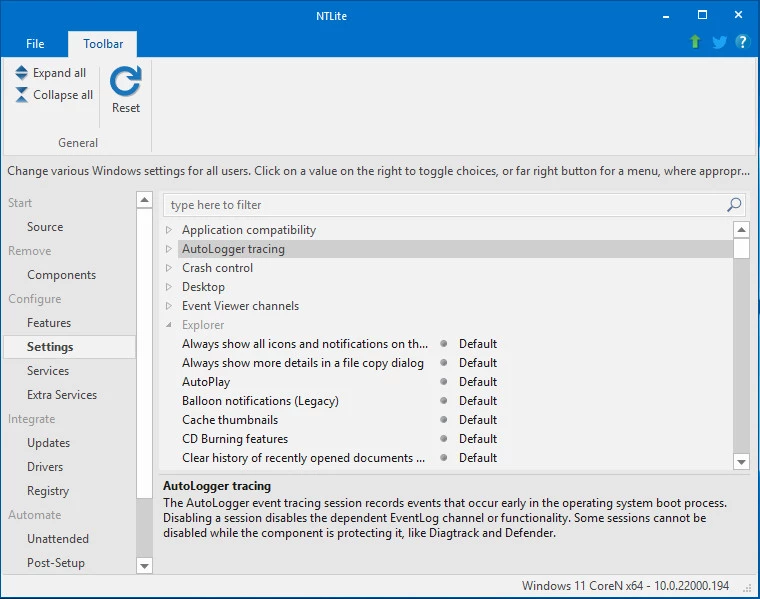
NTLite is an advanced desktop utility designed specifically for system administrators, IT professionals, and PC enthusiasts who need to heavily modify Windows installation images before deploying them to target machines. Instead of installing the operating system and spending hours removing unwanted default applications, applying registry tweaks, and manually installing hardware drivers, users can integrate all these changes directly into the source installation media. This approach generates a custom image file that automatically handles provisioning, drastically reducing the total time required to set up multiple workstations, configure virtual machines, or prepare specialized gaming rigs. By stripping the operating system down to its essential components before the setup phase even begins, administrators can significantly reduce the final disk footprint and minimize idle RAM usage.
Unlike generic scripting tools that require manual command-line execution and complex syntax, this application provides a highly visual graphical interface for parsing and modifying large WIM and ESD image files. Administrators begin by loading an extracted Windows installation directory into the program workspace. Once loaded, they can select the specific target edition they wish to modify and begin selectively stripping out unwanted telemetry services, background processes, scheduled tasks, or consumer-grade applications. By creating an unattended setup configuration, users can pre-define localized timezone settings, input languages, user accounts, and network preferences. This ensures that the final installation runs from start to finish without prompting the user for any manual input during the out-of-box experience.
Running as a localized desktop application ensures that massive, multi-gigabyte image files are processed entirely on the host machine's physical disk, avoiding the severe bandwidth bottlenecks associated with cloud-based deployment services. This desktop-first approach also allows direct access to the host machine's hardware profile, enabling the software to capture currently active drivers and inject them straight into the new deployment image. Once all modifications, tweaks, and automated tasks are queued in the pending changes list, the utility compiles the changes and exports a highly optimized, bootable ISO file. This final file is instantly ready for USB deployment tools or direct hypervisor booting, providing a clean, fully customized installation environment. By standardizing these deployments, entire IT departments can ensure that every single machine on the network boots with identical security policies, restricted application access, and up-to-date hardware definitions right from the very first startup sequence.
Key Features
- Image Format Conversion: The application automatically detects Electronic Software Download (ESD) files, which are highly compressed, and provides a direct Convert menu option to transform them into standard Windows Image (WIM) formats for mounting and editing. Users can also split large WIM files into smaller Spanned Windows Image (SWM) chunks, which is necessary to bypass the strict 4GB individual file size limit when creating bootable FAT32-formatted USB drives.
- Granular Component Removal: Administrators can strip out specific underlying system components, default application packages, and background telemetry tasks to permanently reduce the final disk footprint. The Component menu interface highlights critical system dependencies in red, actively warning the user if removing a specific service will break the Windows Store, disrupt network printing capabilities, or disable required multimedia codecs.
- Automated Driver Integration: Hardware drivers can be injected directly into the installation media, ensuring that crucial network adapters, graphics cards, and storage controllers function immediately upon first boot without manual installation. The utility includes a Host Hardware feature on the toolbar that scans the currently active machine, gathers all live drivers, and securely transfers them into the target image repository.
- Unattended Setup Generation: The software visually generates custom autounattend.xml files to automate the entire out-of-box experience, bypassing tedious installation screens. Administrators can pre-fill static computer names, specify regional settings, bypass the mandatory Microsoft account sign-in prompt, configure disk partitioning layouts, and create local administrator accounts automatically.
- Pending Task Automation: Rather than applying changes one by one and constantly mounting or unmounting the image, the application queues all requested modifications into a single batch list on the Apply page. Once the user clicks the Process button, the engine sequentially mounts the registry hives, deletes the requested component files, injects the updates, applies ESD compression if requested, and saves the final image without requiring any intermediate intervention. This batch processing ensures that multiple modifications do not corrupt the image header during rapid iterative testing.
- Live System Modification: Beyond offline image editing, the tool features a Live mode that can attach to the currently running operating system to apply deployment tweaks directly. This allows advanced users to remove stubbornly locked system applications, disable background telemetry, and apply deployment-level registry modifications to their active host machine without executing a complete system wipe and reinstall. Live mode acts essentially as a deeply integrated local configuration panel that bypasses standard operating system permissions.
How to Install NTLite on Windows
- Download the executable installer package directly from the official developer website to ensure you receive the unmodified setup file.
- Launch the setup executable and grant the required administrative privileges when the User Account Control prompt appears, as the tool requires deep system access to mount virtual disks.
- Accept the end-user license agreement and select the desired destination folder on your local system drive, ensuring you have enough free disk space to handle large temporary files later.
- Choose whether to create standard desktop shortcuts or enable portable mode; portable mode extracts the necessary files into a single directory without writing to the host registry.
- Click install to copy the executable files, interface libraries, and local dependencies to the selected path.
- Launch the application and, if prompted, enter your license key in the File menu under Manage License to unlock premium component removal and advanced automation features.
- To begin your first deployment project, extract the entire contents of a Windows installation ISO into a standard local folder on a fast storage drive.
- Click the Add button on the Target page toolbar, select Image Folder, and point the program to the extracted directory so it can discover the base installation files.
NTLite Free vs. Paid
The developer offers a permanent Free tier intended for personal, non-commercial use, educational exploration, and initial deployment testing. This baseline version allows users to load images, remove basic system components, integrate external drivers, and generate unattended setup files for out-of-box automation. However, the Free tier restricts access to deeper system modifications, live installation editing, and the automated downloading and integration of specific feature updates.
For advanced deployment functionality, users must upgrade to one of the paid perpetual license tiers, which include Home, Professional, and Business editions depending on the intended scale of use. Purchasing a license unlocks the ability to remove heavily restricted telemetry components, configure advanced deployment options, and utilize the full suite of automated update integrations. The Business license specifically permits commercial usage for system administrators managing enterprise IT environments, while the Home and Professional tiers are restricted to personal or enthusiast machines.
Paid licenses are perpetually valid for the exact build version purchased, meaning the software will never arbitrarily expire or require a mandatory ongoing subscription to keep functioning. However, each purchased license includes a limited period of included updates—typically one full year—after which users must purchase a renewal at a discounted rate if they want to download the newest application builds designed to support the absolute latest operating system feature drops.
NTLite vs. MSMG Toolkit vs. DISMTools
MSMG Toolkit is a free, script-based alternative that utilizes the command line to modify installation media by calling native Windows deployment commands in the background. Because it relies heavily on a text-based interface, MSMG Toolkit requires a steep learning curve, exact syntax knowledge, and constant manual navigation through numbered batch menus. Users who prefer a completely open-source scripting environment and do not mind reading extensive documentation often rely on MSMG Toolkit to achieve similar component removal goals without purchasing a commercial graphical license.
DISMTools acts as a modern graphical front-end for the native Deployment Image Servicing and Management framework, offering a project-based workflow heavily inspired by visual programming environments. While it is highly focused on driver injection, feature enablement, and update servicing rather than aggressive system debloating, DISMTools is frequently updated and completely free to use. However, it completely lacks the deep, fine-grained registry editing and component-stripping abilities found in specialized third-party modification utilities.
NTLite remains the strictly better fit for system administrators who need a visual, highly granular interface that actively warns them about component dependencies before they permanently break the target operating system. While it requires a paid license for its most advanced stripping features, its ability to quickly generate visual unattended XML files, rapidly convert ESD formats to WIM, and visualize the exact final disk footprint makes it exponentially faster for repetitive deployment engineering.
Common Issues and Fixes
- Component removal breaks unrelated applications. Removing specific telemetry, networking, or background services can accidentally break software dependencies, such as the Connected Devices Platform breaking the Customization menu on the final installation. To fix this, reload the original image, carefully review the compatibility warnings highlighted in red on the Component page, and strictly leave core Windows dependencies intact.
- Media Feature Pack missing error in games. Utilizing the aggressive community gaming preset often removes the default Windows Media Player codecs, which many modern games secretly rely on for intro cutscene playback. Resolve this by modifying the preset XML before processing the image, specifically ensuring the Windows Media Player component remains unchecked for removal.
- Windows Update fails to install cumulative patches. Stripping out the internal servicing stack or aggressively clearing the component store prevents the operating system from applying future security updates. If you plan to update the target machine later via the internet, actively avoid removing the Servicing Stack components and do not execute full resetbase commands on the mounted image.
- Application crashes when checking for online updates. Specific graphical builds may silently crash if the local update cache becomes corrupted while fetching the latest Microsoft update catalogs from external servers. Navigate to the local application data directory, clear the update cache folder manually, and restart the utility to force a fresh, uncorrupted catalog download.
- Bootable ISO fails to fit on standard USB media. After integrating massive driver packs and cumulative updates, the resulting WIM file often exceeds the 4GB maximum file size limit imposed by the FAT32 file system required for legacy UEFI booting. To resolve this, navigate to the export settings before compiling the final ISO and check the option to split the target image into multiple SWM files, ensuring no single chunk exceeds the file system limit.
Version 2026.01.10761 — January 2026
- Introduced a new Edition Changer tool, allowing users to modify the edition directly via the image right-click menu.
- Expanded Unattended setup options with new input fields for Support App, Provider, Trade-in, and Recycle URLs.
- Optimized the user interface by merging the 'Services' and 'Extra Services' pages into unified tabs within the Settings area.
- Improved component modularity with new 32-bit separation for Display Policy Service, Token Broker, and Capability Access Manager.
- Added a dedicated compatibility option for Legacy Games to ensure better stability after removals.
- Resolved a propagation issue where MSIX application changes were occasionally failing to apply to the main image.
- Fixed a stability bug related to running multiple instances of the application.