Software engineering teams building enterprise data applications frequently face the challenge of generating invoices, inventory summaries, and interactive dashboards. Telerik Reporting provides a complete .NET embedded reporting framework that handles the entire lifecycle of data visualization, from initial layout construction to final document rendering. Instead of writing custom HTML layouts or raw database parsing code for every new document requirement, developers and data analysts can construct visual templates using dedicated desktop tooling and inject them directly into their software projects. The tool processes raw data from multiple endpoints and formats it according to strict visual rules before displaying it to the end-user.
While many data visualization tools operate strictly inside web browsers, relying on a local desktop environment provides distinct advantages for heavy structural work. The core of this system includes a dedicated Standalone Report Designer, a Windows executable that functions independently of integrated development environments. By separating the layout engine from the application code, business logic remains isolated from presentation layers. Analysts can drag text boxes, charts, and tables onto a local canvas, configure complex conditional formatting, and save the result as an independent XML package. Developers then load these XML definitions into their host applications using the provided viewer components, ensuring that document layouts remain consistent regardless of whether the final output is rendered on a desktop client or a web portal.
The practical value of this architecture becomes obvious when maintaining hundreds of distinct document templates. Modifying a tax rate layout or adjusting a company logo in a traditional hard-coded report often requires recompiling the entire host application. With Telerik Reporting, teams manage layouts as external files, updating parameters and data bindings without modifying the compiled software. The engine manages the heavy lifting of pagination, data grouping, and rendering output into standard formats, allowing teams to focus on actual data relationships rather than struggling with page breaks and print margins.
Key Features
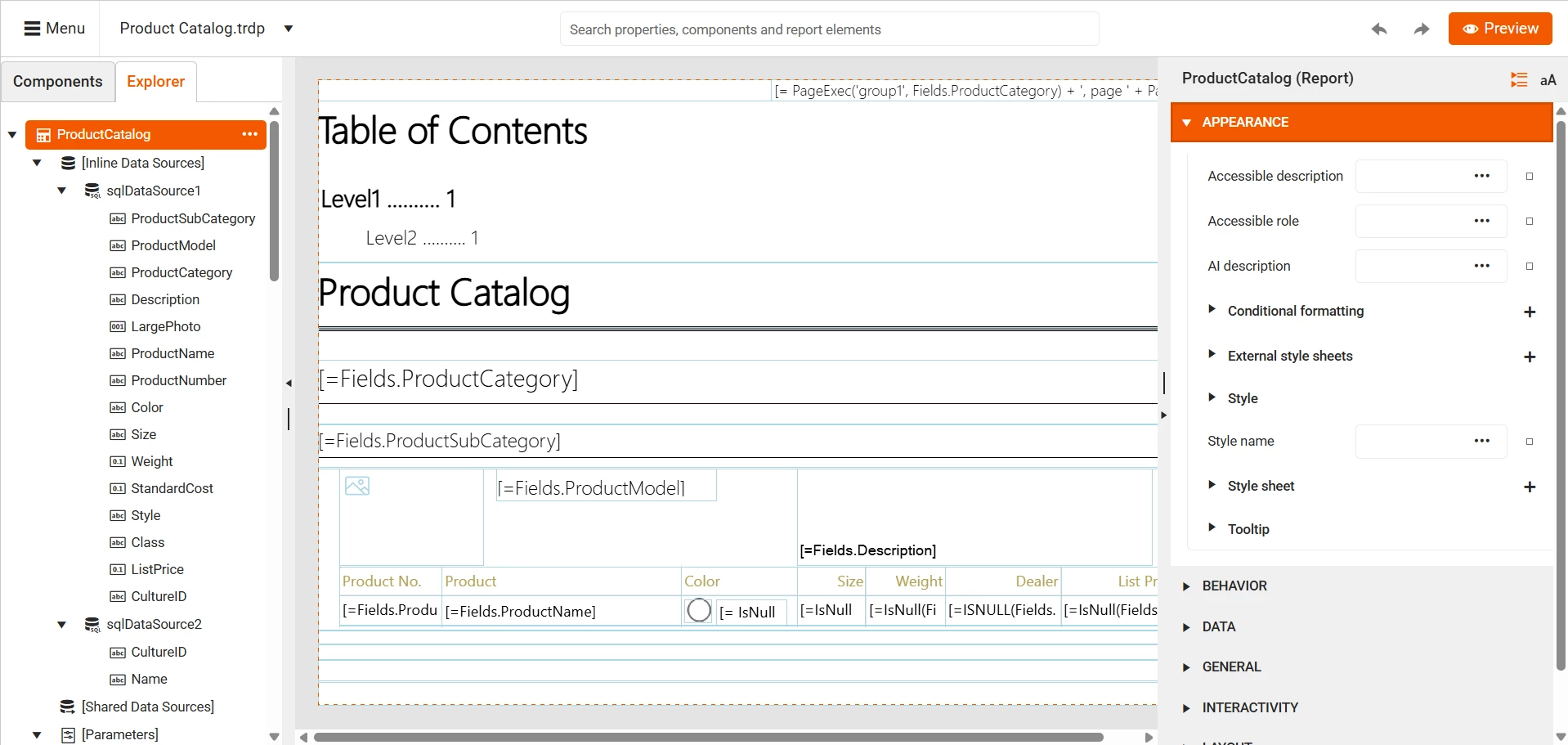
- Feature Name: Standalone Desktop Report Designer. This independent Windows application provides a visual design surface for constructing layouts without writing code. The interface includes a Toolbox for dropping layout elements, a Report Explorer for navigating document hierarchies, and a Property Grid for fine-tuning text alignment, colors, and margins. The output is saved in standardized TRDP or TRDX XML formats.
- Feature Name: Extensive Data Source Binding. The tool retrieves information natively through the built-in SqlDataSource component, which connects directly to Microsoft SQL Server databases. It also supports binding to Entity Framework models, external REST APIs, and local object collections, providing wizards to help users map database columns directly to report fields.
- Feature Name: Broad Export Format Support. The engine renders finished documents into more than 15 distinct file types, allowing end-users to save their data locally. Supported formats include standard PDF documents, Microsoft Excel spreadsheets, Microsoft Word documents, PowerPoint presentations, and raw CSV files, preserving styling and pagination across all outputs.
- Feature Name: Interactive Data Visualization. The designer includes specialized layout components for translating raw numbers into visual context. Users can configure crosstabs, linear gauges, pie charts, and complex sub-reports, adding drill-down menus and drill-through links that allow readers to click summary metrics to view underlying row data.
- Feature Name: Embeddable Web Report Designer. In addition to the local Windows executable, the suite includes a widget that developers can integrate directly into their own web applications. This allows end-users to modify report layouts within their browser using a familiar drag-and-drop interface, without needing the standalone local designer installed on their machine.
- Feature Name: AI Coding Assistant Integration. Developers configuring the reporting engine inside their development environment can access an AI extension that generates configuration code automatically. This assistant reads the official API documentation context to help troubleshoot rendering errors, suggest component properties, and automate the boilerplate code required to embed viewer controls.
How to Install Telerik Reporting on Windows
- Navigate to the Telerik account portal, access the downloads section, and download the Windows installer package for the reporting suite.
- Launch the downloaded Windows installer and advance past the initial end-user license agreement screen.
- Review the Customization step, where you should leave the Examples option checked; this installs pre-configured templates and prepares the Microsoft SQL Server AdventureWorks sample database for local testing.
- Specify the destination folder, which defaults to the Progress directory within the Program Files hierarchy, and click Install.
- When prompted by the setup wizard, define your database server credentials and connection authentication method so the installer can deploy the sample tables.
- Finish the setup wizard, then open your file explorer and navigate to the newly created local Report Designer folder.
- Locate and launch the executable file named
Telerik.ReportDesigner.exeto verify the visual interface loads correctly. - For developer integration, open your development environment, configure the Telerik NuGet feed using your account API key, and install the specific reporting packages required for your host application.
Telerik Reporting Free vs. Paid
Telerik Reporting is a commercial software product that requires a paid license for development use. The vendor offers a fully functional 30-day free trial that allows teams to test the complete feature set, including all design tools and viewer components. During the trial period, the rendering engine applies a visible copyright watermark across all generated pages and viewer components. This watermark serves as the only functional restriction, ensuring developers can accurately test complex document layouts before committing to a purchase.
The standard commercial licensing is based on a per-developer model with no ongoing end-user distribution fees. The entry-level tier, known as Lite Support, costs $699 annually per developer and includes a standard response time with a capped number of support incidents. The Priority Support tier costs $799 annually per developer, providing faster response times and unlimited support tickets. For teams requiring direct phone assistance and remote web session troubleshooting, the Ultimate Support tier is available for $1,199 annually per developer.
Once a commercial license is acquired, developers must download the specific commercial assemblies from their account portal to replace the trial files. The commercial license grants royalty-free redistribution rights, meaning you can embed the reporting engine into your proprietary applications and distribute them to unlimited clients without paying per-server or per-document generation fees. The reporting framework is also frequently acquired as part of the broader DevCraft bundles, which package the reporting tools alongside hundreds of other user interface components.
Telerik Reporting vs. DevExpress Reporting vs. Crystal Reports
DevExpress Reporting provides a highly detailed banding engine and tight integration with the broader DevExpress user interface ecosystem. Teams already utilizing DevExpress data grids and navigation controls often choose this reporting engine because it shares a unified API and styling framework, reducing the learning curve. However, its heavy reliance on specific proprietary control structures can make it slightly more complex to untangle if a project requires a highly decoupled layout approach.
Crystal Reports is a legacy reporting standard that has existed for decades, known for handling massive, highly structured database queries. It remains heavily utilized in older enterprise environments where existing complex procedures are already mapped directly to its proprietary file format. Modern development teams often avoid starting new projects with it due to its rigid server requirements, slower adoption of newer web framework standards, and historically steep learning curve for custom application embedding.
Telerik Reporting is the stronger choice for teams looking for modern, standalone XML-based layouts and direct embedding across modern web architectures. Its reliance on the TRDP file format allows layouts to be managed outside the application code, and its royalty-free distribution model removes the anxiety of scaling to thousands of end-users. When developers need to embed document generation inside modern single-page applications or .NET desktop software without tying themselves to restrictive server-side licensing, Telerik provides the most flexible workflow.
Common Issues and Fixes
- Problem description. Watermarks randomly appear on rendered documents and viewers. This happens when the application is compiled using trial assemblies instead of the commercial binaries. Log into your account portal, download the specific developer assemblies, replace the trial DLLs in your project, and clear your local output folders before recompiling.
- Problem description. The designer throws an XmlSerializer cannot resolve type error when loading a layout. This occurs when an XML layout file contains an empty TypeName property, often due to a missing custom assembly reference. Open the TRDP or TRDX file, locate the empty TypeName node, and supply the fully qualified assembly name for the missing object data source.
- Problem description. The engine generates endless identical pages or repeating header blocks. This triggers when both the main document and a nested layout element are bound to the exact same data source, causing the engine to iterate the layout twice. Check the data binding settings and clear the nested item's DataSource property so only the parent container iterates through the database records.
- Problem description. The Standalone Report Designer crashes or fails to recognize custom objects. This happens when custom external assemblies are not placed in the correct local directory. Copy your custom compiled assembly directly into the main Report Designer installation folder and update the local configuration file so the designer can locate the custom types.
- Problem description. Connecting to a database works in the designer but fails in the web viewer. This occurs when the designer utilizes a named connection string that exists only in the local executable configuration. Copy the exact named connection string from the local designer configuration file and paste it into the main configuration file of your host application.