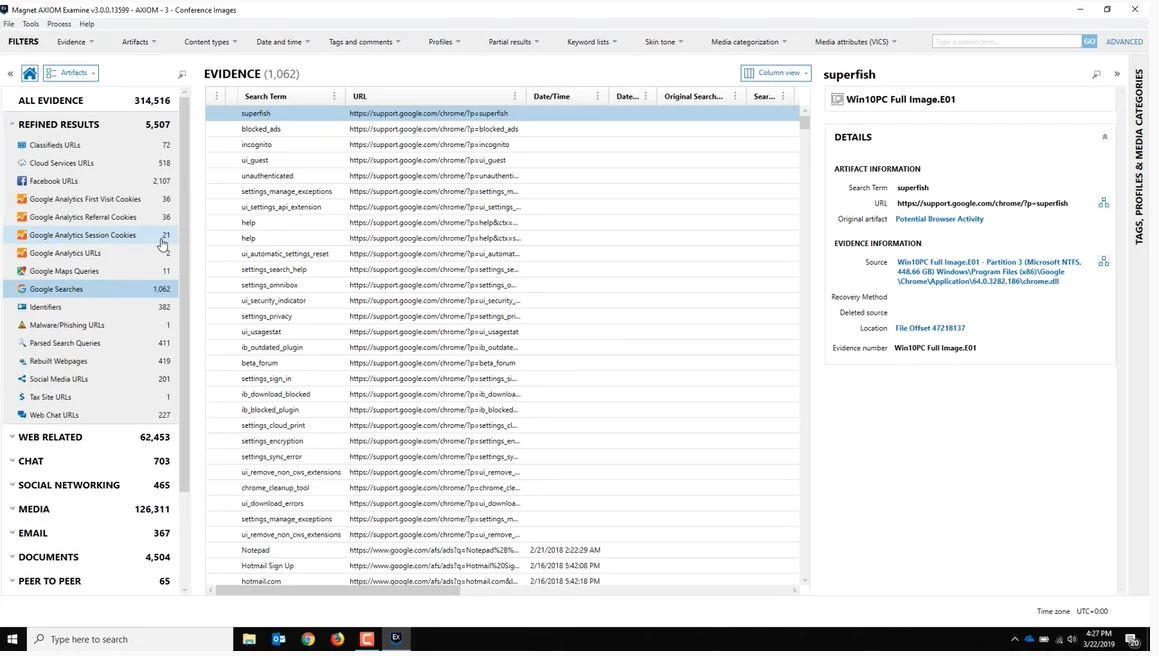
MAGNET AXIOM is a digital forensics and incident response desktop platform built for law enforcement, corporate security teams, and professional lab examiners. It specializes in recovering, parsing, and analyzing digital evidence from smartphones, computer hard drives, cloud storage accounts, and connected devices within a single unified workspace. Instead of forcing an examiner to manually carve raw hexadecimal data or rely on fragmented utilities, investigators use this desktop application to automatically extract deleted messages, browser histories, media files, and volatile memory captures. The software fundamentally shifts the investigative workflow away from file-system-first analysis to an artifact-first approach. By focusing directly on human-readable data—such as encrypted chat threads, geolocation points, or email headers—examiners can rapidly piece together chronological events without getting bogged down in unallocated disk space. The localized desktop environment ensures that highly sensitive chain-of-custody data remains secure, allowing agencies to process massive case files entirely offline or within protected, air-gapped lab networks without exposing evidence to external web servers.
While generic undelete utilities focus on retrieving accidental file deletions for casual home users, this suite is explicitly designed for strict legal standards and court-admissible reporting. It integrates with dedicated hardware acquisition tools, allowing teams to ingest raw smartphone extractions alongside computer disk images and provider warrant returns. This unified analysis prevents investigators from switching between multiple software interfaces, keeping complex cases manageable. By correlating data points across multiple devices belonging to the same suspect, the application helps examiners find the specific moments when a document moved from a local drive to a webmail attachment.
This level of desktop processing requires serious local hardware, but it ensures that examiners retain total control over the indexing, hashing, and storing of critical evidence. Because the application handles deeply nested file structures, fragmented databases, and custom chat application formats, it demands significant processor and memory resources to rebuild communication logs accurately. For digital forensic professionals managing heavy caseloads, having a centralized desktop environment to analyze cross-device activity dictates the speed at which investigations can move forward.
Key Features
- Artifact-First Evidence Parsing: The application bypasses traditional manual file-system browsing to surface actionable data like chat logs, emails, and social media posts. The software automatically decodes thousands of application-specific databases, including obscure encrypted messaging formats and hidden browser caches, placing them directly into a searchable grid. This includes reconstructing fragmented SQLite databases and interpreting temporary internet files to reveal web history that a user attempted to wipe.
- Unified Timeline Analysis: Examiners can reconstruct a chronological view of user activity by combining data from computer drives, mobile devices, and network backups into one continuous feed. This interface plots file executions, web searches, and sent messages on a single graphical timeline, making it obvious when a suspect switched from a desktop browser to a mobile application to continue a conversation.
- Evidence Connections Mapping: A dedicated visualization tool draws automated relationship graphs between distinct artifacts, user accounts, and physical devices. By analyzing communication frequency and file sharing behavior, the visualizer helps investigators identify networks of individuals or trace the exact origin of a downloaded file across multiple storage volumes.
- Media Explorer and Image Categorization: The platform scans thousands of images and video files, identifying and categorizing them using local processing models rather than relying on external web APIs. It includes native optical character recognition to read and index text inside scanned documents or screen captures, and it groups visual evidence by specific visual attributes, flagging potentially illicit material for manual review.
- Volatile Memory Analysis: Investigators can ingest volatile RAM captures to extract active background processes, network connections, and decrypted data fragments that only existed in active memory. This function relies on bundled memory analysis scripts to identify malware execution paths, making it critical for corporate incident response and unauthorized access investigations where the malicious payload never touched the physical hard drive.
- Automated Court-Ready Reporting: Users can tag specific artifacts, add custom notes, and export the selected evidence into standardized PDF, HTML, or JSON reports designed for legal proceedings. The export engine maintains exact metadata records, cryptographic hash values, and strict chain-of-custody logs, ensuring that non-technical stakeholders can understand the findings while meeting strict evidentiary standards in a courtroom environment.
How to Install MAGNET AXIOM on Windows
- Log into your verified account on the official vendor support portal to request the primary download package, as public direct links are intentionally restricted to vetted professionals.
- Download the packaged ZIP archive containing the Windows installer and extract its contents entirely to a local directory on your dedicated processing workstation.
- Double-click the extracted executable setup file to launch the installation wizard, ensuring you run the process with local administrator privileges.
- Review the End User License Agreement, select your preferred interface language from the dropdown menu, and confirm the destination folder, which defaults to the standard program files directory on the primary system drive.
- Allow the setup to copy the core application files, hardware drivers, and dependency packages like the required Microsoft .NET framework components.
- Keep the checkbox to launch the main processing interface selected, then click the final finish button to exit the installation wizard.
- On the initial startup, wait for the activation prompt; you must either insert your physical USB license dongle into the workstation or point the application to your organization's local network license server IP address.
- Open your local endpoint security or antivirus software and manually add the entire installation directory to the exclusion list, preventing background scanners from aggressively quarantining the memory analysis modules or custom decryption scripts.
MAGNET AXIOM Free vs. Paid
This application operates strictly as enterprise-grade forensic software and does not offer a public consumer tier, an open-source alternative, or an easily accessible trial for casual users. Law enforcement agencies, military units, and corporate security clients must negotiate contracts directly with the vendor's sales department. The pricing model primarily revolves around high-cost term subscriptions or specific perpetual licenses that remain heavily tied to recurring annual maintenance fees.
For standard subscription deployments, industry sources estimate the cost typically starts at approximately four thousand to five thousand dollars per user annually, depending on the specific module package selected. There are distinct variations of the software tailored for different environments, such as a law enforcement package versus a corporate network investigation package, and each carries different licensing costs. Perpetual licenses are occasionally available for public sector clients who require fixed capital expenditures, but these still demand a separate term subscription to receive necessary software updates, artifact database parsers, and technical support access.
The software enforces its licensing strictly via physical hardware USB dongles or localized network license servers. Organizations with multiple analysts often deploy a local license server to share concurrent processing seats among different lab workstations. Prospective buyers cannot simply download and run the software; they must contact the vendor to request a guided demonstration and a temporary trial license, which requires thorough verification of professional credentials and organizational affiliation.
MAGNET AXIOM vs. OpenText EnCase Forensic vs. Cellebrite Physical Analyzer
OpenText EnCase Forensic serves as a historic legacy standard in the digital forensics industry, known for its deep file-system-level analysis and massive e-discovery capabilities on corporate endpoints. Investigators often prefer EnCase when dealing with traditional dead-box computer forensics, massive corporate network collections, or legacy Windows environments where raw byte-level inspection and custom scripting are strictly necessary. However, its interface remains notoriously complex, and it requires a high degree of manual work to extract human-readable evidence from modern encrypted communication applications.
Cellebrite Physical Analyzer stands as the undisputed industry standard for the direct physical extraction of hardware data, effectively bypassing complex device encryption on modern mobile hardware. Forensic teams rely heavily on Cellebrite to create the initial raw image from a locked smartphone, a highly specialized task that standard desktop-focused analytical software cannot perform independently. While Cellebrite excels at mobile acquisition and initial decryption, its interface for combining multi-source data—such as cloud account returns and computer hard drives—lacks the specialized artifact centralization found in dedicated desktop parsers.
MAGNET AXIOM bridges the gap between these two extremes by acting as the ultimate analytical aggregator for multi-device investigations. Rather than choosing entirely between these tools, forensic labs frequently use hardware extraction devices to dump the mobile data, and then ingest that raw extraction into this desktop platform alongside computer disks and cloud logs. When an investigator needs to build a single chronological timeline showing a suspect downloading a file on a desktop computer and subsequently sharing it via a mobile chat application, this software provides the most efficient workflow for connecting those separate events.
Common Issues and Fixes
- Hardware dongle not recognized. The application will refuse to start processing or exporting data if it cannot detect the physical USB license key. Ensure the dongle is plugged directly into the motherboard rather than a generic USB hub, or verify that your USB redirection software is actively routing the device to your virtual machine interface.
- Extremely slow processing times on large cases. Scanning massive disk images or multiple device extractions simultaneously can take several days on standard workstation hardware. To accelerate database parsing, ensure your temporary processing directory is located on a fast NVMe solid-state drive rather than a mechanical hard drive, and assign more logical CPU cores in the initial job settings.
- Missing evidence from newly updated messaging applications. When popular communication applications update their database structures, the software may temporarily fail to parse new messages. Check the official vendor support portal for the latest artifact update patches, as the development team frequently releases minor updates to address schema changes in third-party app databases.
- Antivirus blocking memory analysis scripts. Local endpoint security tools frequently flag the volatile memory analysis modules or bundled forensic scripts as malicious behavior due to their deep scanning nature. You must manually add the entire installation folder to your antivirus exclusion list to prevent the silent quarantine of necessary processing files.
- Corrupted temporary workspace databases. If the workstation loses power or runs out of disk space during a heavy extraction job, the local SQLite indexing databases can become irrecoverably corrupted. Always allocate a temporary processing drive with at least double the free space of your total ingested evidence, and restart the specific parsing job from scratch if an unexpected crash occurs.
Version 5.4.0.26185 — April 2025
- Added capability to acquire and analyze ChatGPT Library and Project files from cloud sources.
- Added new artifacts for Apple Notes Embedded Objects (iOS), Microsoft Teams Activity (iOS), and Whoo application data (Android/iOS).
- Improved RSMF exports by allowing chat grouping by time period or message count, with automatic splitting for files exceeding 2GB.
- Improved Microsoft OneDrive acquisition to capture full file version histories rather than just the most recent version.
- Improved Apple Notes decryption to support changes introduced in iOS 18.
- Improved Signal for Windows support to parse message reactions and edit history.
- Expanded email and chat analysis to support processing of .msg files within Microsoft Teams and Outlook artifacts.
- Updated the integrated Passware SDK to the latest version for enhanced decryption capabilities.