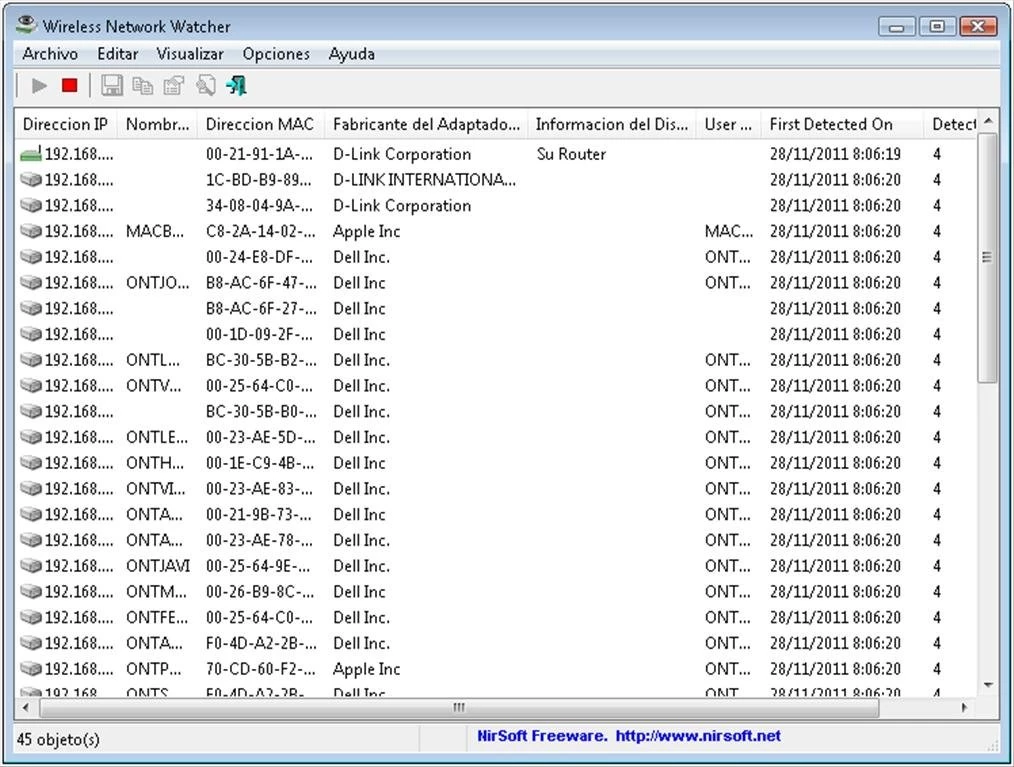
Wireless Network Watcher is a specialized utility that scans your local network to discover and list all active computers, smartphones, printers, and smart home appliances connected to your router. Developed as a lightweight desktop tool, it provides immediate visibility into your local subnet without requiring complex configurations or background server deployments. When launched, the application broadcasts ARP queries and ICMP pings across the network, resolving the responses into a clear, grid-based interface. Administrators and home users rely on this software to quickly audit their networks, track down the local IP address of a misbehaving printer, or identify unauthorized hardware consuming bandwidth.
Unlike heavy enterprise monitoring platforms that require dedicated collector servers and complex database setups, this desktop application focuses purely on local, on-demand discovery. It maps out your network topology by displaying critical data points for every responding piece of hardware. The primary grid populates with the IP address, the physical MAC address, the name of the device, and the company that manufactured the network adapter. This manufacturer column is particularly useful for identifying headless hardware; for example, seeing a specific component maker often helps pinpoint a smart plug, security camera, or television that does not broadcast a standard human-readable hostname to the local router.
The software is built for practical, everyday network administration tasks. Whether you need to run a quick manual scan to see why a file server is unreachable, or you want to leave the utility running in the system tray to monitor for new connections, it adapts to the workflow. Because it runs natively on the Windows desktop, it utilizes minimal system resources, avoids cloud account requirements, and allows for rapid command-line execution. This makes it a staple for IT professionals who need to generate quick hardware inventory reports or export subnet data into spreadsheets for further analysis.
Key Features
- Real-Time Network Scanning: The software maps the active local subnet using ARP and ICMP requests to populate a detailed grid. It immediately displays the IP address, MAC address, device name, and network adapter manufacturer, allowing users to identify connected hardware without logging into a router interface.
- Continuous Background Monitoring: Users can configure the application to scan the network continuously at specific intervals while minimized to the system tray. Navigating to the Options menu allows you to enable tray balloon notifications or audio beeps that trigger the moment a new MAC address joins the network or an existing one drops offline.
- Custom Device Tracking and Labeling: Through the Properties window, accessible by pressing Alt+Enter on any selected row, users can input custom notes into the User Text field. This allows administrators to manually label recognized printers, routers, or personal phones, making it instantly obvious when an unknown piece of hardware appears in the grid.
- Historical Device Memory: The application utilizes a local configuration file to remember hardware that has connected in the past. By toggling the Show All Previous Devices option, the grid will display gadgets that were historically detected on the subnet, including their first and last detection timestamps, even if they are currently powered down.
- Command-Line Exporting: System administrators can run the executable silently via command-line arguments to generate network inventories without interacting with the graphical interface. Using parameters like /scomma, /shtml, or /sxml forces the software to scan the default adapter and immediately dump the results into CSV, HTML, or XML files for automated logging.
- Manual Adapter and Subnet Selection: For systems with multiple network interfaces or virtual bridges, the Advanced Options menu (F9) provides manual control over the scanning parameters. Users can select a specific physical network adapter from a dropdown list or input a custom IP address range, such as 192.168.2.1 to 192.168.2.255, to ensure the correct subnet is monitored.
How to Install Wireless Network Watcher on Windows
- Download the official Windows installer package directly from the developer website to your local storage.
- Locate the downloaded executable file in your default Downloads folder and double-click it to launch the setup wizard.
- Review the standard installation welcome screen and click Next to proceed to the directory selection phase.
- Accept the default destination folder path, which is usually located within the Program Files directory on your primary system drive, or click Browse to specify a custom installation location.
- Choose your preferred shortcut options by checking or unchecking the boxes for a desktop icon and a Start Menu folder for quick operational access.
- Click Install to unpack the core application executable, the included MAC address database, and the readme documentation into the designated folder.
- Finish the setup process and leave the box checked to launch the application immediately; upon its first run, it will automatically detect your primary network adapter and execute an initial scan of your local subnet.
Wireless Network Watcher Free vs. Paid
Wireless Network Watcher operates under a strict freeware model, aligning with the developer long-standing philosophy for system utilities. There are no paid tiers, premium subscriptions, or enterprise licenses required to unlock its functionality. The software is provided entirely free of charge for both personal home use and commercial deployment in corporate IT environments. Administrators can install the executable on as many workstations as needed without tracking seat counts or entering license keys.
Because the product is completely free, users do not have to navigate trial periods, artificial scan limits, or feature paywalls. The ability to export data to CSV or HTML, the continuous background monitoring tools, and the command-line execution parameters are all fully available immediately after installation. There are no watermarks on exported reports and no restrictions on the number of IP addresses the application can query within a subnet.
The developer sustains the project through website traffic and voluntary donations rather than mandatory software monetization. The utility is fully self-contained and operates locally, meaning it does not prompt users to create cloud accounts, does not require an active internet connection for license validation, and does not push third-party plugin ecosystems. If you are extracting or installing the tool, you are receiving the complete, unrestricted version by default.
Wireless Network Watcher vs. Advanced IP Scanner vs. Angry IP Scanner
Advanced IP Scanner is a highly capable networking tool that emphasizes remote administration and local control. While it effectively maps out the local subnet to reveal connected machines, its interface includes direct shortcuts for taking action on those discoveries, such as launching Remote Desktop (RDP) sessions, connecting via FTP, or issuing Wake-On-LAN and remote shutdown commands. Administrators should choose Advanced IP Scanner when they actively need to manage, access, and control networked Windows computers from a central console, rather than simply identifying what hardware is present.
Angry IP Scanner is an open-source, Java-based application engineered for raw scanning speed across large, complex network environments. It utilizes a multi-threaded architecture to ping massive IP ranges concurrently, making it significantly faster when scanning multiple subnets at once. It also allows users to configure custom data fetchers to probe specific open ports on the discovered hardware. IT professionals should deploy Angry IP Scanner when they are dealing with vast corporate networks, require strict cross-subnet port auditing, and are comfortable installing the necessary Java Runtime Environment to operate the tool.
Wireless Network Watcher is the superior choice for users who require a lightweight, portable utility dedicated entirely to passive monitoring and straightforward discovery. It relies on standard ARP and ICMP requests without the overhead of Java, complex multi-threading setups, or remote administration modules. It excels at running quietly in the system tray, providing immediate audio or visual alerts the moment an unauthorized MAC address joins the local Wi-Fi. It is the most efficient, friction-free option for generating a quick CSV inventory or catching network freeloaders without navigating complex configuration screens.
Common Issues and Fixes
- Software scans the wrong network adapter. When a computer has multiple active connections, such as a physical Ethernet line alongside active virtual machine network bridges, the application may default to scanning the wrong subnet. Press F9 to open the Advanced Options window, check the box to use a specific network adapter, and manually select your primary hardware interface from the dropdown list.
- Specific smart appliances or mobile phones do not appear. Many modern mobile gadgets and IoT devices utilize aggressive power-saving sleep modes or strict internal firewalls that drop standard ICMP ping requests. To force discovery, manually wake the device by interacting with it, or verify its connection through your router client list, as passive desktop scanners cannot force firewalled hardware to respond.
- Background audio alerts trigger too frequently. If you enable continuous monitoring, mobile devices that frequently disconnect and reconnect to save battery life will cause the application to beep constantly. Navigate to the Options menu and uncheck Beep On New Device to silence the audio, while leaving the visual tray balloon notifications active for silent monitoring.
- Custom device labels disappear after closing the app. If you assign specific names using the User Text field but they vanish upon restarting, the application likely lacks write permissions to save its configuration data. Ensure that the WNetWatcher.cfg file is not set to read-only, and verify that the program is not running from a locked external drive that prevents local file modification.
- The network adapter company column is blank. The software relies on an internal database to match MAC addresses to hardware manufacturers. If a newly released gadget appears with a blank company field, the internal OUI database is likely outdated. Downloading the latest build from the developer replaces the internal database with current MAC address assignments, restoring the manufacturer identification feature.
Version 2.43 — June 2025
- Added support for a larger number of custom context menu entries, now allowing up to 20 user-defined items.
- Improved the internal MAC address database to provide more accurate manufacturer identification for connected devices.
- Fixed minor internal errors and stability issues to ensure reliable network scanning performance.