Windows users frequently encounter a frustrating barrier when attempting to reorganize or clean their hard drives: a prompt stating that a file cannot be deleted because it is currently open in another program or access is denied. Often, the operating system does not clearly identify which background service or hidden task is holding the lock, leaving the user completely unable to proceed with their routine tasks. Wise Force Deleter addresses this specific system behavior. It is a specialized utility that hunts down the exact background processes restricting your files, forcibly terminates those specific handles, and executes the deletion command. This utility targets users who regularly manage large volumes of files, reorganize extensive file directories, or clean up after uninstalled applications that leave stubborn temporary files scattered behind.
Choosing a dedicated local application for this task is a practical necessity. Web-based file managers or cloud synchronization tools operate too high up in the software stack to interact with local system locks or administrator privileges. Managing and terminating active background tasks requires low-level access to the local operating system architecture. By running directly on the local machine, this utility can interface directly with standard system permissions and active memory usage, terminating the restrictive threads instantly.
When a file is locked by a crash, a frozen media player, or a stalled background update, typical troubleshooting requires opening the Task Manager, guessing which process is responsible, and hoping a forced quit resolves the issue. If that fails, users usually resort to rebooting their entire machine. This application bypasses that tedious workflow. It translates the complex administrative task of process management into a simple visual interface, allowing users to select the stubborn file and force the system to release it immediately.
Key Features
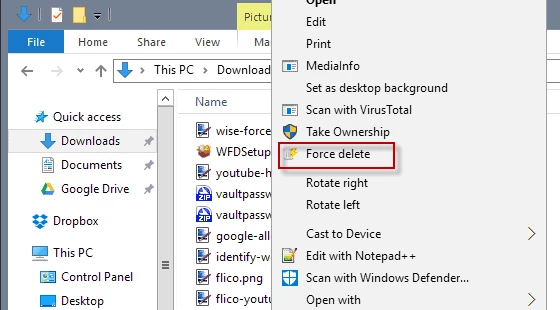
- Context Menu Integration: The software embeds a dedicated Force Delete command directly into the standard Windows Explorer right-click menu. Instead of launching the utility manually and navigating through an internal file browser, users can target stubborn files the moment they encounter a deletion error.
- Drag-and-Drop Interface: The main application window acts as a central staging area where users can drag locked files from multiple different directories and drop them into a single queue. This visual collection method is practical when clearing out files from various locations across a hard drive simultaneously.
- Batch Processing Capability: Users are not restricted to handling one file at a time. The interface supports standard keyboard shortcuts, allowing users to hold the Shift or Control keys to highlight multiple items within a folder, add them to the queue, and execute the deletion for the entire batch in one action.
- Targeted Process Termination: When an item is added to the list, the utility identifies the exact background executable or background thread that is keeping the data active. Clicking the Unlock & Delete button commands the application to close that specific handle without requiring a full system reboot.
- Permission Restriction Override: Certain items remain undeletable because they require strict administrative ownership, often presenting an Access Denied dialog. The utility automatically alters the temporary permissions linked to the target data, granting the current user account the necessary authority to wipe the item from the disk.
- Visual Deletion Queue: The interface provides a clear list of all items scheduled for removal, displaying their exact file paths and current status. This allows users to review the queued items carefully, select individual entries, and click the Remove button to take them out of the list before committing to the final deletion.
How to Install Wise Force Deleter on Windows
- Download the official Windows installer executable from the vendor's primary distribution server.
- Navigate to your designated downloads directory and double-click the setup file to initiate the installation wizard.
- Click Yes when the User Account Control prompt appears on your screen. The software requires administrative privileges to install correctly and to execute low-level process termination tasks later.
- Review the end-user license agreement presented in the initial wizard screen and click to accept the terms to proceed.
- Select the destination path on your local drive where the application files will reside. The wizard defaults to the standard program files directory, which is optimal for utilities requiring system-level access.
- Choose whether you want the installer to generate a desktop shortcut for manual launches, then click the install button to extract the necessary application files.
- Wait for the progress bar to complete, then close the setup wizard. You do not need to restart your computer to begin using the tool.
- Open your file manager, right-click on any standard text or image file, and verify that the Force Delete option is now visible in your context menu.
Wise Force Deleter Free vs. Paid
Wise Force Deleter is distributed entirely as freeware. The developer provides the complete application without charging any upfront purchase fees, and there are no hidden subscription models to navigate. Users who acquire the utility have immediate access to the full scope of its capabilities, including the context menu integration and batch processing functions.
Unlike many utility programs in the optimization category, this application does not implement trial restrictions. There are no limits on how many files you can unlock per day, nor are there artificial delays or nag screens interrupting the workflow. The visual queue, drag-and-drop mechanics, and core process termination tools function exactly the same for every user on day one as they do years later.
The vendor maintains this specific tool as a free utility to complement their broader portfolio of premium system optimization and maintenance software. While you might see references to their other commercial products on their official website, the file deletion tool itself operates independently. You are never required to purchase a perpetual license or buy supplementary credits to unlock a stubborn file.
If a file remains locked, it is due to a technical limitation of the file system rather than a paywall. Because the software is completely free, users in enterprise environments should verify their internal IT policies regarding freeware utility deployment, though the vendor does not impose strict licensing variations between home and commercial usage for this specific build.
Wise Force Deleter vs. IObit Unlocker vs. LockHunter
IObit Unlocker is designed for users who want options beyond sheer destruction. Instead of only offering a delete function, this alternative allows users to choose Unlock & Rename, Unlock & Move, or Unlock & Copy from a drop-down menu. If a file is locked by a process but you actually need to preserve the data and shift it to an external drive, IObit provides the granular control to release the file and immediately relocate it without risking permanent data loss.
LockHunter prioritizes transparency and data safety over immediate removal. When you target a file with this alternative, the interface clearly displays the exact names and executable paths of the background processes keeping the file open, giving you the knowledge to investigate the root cause of the system lock. Furthermore, when it removes a file, it sends the item directly to the Windows Recycle Bin, offering a crucial recovery method if you accidentally select the wrong item during a rapid cleanup session.
Wise Force Deleter is the optimal choice when your primary goal is pure speed and finality. It strips away the extra file management commands and diagnostic displays in favor of a strictly functional, single-purpose graphical interface. When you have a folder full of stubborn leftover temporary files and you just want them gone permanently without dealing with recycle bin clutter or secondary prompts, this utility provides the most direct path to a completely clean directory.
Common Issues and Fixes
- Inability to delete an entire folder structure. The application is specifically programmed to target and process individual files, not parent directories. To bypass this limitation, open the targeted folder, select all the contents using the Ctrl + A keyboard shortcut, drag them into the deletion queue, process them, and then manually delete the empty folder using the standard Windows method.
- Accidental removal of important data. Items processed by this tool bypass the standard Windows Recycle Bin, resulting in immediate and permanent data loss. To prevent mistakes, always review the list of items in the application interface and use the Remove button to drop any uncertain files from the queue before clicking the final action button.
- Security software blocking the execution. Because the utility actively hunts down and forcefully kills background processes, aggressive antivirus programs may flag it as suspicious behavior. You can resolve this interference by opening your security software settings and adding the application's installation folder to the explicit exclusions or whitelist.
- Context menu entry disappears. Major operating system updates can sometimes overwrite custom explorer shell extensions, causing the right-click option to vanish. To restore the integration, open the main application from the start menu using the Run as administrator option, or simply run the installer package a second time to repair the registry entries.
Version 1.5.7.59 — July 2025
- Added support for command line operations, allowing users to force delete files and folders via CMD.
- Improved the application interface with minor visual enhancements for better usability.
- Fixed minor known bugs to increase overall stability.