Whenever you finish a clean installation of a modern Microsoft operating system, navigating to the Device Manager often reveals a frustrating tree of yellow warning triangles. These warnings highlight components labeled vaguely as "Unknown Device," "PCI Simple Communications Controller," or "SM Bus Controller." While the computer might appear to function normally—allowing you to browse the web or open documents—these generic labels indicate that the operating system does not fully understand the underlying motherboard architecture. Without the correct maps for the hardware, the system defaults to basic generic routines provided by Microsoft. This fallback behavior can result in unexpected micro-stutters during heavy computational tasks, delayed audio processing, inconsistent sleep and wake cycles, and higher idle temperatures.
Intel Chipset Device Software resolves this communication gap by injecting the correct INF text files directly into the operating system's internal driver store. Unlike a traditional graphics or audio package that installs executable code, custom control panels, and heavy background processes, this utility is primarily a collection of passive configuration files. These files cross-reference the exact Vendor IDs and Device IDs physically present on the motherboard with their correct human-readable names and preferred internal routing paths. By mapping out the Platform Controller Hub (PCH), dedicated memory controllers, and PCI Express root ports, the utility allows the system scheduler to coordinate data traffic efficiently across the board.
System builders, IT administrators, and standard desktop users deploy this package as the very first step after loading the operating system. Establishing the correct hardware foundation ensures that every subsequent installation—from the discrete graphics card driver to the high-speed network adapter—has a properly defined, optimized data pathway to the central processor. Applying these specific configuration files prevents the hardware from operating in a limited ACPI fallback state, restoring proper interrupt routing, accurate temperature sensor reporting, and reliable power state transitions.
Key Features
- Accurate Hardware Identification: The utility replaces generic placeholder names in the hardware tree with exact component designations. By injecting precise INF files, it translates obscure hardware IDs into clearly labeled memory controllers, PCI bridges, and system timers, preventing conflicts when the system attempts to assign interrupt requests or memory ranges to specific devices.
- SMBus Controller Configuration: Correctly identifies the System Management Bus, which handles low-bandwidth communication for critical motherboard sensors. Proper identification allows hardware monitoring applications to read accurate voltage states, fan speeds, and memory module SPD profiling data without triggering polling errors.
- Power Management Foundation: Updates the underlying ACPI behavior by explicitly defining the motherboard's specific sleep and wake capabilities. This prevents common errors where a desktop computer fails to wake from standby, corrupts data during hibernation, or spins its cooling fans aggressively while sitting at the desktop idle.
- Silent Installation Support: Network administrators can bypass the graphical interface entirely using built-in command-line arguments. Executing the setup file with a /SILENT or -q switch allows the configuration files to deploy quietly across hundreds of enterprise machines without requiring manual intervention, making it ideal for unattended deployment scripts.
- Safe Dating Hierarchy: The utility intentionally dates all applied INF files to July 18, 1968, which is the exact day the manufacturer was founded. This symbolic, backdated timestamp acts as an internal ranking mechanism. It guarantees that if a hardware vendor eventually releases a true, dedicated software package for a specific component, the operating system will correctly prioritize the newer date and safely overwrite the baseline text file.
- Legacy Hardware Bridging: Ensures backward compatibility by correctly mapping out older data lanes, direct memory access controllers, and storage interfaces. This allows modern operating systems to interact correctly with older hardware interfaces that might otherwise trigger system stability faults or initialization failures during the boot sequence.
How to Install Intel Chipset Device Software on Windows
- Download the executable Windows installer package, typically distributed as a single SetupChipset file, directly to your local storage drive from an official source.
- Ensure you are logged into an account with full administrative privileges, as the utility needs to write low-level entries into the core registry and driver store.
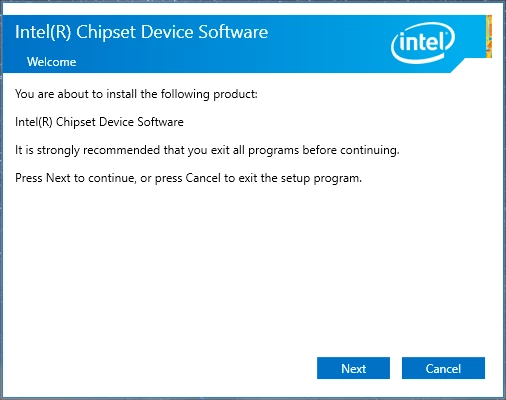
- Double-click the downloaded executable to initialize the setup wizard, wait for the extraction process to begin, and carefully review the presented end-user license agreement.
- Click next to move into the deployment phase, where the program will temporarily unpack the underlying INF text files into a hidden system directory for staging.
- Wait while the utility scans your physical motherboard architecture to accurately detect which specific bridges, memory controllers, and internal buses require updated identification files.
- Allow the installer to register the correct configuration files; during this brief process, you might notice your screen flash or hear standard connection chimes as the operating system actively re-evaluates the hardware tree.
- Click the final confirmation button to close the setup wizard once the success screen appears, noting that no desktop shortcuts or system tray icons will be created.
- Restart your computer immediately to finalize the hardware mapping, clear out any lingering generic fallback routines in the memory, and ensure the newly identified data paths initialize correctly from a cold boot.
Intel Chipset Device Software Free vs. Paid
This essential hardware configuration package is distributed completely free of charge. Because it serves as a fundamental requirement for making silicon function correctly within a consumer operating system, the manufacturer provides it as an inherent part of owning their hardware. There are no paid tiers, premium subscriptions, or enterprise licensing fees required to access the full set of INF files. Anyone with compatible hardware can acquire the utility directly without creating an account or providing billing details.
Consumers should exercise extreme caution if encountering third-party websites or driver updater applications that demand payment to fix yellow warning triangles in the system hardware tree. The official INF collection contains no artificial limitations, does not insert watermarks, and never prompts the user for a credit card. It is a strictly functional, zero-cost archive designed exclusively for maintaining system stability.
The utility also does not bundle advertisements, browser toolbars, or trial-based add-ons. Its entire purpose is to enter the system, drop the necessary configuration text files, and remain completely invisible during daily operation. Any platform attempting to monetize these specific foundational files is unauthorized and should be avoided entirely.
Intel Chipset Device Software vs. Generic Windows Drivers vs. AMD Chipset Drivers
Generic Windows Drivers serve as the default fallback when you first install the operating system from a flash drive. They guarantee that your computer will boot, display an image, and allow basic mouse movement by applying a conservative, one-size-fits-all approach to hardware interrupts and power states. However, relying permanently on these generic routines forces the hardware to operate without specific architectural knowledge. This lack of specificity can lead to higher DPC latency, increased power consumption at idle, and mysterious sleep-state failures over time.
AMD Chipset Drivers address the exact same foundational hardware needs but are engineered exclusively for the competing Ryzen motherboard ecosystem. Unlike the purely passive INF text files utilized by the Intel package, the AMD equivalent actively installs custom power plans, scheduling algorithms, and executable background services to coordinate core parking and voltage regulation. Attempting to mix these utilities is physically impossible due to vendor locks, but they highlight differing engineering philosophies: one relies on lightweight passive identification, while the other uses active software management to control processor behavior.
Users operating an Intel-based motherboard should view the Intel Chipset Device Software as a strict requirement rather than an optional tweak. While the generic fallback drivers are useful for completing the initial operating system installation and getting the machine online, applying the manufacturer's specific configuration files ensures the underlying hardware communicates at peak efficiency. It closes the gap between standard compatibility and the intended hardware performance baseline.
Common Issues and Fixes
- Problem description. A yellow warning persists on the "PCI Simple Communications Controller" after installation. This specific utility focuses only on core motherboard identification and does not include the Management Engine Interface. You must download and install the separate Intel MEI package to resolve this remaining warning in the hardware tree.
- Problem description. USB devices or external drives are still not recognized correctly. The configuration files only identify the central host controllers on the motherboard; they do not contain actual data transfer code for peripherals. You need to obtain the specific USB 3.0 or Thunderbolt host controller drivers directly from your motherboard manufacturer's support page.
- Problem description. The setup window appears briefly and immediately closes itself without finishing. This behavior typically occurs if the installation package detects that your current system files are already perfectly up to date and require no modifications. To force an override or view the exact error, open an administrative command prompt and run the executable with the -extract flag to manually review the files.
- Problem description. The computer refuses to wake from sleep even after the hardware is correctly identified. Aggressive operating system fast-boot settings can interfere with standard ACPI sleep states, causing the system to hang. Navigate to your power options control panel and disable the "Fast Startup" setting to force the operating system to re-initialize the newly identified hardware controllers correctly upon every boot cycle.
Version 10.1.20398.8776 — January 2026
- Added official WHQL support for next-generation PantherLake and ArrowLake chipset architectures.
- Updated INF configurations for Granite Rapids and Lunar Lake platforms to ensure proper device recognition.
- Implemented new WHQL certified definitions for Meteor Lake, Raptor Lake, and Alder Lake PCH components.
- Enhanced compatibility with Windows 11 24H2 and Windows Server 2025.
- Fixed identification errors for various legacy Tiger Lake and Comet Lake system devices.
- Improved system stability by resolving minor enumeration bugs in Device Manager.