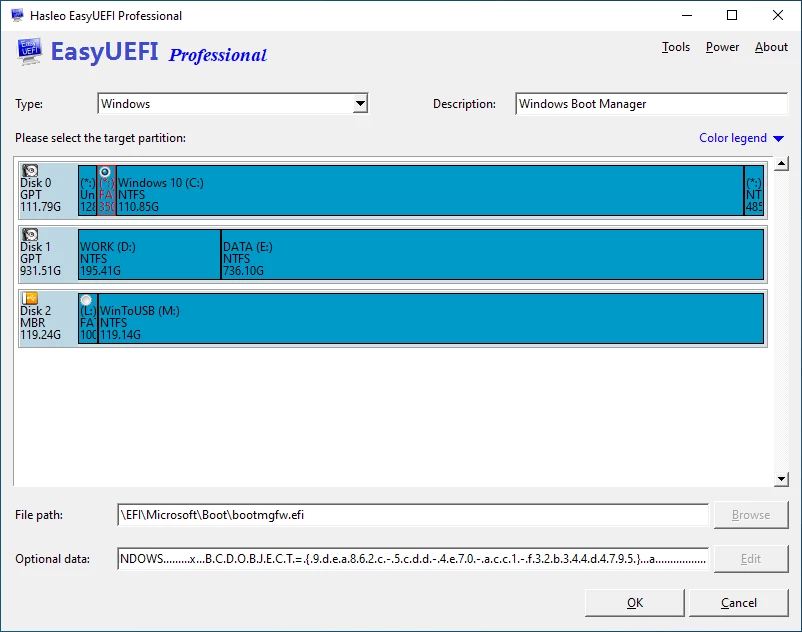
Start with the classic frustration: repeatedly tapping specific keys during system startup just to access a cryptic, uninviting firmware interface. Hasleo EasyUEFI removes this friction by giving users full control over their system's boot configuration directly from the Windows desktop. Whether dealing with a complicated dual-boot setup, migrating an operating system to a completely new solid-state drive, or troubleshooting a machine that mysteriously refuses to load its primary operating system, this utility provides a visual, practical hub for managing exactly how the motherboard hardware hands off control to the software.
When configuring multiple drives or recovering a corrupted startup sequence, users are frequently forced to navigate a maze of archaic menus. The experience is often unintuitive, with confusing acronyms, overlapping settings, and no clear way to undo a mistake. Instead of typing dense command-line instructions in an elevated terminal or guessing which generic entry corresponds to which physical drive, users can create, delete, reorder, and clean up boot options through a clean graphical interface.
The software reaches well beyond simple startup ordering by offering direct management of the hidden EFI System Partition. This partition acts as the engine room of the startup sequence, and having direct desktop access to back it up or rebuild it saves users from relying on complex command-line disk utilities. System administrators, PC repair technicians, and advanced home tinkerers rely on this dedicated desktop application because it combines live, active configuration with essential disaster recovery preparation. Modifying startup behavior always carries the inherent risk of rendering a machine unbootable. To mitigate this, the software includes built-in tools to capture working configuration states and generate a standalone emergency recovery disk. This means that even if a failed operating system update overwrites the primary boot path, users retain an independent fallback method to restore hardware functionality without a full format.
Key Features
- Feature Name: Visual Boot Option Editing: Instead of navigating rigid motherboard menus, users can directly create, delete, or reorder firmware boot entries from a standard interface. This allows for clear naming and immediate reorganization of priority without needing a system restart to apply the initial layout changes.
- Feature Name: One-Time Boot Selection: Users can specify a target drive for the very next restart without permanently altering the system's primary startup sequence. This eliminates the repetitive cycle of entering the firmware, changing the primary device to a USB stick, booting into the diagnostic environment, and then repeating the entire process to revert the primary target back to the internal system drive.
- Feature Name: EFI System Partition Management: Because the operating system strictly locks this partition to protect it from accidental tampering, standard disk management utilities offer almost no options to interact with it. The application grants direct access to backup, restore, or completely rebuild the hidden partition if it becomes corrupted, and allows moving it from one physical drive to another during storage upgrades.
- Feature Name: Emergency Disk Creation: The software generates a bootable rescue environment that can be written to a USB flash drive or optical media. If the primary operating system fails to load due to bootloader corruption, this standalone rescue environment allows users to access the recovery interface and repair the damaged startup sequence offline.
- Feature Name: Configuration Backup and Restore: Modifying system startup files can lead to unexpected lockouts. The tool allows users to save a complete snapshot of their working configuration before experimenting, guaranteeing an instant rollback path if a new secondary installation overwrites the expected startup path.
- Feature Name: Unused Entry Cleanup: Over time, testing different operating systems or replacing hardware leaves orphaned startup entries that clutter the firmware menu. The interface highlights these dead paths and provides a simple cleanup mechanism to strip away useless entries, speeding up the hardware initialization phase.
- Feature Name: Command-Line Support: Available exclusively in the Enterprise tier, this feature allows IT professionals to execute modifications using terminal scripts. This text-based access supports the automation of repetitive setup tasks across large batches of identical workstations in a corporate hardware deployment scenario.
How to Install EasyUEFI on Windows
- Download the official installer package directly from the vendor's primary website to ensure you receive an unmodified setup file.
- Launch the downloaded setup executable and accept the standard user account control prompt, as the installer requires administrative privileges to write files to the system drive.
- Follow the setup wizard prompts, review the end-user license agreement, and confirm the default destination folder on your primary local disk to prevent permission conflicts.
- Allow the installer to extract the necessary application files, write the required registry keys, and generate a desktop shortcut for easy access.
- Finish the setup wizard and launch the application; upon the first run, the interface will default to the standard trial mode, displaying the available management modules.
- To unlock unrestricted access and remove trial limitations, navigate to the "About" menu within the application window and select the "Activate license" option.
- Enter the email address used during purchase along with the corresponding vendor-supplied registration code into the activation dialogue box.
- Restart the application completely when prompted, which forces the software to verify the credentials and transition permanently into the fully licensed operational state without requiring any additional downloads.
EasyUEFI Free vs. Paid
The developer offers the software across multiple tiers to separate casual home users from IT professionals managing heavy deployments. A free trial tier is available for basic evaluation, allowing users to download and inspect the interface layout before committing to a purchase. However, core functionalities required for persistent, advanced system repairs typically require moving to a licensed tier, as the trial acts more as a functional preview than a permanent utility.
The Professional edition is the standard paid tier for individual users and small operations, typically priced around $29.95 excluding local taxes. Purchasing this tier secures a license that allows activation on two separate computers. Crucially, the Professional tier includes free lifetime upgrades, ensuring that as motherboard firmware standards evolve, the software remains compatible without demanding additional upgrade fees. This tier unlocks the ability to manage the system partition and build the critical emergency media.
For large-scale IT departments, the vendor provides an Enterprise edition, generally starting around $44.95 for a base license, with larger site-license bundles available for heavy corporate environments. The Enterprise tier allows activation on an unlimited number of computers strictly within the same organization at a single physical site. Beyond the expanded activation allowance, this tier introduces command-line support, giving system administrators the ability to write scripts that automate startup configuration tasks across hundreds of machines during mass deployment.
EasyUEFI vs. EasyBCD vs. Grub2Win
EasyBCD is a popular utility focused largely on the Windows Boot Configuration Data store and older Master Boot Record setups. It excels at adding custom entries to the standard software boot menu, such as virtual hard disks, legacy installations, or secondary environments. Users should choose EasyBCD when they want to strictly modify the text-based software selection menu rather than the motherboard's underlying firmware priorities.
Grub2Win is an open-source tool designed specifically to facilitate safe dual-boot scenarios between Windows and various alternative open-source operating systems. It operates by installing a native GNU GRUB directory directly onto the system drive, acting as an intermediary manager that prevents standard updates from accidentally overwriting the alternative startup path. Users dealing heavily with open-source platforms and requiring a highly customizable, graphical pre-boot menu will find Grub2Win to be the ideal utility.
EasyUEFI is the better choice when the objective is direct manipulation of modern motherboard firmware rather than secondary software bootloaders. It bypasses the software storage store to interact straight with the hardware variables, making it strictly necessary for managing actual hidden partitions, rebuilding missing hardware-level files, or fixing a machine that cannot even reach a software boot menu. If the task involves bare-metal partition recovery or generating a standalone rescue drive, this utility provides the exact technical leverage required.
Common Issues and Fixes
- Problem description: USB drive not recognized for emergency disk creation. If the built-in media builder fails to detect your connected flash drive, unplug the device and reconnect it directly to a rear USB 3.0 port on the motherboard. Verify that the drive is properly formatted and holds a visible partition within the local disk management console.
- Problem description: Registration code fails to apply correctly. Sometimes the software continues to display trial limitations even after entering a valid code. Ensure there are no trailing spaces copied alongside your email, apply the credentials, and then completely close and restart the application to force the new license state to load.
- Problem description: Blue screen crash when booting the recovery media. A system crash during the boot sequence usually indicates missing storage or chipset drivers. Ensure the target computer's hardware is natively compatible with the underlying system image used to build the disk, and check your firmware settings to verify the partition scheme matches the hardware mode.
- Problem description: Unable to access firmware settings via keyboard shortcut. Fast Boot features enabled in the operating system can cause a machine to initialize too quickly to register keyboard presses. Disable the Fast Boot option located inside the system power configuration menu to restore the necessary initialization window for keyboard detection.
- Problem description: Missing or severely corrupted system partition. If the primary disk loses its startup partition, the installed environment becomes entirely inaccessible. Boot the machine using the previously created standalone emergency USB, navigate to the partition management module, and select the rebuild function to write a fresh startup path to the primary drive.
Version 6.2 — January 2026
- Introduced support for creating Windows PE emergency media compatible with the 2023 Windows UEFI Certificate Authority standards.
- Enabled management of Boot Configuration Data (BCD) for Windows installations running on the ReFS file system.
- Optimized the software activation process for better reliability.
- Resolved various minor bugs to enhance overall product stability and performance.