For genealogists, therapists, social workers, and clinical researchers, documenting a family tree requires more than just noting births and marriages. GenoPro is a specialized desktop application built specifically to map complex family dynamics, emotional relationships, and medical histories. While consumer genealogy tools focus entirely on historical records and archival citations, this software is designed for creating detailed genograms. A genogram is a clinical visual representation that tracks behavioral patterns, hereditary conditions, and social connections across multiple generations. By plotting out these variables, practitioners can identify recurring cycles of addiction, trace genetic health risks, and visualize deeply rooted family conflicts in a single detailed diagram.
Operating as a native desktop application provides distinct advantages for professionals handling sensitive client data. Because the software stores information locally on the hard drive, it aligns easily with strict patient confidentiality requirements and data privacy regulations. Users do not have to worry about mandatory cloud synchronization, external server breaches, or web browser lag when handling massive files. The application interface prioritizes raw data entry speed and structural clarity over modern aesthetic design, ensuring that users can map reconstructed families, multiple marriages, and multi-generational households without experiencing graphical slowdowns.
Rather than relying on subscription-based web portals, researchers use this tool to build standalone databases capable of holding tens of thousands of individuals. The software effectively integrates graphical drawing mechanics with a spreadsheet-style backend environment. This dual-pane architecture ensures that every visual symbol on the genogram links directly to customizable data fields for medical tags, emotional markers, and biographical notes. Updating a birth date or adding a disease marker in the spreadsheet view instantly updates the corresponding node on the graphical chart, eliminating redundant data entry and reducing the risk of clinical inaccuracies.
Key Features
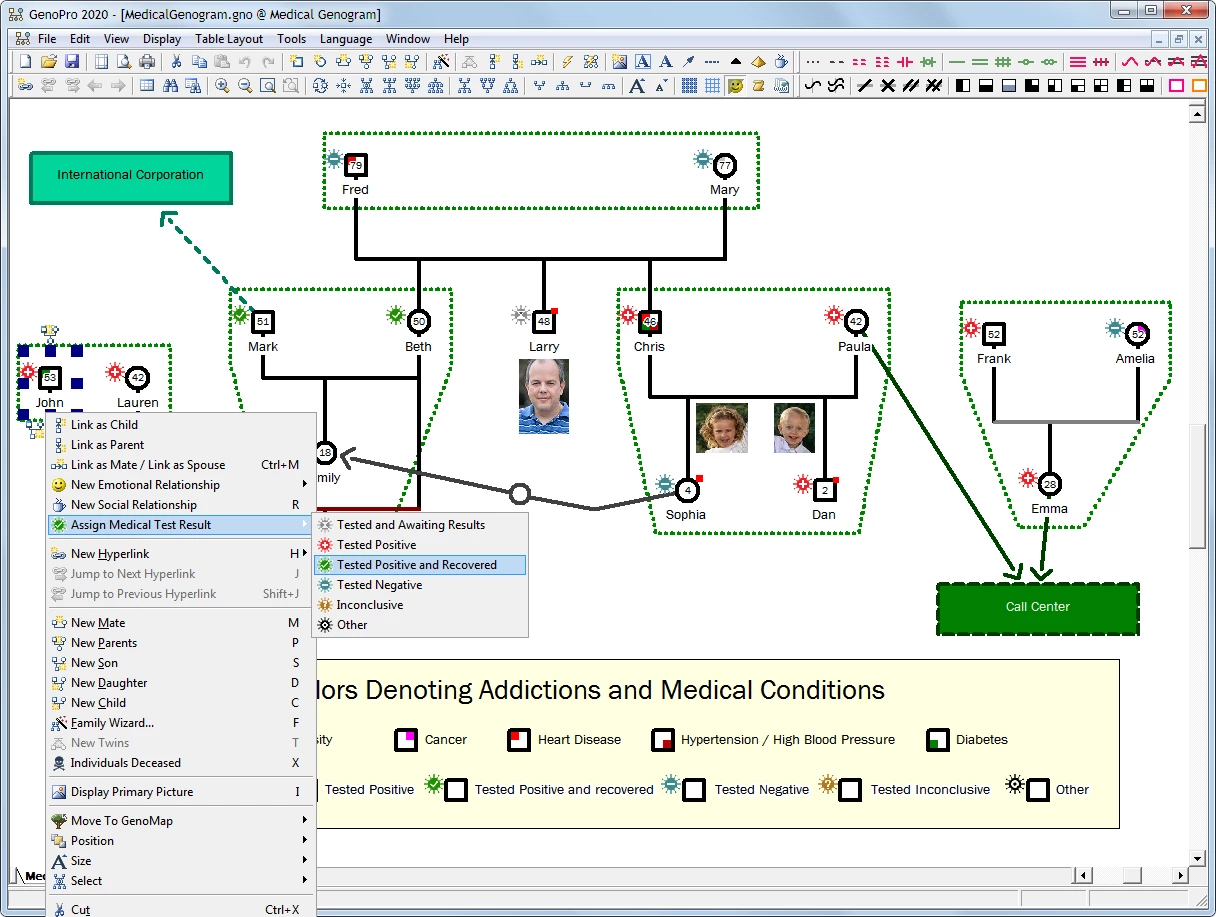
- Clinical Genogram Symbols: The software maps emotional connections using standard clinical markers recognized in social work and therapy. Users can draw jagged lines to indicate hostility, double lines for close relationships, or cut lines to represent estrangement. It also includes specific medical icons to track hereditary conditions like heart disease, depression, or alcoholism across the family line.
- Integrated Table Layout: This feature displays all genealogy data within an integrated spreadsheet format beneath the visual canvas. It allows users to perform bulk editing, sort massive data columns, and quickly identify missing dates or disconnected family members. Modifying text in this table immediately updates the visual genogram, ensuring perfect synchronization between the visual chart and the underlying database.
- AutoArrange Pedigree Trees: For complex layout tasks, this tool automatically structures family layouts from imported data or external scripts. It uses a built-in algorithmic engine to place ancestors at the top and descendants at the bottom, adjusting spatial gaps automatically when dealing with multiple marriages, divorces, and reconstructed family units. This saves hours of manual dragging and aligning.
- Interactive HTML Report Generation: The application generates navigable web reports utilizing Scalable Vector Graphics (SVG) for high-quality scaling on any monitor. These reports create a mini-website where clicking on a family member's node opens a dedicated profile page containing their biography, attached photographs, and medical history. These generated folders can be shared offline via a USB drive or hosted on a private clinic server.
- GEDCOM Data Import and Export: To prevent vendor lock-in, the program fully supports the standard Genealogical Data Communication (GEDCOM) file format. This enables users to transfer pedigree charts to and from other traditional database tools without losing the core relationship structures. It supports UTF-8 encoding to preserve international characters and complex alphabets during the transfer process.
- Massive Capacity Scaling: The underlying object-oriented database engine handles large-scale community documentation efficiently without bogging down the operating system. It supports up to one million individuals and custom fields per single file without degrading local desktop performance. This capacity allows genetic researchers to map entire isolated communities or multi-generational regional lineages in one continuous file.
- Custom Scripting and Automation: Advanced users can utilize built-in support for VBScript and JavaScript to create custom report templates or analyze specific pedigree patterns. The software exposes its internal objects to external scripts, allowing researchers to run automated queries against the database to calculate genetic risks, isolate specific medical traits, or export targeted subsets of the population into external statistical tools.
How to Install GenoPro on Windows
- Download the official Windows installer executable package directly from the developer's website to your local storage drive.
- Launch the downloaded executable file to open the setup wizard, review the end-user license agreement, and accept the terms to proceed.
- Choose the destination folder for the application files. The setup defaults to the standard Program Files directory on the primary Windows partition, but you can select an alternate drive if required.
- Select whether you want the installer to generate a desktop shortcut and a Start menu folder for easier access.
- Click the install button to extract and copy the core application files. The process is entirely offline and does not require downloading additional heavy assets.
- Launch the software from the newly created desktop shortcut. Upon the first launch, a Registration Wizard dialog will immediately appear prompting you for a valid email address.
- Enter your email to receive a free evaluation code, or skip the prompt entirely to run the application in the restricted free mode.
- Check your email inbox, copy the provided evaluation code, and paste it into the wizard to unlock all saving and exporting features for the trial duration.
GenoPro Free vs. Paid
The developer operates on a perpetual license model, meaning users pay a one-time fee to own the software indefinitely without any recurring monthly or annual subscription charges. To test the application, the vendor offers a 14-day evaluation period that unlocks all premium application features. To begin this trial, users must submit an email address through the internal registration wizard to receive an evaluation code. During this two-week window, there are no restrictions on database size, saving operations, exporting capabilities, or HTML report generation.
Once the evaluation period expires, the software automatically reverts to a restricted free mode. In this state, the application limits the creation of new documents to a maximum of 25 individuals. While users can still open, view, and navigate larger files that were created previously, saving any new modifications to an expansive family tree requires purchasing a permanent registration code. Clinics or organizations needing multiple seats can purchase site licenses to deploy the tool across multiple workstations at a reduced per-user cost.
Students working on academic projects, such as a social work genogram assignment, can request a 180-day educational code through their professors to bypass the individual limit for an entire semester. Additionally, the developer provides a legacy edition of the software entirely for free, which can be downloaded directly from their archive. This older edition does not impose the 25-person limit, allowing unlimited basic mapping. However, it lacks the advanced table layout tool, the modern HTML report generator, and the updated medical symbols found in the current commercial release. Users can install both the free legacy edition and the modern trial environment in separate folders on the same machine without conflict.
GenoPro vs. Creately vs. RootsMagic
Creately is a cloud-based diagramming application that provides visual genogram templates alongside general flowcharts and business mind maps. It excels in real-time visual collaboration, allowing multiple users to edit a chart simultaneously from a web browser using a simple drag-and-drop canvas. However, Creately is fundamentally a drawing utility rather than a structured database, making it difficult to manage and analyze thousands of linked family records. It also requires an active internet connection and stores data on external servers, which can easily violate privacy compliance requirements for clinical patient documentation.
RootsMagic operates as a traditional, highly structured genealogy database designed for tracking historical census records, mapping DNA test results, and managing archival source citations. While it excels at building standard pedigree charts and syncing data with online historical repositories like FamilySearch, it lacks the specialized drawing tools needed to map complex emotional interactions, domestic abuse, or specific hereditary medical conditions. RootsMagic focuses primarily on long-term ancestral history, whereas clinical genograms focus on present-day family dynamics and psychological behavioral patterns.
Choose Creately for quick, collaborative visual charts that do not require deep underlying data entry. Choose RootsMagic for rigorous historical genealogy research and academic source citation tracking. GenoPro remains a better fit for social workers, therapists, and medical researchers who need to build offline, clinical-grade genograms that map complex emotional and medical relationships across massive, locally stored databases.
Common Issues and Fixes
- The software refuses to save documents containing more than 25 individuals. This restriction automatically triggers when the 14-day evaluation period expires. To remove the save restriction on larger trees, you must purchase a permanent registration code from the vendor, apply an academic code, or start a completely new document.
- Complex family lines overlap and become visually confusing. When mapping multiple marriages, divorces, or step-families, relationship lines can cross and tangle. Use the built-in AutoArrange tool to optimize the mathematical layout, or apply the hyperlink feature to split the complex tree safely across multiple separate visual maps.
- Accented characters appear corrupted after a GEDCOM file import. This text corruption occurs when the source file uses legacy ANSEL character encoding instead of standard Unicode. To fix this, export the genealogical data from your previous database software specifically using UTF-8 encoding before importing it into the application.
- The biological gender of a pregnancy symbol is undefined. By default, a new pregnancy is represented by an ambiguous triangle symbol on the visual chart. To clarify this, double-click the triangle to open the object properties dialog, where you can explicitly set the biological gender or document a specific medical outcome.
- Interactive HTML reports display broken layouts when opened locally. Modern web browsers often block local JavaScript files from running due to strict local file security policies. To view the interactive SVG elements correctly, you may need to host the generated export folder on a local web server or adjust your browser's local file execution settings.
Version Latest — 2026
- New Medical History Panel: Introduced a dedicated interface for tracking viral infection propagation and logging test results directly on the genogram.
- Custom Medical Tags: Added the ability to create user-defined fields within the medical history section for more flexible health data recording.
- Criminal History Tracking: Implemented a new panel to document criminal backgrounds, including specific options for labeling incarceration status.
- Enhanced Report Generator: Updated report templates to support HTML output with integrated picture albums, timelines, and interactive SVG family trees.
- Contextual Toolbar: Added a dynamic toolbar that appears near selected individuals to facilitate quicker addition of parents, spouses, and children.
- Picture Mode: Included a feature to transform the traditional family tree view into a picture-based tree for visual storytelling.