Web browsers and communication tools rely on internal databases to store critical user data, including active profiles, bookmarks, browsing history, cookies, and interface preferences. For Mozilla Firefox, these files include the places.sqlite database for bookmarks and the cookies.sqlite file for session data. Google Chrome relies on structurally similar files typically named History, Cookies, and Web Data located deep within the user data directory. Over months of daily web browsing, these underlying database files accumulate fragmented data and empty structural spaces as records are constantly written, modified, and permanently deleted. This continuous read-write cycle causes the physical database files to expand in size, forcing the storage drive to perform inefficient, scattered read operations. As a result of this internal fragmentation, the browser takes longer to start, delays the rendering of new tabs, and makes routine interface interactions feel sluggish, regardless of internet connection speeds. Instead of resorting to clearing out useful history or deleting necessary cookies to regain basic performance, users require a specialized method to maintain their accumulated data while actively restoring the logical file structure.
SpeedyFox is a targeted desktop utility engineered to resolve this exact database fragmentation across a wide spectrum of popular web browsers and messaging clients. Rather than operating as a generic system cleaner that permanently erases personal data to free up storage space, it directly interacts with the SQLite architecture utilized by Mozilla Firefox, Google Chrome, Opera, Vivaldi, Mozilla Thunderbird, and Skype. By systematically compacting these database files and removing empty structural blocks, the software reduces the overall file footprint and accelerates disk read-write operations. This focused optimization process allows users to keep their years of accumulated browsing history and thousands of categorized bookmarks while returning the application's startup time and general responsiveness to a freshly installed state. The impact is noticeable on older mechanical hard drives, and even users with modern solid-state drives benefit from the reduced processing overhead required to parse large, heavily modified database files.
Choosing a dedicated database optimization tool offers practical advantages over utilizing built-in browser reset functions or relying on broad system maintenance suites. Built-in application resets frequently force users to reconfigure their installed extensions, log back into frequently visited websites, and manually rebuild their daily workflow preferences from scratch. SpeedyFox operates outside the active browser environment, allowing it to safely lock the database files, perform a deep structural rebuild using established SQLite vacuum commands, and release the optimized files without altering the actual user data contained inside. Because the application runs as a lightweight, standalone portable executable, it accommodates advanced technical workflows. Users can manage multiple isolated profiles, maintain portable browser installations on external storage drives, or automate silent maintenance routines through custom Windows command-line scripts without modifying the host operating system.
Key Features
- Feature Name: Targeted SQLite Compaction: The utility executes a safe, localized rebuild of the underlying SQLite database files used by modern web browsers to store persistent user data. By applying specialized database vacuum commands, it eliminates structural fragmentation and redundant empty space within the files, reducing their physical footprint on the storage drive without deleting active bookmarks, history logs, or saved authentication tokens.
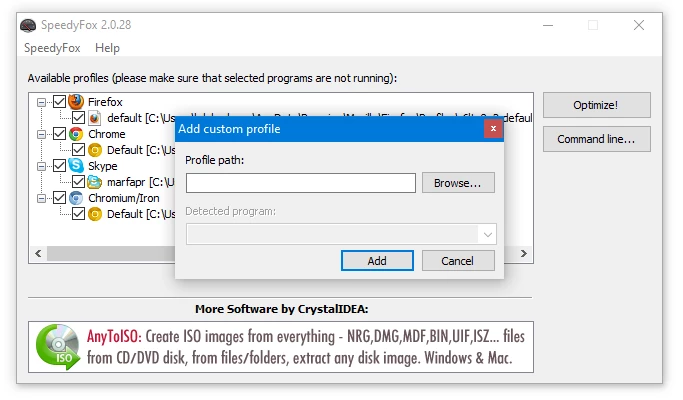
- Feature Name: Multi-Browser Auto-Detection: Upon initial launch, the graphical interface automatically scans standard Windows directory paths and user application data folders to locate installed profiles. It supports a vast array of web browsers, including Firefox, Chrome, Vivaldi, Opera, Yandex, and other Chromium-based variants, populating a clear list of discovered profiles in the main window for simple checkbox selection.
- Feature Name: Communication App Support: Beyond traditional web browsers, the software recognizes and optimizes database structures for heavy desktop communication clients such as Skype and Mozilla Thunderbird. Compacting these specific application profiles accelerates message history indexing, speeds up initial application startup, and improves search query responsiveness when navigating through large, multi-year email or chat archives.
- Feature Name: Custom Profile Targeting: For users who run portable browser variants from external flash drives or install their web applications in non-standard directory structures, the interface includes an explicit option to manually add unlisted profiles. Users can drag and drop a custom profile folder directly into the active application window or navigate through the context menu to specify the exact path, ensuring non-standard setups receive the exact same structural database repairs.
- Feature Name: Command-Line Automation: System administrators and advanced technical users can trigger the entire optimization process without interacting with the graphical user interface by employing built-in command-line arguments. By passing the '/all' parameter via a standard Windows Command Prompt or integrating it into a scheduled background task, users can automate unattended database maintenance on a daily or weekly basis.
- Feature Name: Portable Application Execution: The application requires no formal installation wizard and writes no tracking keys or configuration data to the host Windows registry. Users can run the executable file directly from an external USB flash drive, a localized network share, or a secondary storage disk, making it a highly practical addition to external diagnostic toolkits utilized by IT technicians.
How to Install SpeedyFox on Windows
- Download the SpeedyFox executable package directly from the official provider, ensuring you save the standalone file to a known location where your active user account maintains full read and write permissions.
- Navigate to your default Windows Downloads directory and locate the downloaded file, which will typically be packaged inside a compressed ZIP archive depending on the specific release format you selected.
- If the file is compressed, right-click the archive, select the native Windows extraction option, and carefully unpack the contents into a newly created folder to isolate the application files.
- Move the standalone executable file to a permanent, secure directory on your primary storage drive, such as a dedicated system utilities folder, to prevent accidental deletion during routine disk cleanups.
- Right-click the application executable file, navigate through the resulting context menu options, and select the command to create a shortcut, subsequently placing this convenient launch icon directly on your active Windows desktop.
- Before initiating the application for the first time, manually verify that all active web browsers, background Skype instances, and Thunderbird email windows are completely closed so the utility can secure exclusive access to the required SQLite files.
- Double-click the newly created desktop shortcut to launch the application interface, which will immediately execute a system scan and present all automatically detected profiles in a clear checklist ready for immediate database optimization.
SpeedyFox Free vs. Paid
SpeedyFox is distributed as freeware, meaning all documented functionality is available to users at no cost. The developer does not restrict any core optimization features, processing capabilities, or database compaction commands behind a commercial paywall, subscription model, or limited trial period. Users have direct access to multi-browser auto-detection, custom profile pathing, and advanced command-line automation exactly as soon as they download the executable file. The software contains no hidden premium tiers, nor does it insert artificial profile export limits or require a registered user account to perform basic structural repairs on targeted databases.
Because the utility is free for personal and commercial deployment, IT professionals and system administrators can legally deploy it across vast corporate networks or include it on diagnostic external flash drives without managing enterprise licensing agreements. The application does not require an active internet connection to verify a license key or communicate with external activation servers, ensuring it functions reliably in isolated, offline environments or highly secure government workstations. The developers maintain and update the software to support new browser database configurations without implementing restrictive anti-piracy mechanisms or mandatory cloud check-ins.
The absence of a paid consumer tier guarantees that users will not encounter promotional pop-ups or artificial delays demanding upgrades to a professional version during their routine maintenance workflows. Support for the software is provided primarily through official technical documentation, community user forums, and periodic patch updates that adapt to evolving browser architectures. This straightforward distribution model ensures that the utility remains a consistently lightweight, transparent desktop tool solely dedicated to its primary function of repairing fragmented databases.
SpeedyFox vs. CCleaner vs. BleachBit
CCleaner is a widely recognized system maintenance utility that focuses primarily on freeing up storage capacity by identifying and permanently deleting temporary files, active tracking cookies, and extensive browser cache data. While it includes supplementary tools for registry cleaning, startup program management, and software uninstallation, its approach to web browser optimization relies almost entirely on raw data removal. Users should choose CCleaner when their primary objective is to reclaim gigabytes of lost disk space, enforce basic privacy standards by wiping their daily browsing history, or centrally manage their Windows operating system configurations.
BleachBit operates as an open-source, aggressive file deletion tool favored by privacy-conscious technical users and system administrators. It deeply scrubs the operating system and installed applications, permanently destroying application cache files, system error logs, and localization data to ensure secure privacy. Like CCleaner, BleachBit includes a specific option to vacuum browser SQLite databases, but its primary architectural identity remains a secure data shredder designed to leave no recoverable traces. Users should deploy BleachBit when they need to securely wipe highly sensitive personal information, remove deep system-level temporary files, and prefer utilizing a lightweight application with absolutely no commercial upsells.
SpeedyFox is the decisively better fit for users who want to explicitly accelerate their web browser responsiveness without deleting any of their personal workflow data or accumulated history. While CCleaner and BleachBit attempt to improve system performance largely by discarding gigabytes of files, SpeedyFox strictly reorganizes the internal physical structure of existing SQLite databases. This crucial difference makes it the superior choice for professionals who rely on large bookmark libraries, extensive multi-year browsing histories, and deeply localized offline email archives in Thunderbird, as it physically shrinks the database footprint and speeds up disk reads while preserving every single piece of user information.
Common Issues and Fixes
- Problem description: Profile not detected in the main list. If you utilize a portable browser distribution or have installed a web application completely outside the standard Windows AppData directory structure, the utility will fail to find the database automatically. You can bypass this limitation by navigating to the main application menu, selecting the option to add a custom profile, and manually browsing directly to the active folder containing your target SQLite files.
- Problem description: Optimization fails with a locked file error. The Windows operating system strictly prevents the utility from modifying active database files while the parent application is actively reading from or writing to them. To resolve this file-locking conflict, ensure the target web browser or communication application is completely closed; if the error text persists, open the native Windows Task Manager and forcefully terminate any lingering background processes for that specific application.
- Problem description: Browser performance degrades again after several weeks. Because modern web browsers constantly write, modify, and delete localized data during normal daily internet usage, SQLite database fragmentation is a continuous, natural process. You can maintain a responsive browsing experience by creating a dedicated scheduled task in Windows that runs the utility using the command-line execution switch to automate the rebuilding process on an unattended weekly basis.
- Problem description: Database size remains unchanged after optimization. If a targeted browser profile is relatively new or has minimal accumulated browsing history, the internal SQLite database will not have generated significant internal empty space or severe fragmentation. In this specific scenario, no corrective action is required; the lack of file size reduction simply confirms that the structural integrity of the database file is already optimal and is not responsible for any observed application sluggishness.
Version 2.0.30 — October 2020
- Introduced a refreshed design for the application icon.
- Updated the internal SQLite engine to version 3.33.2 to enhance database optimization and performance.