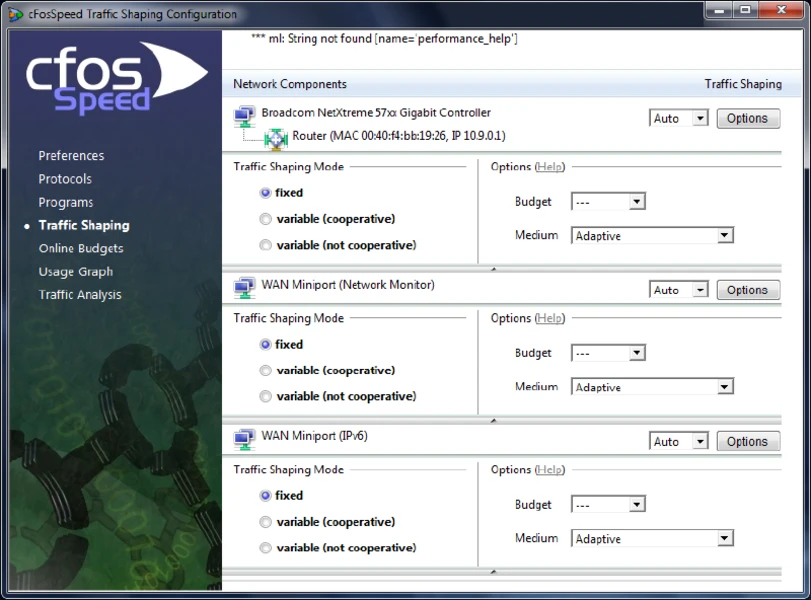
cFosSpeed is a specialized network driver designed to optimize internet connections through a technique called traffic shaping. Instead of processing network packets on a rigid, first-come, first-served basis like standard Windows drivers, this software intelligently sorts incoming and outgoing data. By attaching itself directly to the Windows network stack, it analyzes traffic in real time to ensure that latency-sensitive applications—such as competitive multiplayer games, voice-over-IP (VoIP) calls, and live streaming software—always receive top priority over bulk data transfers like background updates or large file downloads.
This driver is primarily aimed at gamers, remote workers, and users managing busy household networks where multiple devices compete for limited bandwidth. When one person in a household starts a large peer-to-peer download, a typical network will immediately suffer from bufferbloat, causing ping times to spike and voice calls to drop. The software solves this concrete problem by queuing the bulk traffic and feeding it to the router only when there is free space, keeping the connection highly responsive. Users interact with the software primarily through a transparent desktop overlay and a system tray icon, where they can adjust priority sliders, view real-time protocol traffic, or enable specific modes like Low-Latency for gaming. Operating silently in the background as a Windows service, the utility avoids the heavy system resource consumption typical of bulkier networking suites.
While modern routers often include basic Quality of Service (QoS) features, relying on a dedicated desktop application provides significantly more granular control. A router can only guess application types based on ports, whereas a host-based driver running directly on Windows can identify the exact executable generating the traffic. This deep integration allows the software to expand TCP receive windows dynamically and apply Layer-7 packet inspection, ensuring precise traffic management without requiring complex network administration skills or expensive enterprise hardware.
Key Features
- Traffic Shaping Engine: By intercepting packets at the network adapter level, the software reorganizes data queues to prioritize time-sensitive payloads. If an online game needs to send movement data while a web browser is fetching a large archive, the shaping engine delays the browser's packets by a fraction of a millisecond to let the game data pass first. This mechanism results in consistently lower ping and prevents bufferbloat during heavy network loads, relying on advanced TX (transmit) and RX (receive) queuing methods.
- Layer-7 Protocol Analysis: Instead of relying solely on standard port numbers—which many applications randomize or obscure—the driver inspects the actual payload of the network packets. This deep packet inspection allows it to accurately identify specific traffic types, such as HTTP video streaming, SSH bulk transfers, or RTP voice streams. It then applies the correct priority tier regardless of the port being used, ensuring accurate categorization even for non-standard network configurations.
- Dynamic RWIN Expansion: The software actively monitors download streams and dynamically adjusts the TCP Receive Window (RWIN) size. By expanding this window on poorly optimized connections, it allows the sender to transmit more data before waiting for an acknowledgment packet. This network stack adjustment can significantly accelerate download speeds for older protocols or high-latency long-distance routing paths where default Windows auto-tuning falls short.
- Net Talk LAN Coordination: When multiple computers on the same local network run the software, they communicate with each other using a proprietary protocol. They broadcast their bandwidth statistics via localized UDP packets several times per second, allowing each machine to adjust its own traffic shaping rules based on the total household load. This prevents multiple desktop clients from competing blindly for limited router bandwidth and causing self-inflicted latency.
- Online Budgets and Usage Graphs: Users can configure up to ten distinct data or time budgets through the Options menu to manage metered connections. You can set a strict gigabyte limit, assign a specific reset day, and choose whether the software should enforce a hard cap when the limit is reached. The interface includes real-time graphical overlays showing exact receive and transmit activity, making it easy to spot background data hogs on your local machine.
- Game Analyzer Interface: To assist competitive players diagnosing network jitter, the software includes a dedicated diagnostic overlay. The Game Analyzer tracks the exact latency of the current active gaming session, displaying a real-time graph of ping fluctuations directly on the screen. This visual tool helps users determine if a lag spike was caused by their local network load or by the external game server itself, providing actionable diagnostic data.
How to Install cFosSpeed on Windows
- Download the official Windows installer package and double-click the executable file to launch the setup wizard.
- Grant Administrator permissions when the User Account Control (UAC) prompt appears, as the application requires system-level access to inject a custom driver into the network stack.
- Follow the on-screen prompts to accept the end-user license agreement and select your desired destination folder on your local storage drive.
- Allow the installer to deploy the background service and attach the specialized SPEED.INF driver to your physical and virtual network adapters.
- Anticipate a brief network disconnection; your active internet connection will drop for a few seconds while Windows resets the network interfaces to apply the new driver hooks.
- Locate the new status window overlay on your desktop or check the system tray icon to verify the application is actively running and monitoring local network traffic.
- Initiate a short line calibration phase by performing a large file download and upload simultaneously. This initial stress test helps the background service accurately measure your line's maximum physical bandwidth capacity.
cFosSpeed Free vs. Paid
The software operates on a straightforward licensing model, starting with a 30-day trial period. During this initial evaluation phase, users have unrestricted access to all traffic shaping features, local network coordination, Layer-7 analysis, and custom prioritization rules. The developer applies no hidden bandwidth caps, export limits, or forced visual watermarks during the trial. This fully functional window is designed to let users verify if the routing adjustments actually improve their specific network environment before committing to a purchase.
Once the 30-day trial expires, the software requires a paid lifetime license, which is officially priced at €15.95 for individual home users. This is a one-time perpetual purchase rather than a recurring monthly subscription, presenting a predictable cost for long-term use. The standard license grants the right to use the software on a single computer and includes lifetime version updates, ensuring the underlying driver remains compatible with future Windows network stack modifications or security changes.
For households managing multiple desktop systems, the vendor occasionally offers bulk licensing discounts, but the core product relies entirely on direct sales rather than tiered premium add-ons or enterprise-only feature locks. The application functions entirely locally for network shaping, though license validation, update checks, and the initial trial activation require brief communication with the vendor's authentication servers.
cFosSpeed vs. NetLimiter vs. NetBalancer
NetLimiter is the better choice if your primary goal is to manually set strict, hard-coded upload and download speed caps for individual applications. It functions heavily as an application firewall, allowing users to explicitly block specific executables from accessing the internet altogether, track historical data usage over months, or carefully monitor exact byte counts per program. While it offers excellent manual control, it requires constant user intervention to maintain an organized ruleset and does not automatically prioritize packets for gaming.
NetBalancer excels in multi-device environments where administrators need to enforce complex synchronization rules across several machines. It provides deep system-level control to assign distinct network priorities and distribute customized bandwidth profiles from a central interface. This makes it practical for users managing a small office network where bandwidth must be rationed strictly, but the interface can feel complex and excessive for a standard desktop user simply trying to lower their personal gaming latency.
cFosSpeed is the better fit when you want an automated, maintenance-free traffic shaping engine. Rather than forcing you to manually type in bandwidth caps for every new program, its dynamic packet prioritization and Layer-7 analysis automatically keep your gaming ping low and voice calls clear even when your connection is heavily loaded. It focuses strictly on intelligently reordering data queues at the driver level, making it a direct and highly effective tool for mitigating bufferbloat on a single desktop without the burden of constant manual oversight.
Common Issues and Fixes
- Problem description. Driver installation fails or hangs indefinitely. If the setup wizard stalls for more than fifteen minutes, Windows may be blocking the automated driver injection. To fix this, open your Windows Network Connections panel, right-click your active Ethernet or Wi-Fi adapter, select Properties, click Install, choose Service, and manually add the SPEED.INF file from the application's installation directory.
- Problem description. Unexpected network disconnections during heavy load. Improperly calibrated line settings can cause the shaping engine to miscalculate queues and temporarily choke data delivery. Right-click the system tray icon, navigate to the Traffic Shaping menu, select the option to clear calibration data, and then run a continuous download and upload to let the driver relearn your exact connection speed.
- Problem description. Conflicts with bundled motherboard software. Hardware manufacturers often bundle customized, older variations of this exact shaping engine under names like MSI LAN Manager, ASRock XFast LAN, or ASUS GameFirst. You must completely uninstall these heavily modified OEM network utilities and restart your computer before installing the official mainline driver to prevent severe system lockups.
- Problem description. Status window overlay disappears. Users frequently drag the transparent monitoring graph off the edge of their screen by accident, making it impossible to click. You can restore the interface by right-clicking the application's system tray icon, navigating to Window Settings, and selecting the option to reset the window position to its default desktop coordinates.
Version 13.10 Build 3004 — June 2025
- Implemented a major rewrite of the core networking code to significantly enhance throughput and efficiency.
- Added support for modern Task Offloading technologies, including Checksum Offloading (IP, TCP/UDP), Large Segment Offloading (LSO), and Receive Segment Coalescing (RSC).
- Improved Traffic Shaping logic to utilize multiple simultaneous Internet routes, benefiting load-balancing configurations like combined LAN and mobile adapters.
- Optimized pass-through LAN traffic handling to ensure maximum speed for data that does not require shaping.
- Introduced a new, high-performance API for retrieving connection statistics, offering up to 20x faster response times.
- Added a Connection per Second (CPS) history graph to the current connections dialog, covering the last 15 seconds.
- Enhanced full-screen application detection, now supporting configurations where the full-screen window is on a different monitor than the status window.
- Fixed compatibility issues with ad hoc VPNs by ensuring out-of-band packet information remains intact during processing.
- Reduced CPU usage significantly, maintaining barely noticeable load even during 10 GBit/s data transfers.
- Included new UDPv6 pingers to further stabilize connection monitoring and latency reduction.
- Added Windows 10 toast notification support for update alerts (Build 17763 and newer).