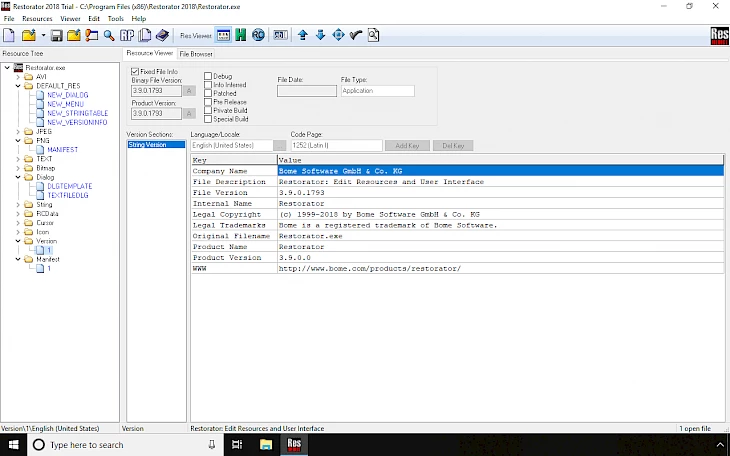
Restorator is a dedicated Windows binary resource editor that allows users to open, inspect, and modify compiled executable files and dynamic-link libraries without requiring access to the original source code. When software is compiled, developers embed assets like user interface dialogs, menus, text strings, and icons into specific resource sections within the binary. This application safely extracts those embedded elements, presenting them in a structured folder tree where they can be altered and compiled back into the host file. It provides a direct method for altering the graphical user interface and internal text of a finished program, bypassing the need for a compiler or native development environment.
Translators, software customizers, and interface designers use this utility to adapt existing software to new environments. For example, a translator can open a foreign-language application, locate the internal string tables, and replace every menu label or warning prompt with their native language. Interface designers use it to replace low-resolution application icons with modern, high-definition variants, or to swap out embedded bitmap images to match a specific corporate branding standard. Because it writes changes directly to the target executable, the modifications are permanent and load natively when the program executes.
Relying on a native desktop application is necessary for this type of binary manipulation. Browser-based tools or lightweight cloud editors cannot handle the local file system integration required to parse complex binary headers, unpack executable resource structures, and inject modified data back into system-level files without corrupting the file signature. A local desktop environment ensures that the user has direct memory access, local hard drive parsing, and the computational processing required to handle large hex dumps or uncompressed audio files embedded within legacy software packages.
Key Features
- Visual Dialog Editing: Modify the layout of application windows directly on the screen using a visual layout tool that reads the binary dialog structure. Users can click and drag buttons, text fields, and dropdown menus to new local coordinates, resize elements to fit longer translated text, and adjust alignment instantly. This eliminates the need to manually calculate pixel coordinates in a standard resource script, ensuring that text does not overflow its designated container.
- Built-in Localization Architecture: Add entirely new languages to an existing application by duplicating the original string tables and dialog resources. Translators can input new localized text for every interface element, allowing the altered software to detect the host operating system language automatically. The application boots natively in the newly added language based on local regional settings without overwriting the original default language strings.
- Standalone Modification Export: Generate self-executing modification executables that contain only the altered resource data rather than distributing the entire heavy program. This allows users to share custom user interface skins or community translations legally and efficiently, avoiding copyright distribution issues. The standalone file only applies the visual changes to the end user's existing local installation, reducing bandwidth and simplifying the update process.
- Extensive Binary Format Compatibility: Open and manipulate standard Windows binary formats including standard executables, dynamic-link libraries, standard resource files, and legacy Delphi component resources. The software parses the internal directory structure of these files automatically upon loading, separating the executable logic code from the modifiable aesthetic and text assets. This broad format support ensures that both modern programs and older legacy tools can be customized safely.
- Asset Extraction and Injection: Export internal binary assets such as embedded bitmaps, application icons, uncompressed audio files, and cursor graphics directly to a local system folder. Users can alter these extracted assets in external graphical or audio editing software and inject the newly saved files back into the target application with a single interface command. The application handles the binary offset recalculations automatically so the target program does not crash.
- Hexdump and Raw Data Viewing: Switch between standard visual asset editing and raw hexadecimal data inspection for complex modification tasks. This allows advanced users to manually alter undocumented application structures, analyze unknown binary blobs, or manually correct corrupted byte sequences that the visual parsing engine cannot read. It provides a fallback method for editing obscure resource types that lack standard graphical headers.
- Command-Line Interface Automation: Execute resource modifications through terminal commands rather than relying entirely on the graphical interface. System administrators can write batch scripts that automate the replacement of corporate logos, icons, or specific text strings across hundreds of executable files simultaneously, which is highly efficient during enterprise deployment.
How to Install Restorator on Windows
- Download the official Windows installer package from the verified developer repository or a trusted software distribution directory to ensure you receive an unaltered, secure setup file.
- Navigate to your local download directory and double-click the setup executable to launch the deployment wizard, granting administrative privileges if the Windows User Account Control dialog requests permission to make changes to your device.
- Review and accept the end-user license agreement presented on the first screen, which details the terms of use, local storage requirements, and the specific rules governing the evaluation period versus the fully licensed operational mode.
- Select your preferred installation directory when the path selection screen appears; the default path is typically within the standard local Program Files directory, but you can assign a custom secondary drive if you prefer to keep your development utilities isolated.
- Configure your desired file association settings during the setup process; you can choose to link specific extensions so that they open automatically in this resource editor when double-clicked from the file explorer.
- Click the execution button to write the application files, internal parsing libraries, and offline help documentation to your local storage drive, waiting a few moments for the extraction progress bar to complete the data transfer.
- Finish the setup wizard and allow the program to launch automatically for the first time, where you will be greeted by a welcome prompt asking you to either enter a valid purchased license code or proceed under the restrictions of the thirty-day evaluation mode.
Restorator Free vs. Paid
The software is distributed under a commercial shareware model, meaning it is not completely free, but it does offer a structured evaluation period for new users. Anyone can download and run the application in a restricted trial mode for exactly thirty days. During this initial evaluation window, users have access to the majority of the internal parsing tools, extraction commands, and visual layout editors necessary to test the program against their specific target executables. This allows translators and designers to ensure that the application can successfully open and recompile their specific files before committing to a purchase.
However, the trial edition enforces several strict operational limitations designed to prevent long-term commercial use without a license. Every time the software launches, a timed reminder screen appears, interrupting the workflow and requiring the user to wait before accessing the main interface. More importantly, any compiled application or extracted asset saved during the evaluation period is systematically marked by the engine. This internal marking alerts end-users that the file was modified using an unregistered copy, which is unacceptable for professional deployment or commercial software distribution.
Purchasing a full commercial license, which typically costs around $69 or the equivalent in regional currency, permanently removes all evaluation restrictions. The software operates on a perpetual license model, meaning this single upfront payment grants indefinite access to the software without any mandatory recurring subscription fees. Entering the purchased license code into the application instantly disables the startup delay screen and prevents the engine from applying modification markers to saved files. Furthermore, registered users are entitled to unlimited free updates, ensuring long-term compatibility with evolving Windows binary structures.
Restorator vs. Resource Hacker vs. PE Explorer
Resource Hacker serves as a strictly free, lightweight alternative for viewing, extracting, and compiling assets inside standard Windows binaries. Because it operates at zero cost, it is highly popular among casual users who only need to perform quick, infrequent tasks like swapping out a single desktop icon or altering a hardcoded text warning. However, it lacks the advanced visual layout controls and automated standalone modification generators found in commercial editors. Users should choose Resource Hacker for simple, one-off extraction tasks, but interface translators will find its text manipulation workflow too manual for large-scale localization projects.
PE Explorer targets a completely different demographic, operating as an advanced, premium developer suite that costs significantly more than standard visual editors. It includes a heavy focus on reverse engineering, featuring a built-in disassembler, dependency scanner, and unpacking tools designed to analyze executable code logic rather than just aesthetic assets. It is built specifically for security analysts and programmers debugging lost source code. Users should choose PE Explorer if they need to read assembly language and trace broken dependencies, but those who only need to translate interface strings will find its interface overly complex and its high price unnecessary.
Restorator occupies the middle ground, offering a specialized visual toolset tailored specifically for user interface translators, software skinners, and deployment engineers. It provides a much more comfortable visual editing environment than free utilities, eliminating the need to write manual coordinate scripts, without forcing users to pay for complex disassembly features they will never use. It is the optimal choice for users whose primary goal is to safely localize, rebrand, and modify the external aesthetics of an application rather than debugging its internal code architecture.
Common Issues and Fixes
- Broken Windows executable file associations. Some users report that after installation, double-clicking any standard executable file on the desktop launches the resource editor instead of the intended program. To fix this, open the editor, navigate to the internal Tools menu, select "Edit File Associations," set both the Context and Association options to "None," and then reboot your computer to restore normal behavior.
- Target application crashes after saving modifications. Editing string lengths or radically changing dialog layouts can sometimes corrupt the internal executable structure, causing the modified program to fail upon launch. Always keep a backup of the original unedited file, and ensure you are not modifying critical code sections or protected wrapper modules that actively verify file integrity during the boot sequence.
- Cannot extract individual icon dimensions. Dragging a multi-layered icon file directly out of the resource tree into a folder might only grab the default display layer instead of all embedded sizes. To isolate specific dimensions, right-click the specific icon resource, select the "Extract" command from the context menu, and save the asset as a standard bitmap file to force the engine to split out the individual dimension layers.
- Modified resources contain an unwanted trial watermark. Applications edited and saved during the evaluation period will have an internal marker added by the engine, indicating the file was altered with unregistered software. To fix this, purchase a full license code from the developer, enter the code into the registration prompt to verify the software locally, and then recompile your target files to generate clean, unmarked executables.
Version Restorator 2018 (Version 3.90 Build 1793) — June 2018
- Resolved a stability issue where the application would freeze when deleting resource folders.
- Fixed functionality bugs within the ResPatcher module to ensure correct patch application.
- Added support for icon resources containing embedded PNG images.
- Introduced limited compatibility for editing 64-bit executable files (AMD64 and IA64 architectures).
- Improved the user interface with enhanced toolbar graphics and icon rendering.
- Streamlined string management, allowing string resources to be displayed and edited in a unified view.
- Implemented a new command-line switch (
-extract) to facilitate automated resource extraction to files. - Corrected a graphical glitch that caused black bars to appear at the top of images in the viewer.
- Fixed issues related to the corruption of version resources during multiple commit operations.
- Addressed a bug where assigning a file from the command line created a new resource instead of updating the selected one.
- Resolved an access violation error that occurred when saving individual resources.