RMPrepUSB operates as an advanced disk management and bootable media creation utility engineered strictly for Windows environments. Unlike conventional formatting wizards that abstract away drive geometry, this software provides users with granular, low-level control over master boot records, partition tables, and file systems. It is built for IT administrators, diagnostic technicians, and advanced users who need to build custom multi-boot flash drives, revive corrupted storage devices, or execute precise disk imaging tasks. Because it communicates directly with the storage controller, it bypasses standard operating system format restrictions, allowing users to format large volumes with FAT32 or configure custom cluster sizes that optimize read and write speeds for flash memory.
The core workflow revolves around preparing physical storage for complex pre-boot execution environments. Users rely on this tool when standard single-payload flashers fail to accommodate legacy BIOS requirements, custom bootloader chaining, or obscure diagnostic tools. By providing direct access to Grub4DOS and Syslinux configurations, the software allows technicians to load multiple recovery environments, offline antivirus scanners, and operating system installers from a single flash drive. This level of raw hardware access requires a dedicated desktop application running with administrative privileges; browser-based alternatives or lightweight web tools simply cannot intercept local USB controller commands, modify physical sector data, or inject custom boot codes into a specific partition offset.
Beyond standard formatting, the application serves as a thorough diagnostic workbench for removable storage. It addresses the practical reality of maintaining bootable toolkits by incorporating emulation capabilities, speed testing, and sector-level backup operations directly into the primary interface. Instead of juggling separate applications to wipe a corrupted partition, install a boot manager, copy payload files, and verify the boot sequence, users handle the entire lifecycle within one window. This strict adherence to offline, localized processing ensures that users can build, test, and deploy critical recovery media entirely without internet dependencies, making it a staple in environments where external network access is restricted.
Key Features
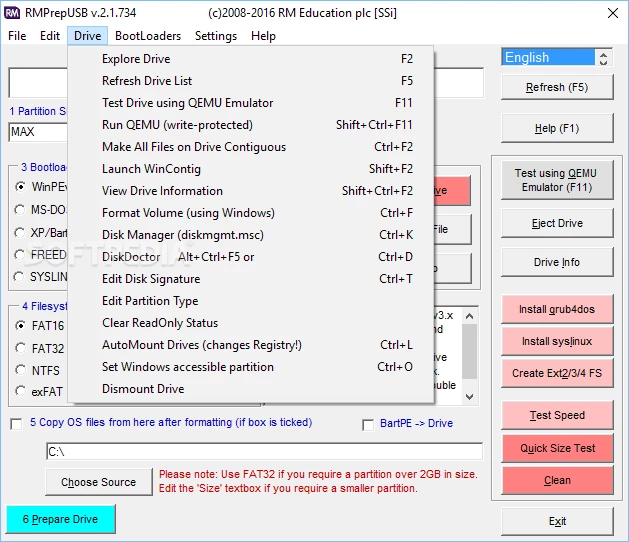
- Advanced Bootloader Installation: The software allows precise injection of various boot codes directly into the master boot record or partition boot record of the target drive. Users select from Grub4DOS, Syslinux, Windows PE, or legacy MS-DOS configurations using dedicated radio buttons. This ensures compatibility when booting older legacy BIOS systems that expect specific sector offsets, allowing for chained menus configured via the F4 shortcut.
- Integrated QEMU Boot Emulation: Testing a newly created bootable flash drive no longer requires restarting the host machine. The interface features a dedicated button to launch a local QEMU virtual machine, booting directly from the prepared USB device in a secure sandbox. This immediate feedback loop saves time during the configuration of complex menus, allowing users to verify syntax and payload execution instantly.
- Raw Sector-Level Imaging: Moving beyond standard file copying, the application includes Drive-to-File and File-to-Drive operations for exact cloning. This extracts the entire physical geometry of the flash drive—including the master boot record, hidden partitions, and bootloader files—into a single raw image file. Technicians can archive perfect snapshots of working diagnostic drives and deploy them to new hardware without rebuilding partition structures.
- Hardware Capacity Verification: To combat the proliferation of counterfeit storage media, the utility integrates a FakeFlashTest algorithm. This test writes specific data patterns at precise block intervals across the claimed capacity of the drive and attempts to read them back. If the hardware uses a modified firmware controller to spoof its size, the test flags the missing sectors, preventing reliance on fraudulent storage.
- Command-Line Automation Engine: While the graphical interface handles interactive tasks, the core formatting engine is driven by a standalone executable named RMPartUSB. System administrators can bypass the graphical interface and script this command-line tool into batch files for mass deployment. It accepts flags to silently partition, format, and copy operating system files across multiple drives simultaneously, streamlining enterprise provisioning.
- Non-Destructive Performance Profiling: Users can benchmark the sequential read and write speeds of connected storage without erasing existing partitions. The speed test function temporarily allocates a test file, measures throughput directly to the flash memory chips, and outputs results to a structured CSV file. Pressing the F6 shortcut automatically opens these metrics in a spreadsheet application for historical performance tracking.
- Deep Drive Wiping: When a flash drive exhibits corrupted partition tables that native Windows disk managers cannot resolve, the dedicated Clean function intervenes. This command forcefully erases the master boot record and all partition sector data, resetting the drive to an unallocated raw state. It recovers devices rendered unusable by failed formatting attempts or aggressive third-party partitioning tools.
How to Install RMPrepUSB on Windows
- Navigate to a verified software directory or the official developer repository to download the Windows installer package.
- Locate the downloaded executable file in your local directory and double-click it to initiate the installation wizard.
- When the User Account Control prompt appears, click "Yes" to grant the installer the administrative privileges required for low-level drive access.
- Review the end-user license agreement, which outlines the terms for free private and non-commercial usage, then proceed to the next step.
- Select the destination folder path on your local system drive where the core executable and accompanying bootloader binaries will reside.
- Choose whether to create desktop and start menu shortcuts for quicker access to the utility and its associated documentation files.
- Click "Install" to extract the core application files, the command-line engine, and the bundled QEMU emulator components to your chosen directory.
- Close the setup wizard and launch the application from the new shortcut; the software will open and scan physical USB ports without requiring account creation or internet activation.
RMPrepUSB Free vs. Paid
RMPrepUSB operates under a strictly freeware licensing model for private, educational, and general non-commercial use. The developer provides the entire suite of tools—including the graphical interface, the underlying command-line engine, the QEMU emulator, and all sector-editing features—without any financial cost. There are no restricted pro tiers, no hidden trial limits, and no watermarks placed on the created bootable drives. The software functions fully offline without demanding a license activation.
The business model supporting the software relies on voluntary donations and commercial licensing agreements for large-scale enterprise deployments. If an organization intends to bundle the core executable within proprietary software, or if they plan to distribute the tool commercially to more than one thousand end users, they must contact the developer to negotiate a custom commercial license fee. This ensures the underlying technology remains sustainable while keeping the desktop utility completely free for everyday technicians.
For independent IT professionals, home lab enthusiasts, and small repair shops, the free version imposes zero technical restrictions. Every formatting option, bootloader injection, and drive testing mechanism is permanently unlocked. Users do not face export limits or mandatory cloud accounts, ensuring the tool remains a reliable, offline asset for permanent local deployment.
RMPrepUSB vs. Rufus vs. Ventoy
Rufus focuses on speed and simplicity, making it the standard choice for users who need to quickly flash a single operating system image to a drive. It excels at parsing modern UEFI boot requirements, automatically configuring necessary parameters, and bypassing specific hardware checks for newer operating systems. However, Rufus generally overwrites the entire drive for a single payload and abstracts away intricate sector-level details. If you just need to install an operating system quickly without managing custom boot menus, Rufus provides a much more streamlined, user-friendly experience.
Ventoy takes a dynamic, drag-and-drop approach to multi-booting, formatting the drive once and allowing users to copy raw disk image files directly onto an exFAT partition. Upon booting, Ventoy generates a menu on the fly based on the files present on the drive, eliminating the need to repeatedly reformat the media when updating payloads. This makes it practical for IT workers managing dozens of different installation environments. Nevertheless, Ventoy relies heavily on its own custom bootloader logic, which occasionally struggles with obscure diagnostic tools or highly specialized legacy BIOS hardware.
RMPrepUSB is the better fit when users require strict, manual control over the drive's geometry and the specific bootloader sequence. It caters directly to technicians who need to write custom Grub4DOS scripts, format drives with non-standard cluster sizes, or extract raw sector images for forensic cloning. While it involves a steeper learning curve than Rufus and Ventoy, its ability to clean corrupted partition tables, emulate boot sequences in QEMU, and execute command-line formatting makes it an indispensable diagnostic workbench for legacy hardware and heavily customized pre-boot environments.
Common Issues and Fixes
- Drive not recognized by Windows after formatting. This occurs when a previous formatting tool or corrupted payload writes invalid data to the master boot record. To fix this, click the Clean button in the interface to forcefully erase all partition sector data, then select your desired file system and click Prepare Drive to rebuild the partition table correctly.
- Boot menu fails due to non-contiguous files. Grub4DOS requires disk image files to be written in a single contiguous block of flash memory, which fails if the drive is heavily fragmented. Run a dedicated defragmentation tool specifically on the target USB drive to align the payload files before attempting to boot.
- QEMU emulator displays a blank screen or crashes immediately. The built-in virtual machine allocates a strict, limited amount of host memory by default, which may not be enough to load larger pre-boot environments. When initiating the QEMU test via the interface, manually enter a higher RAM allocation value in the prompt.
- Accidental formatting of the wrong disk is prevented but causes confusion. By default, the software actively hides any storage volume larger than 128GB to prevent users from wiping their primary host drives. If you intentionally need to format a massive external hard drive, manually check the ALLDRIVES override box in the interface.
Version Latest — 2026
- Added experimental support for detecting and reporting GPT (GUID Partition Table) information on drives.
- Improved handling of USB devices that contain non-printable or invalid characters in their model name strings.
- Updated the integrated RMPartUSB tool to version 2.1.753 to resolve potential output issues with the GETDRV command in batch scripts.