Adobe Shockwave Player serves as a dedicated runtime environment designed to execute interactive multimedia, 3D web applications, and complex e-learning courses created with the Director authoring platform. While the modern internet has fully transitioned to native HTML5, WebGL, and JavaScript rendering standards, this specific desktop utility remains a necessary tool for digital archivists, retro gaming enthusiasts, and network administrators maintaining legacy intranet training modules. It bridges the critical gap between older proprietary file formats and current Windows operating systems, allowing historical internet media to function exactly as originally intended.
Users rely on this software specifically to render Director Compressed Resource files, parse external cast member assets, and process hardware-accelerated 3D environments that utilize the Havok physics engine. Unlike standard media players that simply parse linear video and audio streams, this environment acts as a full interactive engine. It continuously recalculates user inputs, manages collision detection routines, and executes branching multimedia paths in real time based on custom scripting logic. The runtime handles a variety of specific file extensions natively, primarily focusing on compiled ".dcr" files, but also interacting with protected ".dxr" files and external ".cct" cast libraries that store modular graphics and audio files externally to keep initial load times low.
Maintaining a local installation of this plugin matters because modern browsers have entirely removed the Netscape Plugin Application Programming Interface and ActiveX architectures required to parse these specific legacy formats. By pairing this local package with a compatible legacy browser interface like Internet Explorer, users bypass current web restrictions to access unarchived interactive projects, test direct CD-ROM backups, and run local multimedia interactives without relying on experimental or inaccurate emulation layers. Because the runtime does not include any timeline editing or authoring tools, it remains strictly a player, utilizing the host machine's central processing unit and graphics hardware to execute the pre-compiled logic locally without server-side rendering dependencies.
Key Features
- Director File Playback: Renders protected Director Compressed Resource files and compiled cast files locally. The engine unpacks the compressed multimedia assets, loads the designated stage parameters, and executes the embedded logic required for interactive navigation and scene transitions.
- Havok Physics Integration: Processes real-time 3D collision detection and rigid body dynamics directly within the application window. This allows retro 3D web applications to simulate accurate gravity, friction, bouncing, and physical object interactions without requiring external third-party physics libraries or constant network calls.
- Hardware-Accelerated 3D Rendering: Connects directly with local DirectX and OpenGL application programming interfaces on Windows systems to output complex polygonal geometry and high-resolution textures. Users can manually switch between rendering hardware modes by right-clicking the active content stage and accessing the contextual 3D Renderer menu.
- Lingo Script Execution: Interprets the custom object-oriented scripting language utilized by the original authoring tool to handle precise mouse inputs, keyboard events, and timeline commands. This strict interpretation ensures that point-and-click adventure interfaces, inventory systems, and complex branching menus respond correctly to user input.
- Modular Extension Support: Expands base runtime functionality by loading modular extensions called Xtras from the local installation directory. These specific modules add specialized capabilities such as external audio format decoders, custom screen transitions, database connectivity, or direct local file system access.
- Multi-Channel Audio Mixing: Processes simultaneous sound layers using embedded audio compression techniques. This capability enables continuous background music playback on one channel while triggering independent foreground sound effects and voiceover dialogue on separate channels during interactive segments without audio dropouts.
- Local Asset Caching: Stores downloaded multimedia assets, such as heavy background audio tracks, large bitmaps, and 3D wireframes, in a temporary local Windows directory. This caching behavior ensures that large interactive files do not need to redownload repeatedly when a user transitions back and forth between different levels or interactive scenes.
How to Install Adobe Shockwave Player on Windows
- Download the full offline Windows installer package to the local disk, ensuring you select the complete version rather than the slim web installer to guarantee all extension modules are included.
- Close all active web browsers, specifically Internet Explorer and any compatible legacy browser applications, to prevent system file locking during the setup sequence.
- Remove any existing or corrupted installations by running the vendor-provided uninstaller utility, as overlapping framework files frequently cause directory errors.
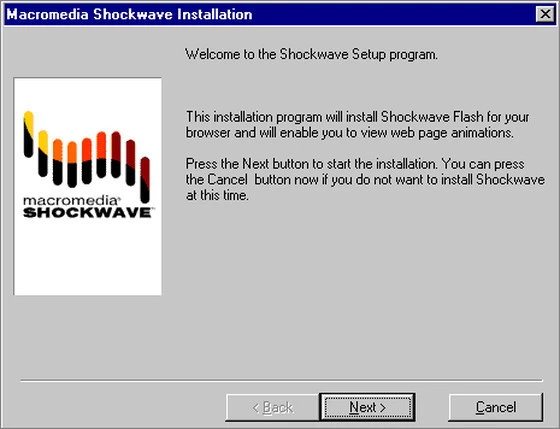
- Launch the downloaded executable file to initiate the extraction process and launch the primary setup wizard.
- Review the end-user license agreement and carefully decline any bundled third-party toolbars, browser search modifications, or unrelated utility software offered during the prompt screens.
- Accept the default installation directory path to ensure the necessary ActiveX controls and extension modules register correctly within the restricted Windows system folders.
- Finish the setup wizard and completely restart the computer to verify that all registry keys for the associated media MIME types apply successfully across the operating system.
- Open Internet Explorer, navigate to a local directory containing a legacy project, and click the yellow notification bar prompt to allow the add-on to execute the content locally.
Adobe Shockwave Player Free vs. Paid
Adobe Shockwave Player operates entirely as free software for the end-user. There is no financial cost to download, install, or run the playback engine on a local machine, and the runtime environment contains no premium tiers, feature limitations, or mandatory subscription requirements. Users do not need to create an account, sign in, or activate the software to render local files.
During the active lifecycle of the format, the vendor generated revenue exclusively through the commercial sale of the Director authoring suite, which development studios used to compile and export the interactive media. Distributing the resulting files to the public and consuming them via this browser plugin was always an unrestricted, zero-cost process for the audience, free from embedded trial watermarks or arbitrary playback time limits.
Because the vendor officially discontinued the platform, there are no official enterprise support contracts, priority updates, or commercial licensing options left to purchase. Users must exercise caution if third-party hosting sites attempt to charge money, mandate trial periods, or require registration codes to download the installer, as the legitimate runtime module has always functioned strictly as unrestricted freeware.
Adobe Shockwave Player vs. Adobe Flash Player vs. Flashpoint Archive
Adobe Flash Player served as the sister runtime environment optimized for lightweight vector graphics, timeline animations, and streaming video rather than heavy 3D media and complex scripting. While it eventually absorbed basic 3D rendering capabilities, it utilizes an entirely different underlying architecture based on ActionScript. It cannot parse Director files, load cast members, or execute Lingo scripts. Users cannot use one plugin to play the other format; they must maintain both plugins separately if they need to access the full spectrum of legacy internet media.
Flashpoint Archive operates as a massive community-driven preservation project that bundles a custom launcher, an automated proxy routing system, and thousands of pre-downloaded legacy web games into one massive standalone directory. It requires significant hard drive space to store the bundled media library locally and functions within a closed software sandbox rather than integrating natively into the operating system as a standard browser add-on.
Users should choose the Flashpoint Archive when they want an immediate, all-in-one library of curated retro web games without the technical hassle of configuring legacy browsers or managing individual plugin files. However, Adobe Shockwave Player remains the strict operational requirement for digital archivists, developers, and IT administrators who need a native system-level plugin. It is necessary when manually testing specific unarchived projects, accessing local interactive CD-ROM directories, or maintaining customized corporate training tools that rely on specific registry hooks within a legacy Windows infrastructure.
Common Issues and Fixes
- Director Player Error regarding missing extensions. This playback disruption happens when a specific multimedia file requires an extension module that failed to load or does not exist in the installation directory. To fix this, uninstall the software completely using the dedicated uninstaller utility, then reinstall using the full offline installer package rather than the slim web installer to ensure all default extension modules unpack correctly into the system folder.
- Content blocked or failing to load in modern browsers. Current browser engines have entirely removed the extension architecture required to run legacy native plugins. You must open the specific media utilizing Internet Explorer via the Windows legacy features, or rely on a specialized backward-compatible browser branch designed explicitly to maintain legacy add-on support.
- Black screen or freezing during 3D rendering. This hardware crash occurs when the legacy hardware-accelerated graphics mode conflicts with current display drivers. Right-click the application window, select the 3D Renderer option from the context menu, and switch the display setting from the DirectX interface to the software rendering mode to bypass the direct driver conflict.
- Script Error and Handled Not Defined prompts. This execution error usually points to a corrupted local registry configuration or conflicting leftover files from older Macromedia installations. Run the dedicated uninstaller, reboot the machine, and reinstall the package cleanly to overwrite broken registry pointers and correct the system folder access paths.
- Audio stuttering or missing sound channels. This timeline desynchronization happens when the embedded audio compression format fails to decode through the modern operating system default sound mixer. Navigate to the executable properties of the host browser, open the compatibility tab, and enforce compatibility mode for Windows 7 to properly align the legacy audio channels.
Version 12.3.5.205 — March 2019
- Resolved multiple critical memory corruption vulnerabilities to prevent potential code execution attacks.
- Removed playback support for the legacy Director Movie (.dir) file format.
- Addressed stability issues to enhance overall player security and reliability.