WSUS Offline Update allows IT administrators and system technicians to securely update Microsoft Windows environments without connecting the target machines to the internet. By utilizing a localized repository of official update files, this utility bypasses the need for a live network connection during the update process. It solves the practical problem of deploying security fixes to air-gapped computers, freshly installed systems, or isolated testing labs where external network access is restricted or strictly monitored. Instead of waiting for built-in update services to scan, download, and install packages individually, administrators can pre-download the entire catalog onto a portable drive and apply the payloads directly. This method strictly guarantees that machines only execute files provided by the administrator, effectively isolating the initial setup process from unknown external network threats.
Using a dedicated desktop tool rather than relying on standard background update services provides complete control over the deployment timeline. Relying on default internet-based update agents often results in bandwidth bottlenecks when dozens of machines attempt to pull the same multi-gigabyte files simultaneously. By storing the downloaded catalog on a USB flash drive or local network share, technicians eliminate redundant data transfers. The application ensures that even legacy environments receive necessary updates without exposing vulnerable operating systems to the internet before their defenses are fully configured. For environments running strictly regulated software combinations, having physical media containing the exact required updates is preferable to leaving the built-in update client to sort through potentially breaking feature upgrades on its own. Furthermore, maintaining an offline copy allows technicians to standardize the update baseline across multiple devices, meaning every computer on the domain receives the exact same set of hotfixes regardless of when it is imaged.
Key Features
- Offline Repository Generation: The Update Generator module downloads missing security updates, feature rollups, and framework files directly from Microsoft servers. It stores all payloads in a structured local directory separated by operating system and architecture, eliminating the need for the target machine to access the internet during installation.
- Automated ISO Creation: Users can configure the software to package the downloaded update catalog into a standard ISO image file. This format makes it easy to mount the repository as a virtual drive, store it on shared storage arrays, or burn it to optical media for highly secure, air-gapped deployment inside heavily restricted environments.
- Automatic Reboot and Recall: When deploying a large batch of updates, the installer script can automatically restart the computer as needed without requiring human intervention. It safely modifies temporary startup configurations to resume the installation process immediately after the reboot, preventing technicians from manually babysitting progress bars.
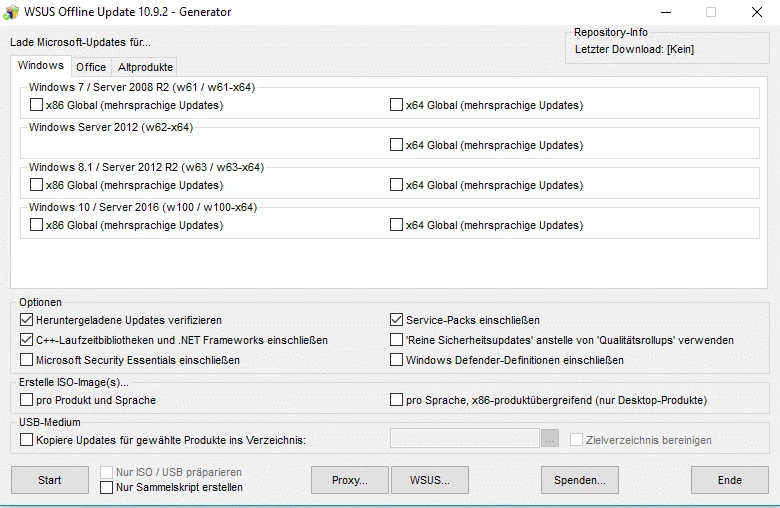
- Component Framework Support: The interface includes dedicated checkboxes for optional developer runtimes like the .NET Framework and Visual C++ Redistributable libraries. Including these specific components ensures that necessary software dependencies are fully met before custom enterprise applications are installed on the newly updated system.
- Cryptographic Hash Verification: Every downloaded update is automatically verified against official hash values to prevent file corruption or malicious tampering. The tool generates its own text files containing the hash data for each package, allowing network administrators to validate the strict integrity of the repository before deploying it to mission-critical production servers.
- Office Update Support: In addition to the core operating system, the tool can pull specific updates for various local installations of Microsoft Office. The generator interface provides distinct product family options, grouping the downloads by architecture type and service pack level so that no unnecessary bandwidth is consumed grabbing unneeded office files.
- Legacy Hardware Provisioning: By allowing selective download filtering, the software ensures older client setups do not waste storage retrieving incompatible modern feature drops. It reads exclusion lists to block unnecessary language packs, preview builds, or deprecated cumulative updates, keeping the final distribution folder compact and optimized for older disk drives.
How to Install WSUS Offline Update on Windows
- Navigate to the official project repository and download the primary application archive, which typically arrives as a standard ZIP file.
- Extract the entire folder structure to a local directory with sufficient storage space or directly to a high-capacity portable USB drive.
- Navigate into the newly extracted root directory and locate the executable named UpdateGenerator.exe, then double-click this file to open the main download configuration interface.
- Select the specific checkboxes corresponding to the Windows editions, architectures, and Office versions you need to update.
- Click the Start button to initiate the command-line background script, which will connect to official Microsoft servers, compare file lists, and populate the local repository folder.
- Wait for the download phase to finish completely, then physically take the portable drive to the target computer that currently requires offline updating.
- Open the subfolder named client on the target machine and launch the UpdateInstaller.exe application.
- Review the final installation options, such as enabling automatic reboots, including optional framework files, and installing Windows Defender definitions, then click Start to apply the updates locally.
WSUS Offline Update Free vs. Paid
WSUS Offline Update is completely free to use and operates strictly under an open-source development model. Because the utility is developed and maintained by a dedicated community of independent developers and system administrators, there are no premium tiers, pro licenses, enterprise editions, or hidden subscription requirements. All functional features, including automated device reboots, custom ISO generation, unlimited catalog downloads, and cryptographic verification, are available entirely out of the box without any trial restrictions or export watermarks.
The application does not enforce artificial bandwidth limits, nor does it restrict the total number of physical or virtual computers you can update. The lack of a commercial monetization model means users do not have to create web accounts, input credit card details, sign in through a web portal, or activate the software using a licensing server. It functions strictly as a standalone utility, processing Microsoft's official catalog entirely locally.
Users concerned about tracking will appreciate that the software does not send telemetry, usage statistics, or user profiles to any third-party vendor. The only external connections made by the software are directly to Microsoft's own content delivery networks to retrieve the actual update binaries. The source code is publicly accessible, allowing enterprise security teams to audit the scripts independently before approving the tool for use in highly classified government or corporate networks.
WSUS Offline Update vs. Portable Update vs. WHDownloader
Portable Update is designed for a very similar offline use case but relies on utilizing the built-in Windows Update Agent API to scan for missing files before downloading them. This precise scanning approach means Portable Update accurately identifies only the exact files needed by a specific machine, saving considerable storage space on the transport drive. However, it requires the user to run the tool directly on the unpatched target machine first to generate a hardware profile, whereas WSUS Offline Update pulls the entire comprehensive catalog in bulk ahead of time.
WHDownloader focuses on pure speed and acts as a lightweight, list-based download manager for individual hotfixes rather than a heavy bulk deployment mechanism. It presents users with specific text-based update lists and allows them to manually select distinct security packages. Technicians generally prefer WHDownloader when they need to grab a specific known fix to resolve an isolated bug on a single machine, but it completely lacks the automated installation scripts, dependency management, and automatic reboot handling found in the larger repository tools.
WSUS Offline Update remains the better fit for administrators managing diverse hardware fleets or deploying fresh operating system images where the current update state is entirely unknown. Because it grabs the entire update catalog for selected operating systems well in advance, technicians can arrive at an offline site with a fully loaded USB drive and update any machine immediately regardless of its prior state. Its automated restart capability makes it vastly superior for large deployment batches where manually babysitting the installation interface is simply not an option for busy IT staff.
Common Issues and Fixes
- Downloads stuck at zero percent during generation. This usually happens when the Background Intelligent Transfer Service (BITS) is configured incorrectly or actively blocked by a strict corporate firewall policy. To fix this, open an elevated command prompt on the generating machine, restart the BITS service, or manually check the outbound firewall rules to ensure the command-line script can successfully reach Microsoft's update servers without SSL inspection interference.
- Update installer fails to execute on the target machine. Running the installer payload from a network path without proper security permissions causes the script to halt immediately. Ensure that the shared network folder explicitly grants read permissions to the anonymous security group, or alternatively, copy the entire client folder directly to the local hard drive of the target device before launching the executable.
- Continuous looping during automatic reboots. The temporary startup configuration modified by the tool sometimes fails to clear itself if the machine loses power unexpectedly or experiences a hard crash. Navigate to the temporary local administrator account created by the software, manually log in using the default credentials, and run the cleanup script located in the client directory to restore standard boot behavior.
- Missing prerequisite errors during initial deployment. The deployment script requires a relatively recent Windows Update Agent to parse the offline catalog data correctly. Run the application's built-in prerequisite installer first, which applies specific preliminary servicing stack updates required to read and validate the rest of the offline files.
- Excessive disk space usage on the transport drive. Over time, obsolete updates accumulate in the download directory, inflating the size of the repository. Use the built-in cleanup option within the generator interface to purge superseded updates, which deletes old binaries that have been replaced by newer cumulative rollups, freeing up gigabytes of flash drive space.
Version Community Edition 12.7beta7 — February 2025
- Resolved a critical error where a PowerShell execution script failed to run properly.
- Added preliminary support for Windows Server 2025 and Windows 11 version 24H2.
- Implemented a new mechanism for generating static download links specifically for Windows 11 updates.
- Expanded compatibility to include Windows 10 version 22H2 and Windows 11 version 23H2.
- Fixed an issue regarding the downloading of specific hotfix files in previous beta builds.