Autoruns is a specialized system utility developed by the Microsoft Sysinternals team that catalogs and exposes every auto-start extensibility point in the Windows operating system. While the built-in Task Manager provides a basic overview of standard startup folder items and primary run keys, this forensic tool digs into the operating system architecture to reveal exactly what code executes during the boot sequence, user login, and application launches. It lists scheduled tasks, background services, low-level drivers, Winlogon notifications, Local Security Authority providers, and browser helper objects. By inspecting these specific locations, the software provides administrators with direct visibility into the persistence mechanisms used by both legitimate software and malicious payloads.
Targeting system administrators, malware analysts, and power users, the software solves the specific job of identifying unwanted or hidden background processes that survive a system reboot. When a computer exhibits unexplained slowdowns, or when an antivirus scan fails to remove a persistent threat, analysts turn to this utility to locate the exact registry key or file path triggering the execution. Instead of relying on automated cleaners that might miss newly developed threat vectors, users manually inspect the raw data. This manual control makes it an essential diagnostic instrument for tracking down stubborn adware, poorly coded application leftovers, and deeply embedded rootkits that disguise themselves as standard system files.
The desktop executable format is deliberate, as it operates entirely locally without requiring cloud processing or background installation services. It reads directly from the host machine's registry and file system, parsing binary data and digital signatures in real time. Because it functions as a portable application, IT professionals keep it on diagnostic USB drives to deploy on compromised machines without leaving temporary files behind. Furthermore, the tool supports analyzing an offline Windows directory, meaning a technician can mount the hard drive of an unbootable computer and use the interface from a host machine to safely disable the problematic driver or malware entry preventing the operating system from starting. The precision of direct registry manipulation separates this application from consumer-grade PC optimizers.
Key Features
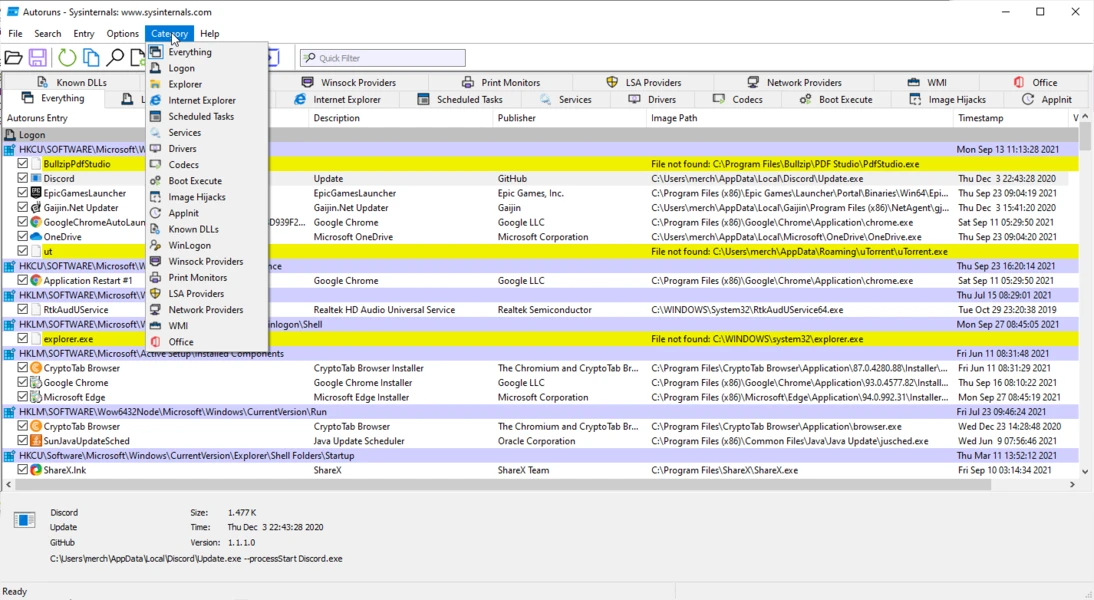
- Exhaustive Auto-Start Categorization: The interface divides system locations into specific tabs rather than presenting a single overwhelming list. Users navigate through dedicated sections such as Logon, Explorer, Internet Explorer, Scheduled Tasks, Services, Drivers, Codecs, Boot Execute, and Image Hijacks. This allows analysts to isolate their search; for example, if an unwanted toolbar appears only when opening a browser, the user can check the Internet Explorer tab to find the specific Browser Helper Object.
- Microsoft and Windows Entry Filtering: To reduce diagnostic noise, the Options menu includes checkboxes to Hide Signed Microsoft Entries and Hide Windows Entries. When activated, the list filters out standard operating system components, leaving only third-party additions and unverified files. This acts as a primary filter for malware hunting, as administrators can quickly see which non-native executables have injected themselves into critical boot sequences.
- Color-Coded Status Indicators: The grid uses specific background colors to communicate the status of an entry. A yellow background indicates a file not found error, meaning the registry key points to a missing executable, often indicating an orphaned entry from an uninstalled program. A pink or red background flags an unsigned file, an unknown publisher, or a missing description, drawing attention to suspicious payloads that lack standard digital certificates.
- VirusTotal Hash Integration: Under the Options menu, enabling Check VirusTotal.com allows the application to calculate cryptographic hashes for every discovered executable and submit them to the online scanning service. The interface populates a dedicated column with the detection ratio, such as 0/74 or 3/74, and the text turns red if multiple antivirus engines classify the file as malicious. Users can also right-click any single row and select Check VirusTotal to scan it manually.
- Baseline Snapshot Comparisons: Administrators can capture the exact state of a healthy system by using the File menu to save the current configuration as a native AutoRuns Data file with an arn extension. Later, if the system begins behaving erratically or if a user suspects an infection, they can open the File menu, select Compare, and load the previously saved snapshot. The interface will highlight any newly added persistence mechanisms in green, making it trivial to see what changed during a recent software installation.
- Direct Registry and File System Navigation: Investigating an entry requires looking at its underlying properties and exact disk location. Right-clicking any item provides a Jump to Entry command, which launches the Windows Registry Editor and navigates directly to the specific key holding the startup value. Similarly, the Jump to Image command opens File Explorer with the target executable already highlighted, allowing the user to inspect file properties, check sizes, or manually delete the binary.
- Command-Line Interface Inclusion: The downloadable archive includes a secondary executable named autorunsc.exe, which provides the exact same scanning capabilities through a command-line interface. This allows system administrators to script automated audits across entire enterprise networks. The command-line variant can output its findings into comma-separated values or XML formats, enabling security teams to pipe the data into spreadsheet applications or centralized logging servers for bulk analysis.
How to Install Autoruns on Windows
- Navigate to the official Microsoft Sysinternals website and download the primary ZIP archive for the utility.
- Locate the downloaded archive in your default downloads directory and extract its contents to a local folder or a dedicated diagnostic USB drive.
- Open the newly extracted folder to view the contents, which include multiple executable files designed for different processor architectures.
- Select Autoruns.exe if you are operating on an older 32-bit system, or double-click Autoruns64.exe to launch the native 64-bit application on modern machines.
- To ensure the application has the necessary privileges to modify registry keys and disable system-level drivers, right-click the executable and select Run as administrator from the context menu.
- Upon the first launch, a Sysinternals software license agreement dialog box will appear; read the terms and click Agree to proceed into the main interface.
- Wait several seconds as the application performs its initial system scan, populating the Everything tab with all discovered auto-start extensibility points.
Autoruns Free vs. Paid
The utility is entirely free to download and use, maintained and distributed directly by Microsoft as part of the Sysinternals suite. There are no paid tiers, no premium upgrades, and no enterprise licensing costs for commercial use. The software is provided as a freeware administrative utility designed to assist IT professionals, developers, and advanced users in diagnosing operating system behavior.
Because the tool operates without a commercial business model, it does not display advertisements, bundle third-party software, or require users to sign in with a Microsoft account. It relies entirely on local execution and optional API calls to VirusTotal for hash checking. There are no artificial limits on how many entries you can scan, disable, or delete, nor are there any restrictions on generating offline comparison files or using the command-line variant.
Users should note that the freeware nature of the product means there is no dedicated customer support channel. Instead of opening support tickets with a help desk, users rely on the official Microsoft Q&A forums, technical documentation, and the broader IT administration community to troubleshoot specific registry issues or interpret complex scan results.
Autoruns vs. Startup Delayer vs. Autorun Organizer
Startup Delayer focuses strictly on optimizing the user login experience by staggering the launch times of legitimate background applications. It uses an active monitoring engine that waits for CPU and disk usage to drop below specific idle thresholds before launching the next program in the queue. This prevents the operating system from stalling under heavy input/output requests during boot. Startup Delayer is designed for users who actively want their programs to load, just not all at exactly the same time. Autoruns lacks this scheduling logic entirely, as its function is to permanently disable or delete items rather than delay them.
Autorun Organizer presents a visual dashboard aimed at casual users who want to speed up their computer without analyzing raw registry keys. It provides built-in charts displaying historical boot times, allows for simple batch processing of standard startup items, and includes an option to delay program launches by a fixed number of seconds. However, it restricts its scope to common run keys and scheduled tasks, missing the deep system-level drivers and shell extensions that advanced threats exploit to maintain persistence.
Autoruns remains the primary choice for forensic investigation and exact system control. It does not offer any ability to schedule or delay application launches, as its sole purpose is to expose every single persistence mechanism on the machine. While it has a steeper learning curve than both Startup Delayer and Autorun Organizer, its deep visibility into Local Security Authority providers, AppInit DLLs, and WMI entries makes it necessary for malware hunting and advanced troubleshooting.
Common Issues and Fixes
- Accidentally causing a boot failure. Disabling critical boot execute images, essential system drivers, or native operating system services can result in a Blue Screen of Death or prevent the machine from starting. To fix this, boot the computer into the Windows Recovery Environment, mount the primary drive, and use the Analyze Offline System feature from another computer to re-enable the exact entry you disabled.
- Overwhelming lists hiding third-party entries. Upon launching the tool, the Everything tab populates with thousands of entries, making it difficult to spot malware or unwanted applications among the standard operating system files. To fix this, open the Options menu, click Hide Signed Microsoft Entries, and then press the F5 key to refresh the list, which will strip away native components and leave only third-party executables.
- Access denied errors when toggling entries. Standard user accounts lack the security permissions required to modify entries located within the HKEY_LOCAL_MACHINE registry hive or protected system folders. To fix this, close the application, locate the executable file, right-click it, and select Run as administrator to grant the tool the elevated privileges necessary to apply your changes.
- False positive malware detections. The VirusTotal integration frequently flags legitimate, newly compiled administrative scripts or obscure open-source tools with low detection ratios, causing their text to turn red in the interface. To fix this, right-click the specific item, select the VirusTotal link to open the scan results in your browser, and manually verify the engine reports, publisher details, and digital signatures before assuming the file is malicious.
Version 14.11 — February 2024
- Resolved an issue where command-line parameters were not correctly parsed for shortcuts located in the Startup folder.
- Implemented general stability enhancements and minor fixes to improve overall reliability.