Sysinternals Suite is a collection of advanced diagnostic utilities for analyzing, configuring, and troubleshooting Windows environments. Originally created by Mark Russinovich and Bryce Cogswell, the package contains over 70 standalone executable files that address specific operating system administration tasks. System administrators, IT professionals, and security analysts rely on these utilities to monitor file system activity, identify elusive malware, manage autostart entries, and inspect memory allocation. By bypassing the standard graphical interfaces, these utilities expose underlying processes and system interactions that remain invisible to everyday desktop users.
Unlike heavily automated PC optimization suites, this toolkit provides raw, unfiltered data directly from the kernel and native APIs. Users do not install a monolithic dashboard; instead, they launch individual graphical applications or command-line utilities tailored to specific problems. Security researchers frequently deploy tools from this bundle to trace the execution paths of suspicious binaries, while IT support teams use the remote execution capabilities to restart services across domain-joined endpoints without interrupting the end user. The interface for each tool prioritizes data density over modern design, presenting tabular data, real-time graphs, and dense event logs.
The software operates without registering shared components or leaving deep traces in the system registry upon deployment. Administrators routinely carry the entire suite on a portable flash drive, dropping it onto compromised or malfunctioning machines to perform immediate forensics. Because the executables span everything from live network connection monitoring to active directory object management, the toolkit replaces dozens of fragmented third-party utilities with a unified, locally executed diagnostic framework. From extracting strings in binary files to forcing physical memory dumps, the suite exposes the exact mechanisms dictating system behavior.
Key Features
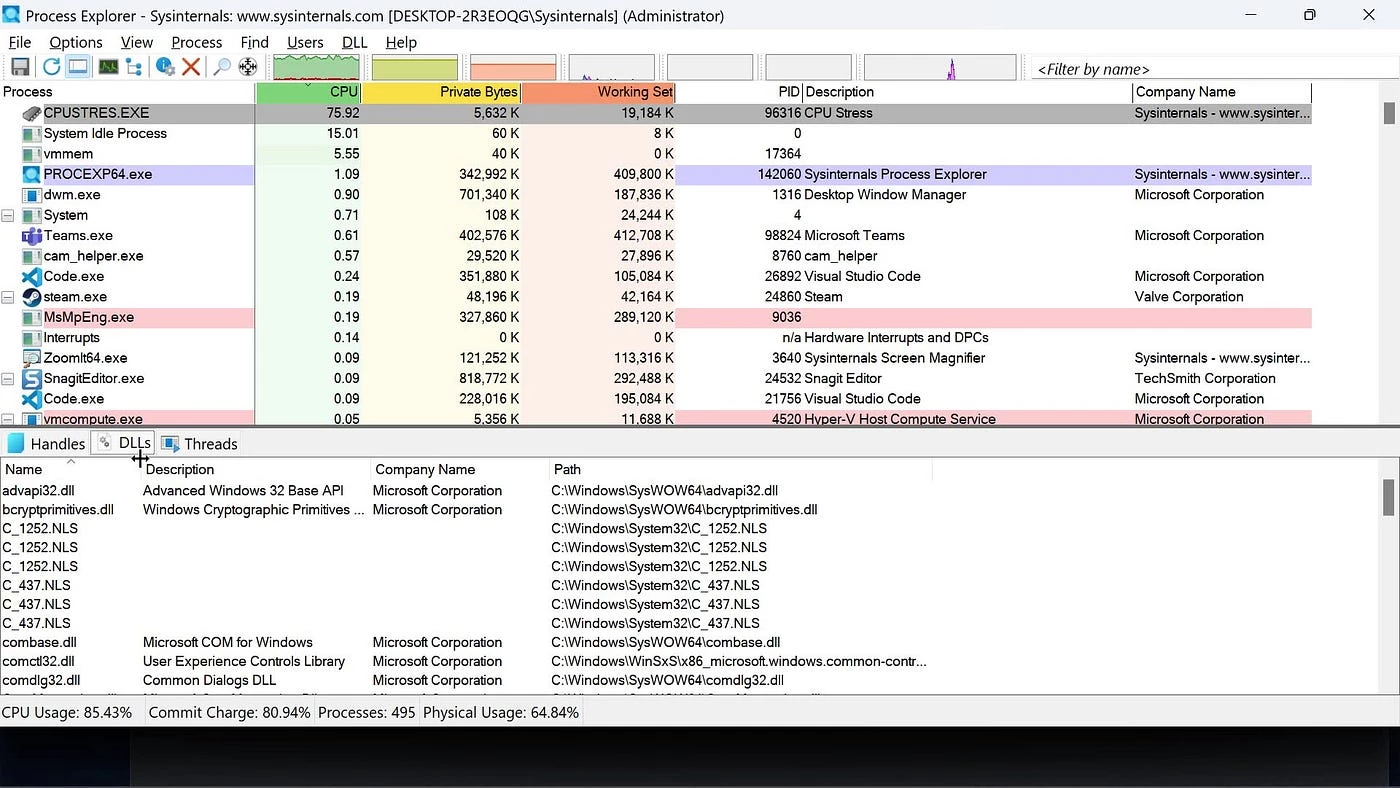
- Process Explorer: This advanced task management utility replaces the standard Task Manager to display detailed hierarchical trees of active processes. The interface exposes loaded DLLs, active threads, and security tokens, and includes a direct "Check VirusTotal.com" toggle in the Options menu to instantly scan running hashes against security databases. Users can right-click any executable to suspend, restart, or forcefully terminate unresponsive threads.
- Process Monitor (Procmon): Administrators use this tool to capture real-time file system, Registry, and process activity. The main interface displays a continuous, color-coded event log that users refine by applying custom include or exclude filters based on process names, operations, or file paths. Exporting these event logs to native PML or standard CSV formats allows teams to analyze erratic application behavior or pinpoint missing file permissions.
- Autoruns: This utility maps exactly which programs are configured to launch during system boot or login. The interface divides startup locations into dedicated tabs such as Logon, Scheduled Tasks, Services, Drivers, and KnownDLLs, exposing deeply hidden autostart entries often exploited by malware. Unchecking a box directly disables the entry without deleting it, providing a safe method to isolate startup conflicts.
- PsTools Package: This embedded collection of command-line utilities allows administrators to execute processes on local or remote systems. The flagship tool, PsExec, provides a remote command prompt that operates without requiring a dedicated client agent installed on the target machine. Other commands within the package enable users to view remote event logs, suspend processes, or retrieve service configurations across an active directory domain.
- TCPView: Network administrators rely on this graphical program to track all active TCP and UDP endpoints on the local machine. The interface details the exact protocol, local address, remote address, and connection state alongside the specific process name owning the socket. Users can select any active connection and use the "Close Connection" button to immediately sever the network link or terminate the responsible process.
- Sysmon (System Monitor): Once installed as a background system service and device driver, this tool logs highly detailed operational data directly to the Windows Event Log. It tracks process creations, network connections, and changes to file creation times, providing forensic analysts with a persistent record of malicious activity. Administrators configure the service using specific XML rulesets to target distinct security threats without overwhelming the event viewer.
- Disk2vhd: Virtualization engineers use this utility to create Virtual Hard Disk (VHD or VHDX) versions of physical disks for use in Hyper-V virtual machines. The program utilizes the Volume Snapshot capability built into Windows to create point-in-time copies, allowing users to clone a live system drive while the operating system remains active. The resulting file can be directly attached to a hypervisor to replicate a physical server environment.
How to Install Sysinternals Suite on Windows
- Download the official ZIP archive containing the suite from the Microsoft website to your local storage drive.
- Right-click the downloaded ZIP file, select "Extract All..." from the context menu, and choose a permanent destination directory, such as C:Sysinternals.
- Navigate to the newly extracted folder, which contains both 32-bit and 64-bit versions of the standalone graphical applications and command-line executable files.
- Open the Advanced System Settings panel, click "Environment Variables", and add your chosen extraction directory path to the System PATH variable to enable launching the command-line tools from any terminal window.
- Right-click a specific graphical tool, such as procexp.exe for Process Explorer, and select "Run as administrator" to ensure the application has sufficient privileges to read kernel-level data.
- Accept the End User License Agreement (EULA) dialog box, which appears individually the first time you execute any newly extracted utility from the suite.
- Alternatively, map a network drive directly to \live.sysinternals.comtools to execute the utilities straight from the internet without keeping local copies on the physical disk.
Sysinternals Suite Free vs. Paid
Sysinternals Suite is completely free for personal, commercial, and enterprise use. Microsoft provides the entire collection of utilities without any licensing fees, subscription models, or premium tiers. Users do not need to create a Microsoft account, register the software, or maintain an active internet connection to validate licensing. Enterprise administrators can freely deploy the executables across local networks, domain-joined endpoints, and remote servers.
The utilities do not contain advertisements, trial limits, watermarks, or artificial feature restrictions. Every executable within the suite offers its complete functionality immediately upon extraction. Because the toolkit is developed and maintained by Microsoft, the cost model reflects a corporate strategy to provide advanced administrative and diagnostic resources directly to the technical community at zero financial cost.
However, because the tools are provided as free downloads, Microsoft does not offer dedicated service-level agreements (SLAs) or guaranteed technical support phone lines specifically for the utilities. System administrators cannot open traditional support tickets for issues related to Process Monitor or Autoruns. Troubleshooting and documentation rely on community forums, user blogs, and official reference guides hosted on the Microsoft Learn platform.
Sysinternals Suite vs. System Informer vs. NirLauncher
System Informer consolidates process management, service configuration, and network monitoring into a single, cohesive graphical interface. Users who prefer managing their entire system state from one highly customizable, open-source dashboard often choose System Informer over opening multiple separate utilities. However, Sysinternals Suite maintains the advantage for administrators who need strictly official, signed Microsoft binaries to comply with tight corporate security policies or who require the specific deep-dive filtering capabilities of Process Monitor.
NirLauncher packages over 200 portable utilities focused heavily on password recovery, browser forensics, and specific hardware configuration readouts. IT technicians diagnosing network cached credentials, extracting lost product keys, or analyzing browser histories will find NirLauncher handles these niche extraction tasks better. Conversely, Sysinternals Suite focuses directly on low-level kernel diagnostics, making it the necessary choice for hunting down malware hooks, tracing registry modifications, and managing active directory remote execution.
Ultimately, Sysinternals Suite is the superior choice for deep, structural operating system troubleshooting. Its tight integration with native system APIs, combined with the assurance of official digital signatures, makes it the standard for environments where third-party open-source executables are restricted. System administrators investigating active memory leaks, tracking exact file system I/O events, or scripting administrative commands across an enterprise domain will find the specialized nature of these standalone tools fits their strict procedural requirements perfectly.
Common Issues and Fixes
- Process Monitor consumes all available RAM and crashes. By default, Process Monitor captures hundreds of thousands of events per minute and stores them in virtual memory. To prevent crashes during long capture sessions, open the File menu, select Backing Files, and choose to store the capture data directly to a named file on the disk rather than utilizing system memory.
- PsExec returns an "Access is Denied" error during remote execution. This occurs when the target machine restricts administrative shares or blocks remote User Account Control (UAC) tokens. Ensure the Admin$ share is enabled on the target machine, verify the Remote Registry service is running, and pass the explicit domain administrator credentials using the -u and -p command-line switches.
- Automated deployment scripts hang waiting for users to accept the software license agreement. Each utility in the suite prompts for EULA acceptance on its first run, which completely halts headless batch scripts or remote deployments. Add the -accepteula switch to the command-line arguments when calling any utility from a script to automatically bypass the graphical prompt and continue execution.
- Process Explorer fails to display loaded DLLs or network connections for system processes. The utility operates with standard user privileges by default, which restricts access to restricted kernel-level service data. Close the application, right-click the executable file, and select "Run as administrator" to elevate the process and reveal the hidden process paths, active threads, and specific loaded modules.
- Disk2vhd fails to capture a live volume and throws a snapshot error. This failure typically points to issues with the Volume Shadow Copy Service (VSS) built into the operating system. Open the Windows Services console, ensure the Volume Shadow Copy service is set to Manual and is able to start, and verify that there is sufficient free space on the target drive to hold the temporary snapshot data.
Version 2025.12.16 — December 2025
- Updated Coreinfo to v4.0, introducing a new graphical user interface (GUI) to visualize system topology alongside the traditional command-line output.
- Enhanced Coreinfo detection capabilities to include checks for advanced feature sets found in modern processor architectures.
- Refined reporting of socket information, NUMA memory node configuration, and cache topology for better system analysis.