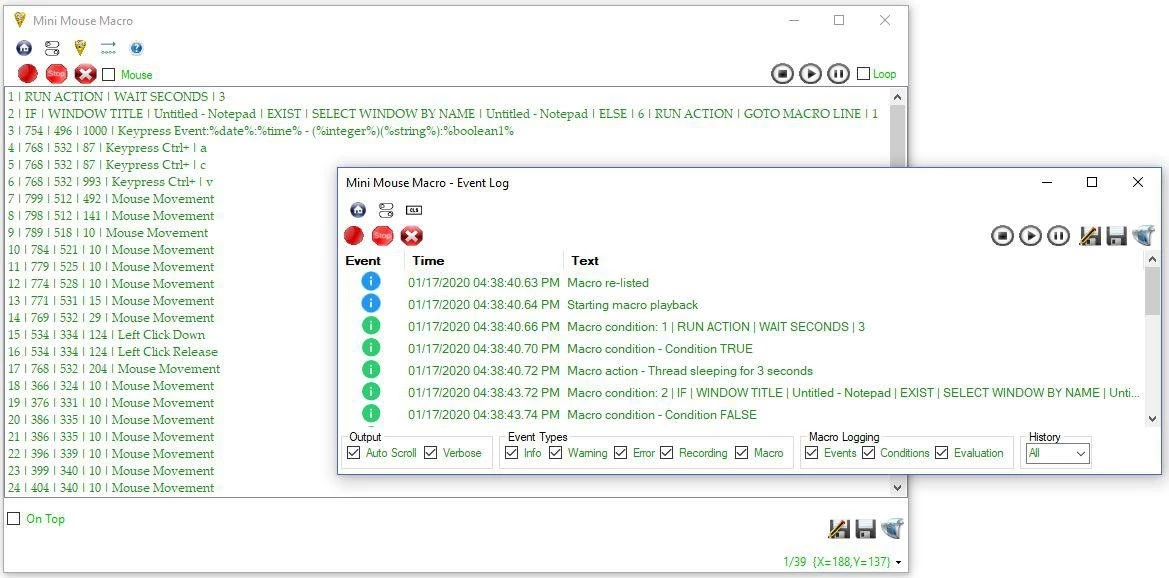
Mini Mouse Macro is a lightweight, portable desktop automation utility designed to record and replay mouse movements, clicks, and keyboard strokes. For users dealing with repetitive data entry, software testing, or legacy application management, this tool captures human input in real time and translates it into an automated sequence. Unlike enterprise robotic process automation suites that require API access or deep programming knowledge, this utility interacts directly with the graphical user interface. It maps the exact paths the cursor takes across the screen and logs the precise timing of every keystroke, allowing the computer to duplicate the physical routine without manual intervention.
The application operates entirely through visual coordinate tracking and system-level input hooks. When a recording session begins, the software monitors the desktop for left clicks, right clicks, and typed characters, assigning a specific screen coordinate and delay value to each action. Because it does not rely on backend software integrations, it can automate tasks across web browsers, local text editors, and proprietary database terminals equally well. The resulting sequence populates as a list of sequential commands in the main interface. Users can execute this list once or configure it to loop continuously until a specific condition is met or a designated stop hotkey is pressed.
One of the primary structural advantages of this tool is its standalone nature. The utility does not write registry keys, create background Windows services, or require administrative deployment. It runs directly from a single executable file, making it highly suitable for IT professionals or desktop support technicians who need to carry automation tools on a portable USB drive. By storing the main application and all generated macro files in a single directory, workers can move their automation routines between different physical workstations without leaving temporary files behind.
Key Features
- Real-Time Input Capture: The software records cursor movements and keystrokes exactly as they happen. It logs the natural timing and delays between actions, ensuring that the automated playback mimics the original user pacing. This prevents the macro from executing commands faster than the target application can process them.
- Text-Based Macro Files: Recorded sequences are saved locally as standard .mmmacro files, which are plain text documents. This format allows users to open the routine in a standard text editor to manually modify X and Y coordinates, adjust delay times, or copy and paste specific lines without needing to rerecord the entire sequence from scratch.
- Custom Scripting and Conditional Logic: Beyond basic playback, the utility supports script additions that evaluate screen conditions. Users can insert custom commands to check the background color of a specific pixel or wait for a custom variable to reach a certain value before proceeding to the next click, preventing the macro from failing if a window loads slowly.
- Command-Line Scheduling Integration: The application accepts command-line arguments for executing specific routines silently. System administrators can configure Windows Task Scheduler to launch the executable and run a designated macro file at a specific time of day, automating overnight maintenance tasks without requiring a user to click the play button.
- Network Controller Communication: A remote action module allows different instances of the application to communicate over a local area network. One workstation running the software can send a command to trigger a macro on a completely different machine, facilitating distributed desktop automation across multiple monitors or isolated hardware setups.
- Slim Screen Interface Mode: To prevent the application window from obstructing the target software during recording, the interface includes a minimized display mode. This reduces the control panel to a small, unobtrusive toolbar that sits out of the way, providing quick access to the record, play, and stop buttons without covering critical screen space.
How to Install Mini Mouse Macro on Windows
- Download the official executable file and navigate to your local downloads directory to locate the package.
- Because the application is entirely portable, there is no traditional setup wizard to execute. Right-click the downloaded file and select Properties.
- Check the Unblock box at the bottom of the General tab if Windows SmartScreen has flagged the executable, then click Apply to grant the system permission to run it.
- Create a dedicated folder in a persistent location, such as the local Documents directory or an external USB flash drive, to house the application.
- Move the unblocked executable file into this new folder. This ensures that any automatically generated configuration files or saved macro text documents remain organized in one place.
- Right-click the executable file and select Send to followed by Desktop (create shortcut) to establish a quick launch point for daily workflow access.
- Double-click the executable or the new shortcut to launch the interface. The main control panel will appear immediately without requiring a system reboot or background service initialization.
- Navigate to the Options menu on the first run to assign your preferred start and stop hotkeys, ensuring they do not conflict with the default shortcuts of your primary applications.
Mini Mouse Macro Free vs. Paid
The core functionality of Mini Mouse Macro is completely free to download and use. This free tier operates without mandatory advertisements, time-limited trial periods, or forced watermarks. Users relying on the free version gain full access to the primary recording engine, coordinate mapping, infinite looping capabilities, and the ability to save or edit macro text files. The standard release handles most basic desktop automation requirements natively, allowing users to capture mouse paths and keystrokes without encountering artificial paywalls for routine tasks.
For advanced workflow automation, the developer offers a paid Pro tier. Upgrading to the Pro version unlocks complex features designed to make macros react intelligently to changing screen states. The most notable additions in the Pro tier include optical character recognition and image matching. Instead of relying solely on static X and Y coordinates, Pro users can instruct the macro to read text on the screen or locate a specific graphical button before executing a click. This significantly reduces the chance of a macro breaking if a web page layout shifts or an application window resizes.
The Pro version requires a purchased license, which applies to a single local machine. To upgrade, users must create an account on the official developer website, finalize the transaction, and apply the resulting license to their local desktop client. Despite the account requirement for the transaction, the application itself operates fully offline. Once the Pro features are unlocked locally, the software does not require an active internet connection or continuous cloud verification to run scheduled tasks, preserving its utility in air-gapped or restricted network environments.
Mini Mouse Macro vs. TinyTask vs. AutoHotkey
TinyTask is an aggressively minimalist automation utility built for immediate, single-purpose recording. It captures screen actions instantly and allows users to save the output as an independent executable file. However, TinyTask provides no visual interface for editing the recorded steps, meaning that if an error occurs during capture, the user must record the entire process again. It is the better option for individuals who need to automate a simple, temporary task in a matter of seconds without adjusting variables or delays.
AutoHotkey is a complex, text-based scripting language designed for deep Windows automation. Rather than relying on a visual recording interface, AutoHotkey users write code to interact directly with window classes, system processes, and application programming interfaces. This makes AutoHotkey incredibly reliable when dealing with shifting interface layouts, but it carries a steep learning curve. It is the correct choice for system administrators and programmers who want to build permanent, logic-heavy background utilities and are comfortable writing raw syntax.
Mini Mouse Macro occupies a practical middle ground for users who want the visual simplicity of a recorder but require the editability of a script. It captures actions visually like TinyTask, but populates a list of editable commands. Users can adjust specific coordinates, change delay timings, and inject basic conditional logic without needing to learn a full programming language. Mini Mouse Macro is the superior fit when a user needs to quickly build an automation routine that requires minor manual adjustments or network execution, but lacks the time or coding background to script the workflow from scratch.
Common Issues and Fixes
- Antivirus software flags the portable executable as a threat. This occurs because the utility utilizes global system hooks to monitor keystrokes and control the mouse cursor, behavior that heuristic scanners frequently classify as a keylogger. To resolve this, open your security suite and add the designated application folder to the exclusion or trusted files list.
- The recorded macro clicks empty space instead of the intended buttons. This happens when the target window is moved, resized, or displayed on a monitor with a different DPI scaling setting, breaking the mapped coordinates. Ensure the target application is maximized or positioned in the exact same desktop location before initiating the playback sequence.
- Keystrokes and mouse clicks fail to register inside full-screen games. Many modern games utilize strict anti-cheat layers that block simulated hardware inputs to prevent unauthorized automation. Try running the macro application as an administrator to grant it elevated input privileges, though hardware-level anti-cheat systems will typically still block software-generated actions natively.
- The assigned hotkey fails to stop a macro loop. If the macro is executing a rapid sequence of commands or interacting with an application running at high CPU priority, the system may delay registering the keyboard interrupt. Open the application options, assign a less common hotkey combination, and ensure the utility is running with administrative rights to maintain input priority.
Version Latest — 2026
- Added new OCR (Optical Character Recognition) condition to detect and evaluate text within images or screen areas.
- Improved the accuracy of the Image Detection action with a complete rewrite of the underlying logic.
- Added a global background color configuration option, enabling a new Dark Mode for the interface.
- Introduced a dedicated Variables dialog to easily view and configure defined variables.
- Added a "Record Numberpad" debug action to better handle numeric keypad inputs during recording.
- Fixed an issue where the Mouse Movement action would fail when triggered from within an IF condition.
- Resolved a bug where nested loop counters would incorrectly carry over values to subsequent iterations.