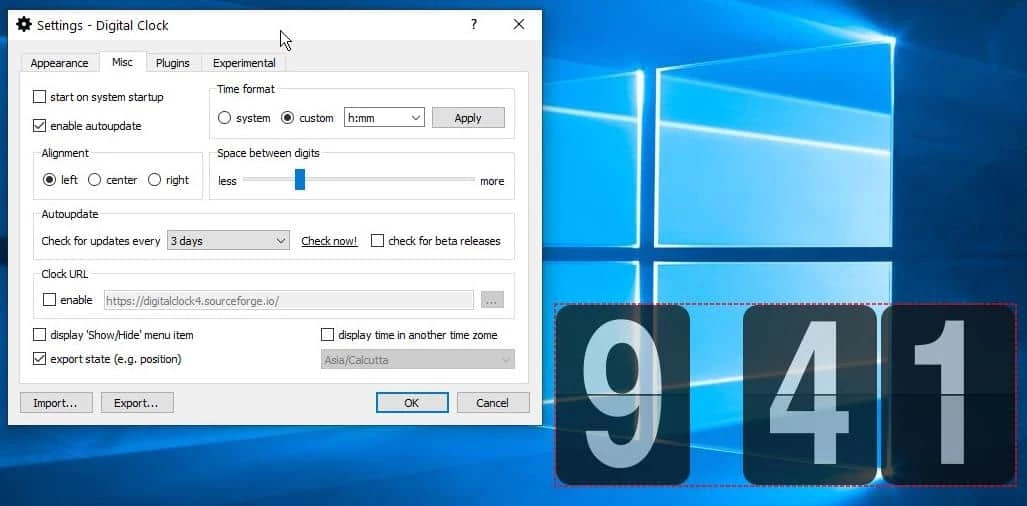
Digital Clock serves as a dedicated desktop widget that moves timekeeping out of the small taskbar corner and onto the main workspace. By replacing the default system clock with a highly visible, customizable overlay, this open-source application allows professionals, streamers, and multi-monitor users to track time without constantly shifting their focus. The software runs quietly in the background, drawing minimal system resources while offering extensive visual flexibility through custom skins, typography selections, and opacity controls. For users working on high-resolution displays or large multi-monitor setups, the standard Windows notification area simply does not provide a large enough time indicator. This tool solves that exact visibility problem by placing a scalable, easily readable numeric display exactly where you need it.
Unlike browser-based timers or heavy widget engines that consume significant memory, this utility is built exclusively for straightforward time management and local aesthetic control. Users who manage strict deadlines, track ongoing project hours, or simply want a large, readable clock on their secondary monitor rely on it for immediate visibility. It integrates directly with the Windows desktop environment, allowing the clock to float above other active applications or stay permanently pinned to the desktop wallpaper. The visual appearance can be tweaked to match the user's exact aesthetic preferences through the application of custom textures, color gradients, and tailored shadow effects that ensure the digits remain legible against any background image.
Beyond basic time display, the application extends its utility through a modular plugin system designed to handle daily productivity tasks. This structure enables users to add functional elements such as custom alarms, countdown timers, and quick note panels directly to the clock interface. Because it operates entirely locally, it requires no account sign-ins, subscription verifications, or cloud synchronization, giving users total control over their data and settings. The result is a specialized desktop tool that handles time tracking, event scheduling, and visual customization with a level of granular detail that generic system utilities and standard taskbar components simply do not provide.
Key Features
- Total Visual Customization: The central settings panel provides granular control over the clock's appearance, allowing users to apply custom typography or pre-built image skins. You can modify background colors, apply complex textures, and adjust the transparency slider to ensure the numbers blend naturally into your existing wallpaper or stand out sharply against busy graphical backgrounds.
- Flexible Screen Positioning: Users can simply click and drag the clock to any location on their desktop workspace, or use the dedicated position menu to mathematically snap it to specific screen corners. An optional "Always on top" toggle forces the widget to remain visible over active application windows, ensuring the time is never hidden behind a maximized web browser, full-screen video player, or complex spreadsheet.
- Modular Plugin Support: A dedicated plugin manager within the settings dialog lets users enable extra utilities that attach directly to the main clock interface. You can activate tools such as an active IP address display, a floating quick notepad, a detailed calendar date overlay, or an hourly chime, turning the basic widget into a highly functional desktop dashboard tailored to your daily habits.
- Advanced Alarm System: The built-in alarm clock plugin supports multiple custom schedules and varied audio triggers for different types of alerts. Instead of relying on standard system beeps, you can assign local MP3 music files or direct web audio URLs to specific alarms, creating personalized audio cues for daily work tasks, upcoming meetings, or scheduled breaks.
- Countdown and Scheduling Tools: For focused, task-based time tracking, the application includes a customizable countdown timer and a computer shutdown scheduler. These plugins allow users to set specific intervals for intense work sessions, automatically triggering visual alerts or deliberately terminating the operating system state when the active timer reaches zero.
- Multi-Monitor Awareness: The graphical interface handles secondary displays natively, letting you drag the widget onto extended monitors without losing your established scaling or transparency settings. This ensures streamers, software developers, and financial analysts can keep a large, distinct clock on a secondary screen while dedicating their primary monitor entirely to active, demanding tasks.
- Local Operation and Independence: The application functions entirely offline without pinging external servers for authorization or feature activation. All customization profiles, alarm schedules, and plugin states are stored locally in standard configuration files, meaning your personalized desktop setup remains fully functional even when the system is disconnected from the internet.
How to Install Digital Clock on Windows
- Navigate to the official project repository and download the Windows installer package that matches your specific system architecture.
- Locate the downloaded executable file in your default downloads folder and double-click it to launch the graphical setup wizard.
- Review the standard installation prompts, selecting your preferred destination directory (the default path usually places the files within the standard Program Files directory on your primary system drive).
- If the setup wizard detects missing dependencies and prompts you to install a Microsoft Visual C++ Redistributable package, accept the prompt, as the application requires these specific runtime libraries to render the interface and manage plugins correctly.
- Proceed through the final confirmation screen and click the finish button; the setup will automatically close, launch the background process, and place a default small clock widget on your active desktop.
- Locate the new application icon in your system tray (typically found near the default Windows taskbar clock), right-click it, and select "Settings" to open the main configuration window and begin adjusting the visual style, font, and scale.
- Navigate to the "Plugins" tab within the active settings dialog to review and enable any additional features, such as the alarm manager or countdown timer, before closing the window to save and apply your customized preferences.
Digital Clock Free vs. Paid
Digital Clock is distributed entirely as free, open-source software under the standard GPL license. There are no paid tiers, premium subscriptions, enterprise editions, or hidden feature restrictions governing its use. Every visual customization option, modular plugin, and advanced scheduling tool is available to all users immediately after the initial installation completes.
The developer maintains the project as a community-driven desktop utility, relying on optional user donations rather than mandatory licensing fees or recurring billing structures. This transparent approach means users never encounter frustrating trial watermarks on the clock interface, enforced limitations on how many alarms can be set, or arbitrary software lockouts that attempt to force an upgrade to a non-existent commercial version.
Because the software operates completely independently of a commercial software-as-a-service business model, it also avoids bundling intrusive third-party adware, analytics trackers, or requiring mandatory account registrations before use. The entire feature set, including complex scheduling and local media playback for alarms, remains strictly functional fully offline. This ensures that the custom skins load and the alarm schedules execute reliably regardless of your active internet connection status or firewall rules.
Digital Clock vs. Rainmeter vs. DS Clock
Rainmeter is a heavy, highly flexible desktop customization engine that allows users to build entire interactive dashboards, hardware resource monitors, and complex graphical widgets from scratch. Users should choose Rainmeter if they want to overhaul their entire graphical interface with custom code, audio visualizers, network activity graphs, and detailed system metrics. However, configuring Rainmeter properly requires editing raw text files and learning a specific markup syntax, which introduces a steep and often frustrating learning curve for users who simply want a straightforward, large time display on their screen.
DS Clock is a traditional synchronization tool that focuses almost entirely on matching the local system time with precise atomic time servers, offering a very simple, minimalist text-based overlay. It is a suitable choice for users who prioritize exact millisecond accuracy and basic text customization without needing a large visual footprint or elaborate graphical skins. While perfectly functional for strict time synchronization, it lacks the graphical polish, varied plugin architecture, and modern scaling options found in newer overlay tools, making it feel visually dated.
Digital Clock strikes a practical, highly usable balance by delivering highly visual, easily configured widgets without the programming requirements of Rainmeter. It is the better choice for users who want immediate visual impact—such as applying custom typography, adjusting opacity levels, and setting up local MP3 alarms—through a standard, intuitive graphical settings menu. It offers significantly more visual flair and daily utility than DS Clock while remaining much lighter and easier to manage than a full desktop customization suite.
Common Issues and Fixes
- Clock widget disappears behind other active application windows. Right-click the widget itself or the associated system tray icon, navigate to the main settings panel, and verify that the "Always on top" option is actively checked so the application remains permanently visible above standard interface elements.
- Custom settings and plugin states reset after a system reboot. This configuration loss occasionally happens when upgrading directly over an older build without clearing old files. Export your current configuration via the settings menu, completely uninstall the application from the Windows control panel, reinstall the latest stable build, and then import your saved configuration file.
- Cannot drag the clock to the extreme edge of the screen monitor. Open the settings panel and look for the specific option that prevents the widget from moving out of the defined screen boundaries. Disabling this restriction allows you to drag the widget partially off-screen or position it tight against multi-monitor bezels.
- Plugins tab appears completely empty or fails to load tools. Ensure that the required Microsoft Visual C++ Redistributable runtime libraries are correctly installed and updated on your operating system. Missing or corrupted runtime libraries can prevent the modular plugin architecture from initializing properly upon startup.
- Selected fonts render with jagged edges or incorrect visual scaling. Switch to a different skin profile or apply a standard TrueType font directly through the settings dialog, then carefully adjust the zoom slider. Some older raster-based graphical skins do not scale cleanly on modern high-resolution or 4K desktop displays.
Version 5.1.9 — January 2026
- Added support for multi-line text input within the Quick Note feature.
- Improved visual feedback by adding icons to the position menu and plugins list.
- Enhanced user interface interactions, including cursor changes to indicate draggable areas.
- Fixed a regression where the clock position reset incorrectly after connecting an external display.
- Resolved discrepancies in text alignment settings to match previous version behaviors.
- Corrected window layering issues to keep the inactive clock window properly backgrounded.
- Addressed rendering artifacts and selection bugs affecting certain light font styles.
- Updated the internal updater and translation files, including new localization for Chinese (CN).