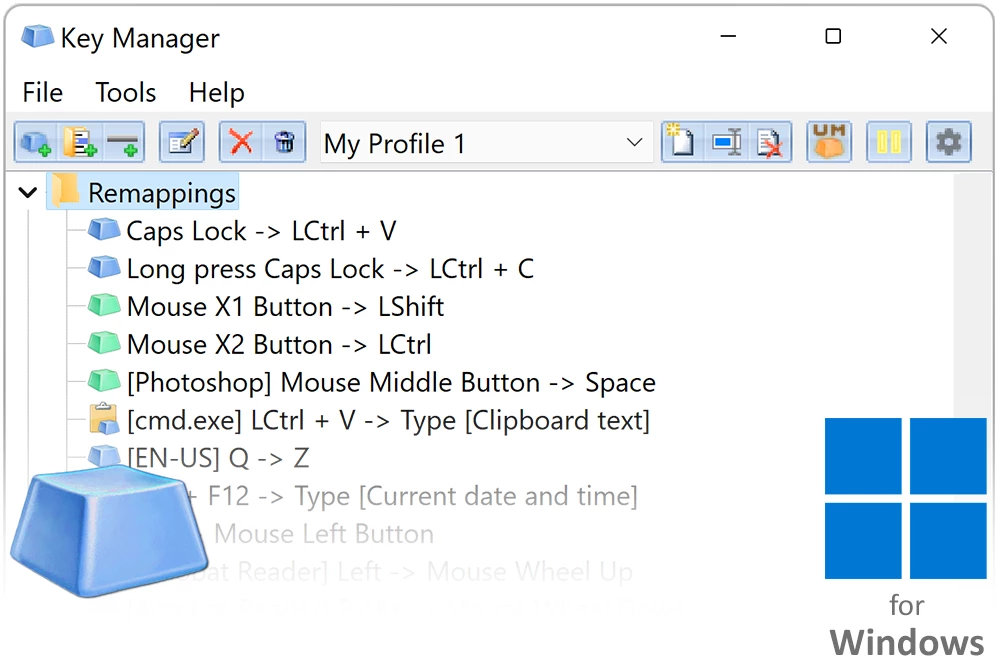
Operating systems provide standard drivers for input devices, but they rarely offer native tools to alter how those devices behave beyond basic pointer speed and double-click timing. ATNSOFT Key Manager is a Windows desktop application that intercepts hardware signals from your keyboard and mouse, allowing you to remap individual buttons, combinations, and sequences before they reach your active applications. By operating entirely in the background from the system tray, it turns standard peripherals into fully customized control surfaces without requiring registry edits or system reboots. The utility captures raw input data directly from the local device controller, processing the signal based on user-defined rules, and outputting a modified command to the operating system.
The utility caters specifically to professionals who rely on heavy data entry, repetitive formatting, or complex software navigation. Instead of memorizing obscure default shortcuts in a video editor or stretching awkwardly to hit multiple keys at once, users can bind those commands to a single mouse button or an unused function key. It also serves individuals working with compact keyboards by allowing them to create custom modifier layers, effectively turning the Caps Lock or Menu key into a secondary shift key that alters the behavior of the entire board. By reducing the physical distance fingers must travel, it minimizes repetitive strain during long data entry sessions.
A local desktop application is strictly necessary for this level of hardware interception. Browser extensions and lightweight cloud tools cannot read global keystrokes or alter inputs across different executable files. By running directly on the local machine, the software can monitor the active window title and dynamically swap your key bindings depending on whether you are typing in an email client or navigating a spreadsheet. This localized approach ensures that your custom text expansions, macro sequences, and application launchers remain instantly responsive and fully available even when disconnected from the internet. Local processing also guarantees that your custom text snippets and macros do not pass through external servers, maintaining strict privacy for sensitive clipboard contents.
Key Features
- Visual Macro Recording: Record key sequences and mouse clicks directly in the software interface, avoiding complex scripting languages to automate repetitive tasks. Users can manually adjust delays in milliseconds between keystrokes to ensure compatibility with slower applications that drop rapid inputs. This functionality turns multi-step form submissions, repetitive data formatting, or specific tool selections into a single button press.
- Custom Popup Menus: Press a designated hotkey to display a floating visual menu of user-defined actions, allowing access to dozens of shortcuts without memorizing every combination. This menu can contain nested folders, meaning users can categorize text snippets, application launchers, and scripts by specific projects. Clicking an item in the menu instantly executes the assigned behavior in the background without stealing window focus.
- Modifier Key Creation: Turn standard keys like Caps Lock, Scroll Lock, or the Menu key into custom modifier keys, opening up entirely new shortcut layers. This proves especially useful for owners of compact mechanical keyboards who lack dedicated arrow or navigation keys. By holding the new modifier, the standard typing area temporarily transforms into a media control deck, dedicated navigation cluster, or macro pad.
- Application-Specific Profiles: Restrict certain key bindings or mouse behaviors to specific executable files or active windows. This ensures your custom shortcut for an image editor does not accidentally trigger when you switch over to your web browser or instant messaging client. The software monitors the active window title and automatically applies the correct mapping profile on the fly without manual intervention or tray icon clicks.
- System and Power Controls: Assign specific key combinations to adjust volume levels, mute audio, trigger screensavers, or manage monitor power settings directly. Instead of reaching for physical buttons on your display or clicking through multiple control panel menus, you can map these functions directly to your mouse wheel or the top row of your keyboard for immediate access.
- Rich Text Pasting: Bypass the standard Windows clipboard by creating shortcuts that instantly insert large blocks of pre-formatted text into any text field. Users can configure the tool to paste paragraphs with specific fonts, colors, and line breaks intact. This provides significant time savings for customer support agents, administrative staff, or developers who frequently send standardized email replies and code snippets.
How to Install ATNSOFT Key Manager on Windows
- Download the Windows installer package from the official vendor website or verified software directory, ensuring you save the executable to a known local folder such as your default Downloads directory.
- Launch the downloaded setup file and accept the User Account Control prompt to grant the installer the necessary administrative permissions to modify local system directories.
- Read through the end-user license agreement, click the radio button to accept the terms, and review the initial information screen detailing basic configuration guidelines.
- Choose the destination folder on your local storage drive, either accepting the default path in the Program Files directory or clicking browse to select a custom software partition.
- Select the optional tasks during the setup process, such as creating a desktop shortcut icon and allowing the application to run automatically every time the computer boots up.
- Complete the setup wizard, click the finish button, and allow the application to launch for the first time to bring up the main interface window and initialization prompts.
- Locate the application icon in the system tray near the taskbar clock, right-click it to access the settings panel, and begin defining your initial key reassignments or macro folders.
ATNSOFT Key Manager Free vs. Paid
Users can evaluate the application under a free trial that restricts the total number of configurations. Specifically, the trial limits the user to creating a maximum of 20 actions and 10 custom popup menus or folders. This allows enough capacity to test complex macros and application-specific profiles, but heavy users will hit the limitation quickly once they start mapping multiple programs.
To remove these restrictions, the developer requires a one-time paid license. A home license for a single computer costs $49.95, while business licenses for corporate environments carry different pricing structures. Purchasing the license grants the user a registration code that unlocks unlimited actions, text pasting profiles, and popup menus.
The software relies on a perpetual license model, meaning there are no mandatory monthly or annual subscriptions to maintain basic functionality. Once activated, the software works offline without requiring continuous cloud authentication, server checks, or account sign-ins. The vendor has historically offered alternative activation methods such as promotional exchanges, though direct purchase remains the primary route for securing a permanent license code.
ATNSOFT Key Manager vs. AutoHotkey vs. X-Mouse Button Control
AutoHotkey is a free, open-source scripting engine capable of deeply altering Windows input behavior, automating interface interactions, and writing custom logic loops. It is the best choice for programmers or technical users comfortable with writing scripts in a text editor to achieve exact workflow specifications. However, its steep learning curve often alienates general users who just want a visual interface to assign a few shortcuts without reading extensive documentation.
X-Mouse Button Control is a free utility dedicated entirely to mapping mouse buttons, scroll wheels, and tilt inputs on a per-application basis. It excels for users who strictly need to change mouse behavior for specific video games or timeline editing, offering intricate control over cursor movement. However, it completely lacks keyboard remapping, custom text pasting capabilities, and floating macro menus, making it insufficient for full workspace automation.
ATNSOFT Key Manager bridges the gap by offering a clean graphical interface that handles both keyboard and mouse inputs simultaneously without requiring the user to write a single line of code. It is the better fit for professionals who need to build custom shortcut menus, configure macro sequences, and switch between application profiles instantly. While it carries a price tag, the time saved by configuring workflows visually rather than debugging custom scripts justifies the investment for many daily users.
Common Issues and Fixes
- Macros failing to trigger in full-screen applications. Some full-screen games block simulated keystrokes to prevent automated inputs. Fix this by launching the program as an administrator and ensuring the profile is strictly assigned to that specific application executable.
- Conflicting inputs when pressing remapped keys. This usually happens if another hotkey tool is running simultaneously, causing a loop or double input. Fix this by closing alternative mapping programs and disabling background keyboard utilities in the Windows Task Manager startup tab.
- Custom key presses not passing through networked KVM switches. Tools that share a single mouse and keyboard across multiple Windows machines often transmit raw hardware codes rather than software states. Fix this by installing and configuring the mapping software locally on the client machine instead of relying on the host computer to send the altered signals.
- The free trial blocks new action creation. The trial version enforces a hard limit of 20 active shortcuts and 10 folders. Fix this by reviewing your existing list and deleting unused items to free up slots, or purchase a registration code to remove the restriction entirely.
Version 1.15.0.460 — August 2022
- Introduced full support for the Czech language interface.
- Resolved various bugs and inconsistencies within existing localizations.