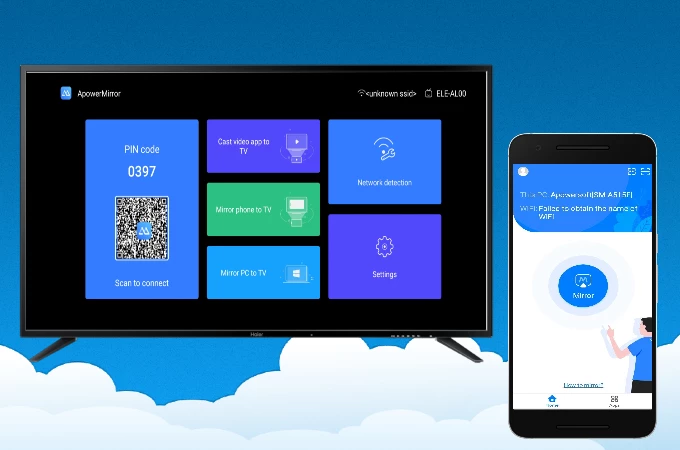
Apowersoft ApowerMirror functions as a screen casting application that connects handheld devices to a desktop monitor. The software allows users to project the display of a smartphone or tablet directly onto a Windows computer in real time. This provides a direct method for viewing mobile applications, reading documents, and watching media on a larger screen without relying on heavy software emulators. By mirroring the actual hardware output, the application ensures that users see exactly how an application behaves on a physical device, which is particularly useful for software testing and demonstration purposes.
Beyond basic display mirroring, the application enables direct physical control over the connected mobile hardware. When paired via a wired connection, users can navigate the mobile interface using their desktop mouse and type messages using their physical keyboard. This bypasses the need to rely on small touch screens for extended typing sessions, responding to text messages, or managing complex navigation tasks. For content creators, this means they can manage mobile workflows entirely from their primary workstation without constantly picking up their phone.
The application supports both wired and wireless communication protocols to fit different environments. A direct USB connection delivers low-latency transmission and high framerates, making it suitable for fast-paced mobile gaming and professional live streaming setups. Conversely, a Wi-Fi connection offers a cable-free setup for casual presentations or remote viewing across a room. The desktop client handles the video decoding locally, requiring adequate system resources and an active network connection to maintain a steady feed during high-definition casting. Furthermore, the application integrates easily into existing broadcast workflows, allowing software like OBS Studio to capture the mirrored window for live streaming to external platforms.
Key Features
- Desktop Control for Mobile Hardware: Navigate mobile interfaces using a physical mouse and keyboard. The application maps desktop input commands to the connected smartphone, allowing users to click icons, swipe through menus, and type long text messages directly from their Windows workstation. This eliminates the need to switch back and forth between a computer and a handset during busy work sessions.
- Game Keyboard Mapping: Assign physical keyboard keys to specific touch zones on a mobile screen. This translates physical keystrokes into virtual touch inputs, providing tactile control for mobile games that lack native desktop peripheral support. Users can configure a digital joystick, map action buttons, and save custom control profiles for different gaming titles.
- Local Screen Recording and Capture: Capture the mirrored video feed directly to the computer's hard drive as an MP4, AVI, or WMV file. The interface includes a dedicated recording toolbar that bypasses the need to install third-party capture utilities. It also features a one-click screenshot tool that instantly saves high-resolution images of the mobile display directly to a local Windows folder.
- Simultaneous Multi-Device Display: Connect up to four different smartphones or tablets to the same computer at once. The desktop client splits the workspace to show all active feeds side-by-side. This function helps developers test applications across different hardware models simultaneously, or allows multiple users to share their screens during a collaborative meeting.
- Live Whiteboard Annotation: Draw directly over the mirrored video feed using built-in markup tools. The application provides a presentation toolbar with options for adding colored lines, highlighting text, and drawing basic shapes to emphasize specific parts of the screen. This is frequently used by educators and trainers to direct attention during software demonstrations.
- Flexible Connection Methods: Establish a link using either a direct USB cable or a local Wi-Fi network. The wired method prioritizes low-latency input and stable high framerates, while the wireless option provides mobility when standing away from the desk. The software also includes an advanced remote casting feature that allows connections across different network segments, provided both devices have internet access.
- Notification Synchronization: View incoming mobile alerts directly on the Windows desktop. When connected, the application pushes incoming text messages, application alerts, and system notifications to the computer screen. This ensures users do not miss important communications while their physical device is resting on a desk or charging across the room.
How to Install Apowersoft ApowerMirror on Windows
- Download the official Windows installer executable directly from the vendor's website to ensure you receive the unmodified application package.
- Double-click the downloaded setup file to trigger the Windows User Account Control prompt and authorize the installation process.
- Select your preferred interface language and choose the destination folder on your local storage drive, or leave the default system path intact.
- Review the installation options, such as creating a desktop shortcut or adding the application to the Windows startup sequence, then proceed.
- Wait for the setup wizard to extract the core application files, install necessary video decoding libraries, and complete the installation.
- Launch the desktop client and choose either a wired USB or wireless Wi-Fi connection method from the main dashboard interface.
- To utilize physical desktop controls, connect the smartphone to the computer using a physical USB cable, then navigate to the developer settings on the mobile device to enable debugging permissions.
- Accept the authorization prompt that appears on the handheld screen to allow the computer to push the companion app to the device and establish the live video feed.
Apowersoft ApowerMirror Free vs. Paid
The software operates on a strict freemium business model that divides its capabilities between a trial tier and premium subscriptions. The free version allows users to test the core mirroring functionality using both Wi-Fi and USB connections. However, this unpaid tier heavily restricts the output quality. It applies a large, non-removable watermark over the mirrored video feed, limits the maximum display resolution, and enforces strict time limits on individual casting sessions. Once the time limit is reached, the connection drops and requires the user to manually reconnect.
Upgrading to a paid VIP subscription removes the watermark, lifts the session time limits, and unlocks higher-resolution casting settings. The paid tier also grants full access to the application's advanced interactive capabilities. Features such as full mouse and keyboard control, simultaneous multi-device mirroring, game key mapping, and the live whiteboard annotation tools require an active subscription. Without upgrading to the VIP status, these interactive functions remain locked behind paywalls, leaving the free version useful only for brief, basic viewing tasks.
The developer offers multiple billing structures to accommodate different financial preferences. Home users can select from recurring monthly subscriptions, annual plans, or a perpetual lifetime license that requires a single upfront payment. The monthly plan typically starts around $20, the annual plan hovers around $40, and the lifetime license often costs $60 or more depending on current vendor promotions. Business users who intend to use the software for commercial purposes must purchase separate commercial licenses, which are priced higher and include provisions for deploying the application across multiple corporate workstations. All paid plans require an internet connection for account verification and initial activation.
Apowersoft ApowerMirror vs. Reflector 4 vs. LetsView
Reflector 4 operates primarily as a standalone wireless receiver that turns a Windows computer into a target for built-in wireless casting protocols. It excels in classroom, boardroom, or auditorium environments where presenters want to display a mobile screen wirelessly without the hassle of installing companion client applications on the phone itself. However, Reflector 4 functions strictly as a one-way viewing tool. It lacks the reverse-control features that allow a desktop user to navigate the mobile device using a physical mouse and keyboard, making it less suitable for users who want to manage their phone entirely from their computer desk.
LetsView is a completely free screen mirroring utility that focuses exclusively on wireless display sharing over a local network. It provides an accessible, lightweight way to cast a phone screen to a monitor for casual viewing and includes basic snapshot and recording tools without charging subscription fees. Because it relies entirely on Wi-Fi communication, it cannot match the low-latency performance of a direct wired USB connection. Furthermore, LetsView does not offer any physical desktop control over the connected hardware or advanced game mapping features, limiting its appeal for mobile gamers or heavy multi-taskers.
Apowersoft ApowerMirror remains the better fit for users who require strict, low-latency control over their mobile hardware from a desktop workstation. The inclusion of a wired USB connection method, physical keyboard mapping for translating touch controls, and simultaneous multi-device support makes it a heavier but far more capable tool. While it requires a paid subscription to unlock its full potential, it provides a level of interactive control and recording stability that simple wireless receivers cannot replicate, making it ideal for streamers, software testers, and content creators.
Common Issues and Fixes
- Noticeable lag or stuttering during wireless mirroring. This performance drop frequently occurs when the local Wi-Fi network is congested or operating on a slower, interference-heavy 2.4 GHz frequency band. The fix is to switch the local router and both connected devices to a 5 GHz network, or abandon the wireless method entirely and switch to a direct USB cable connection for a stable, high-framerate video feed.
- Black or white screen appears after establishing a connection. The application's default video rendering engine occasionally conflicts with the active graphics hardware or drivers on the host computer. Open the desktop application settings, navigate to the display options menu, and change the render mode from its default setting to either D3D or OpenGL to restore proper visual output.
- Desktop keyboard and mouse control stops working over Wi-Fi. The physical control permissions on the mobile device are designed to reset for security reasons whenever the handset is rebooted. To resolve this restriction, connect the phone to the computer using a physical USB cable first to re-authorize the background control permissions, then disconnect the cable to resume wireless operation.
- The computer fails to recognize the phone via a wired USB connection. This communication failure is typically caused by missing, outdated, or conflicting USB drivers on the host Windows machine. Navigate to the software's connection settings and use the built-in peripheral driver tool to scan for, download, and install the correct communication drivers for the specific connected hardware model.
- Unable to capture the mirrored window in broadcasting software. When trying to stream the mirrored feed using tools like OBS Studio, the window may appear completely blank due to hardware acceleration conflicts. To fix this, add a standard "Window Capture" source in OBS, point it to the active projection window, and ensure the capture method is set to "Windows 10" or disable hardware acceleration within the mirroring app's settings.
Version Latest — 2026
- Introduced a new browser-based mirroring solution, allowing for instant screen casting without requiring software installation.
- Redesigned the main functional interface to provide simpler navigation and a smoother user interaction experience.
- Implemented support for cross-network mirroring, enabling devices to connect and cast even when on different network segments.
- Enhanced connection stability and reduced latency for real-time mirroring sessions.
- Fixed minor bugs and optimized overall system performance for better reliability.